
bootstrap 弹框
<!DOCTYPE html> <html>
<head>
<meta name="viewport" content="width=device-width" />
<link href="~/Content/bootstrap.css" rel="stylesheet" />
<script src="~/Scripts/jquery-1.10.2.js"></script>
<script src="~/Scripts/bootstrap.min.js"></script>
<title>Index</title>
</head>
<body>
<input type="button" name="name" value="新增" id="btn_add" />
<input type="button" name="name" value="编辑" id="btn_edit" />
<div class="modal fade" id="myModal" tabindex="-1" role="dialog" aria-labelledby="myModalLabel">
<div class="modal-dialog" role="document">
<div class="modal-content">
<div class="modal-header">
<button type="button" class="close" data-dismiss="modal" aria-label="Close"><span aria-hidden="true">×</span></button>
<h4 class="modal-title" id="myModalLabel">新增</h4>
</div>
<div class="modal-body"> <div class="form-group">
<label for="txt_departmentname">年龄</label>
<input type="text" name="txt_departmentname" class="form-control" id="txt_departmentname" placeholder="年龄">
</div>
<div class="form-group">
<label for="txt_parentdepartment">姓名</label>
<input type="text" name="txt_parentdepartment" class="form-control" id="txt_parentdepartment" placeholder="姓名">
</div>
<div class="form-group">
<label for="txt_departmentlevel">性别</label>
<input type="text" name="txt_departmentlevel" class="form-control" id="txt_departmentlevel" placeholder="性别">
</div>
<div class="form-group">
<label for="txt_statu">自我描述</label>
<input type="text" name="txt_statu" class="form-control" id="txt_statu" placeholder="一句话描述">
</div>
</div>
<div class="modal-footer">
<button type="button" class="btn btn-default" data-dismiss="modal"><span class="glyphicon glyphicon-remove" aria-hidden="true"></span>关闭</button>
<button type="button" id="btn_submit" class="btn btn-primary" data-dismiss="modal"><span class="glyphicon glyphicon-floppy-disk" aria-hidden="true"></span>保存</button>
</div>
</div>
</div>
</div>
<script> //注册新增按钮的事件
$("#btn_add").click(function () {
$("#myModalLabel").text("新增");
$('#myModal').modal();
}); //注册编辑按钮的事件
$("#btn_edit").click(function () {
$("#myModalLabel").text("编辑");
$('#myModal').modal();
}); </script>
</body>
</html>
效果图:

案例二:
<button class="btn btn-warning" data-toggle="modal" id="btn_addjcxxwh"><i class="glyphicon glyphicon-plus"></i> 添加</button>

<div class="modal fade" id="jcxxwhModal" tabindex="-1" role="dialog" aria-labelledby="myModalLabel" aria-hidden="true">
<div class="modal-dialog">
<div class="modal-content">
<div class="modal-header">
<button type="button" class="close" data-dismiss="modal" aria-hidden="true">
×
</button>
<h4 class="modal-title" id="jcxxModalLabel">
新增
</h4>
</div>
<form class="form-horizontal" role="form">
<div class="modal-body"> <div class="form-group">
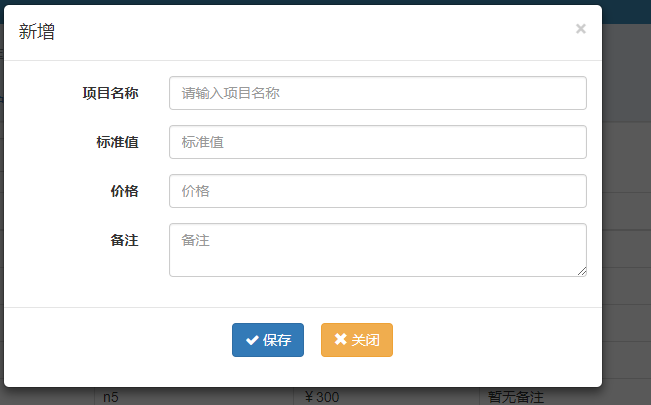
<label for="item_name" class="col-sm-3 control-label">项目名称</label>
<div class="col-sm-9">
<input type="text" class="form-control" required="required" id="item_name" name="item_name" value=""
placeholder="请输入项目名称">
</div>
</div> <div class="form-group">
<label for="standard_value" class="col-sm-3 control-label">标准值</label>
<div class="col-sm-9">
<input type="text" class="form-control" required="required" name="standard_value" value="" id="standard_value"
placeholder="标准值">
</div>
</div>
<div class="form-group">
<label for="price" class="col-sm-3 control-label">价格</label>
<div class="col-sm-9">
<input type="text" required="required" class="form-control" name="price" value="" id="price"
placeholder="价格">
</div>
</div> <div class="form-group">
<label for="remark" class="col-sm-3 control-label">备注</label>
<div class="col-sm-9">
<textarea class="form-control" name="remark" value="" id="remark"
placeholder="备注"></textarea>
</div>
</div> </div>
<div class="modal-footer">
<div class="row">
<div class="form-group">
<div class="col-sm-4 col-sm-offset-4">
<button class="btn btn-primary " type="submit" id="btn_jcxxwhSava"><i class="fa fa-check"></i> 保存</button>
<button class="btn btn-warning" data-dismiss="modal" id="btn_close" type="button"><i class="glyphicon glyphicon-remove"></i> 关闭</button> </div>
</div>
</div>
</div>
</form>
</div><!-- /.modal-content -->
</div><!-- /.modal -->
</div>
效果图:
bootstrap 弹框的更多相关文章
- bootstrap弹框
http://v3.bootcss.com/javascript/#modals 参考bootstrap官网 模态框做php后端 前端一直不行,但是很多时候 用到ajax都要用到弹框,一直在代码里面找 ...
- bootstrap 弹框使用
首先需要准备bootstrap.css,bootstrap .js jquery 我这里有写好的下载地址如下: https://pan.baidu.com/s/1miMahXe 秘钥:tgts & ...
- bootstrap弹框去除遮罩层效果
是通过css解决这个问题,核心css代码如下: .modal-backdrop { filter: alpha(opacity=)!important; opacity: !important; } ...
- 参考bootstrap中的popover.js的css画消息弹框
前段时间小颖的大学同学给小颖发了一张截图,图片类似下面这张图: 小颖当时大概的给她说了下,其实小颖也不知道上面那个三角形怎么画嘻嘻,给她说了DOM结构,具体的css让她自己百度,今天小颖自己参考boo ...
- 自己写的基于bootstrap风格的弹框插件
自己写的一款基于bootstrap风格的弹框插件,暂时只有确认框.提示框.后续功能扩展.bug修改再更新. ;(function($){ //默认参数 var PARAMS; var DEFAULTP ...
- Bootstrap弹出框(modal)垂直居中
最近在做一个eit项目,由于此项目里面一些框架要遵循nttdata的一些规则,故用到了Bootstrap这个东东,第一次碰到这个东东,有很大抵触,觉得不好,但用起来我觉得和别的弹出框真没什么两样.废话 ...
- bootstrap 弹出框点击其他区域时弹出框不消失选项设置
默认情况下,bootstrap 弹出框点击其他区域时,弹出框会自动关闭,在很多时候,我们可能会希望达到和原生弹出框一样的效果,避免不小心点击其他区域时弹框自动隐藏,尤其是对于一些复杂的表单,重复填写可 ...
- Bootstrap 模态框(也可以说的弹出层)
最近在尝试使用bootstrap的模态框 使用模态框主要要引入一下几个js和css: bootstrap.css jquery.1.9.1.js(这个可以灵活选择) bootstrap.js html ...
- bootstrap弹出框
要想使用Bootstrap Popover(弹出框)则必须引入其依赖的文件: jquery.js这个必须的(还是要写在其他js前面,bootstrap是依赖jquery的哦) bootstrap-to ...
随机推荐
- SpringBoot系列: Json的序列化和反序列化
============================= 控制 json 序列化/反序列化=============================1. @JsonIgnoreProperties的 ...
- NLP里面的一些基本概念
1,corpus 语料库 a computer-readable collection of text or speech 2,utterance 发音 比如下面一句话:I do uh main- m ...
- 【一】java 虚拟机 监控示例 Eclipse Memory Analyser
1.堆内存溢出示例代码 import java.util.ArrayList; import java.util.List; public class TestHeap { public static ...
- 路由器数据统计SQL脚本
一.路由器部分 //[饼图]统计路由器在线.离线数量 SELECT COUNT(*) AS total, MINUTE)) ELSE NULL END) AS livecount, MINUTE)) ...
- 用EditPlus和jdk写Java代码
一.安装EditPlus EditPlus: https://www.editplus.com/latest4.html EditPlus注册码在线生成: https://www.jb51.net/t ...
- window中安装mongodb
转自:https://blog.csdn.net/heshushun/article/details/77776706 一.先登录Mongodb官网https://www.mongodb.com/do ...
- Sqlserver 连接oracle和mysql数据库 已经oracle导入sqlserver表数据
SQL Server2012创建连接服务器到ORACLE11G 8,百思考不知道原因啊??突然我发现如下:链接服务器—〉访问接口—〉OraOLEDB.Oracle—〉允许进程内没有勾上,但是我想上面的 ...
- Docker 容器的隔离性
Docker 容器的隔离性 就是 使用Linux namespace 来隔离运行环境和成 cgroup 限制容器使用的资源. namespace 可以顾名思义 命名空间:所以可以理解为每个独立的容器 ...
- Mysql清空表(truncate)与删除表中数据(delete)的区别
来源:http://blog.is36.com/mysql_difference_of_truncate_and_delete/ 为某基于wordpress搭建的博客长久未除草,某天升级的时候发现已经 ...
- 前端向服务器请求数据并渲染的方式(ajax/jQuery/axios/vue)
原理: jQuery的ajax请求:complete函数一般无论服务器有无数据返回都会显示(成功或者失败都显示数据): return result