
The Qt Resource System
The Qt Resource System
The Qt resource system is a platform-independent mechanism for storing binary files in the application's executable. This is useful if your application always needs a certain set of files (icons, translation files, etc.) and you don't want to run the risk of losing the files.
The resource system is based on tight cooperation between qmake, rcc (Qt's resource compiler), and QFile.
Resource Collection Files (.qrc)
The resources associated with an application are specified in a .qrc file, an XML-based file format that lists files on the disk and optionally assigns them a resource name that the application must use to access the resource.
Here's an example .qrc file:
<!DOCTYPE RCC><RCC version="1.0">

<qresource>

    <file>images/copy.png</file>

    <file>images/cut.png</file>

    <file>images/new.png</file>

    <file>images/open.png</file>

    <file>images/paste.png</file>

    <file>images/save.png</file>

</qresource>

</RCC>
The resource files listed in the .qrc file are files that are part of the application's source tree. The specified paths are relative to the directory containing the .qrc file. Note that the listed resource files must be located in the same directory as the .qrc file, or one of its subdirectories.
Resource data can either be compiled into the binary and thus accessed immediately in application code, or a binary resource can be created and at a later point in application code registered with the resource system.
By default, resources are accessible in the application under the same file name as they have in the source tree, with a :/ prefix, or by a URLwith a qrc scheme.
For example, the file path :/images/cut.png or the URL qrc:///images/cut.png would give access to the cut.png file, whose location in the application's source tree is images/cut.png. This can be changed using the file tag's alias attribute:
<file alias="cut-img.png">images/cut.png</file>
The file is then accessible as :/cut-img.png from the application. It is also possible to specify a path prefix for all files in the .qrc file using the qresource tag's prefix attribute:
<qresource prefix="/myresources">

    <file alias="cut-img.png">images/cut.png</file>

</qresource>
In this case, the file is accessible as :/myresources/cut-img.png.
Some resources need to change based on the user's locale, such as translation files or icons. This is done by adding a lang attribute to the qresource tag, specifying a suitable locale string. For example:
<qresource>

    <file>cut.jpg</file>

</qresource>

<qresource lang="fr">

    <file alias="cut.jpg">cut_fr.jpg</file>

</qresource>
If the user's locale is French (i.e., QLocale::system().name() returns "fr_FR"), :/cut.jpg becomes a reference to the cut_fr.jpg image. For other locales, cut.jpg is used.
See the QLocale documentation for a description of the format to use for locale strings.
External Binary Resources
For an external binary resource to be created you must create the resource data (commonly given the .rcc extension) by passing the -binary switch to rcc. Once the binary resource is created you can register the resource with the QResource API.
For example, a set of resource data specified in a .qrc file can be compiled in the following way:
rcc -binary myresource.qrc -o myresource.rcc
In the application, this resource would be registered with code like this:
QResource::registerResource("/path/to/myresource.rcc");
Compiled-In Resources
For a resource to be compiled into the binary the .qrc file must be mentioned in the application's .pro file so that qmake knows about it. For example:
RESOURCES = application.qrc
qmake will produce make rules to generate a file called qrc_application.cpp that is linked into the application. This file contains all the data for the images and other resources as static C++ arrays of compressed binary data. The qrc_application.cpp file is automatically regenerated whenever the .qrc file changes or one of the files that it refers to changes. If you don't use .pro files, you can either invoke rccmanually or add build rules to your build system.
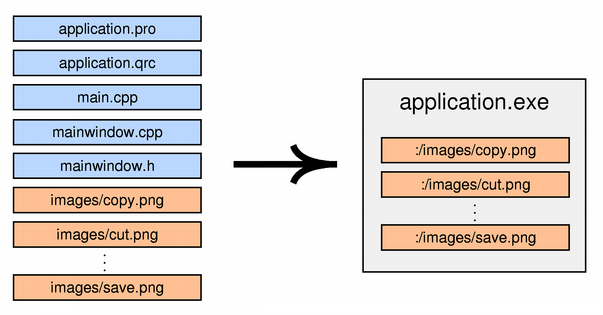
Currently, Qt always stores the data directly in the executable, even on Windows, macOS, and iOS, where the operating system provides native support for resources. This might change in a future Qt release.
Compression
Resources are compressed by default (in the ZIP format). It is possible to turn off compression. This can be useful if your resources already contain a compressed format, such as .png files. You do this by giving the -no-compress command line argument.
rcc -no-compress myresources.qrc
rcc also gives you some control over the compression. You can specify the compression level and the threshold level to consider while compressing files, for example:
rcc -compress 2 -threshold 3 myresources.qrc
Using Resources in the Application
In the application, resource paths can be used in most places instead of ordinary file system paths. In particular, you can pass a resource path instead of a file name to the QIcon, QImage, or QPixmap constructor:
cutAct = new QAction(QIcon(":/images/cut.png"), tr("Cu&t"), this);
See the Application example for an actual application that uses Qt's resource system to store its icons.
In memory, resources are represented by a tree of resource objects. The tree is automatically built at startup and used by QFile for resolving paths to resources. You can use a QDir initialized with ":/" to navigate through the resource tree from the root.
Qt's resources support the concept of a search path list. If you then refer to a resource with : instead of :/ as the prefix, the resource will be looked up using the search path list. The search path list is empty at startup; call QDir::addSearchPath() to add paths to it.
Using Resources in a Library
If you have resources in a library, you need to force initialization of your resources by calling Q_INIT_RESOURCE() with the base name of the .qrc file. For example:
MyClass::MyClass() : BaseClass()

{

    Q_INIT_RESOURCE(resources);

    QFile file(":/myfile.dat");

    ...

}
This ensures that the resources are linked into the final application binary in the case of static linking. You should put the initialization code close to where the resources are used in your library, so that clients of your library will only link in the resources if they use the feature of the library that depends on them.
Note: As the resource initializers generated by rcc are declared in the global namespace, your calls to Q_INIT_RESOURCE() also need to be done outside of any namespace.
If the library includes resources that are not used internally, but instead exposed to clients of the library, the initialization needs to happen in the application code. For example:
int main(int argc, char *argv[])

{

    QApplication app(argc, argv);

    Q_INIT_RESOURCE(graphlib);

    QFile file(":/graph.png");

    ...

    return app.exec();

}
As before, this ensures that the resources are linked into the final application binary in the case of static linking, but also triggers loading of the library in the case of dynamic linking, such as plugins.
Similarly, if you must unload a set of resources explicitly (because a plugin is being unloaded or the resources are not valid any longer), you can force removal of your resources by calling Q_CLEANUP_RESOURCE() with the same base name as above.
Note: The use of Q_INIT_RESOURCE() and Q_CLEANUP_RESOURCE() is not necessary when the resource is built as part of the application.
The Qt Resource System的更多相关文章
- Qt Resource System Qt资源体系(qrc rcc)
Qt资源体系采用平台独立机制来存储应用程序执行时的二进制文件.这种机制在应用程序需要一些确定的文件(图标.翻译文件等等)而且又不想冒丢失文件的风险时是有用的. 资源体系依赖于 qmake, rcc ( ...
- 7、Qt MetaObject System详解
网上的资源比较乱,该文章整理自地址:http://www.xuebuyuan.com/735789.html Qt meta-object系统基于三个方面: 1.QObject提供一个基类,方便派生类 ...
- Qt MetaObject System详解
网上的资源比较乱,该文章整理自地址:http://www.xuebuyuan.com/735789.html Qt meta-object系统基于三个方面: 1.QObject提供一个基类,方便派生类 ...
- Qt Resource系统概说(资源压缩不压缩都可以)
什么是Qt Resource系统?简单的说,就是在可执行程序中存储binary文件,而且还是与平台无关的. 与Qt Resource系统密切相关的有三个法宝,分别是qmake.rcc.QFile. q ...
- Qt属性系统(Qt Property System)
Qt提供了巧妙的属性系统,它与某些编译器支持的属性系统相似.然而,作为平台和编译器无关的库,Qt不能够依赖于那些非标准的编译器特性,比如__property 或者 [property].Qt的解决方案 ...
- Qt之资源系统
简述 Qt 的资源系统用于存储应用程序的可执行二进制文件,它采用平台无关的机制.当你的程序总需要这样的一系列文件(图标.翻译文件等)并且不想冒丢失某些文件的风险时,这就显得十分有用. 资源系统基于 q ...
- 如何在Qt资源文件中包含和释放exe等各种类型文件?
操作系统:Windows 10 X64 企业版 Qt: 5.8.0 QtCreater: 4.2.1 刚刚开始学习Qt,不断遇到困难和挑战,前几天在各个QQ群里询问如何在Qt的资源文件中包含和释放ex ...
- 【Qt官方例程学习笔记】Application Example(构成界面/QAction/退出时询问保存/用户偏好载入和保存/文本文件的载入和保存/QCommandLineParser解析运行参数)
The Application example shows how to implement a standard GUI application with menus, toolbars, and ...
- [Qt Creator 快速入门] 第5章 应用程序主窗口
对于日常见到的应用程序而言,许多都是基于主窗口的,主窗口中包含了菜单栏.工具栏.状态栏和中心区域等.这一章会详细介绍主窗口的每一个部分,还会涉及资源管理.富文本处理.拖放操作和文档打印等相关内容.重点 ...
随机推荐
- Appirater激励用户为你的app评分
如果你此前开发过app,那么你会知道获得用户积极的评分并不是一件简单的事情.不幸的是,用户往往给他们不喜欢的东西负面评价,而不怎么倾向于给喜欢的内容留下积极评价. 所以,你作为一个开发者如何激励用 ...
- 也来学学插件式开发续-利用MEF
前面一个博客:也来学学插件式开发中很多朋友留言说可以用MEF来实现.于是我就试着用MEF实现了一下. 步骤和上一篇差不多,只是加载插件的方式有所不同.这只是一个自己的示例程序,肯定有很多不足之处,欢迎 ...
- 消息队列内核结构和msgget、msgctl 函数
一.消息队列 1.消息队列提供了一个从一个进程向另外一个进程发送一块数据的方法 2.每个数据块都被认为是有一个类型,接收者进程接收的数据块可以有不同的类型值 3.消息队列与管道不同的是,消息队列是基于 ...
- Unix环境高级编程(一)文件I/O
Unix系统中大多数文件I/O只需用到五个函数:open.read.write.lseek.close.本章说介绍的I/O是不带缓冲的,即:每个read和write都调用内核中的一个系统调用.不是IS ...
- Linux内核(9) - 精华版 之 方法论
到目前为之,博客上分享的精华篇都可以归为方法论的范畴,在很多时候,都是方法论要比细节紧要得多.而这些精华篇又可细分为三个专题:Linux大史记:内核学习的方法论:驱动开发的方法论. Linux大史记 ...
- 以太网帧格式、IP数据报格式、TCP段格式+UDP段格式 详解
转载:http://www.cnblogs.com/lifan3a/articles/6649970.html 以太网帧格式.IP数据报格式.TCP段格式+UDP段格式 详解 1.ISO开放系统有 ...
- InnoDB Master Thread I/O Rate详解
一.innodb 在刷盘时要面对的问题: 1.对于innodb 的master thread 这个线程来说,它会在后台执行许多的任务,这些任务大多数都是与IO操作相关的, 比如“刷新脏页到磁盘”.“合 ...
- composer安装第三方的库packagist.org(laravel框架引入第三方库)
建立composer.json composer require phpoffice/phpexcel //安装一个excel扩展库 composer require gregwar/captcha ...
- Nginx+mysql+php(待补全)
先安装 Nginx 通过源码安装可以指定目录(/usr/local/Nginx/) yum或源码安装Mysql yum或源码安装php(记得命令一定要全,别忘了安装php-fpm) 待补全
- redis投票计数
<?php /** * * 缓存利用测试,这里我们获取传过来的投票数据,每次加1,如果增加到了设定值,才将投票 * 次数写回mysql,这大大减轻了与mysql链接的开销,redis的使用由此可 ...