
一款由css3和jquery实现的卡面折叠式菜单
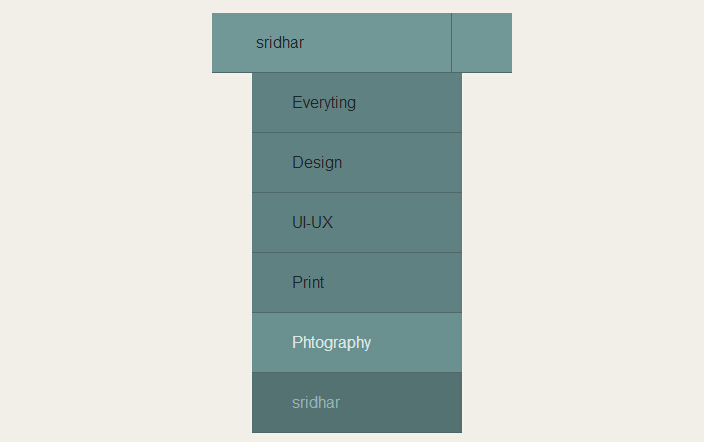
之前已经为大家介绍了好多导航菜单。今天为大家再带来一款由css3和jquery实现的卡片折叠式菜单。当菜单关闭的时候,有三维堆叠的效果。我们一起看下效果图:
html代码:
 <div id="wrapper">

        <h1>

            <i class="icon-sort-by-attributes"></i>CSS3 <span>Card Deck Drop Down</span></h1>

        <div class="card-drop">

            <a class="toggle active" href="#"><i class="icon-camera-retro"></i><span class="label-active">

                sridhar</span> </a>

            <ul>

                <li class="" style="z-index: 6; top: 60px; width: 70%; margin-left: 40px;"><a data-label="Everyting"

                    href="#"><i class="icon-suitcase"></i>Everyting</a> </li>

                <li class="" style="z-index: 5; top: 120px; width: 70%; margin-left: 40px;"><a data-label="Design"

                    href="#"><i class="icon-magic"></i>Design</a> </li>

                <li class="" style="z-index: 4; top: 180px; width: 70%; margin-left: 40px;"><a data-label="UI-UX"

                    href="#"><i class="icon-bolt"></i>UI-UX</a> </li>

                <li class="" style="z-index: 3; top: 240px; width: 70%; margin-left: 40px;"><a data-label="Print"

                    href="#"><i class="icon-tint"></i>Print</a> </li>

                <li class="" style="z-index: 2; top: 300px; width: 70%; margin-left: 40px;"><a data-label="Photography"

                    href="#"><i class="icon-camera-retro"></i>Phtography</a> </li>

                <li class="active" style="z-index: 1; top: 360px; width: 70%; margin-left: 40px;"><a

                    data-label="sridhar" href="#"><i class="icon-camera-retro"></i>sridhar</a> </li>

            </ul>

        </div>

        <br />  <br />  <br />

             <script src="/scripts/2bc/_gg_970_90.js" type="text/javascript"></script>

    </div>
css3代码:
   html, body, div, span, applet, object, iframe, h1, h2, h3, h4, h5, h6, p, blockquote, pre, a, abbr, acronym, address, big, cite, code, del, dfn, em, img, ins, kbd, q, s, samp, small, strike, strong, sub, sup, tt, var, b, u, i, center, dl, dt, dd, ol, ul, li, fieldset, form, label, legend, table, caption, tbody, tfoot, thead, tr, th, td, article, aside, canvas, details, embed, figure, figcaption, footer, header, hgroup, menu, nav, output, ruby, section, summary, time, mark, audio, video

        {

            margin:;

            padding:;

            border:;

            font: inherit;

            font-size: 100%;

            vertical-align: baseline;

        }

        ol, ul

        {

            list-style: none;

        }

        body

        {

            background-color: #F2EFE9;

            overflow: visible;

            padding-top: 40px;

            font-family: helvetica, arial, sans-serif;

            font-size: 1em;

        }

        *

        {

            -webkit-box-sizing: border-box;

            -moz-box-sizing: border-box;

            box-sizing: border-box;

        }

        #wrapper

        {

            width: 680px;

            margin: 0 auto;

            height: 1000px;

        }

        h1

        {

            font-size: 2.5em;

            text-align: center;

            font-weight: bold;

            margin-bottom: 10px;

            line-height: 1.4em;

            color: #4e6a6a;

            text-shadow: 0 1px 0 rgba(255, 255, 255, 0.8);

            font-family: helvetica, arial, sans-serif;

        }

        h1 span

        {

            font-weight: lighter;

        }

        .card-drop

        {

            max-width: 300px;

            position: relative;

            margin: 0 auto;

            -webkit-perspective: 800px;

            -moz-perspective: 800px;

            -ms-perspective: 800px;

            -o-perspective: 800px;

            perspective: 800px;

        }

        .card-drop a

        {

            display: block;

            width: 100%;

            background-color: salmon;

            padding: 20px 0 20px 20px;

            height: 60px;

            text-decoration: none;

            color: #1e2929;

            background-color: #5f8181;

            border-bottom: 1px solid #4e6a6a;

            -webkit-transition: all 0.3s ease-out;

            -moz-transition: all 0.3s ease-out;

            -o-transition: all 0.3s ease-out;

            transition: all 0.3s ease-out;

        }

        .card-drop a i

        {

            display: inline-block;

            width: 20px;

        }

        .card-drop > a.toggle

        {

            position: relative;

            z-index:;

            -webkit-backface-visibility: hidden;

            -moz-backface-visibility: hidden;

            -ms-backface-visibility: hidden;

            -o-backface-visibility: hidden;

            backface-visibility: hidden;

            -webkit-transform-style: preserve-3d;

            -moz-transform-style: preserve-3d;

            -ms-transform-style: preserve-3d;

            -o-transform-style: preserve-3d;

            transform-style: preserve-3d;

            -webkit-transform-origin: 50% 0%;

            -moz-transform-origin: 50% 0%;

            -ms-transform-origin: 50% 0%;

            -o-transform-origin: 50% 0%;

            transform-origin: 50% 0%;

            -webkit-transition: 0.1s linear;

            -moz-transition: 0.1s linear;

            -o-transition: 0.1s linear;

            transition: 0.1s linear;

            background-color: #729797;

        }

        .card-drop > a.toggle:active

        {

            -webkit-transform: rotateX(60deg);

            -moz-transform: rotateX(60deg);

            -ms-transform: rotateX(60deg);

            -o-transform: rotateX(60deg);

            transform: rotateX(60deg);

        }

        .card-drop > a.toggle.active:before

        {

            content: "\f0d8";

        }

        .card-drop > a.toggle:before

        {

            border-left: 1px solid #4E6A6A;

            color: #344646;

            content: "?";

            display: block;

            font-family: 'FontAwesome';

            font-size: 1.3em;

            height: 59px;

            line-height: 60px;

            position: absolute;

            right:;

            text-align: center;

            text-shadow: 0 1px 0 rgba(255, 255, 255, 0.3);

            top:;

            width: 60px;

        }

        .card-drop ul

        {

            position: absolute;

            height: 100%;

            top:;

            display: block;

            width: 100%;

        }

        .card-drop ul li

        {

            margin: 0 auto;

            -webkit-transition: all, 0.3s ease-out;

            -moz-transition: all, 0.3s ease-out;

            -o-transition: all, 0.3s ease-out;

            transition: all, 0.3s ease-out;

            position: absolute;

            top:;

            z-index:;

            width: 100%;

        }

        .card-drop ul li a:hover

        {

            background-color: #6a9090;

            color: #dce5e5;

        }

        .card-drop ul li.active a

        {

            color: #95b1b1;

            background-color: #547272;

            cursor: default;

        }

        .card-drop ul li.closed a:hover

        {

            cursor: default;

            background-color: #5f8181;

        }
js代码:
  $(document).ready(function () {

            (function ($) {

                //Author: Brady Sammons

                //URL: www.bradysammons.com

                /* -------------------------------------------------------- */

                /*    //set Global variables

                /* -------------------------------------------------------- */

                var cards = $(".card-drop"),

        toggler = cards.find(".toggle"),

        links = cards.find("ul>li>a"),

        li = links.parent('li'),

        count = links.length,

        width = links.outerWidth();

                console.info(count);

                console.info(width);

                console.info(toggler);

                console.info(links);

                console.info(li);

                console.info(cards);

                //set z-Index of drop Items

                links.parent("li").each(function (i) {

                    $(this).css("z-index", count - i); //invert the index values

                });

                //set top margins & widths of li elements

                function setClosed() {

                    li.each(function (index) {

                        $(this).css("top", index * 2)

                         .css("width", width - index * 20)

                         .css("margin-left", (index * 20) / 2)

                                                .css("margin-left", (index * 20) / 2);

                    });

                    li.addClass('closed');

                    toggler.removeClass("active");

                }

                setClosed();

                /* -------------------------------------------------------- */

                /*    Toggler Click handler

                /* -------------------------------------------------------- */

                toggler.on("mousedown", function () {

                    var $this = $(this); //cache $(this)

                    //if the menu is active:

                    console.info(this);

                    if ($this.is(".active")) {

                        setClosed();

                    } else {

                        //if the menu is un-active:

                        $this.addClass("active");

                        li.removeClass('closed');

                        //set top margins

                        li.each(function (index) {

                            $(this).css("top", 60 * (index + 1))

                         .css("width", "70%")

                         .css("margin-left", "40px");

                        });

                    }

                });

                /* -------------------------------------------------------- */

                /*    Links Click handler

                /* -------------------------------------------------------- */

                links.on("click", function (e) {

                    var $this = $(this),

            label = $this.data("label");

                    icon = $this.children("i").attr("class");

                    li.removeClass('active');

                    if ($this.parent("li").is("active")) {

                        $this.parent('li').removeClass("active");

                    } else {

                        $this.parent("li").addClass("active");

                    }

                    toggler.children("span").text(label);

                    toggler.children("i").removeClass().addClass(icon);

                    setClosed();

                    e.preventDefault;

                });

            })(jQuery);

        }); //@ sourceURL=pen.js
注:本文爱编程原创文章,转载请注明原文地址:http://www.w2bc.com/Article/6739
一款由css3和jquery实现的卡面折叠式菜单的更多相关文章
- 一款由css3和jquery实现的响应式设计导航
2014年响应式设计成为设计主流.今天要给大家带来一款由css3和jquery实现的响应式设计导航.当显示器为pc时,导航为横条.当客户端为移动端时,呈现坚形导航.我们一起看下效果图: 在线预览 ...
- 一款基于css3和jquery实现的动画弹出层
今天给大家分享一款基于css3和jquery实现的动画弹出层.这款弹出层初页面面一个显示弹出层按钮.单击该按钮时,弹出层以非常炫的动画形式出现.弹出层有关闭按钮,单击半闭按钮,弹出层关闭.效果图如下: ...
- css3和jquery实现的可折叠导航菜单(适合手机网页)
之前为大家介绍了好几款css3导航,今天为大家在介绍的是一款适合放在手机网页的导航菜单.点击列表图标以下拉式的形式显示菜单,单击关闭,动画关闭.效果相当不错.效果图如下: 在线预览 源码下载 这个 ...
- 美轮美奂!9款设计独特的jQuery/CSS3全新应用插件(下拉菜单、动画、图表、导航等)
今天要为大家分享9款设计非常独特的jQuery/CSS3全新应用插件,插件包含菜单.jQuery焦点图.jQuery表单.jQuery图片特效等.下面大家一起来看看吧. 1.jQuery水晶样式下拉导 ...
- 10款最新CSS3/jQuery菜单导航插件
这是我们在2014年收集的10款最新的CSS3 / jQuery菜单导航插件,不论从外观样式,还是功能扩展性,这些jQuery菜单一定可以满足大家的设计需求.这次我们收集的jQuery菜单,有水平 菜 ...
- 8款最新CSS3表单 环形表单很酷
当我们在网站上注册登录还是提交评论,都需要用到表单,今天我们来分享8款最新CSS3表单,有几个效果很酷很特别,有些也非常实用,一起来看看. 1.CSS3环形特色表单 转圈切换表单焦点 这款CSS3表单 ...
- 11款样式新颖的 jQuery/CSS3 网页菜单
今天为大家准备了11款样式风格挺不错的jQuery/CSS3网页菜单,主要包括面包屑菜单.下拉菜单.Tab菜单等,喜欢的朋友赶紧收藏,一起来看看这些菜单. 1.jQuery / CSS3多功能下拉菜单 ...
- 9款风格华丽的jQuery/CSS3插件
今天向大家分享9款效果相当不错的jQuery/CSS3插件,不多说,直接来看看这些插件吧. 1.jQuery动画下拉菜单Smart Menu 这是一款基于jQuery的动画下拉菜单,子菜单外观比较时尚 ...
- 19款绚丽实用的jQuery/CSS3侧边栏菜单
jQuery作为一款主流的JavaScript前端开发框架,深受广告开发者的亲睐,同时jQuery有着不计其数的插件,特别是菜单插件更为丰富,本文将要为大家介绍20个绚丽而实用的jQuery侧边栏菜单 ...
随机推荐
- vsftp限制FTP用户只能访问自己的目录
修改配置文件/etc/vsftpd/vsftpd.conf chroot_local_user=YESallow_writeable_chroot=YESchroot_list_enable=YESc ...
- phpCAS library
The phpCAS library provides a simple API for authenticating users against a CAS server. phpCAS is co ...
- 设置Linux-Centos6.5字符集
登录腾讯云的服务,发现不支持中文字符.草蛋疼.... 01.查看Linux当前语言 echo $LANG C #C代表英文环境 ASCII 编码格式,通杀很多问题(乱码) 02.查看系统支持的 ...
- HDUOJ----1263水果
水果 Time Limit: 2000/1000 MS (Java/Others) Memory Limit: 65536/32768 K (Java/Others)Total Submissi ...
- 选择问题 and 字谜游戏问题
#include <stdio.h> #include <stdlib.h> // 第一题 // 找出N个数的第k个最大者 // 方法1:排序(冒泡),降序找出第k个值 // ...
- Linux时间子系统(三) 用户空间接口函数
一.前言 从应用程序的角度看,内核需要提供的和时间相关的服务有三种: 1.和系统时间相关的服务.例如,在向数据库写入一条记录的时候,需要记录操作时间(何年何月何日何时). 2.让进程睡眠一段时间 3. ...
- Cocos2d-X开发中国象棋《二》project文件概述
我在上一篇博客中介绍了象棋的功能.在接下来的博客中将向大家介绍使用Cocos2d-X怎样一步一步开发中国象棋 开发工具: Cocos2d-X2.2.3 VS2012 项目的文件夹: Classes:存 ...
- Googleplay从服务器检索信息时出错。[DF-DFERH-01]
googleapis.cn services.googleapis.cn 两个地址强制走代理就OK了.
- jenkins 批量修改配置文件
jenkins 批量修改配置文件 jenkin job 修改配置 修改前配置 <runPostStepsIfResult> <name>FAILURE</name&g ...
- 怎么使用 bat 使用日期时间重命名文件名
d: rename A.txt "A%date:~0,4%-%date:~5,2%-%date:~8,2%_%time:~0,2%-%time:~3,2%-%time:~6,2%_backu ...