
软件测试——等价类划分(EditText * 3)
一、程序要求
EditBox 同时允许输入三个1到6个英文字符或数字,点击确定结束。
二、测试分析
| 编号 | 第一个输入框 | 第二个输入框 | 第三个输入框 | 输出 |
| 1 | null | null | null | 三个输入框均不符合要求 |
| 2 | abc | 123 | ab112 | 三个输入框均符合要求 |
| 3 | abc.. | 123 | ab112 | 第一个输入框不符合要求 |
| 4 | abc | 123.. | ab112 | 第二个输入框不符合要求 |
| 5 | abc | 123 | ab112. | 第三个输入框不符合要求 |
| 6 | abcadlsfkja | 123 | ab112 | 第一个输入框不符合要求 |
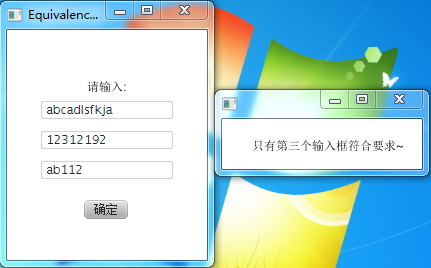
| 7 | abcadlsfkja | 12312192 | ab112 | 只有第三个输入框符合要求 |
| 8 | abcadlsfkja | 12312192 | ab112sfav | 三个输入框均不符合要求 |
三、程序代码
import javafx.application.Application;

import javafx.event.ActionEvent;

import javafx.event.EventHandler;

import javafx.scene.Scene;

import javafx.scene.control.Button;

import javafx.scene.control.TextField;

import javafx.scene.layout.AnchorPane;

import javafx.scene.text.Text;

import javafx.stage.Stage;

public class Equivalence extends Application{

    public static void main(String arg0[]){

        Equivalence.launch(arg0);

    }

    @Override

    public void start(Stage stage) throws Exception {

        stage.setTitle("Equivalence class");

        AnchorPane root = new AnchorPane();

        Text message = new Text("请输入:");

        root.getChildren().add(message);

        AnchorPane.setTopAnchor(message, 50.0);

        AnchorPane.setLeftAnchor(message, 80.0);

        final TextField textInput1 = new TextField();

        root.getChildren().add(textInput1);

        AnchorPane.setTopAnchor(textInput1, 70.0);

        AnchorPane.setLeftAnchor(textInput1, 33.0);

        final TextField textInput2 = new TextField();

        root.getChildren().add(textInput2);

        AnchorPane.setTopAnchor(textInput2, 100.0);

        AnchorPane.setLeftAnchor(textInput2, 33.0);

        final TextField textInput3 = new TextField();

        root.getChildren().add(textInput3);

        AnchorPane.setTopAnchor(textInput3, 130.0);

        AnchorPane.setLeftAnchor(textInput3, 33.0);

        Button submit = new Button();

        submit.setText("确定");

        root.getChildren().add(submit);

        AnchorPane.setTopAnchor(submit, 170.0);

        AnchorPane.setLeftAnchor(submit, 77.0);

        submit.setOnAction(new EventHandler<ActionEvent>() {

            public void handle(ActionEvent arg0) {

                if(checkString(textInput1.getText().toString()) && checkString(textInput2.getText().toString()) && checkString(textInput3.getText().toString())){

                     Stage newStage = new Stage();

                     AnchorPane newRoot = new AnchorPane();

                     Text result = new Text("三个输入框均符合要求~");

                     newRoot.getChildren().add(result);

                     AnchorPane.setTopAnchor(result, 20.0);

                     AnchorPane.setLeftAnchor(result, 30.0);

                     newStage.setScene(new Scene(newRoot, 200, 50));

                     newStage.show();

                }else if(checkString(textInput1.getText().toString()) && checkString(textInput2.getText().toString())){

                    Stage newStage = new Stage();

                     AnchorPane newRoot = new AnchorPane();

                     Text result = new Text("第三个输入框不符合要求~");

                     newRoot.getChildren().add(result);

                     AnchorPane.setTopAnchor(result, 20.0);

                     AnchorPane.setLeftAnchor(result, 30.0);

                     newStage.setScene(new Scene(newRoot, 200, 50));

                     newStage.show();

                }else if(checkString(textInput1.getText().toString()) && checkString(textInput3.getText().toString())){

                    Stage newStage = new Stage();

                     AnchorPane newRoot = new AnchorPane();

                     Text result = new Text("第二个输入框不符合要求~");

                     newRoot.getChildren().add(result);

                     AnchorPane.setTopAnchor(result, 20.0);

                     AnchorPane.setLeftAnchor(result, 30.0);

                     newStage.setScene(new Scene(newRoot, 200, 50));

                     newStage.show();

                }else if(checkString(textInput2.getText().toString()) && checkString(textInput2.getText().toString())){

                    Stage newStage = new Stage();

                     AnchorPane newRoot = new AnchorPane();

                     Text result = new Text("第一个输入框不符合要求~");

                     newRoot.getChildren().add(result);

                     AnchorPane.setTopAnchor(result, 20.0);

                     AnchorPane.setLeftAnchor(result, 30.0);

                     newStage.setScene(new Scene(newRoot, 200, 50));

                     newStage.show();

                }else if(checkString(textInput1.getText().toString())){

                    Stage newStage = new Stage();

                     AnchorPane newRoot = new AnchorPane();

                     Text result = new Text("只有第一个输入框符合要求~");

                     newRoot.getChildren().add(result);

                     AnchorPane.setTopAnchor(result, 20.0);

                     AnchorPane.setLeftAnchor(result, 30.0);

                     newStage.setScene(new Scene(newRoot, 200, 50));

                     newStage.show();

                }else if(checkString(textInput2.getText().toString())){

                    Stage newStage = new Stage();

                     AnchorPane newRoot = new AnchorPane();

                     Text result = new Text("只有第二个输入框符合要求~");

                     newRoot.getChildren().add(result);

                     AnchorPane.setTopAnchor(result, 20.0);

                     AnchorPane.setLeftAnchor(result, 30.0);

                     newStage.setScene(new Scene(newRoot, 200, 50));

                     newStage.show();

                }else if(checkString(textInput3.getText().toString())){

                    Stage newStage = new Stage();

                     AnchorPane newRoot = new AnchorPane();

                     Text result = new Text("只有第三个输入框符合要求~");

                     newRoot.getChildren().add(result);

                     AnchorPane.setTopAnchor(result, 20.0);

                     AnchorPane.setLeftAnchor(result, 30.0);

                     newStage.setScene(new Scene(newRoot, 200, 50));

                     newStage.show();

                }else{

                    Stage newStage = new Stage();

                     AnchorPane newRoot = new AnchorPane();

                     Text result = new Text("三个输入框均不符合要求~");

                     newRoot.getChildren().add(result);

                     AnchorPane.setTopAnchor(result, 20.0);

                     AnchorPane.setLeftAnchor(result, 25.0);

                     newStage.setScene(new Scene(newRoot, 200, 50));

                     newStage.show();

                }

            }

        });

        stage.setScene(new Scene(root, 200,230));

        stage.show();

    }

    public boolean checkString(String str){

        if(str.length() == 0 || str.length() >= 7){

            return false;

        }

        char arr[] = new char[str.length()];

        arr = str.toCharArray();

        for(int i = 0; i < str.length(); i++){

            if((arr[i] >= 'a' && arr[i] <= 'z')||(arr[i] >= 'A' && arr[i] <= 'Z')||(arr[i] >= '0' && arr[i] <= '9'));

            else{

                return false;

            }

        }

        return true;

    }

}
四、程序结果


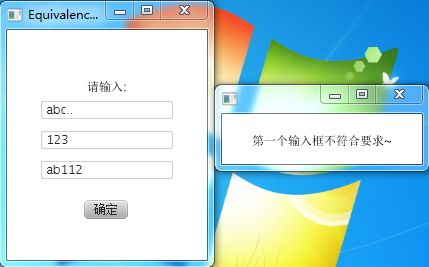
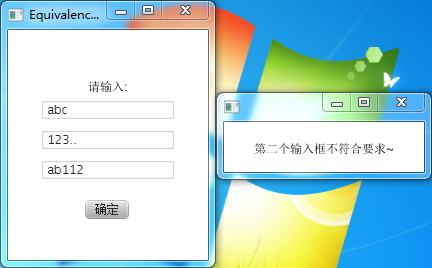
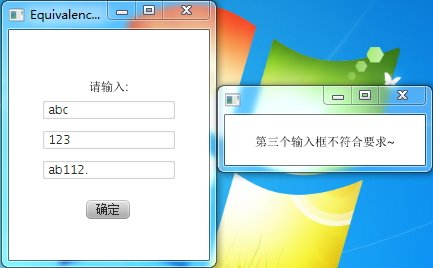
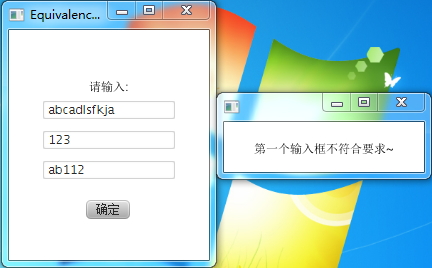

软件测试——等价类划分(EditText * 3)的更多相关文章
- 软件测试技术(二)——使用等价类划分的方法进行的UI测试
测试的目标程序 程序代码 import java.io.BufferedReader; import java.io.BufferedWriter; import java.io.File; impo ...
- 等价类划分方法的应用(jsp)
[问题描述] 在三个文本框中输入字符串,要求均为1到6个英文字符或数字,按submit提交. [划分等价类] 条件1: 字符合法; 条件2: 输入1长度合法; 条件3: 输入2长度合法: 条件4: 输 ...
- Java上等价类划分测试的实现
利用JavaFx实现对有效等价类和无效等价类的划分: 代码: import javafx.application.Application;import javafx.event.ActionEvent ...
- 黑盒测试用例设计方法&理论结合实际 -> 等价类划分
一. 概念 等价类划分法是把程序的输入域划分成若干部分(子集),然后从每个部分中选取少数代表性数据作为测试用例.每一类的代表性数据在测试中的作用等价于这一类中的其他值. 二. 等价类划分的应用 等价类 ...
- 计算某天的下一天:黑盒测试之等价类划分+JUnit参数化测试
题目要求 测试以下程序:该程序有三个输入变量month.day.year(month.day和year均为整数值,并且满足:1≤month≤12.1≤day≤31和1900≤year≤2050),分别 ...
- 软件测试技术(三)——使用因果图法进行的UI测试
目标程序 较上次增加两个相同的输入框 使用方法介绍 因果图法 在Introduction to Software Testing by Paul一书中,将软件测试的覆盖标准划分为四类,logical ...
- [liu yanling]软件测试技巧
1.添加.修改功能 (1)是否支持tab键 (2)是否支持enter键 (3)不符合要求的地方是否有错误提示 (4)保存后,是否也插入到数据库中 (5)字段唯一的,是否可以重复添加 (6)对编辑页列表 ...
- [liu yanling]规范软件测试流程
测试计划 做任何事情都会有输入输出,对于测试过程我们可以把输入理解为测试计划.测试环境准备.测试工具的选择等等,输出可以理解为测试结果.测试用例设计即可以理解为以测试计划为输入的输出,也可以理解为以测 ...
- 软件测试software testing summarize
软件测试(英语:software testing),描述一种用来促进鉴定软件的正确性.完整性.安全性和质量的过程.软件测试的经典定义是:在规定的条件下对程序进行操作,以发现程序错误,衡量软件质量,并对 ...
随机推荐
- Java回顾之JDBC
这篇文章里,我们来讨论一些和JDBC相关的话题. 概述 尽管在实际开发过程中,我们一般使用ORM框架来代替传统的JDBC,例如Hibernate或者iBatis,但JDBC是Java用来实现数据访问的 ...
- 定义集合属性(WPF)
在wpf中,定义集合属性时,字段可以使用“ObservableCollection<T>”定义,以保证数据改变时的自动通知功能:属性可以使用“ICollection”定义,保证属性的灵活性 ...
- SCWS中文分词PHP扩展详细安装说明
因最近写的一段代码,需要用到中文分词,在网上找了一下,发现了scws这个不错的插件,故根据文档安装使用,下面记录下安装的全过程 系统:centos 安装scws wget http://www.xun ...
- Java中字符串比较的注意点
Java中必须使用string1.equals(string2)来进行判断 补充如果: string s1=new String("Hello"); string s2=new S ...
- 安装完Linux Mint后,发现系统中竟没有中文输入法
安装完Linux Mint后,发现系统中竟没有中文输入法,语言支持之后自动更新过程中有些安装包下载失败. 可以采取下面的方法安装上中文输入法. 1. 安装iBus: sudo add-apt-repo ...
- wikioi1036 商务旅行 挺水的lca
链接:http://wikioi.com/problem/1036/ 题意不写了. 思路:很明显找到lca然后用两个点的深度相加-lca的深度就是这一步的最近步数. #include <stdi ...
- idea上查看本文件svn修改的历史版本
如上图依次点击,得到下图,比较即可:
- Codeforces Round #279 (Div. 2) 题解集合
终于有场正常时间的比赛了...毛子换冬令时还正是好啊233 做了ABCD,E WA了3次最后没搞定,F不会= = 那就来说说做的题目吧= = A. Team Olympiad 水题嘛= = 就是个贪心 ...
- Jenkins插件开发(二)-- HelloWorld
在上一篇blog中我们讲了如何搭建jenkins插件的开发环境,接下来介绍如何开发我们的插件. 创建HelloWorld插件 学习每门新语言的时候,我们都会写一个HelloWorld程序,这里介绍的是 ...
- 爱奇艺、腾讯、优酷、搜狐、芒果、乐视、PPTV、音悦台等VIP视频免费观看
观看地址一:http://www.luoruiyuan.cn/pages/id-62_uid-2_btid-35.html 观看地址二:http://movie.luoruiyuan.cn/vip.h ...