转自: http://aredko.blogspot.com/2014/02/knowing-how-all-your-components-work.html
In today's post we will try to cover very interesting and important topic: distributed system tracing. What it practically means is that we will try to trace the request from the point it was issued by the client to the point the response to this request was received. At first, it looks quite straightforward but in reality it may involve many calls to several other systems, databases, NoSQL stores, caches, you name it ...
In 2010 Google published a paper about Dapper, a large-scale distributed systems tracing infrastructure (very interesting reading by the way). Later on, Twitter built its own implementation based on Dapper paper, called Zipkin and that's the one we are going to look at.
We will build a simple JAX-RS 2.0 server using great Apache CXF library. For the client side, we will use JAX-RS 2.0 client API and by utilizing Zipkin we will trace all the interactions between the client and the server (as well as everything happening on server side). To make an example a bit more illustrative, we will pretend that server uses some kind of database to retrieve the data. Our code will be a mix of pure Java and a bit of Scala (the choice of Scala will be cleared up soon).
One additional dependency in order for Zipkin to work is Apache Zookeeper. It is required for coordination and should be started in advance. Luckily, it is very easy to do:
Now back to Zipkin. Zipkin is written in Scala. It is still in active development and the best way to start off with it is just by cloning its GitHub repository and build it from sources:
git clone https://github.com/twitter/zipkin.git
From architectural prospective, Zipkin consists of three main components:
- collector: collects traces across the system
- query: queries collected traces
- web: provides web-based UI to show the traces
To run them, Zipkin guys provide useful scripts in the bin folder with the only requirement that JDK 1.7 should be installed:
- bin/collector
- bin/query
- bin/web
Let's execute these scripts and ensure that every component has been started successfully, with no stack traces on the console (for curious readers, I was not able to make Zipkin work on Windows so I assume we are running it on Linux box). By default,Zipkin web UI is available on port 8080. The storage for traces is embedded SQLite engine. Though it works, the better storages (like awesome Redis) are available.
The preparation is over, let's do some code. We will start with JAX-RS 2.0 client part as it's very straightforward (ClientStarter.java):
01 |
package com.example.client; |
03 |
import javax.ws.rs.client.Client; |
04 |
import javax.ws.rs.client.ClientBuilder; |
05 |
import javax.ws.rs.core.MediaType; |
06 |
import javax.ws.rs.core.Response; |
08 |
import com.example.zipkin.Zipkin; |
09 |
import com.example.zipkin.client.ZipkinRequestFilter; |
10 |
import com.example.zipkin.client.ZipkinResponseFilter; |
12 |
public class ClientStarter { |
13 |
public static void main( final String[] args ) throws Exception { |
14 |
final Client client = ClientBuilder |
16 |
.register( new ZipkinRequestFilter( "People", Zipkin.tracer() ), 1 ) |
17 |
.register( new ZipkinResponseFilter( "People", Zipkin.tracer() ), 1 ); |
19 |
final Response response = client |
21 |
.request( MediaType.APPLICATION_JSON ) |
24 |
if( response.getStatus() == 200 ) { |
25 |
System.out.println( response.readEntity( String.class ) ); |
31 |
// Small delay to allow tracer to send the trace over the wire |
Except a couple of imports and classes with Zipkin in it, everything should look simple. So what those ZipkinRequestFilter andZipkinResponseFilter are for? Zipkin is awesome but it's not a magical tool. In order to trace any request in distributed system, there should be some context passed along with it. In REST/HTTP world, it's usually request/response headers. Let's take a look on ZipkinRequestFilter first (ZipkinRequestFilter.scala):
01 |
package com.example.zipkin.client |
03 |
import javax.ws.rs.client.ClientRequestFilter |
04 |
import javax.ws.rs.ext.Provider |
05 |
import javax.ws.rs.client.ClientRequestContext |
06 |
import com.twitter.finagle.http.HttpTracing |
07 |
import com.twitter.finagle.tracing.Trace |
08 |
import com.twitter.finagle.tracing.Annotation |
09 |
import com.twitter.finagle.tracing.TraceId |
10 |
import com.twitter.finagle.tracing.Tracer |
13 |
class ZipkinRequestFilter( val name: String, val tracer: Tracer ) extendsClientRequestFilter { |
14 |
def filter( requestContext: ClientRequestContext ): Unit = { |
15 |
Trace.pushTracerAndSetNextId( tracer, true ) |
17 |
requestContext.getHeaders().add( HttpTracing.Header.TraceId, Trace.id.traceId.toString ) |
18 |
requestContext.getHeaders().add( HttpTracing.Header.SpanId, Trace.id.spanId.toString ) |
20 |
Trace.id._parentId foreach { id => |
21 |
requestContext.getHeaders().add( HttpTracing.Header.ParentSpanId, id.toString ) |
24 |
Trace.id.sampled foreach { sampled => |
25 |
requestContext.getHeaders().add( HttpTracing.Header.Sampled, sampled.toString ) |
28 |
requestContext.getHeaders().add( HttpTracing.Header.Flags, Trace.id.flags.toLong.toString ) |
30 |
if( Trace.isActivelyTracing ) { |
31 |
Trace.recordRpcname( name, requestContext.getMethod() ) |
32 |
Trace.recordBinary( "http.uri", requestContext.getUri().toString() ) |
33 |
Trace.record( Annotation.ClientSend() ) |
A bit of Zipkin internals will make this code superclear. The central part of Zipkin API is Trace class. Every time we would like to initiate tracing, we should have a Trace Id and the tracer to actually trace it. This single line generates new Trace Id and register the tracer (internally this data is held in thread local state).
1 |
Trace.pushTracerAndSetNextId( tracer, true ) |
Traces are hierarchical by nature, so do Trace Ids: every Trace Id could be a root or part of another trace. In our example, we know for sure that we are the first and as such the root of the trace. Later on the Trace Id is wrapped into HTTP headers and will be passed along the request (we will see on server side how it is being used). The last three lines associate the useful information with the trace: name of our API (People), HTTP method, URI and most importantly, that it's the client sending the request to the server.
1 |
Trace.recordRpcname( name, requestContext.getMethod() ) |
2 |
Trace.recordBinary( "http.uri", requestContext.getUri().toString() ) |
3 |
Trace.record( Annotation.ClientSend() ) |
The ZipkinResponseFilter does the reverse to ZipkinRequestFilter and extract the Trace Id from the request headers (ZipkinResponseFilter.scala):
01 |
package com.example.zipkin.client |
03 |
import javax.ws.rs.client.ClientResponseFilter |
04 |
import javax.ws.rs.client.ClientRequestContext |
05 |
import javax.ws.rs.client.ClientResponseContext |
06 |
import javax.ws.rs.ext.Provider |
07 |
import com.twitter.finagle.tracing.Trace |
08 |
import com.twitter.finagle.tracing.Annotation |
09 |
import com.twitter.finagle.tracing.SpanId |
10 |
import com.twitter.finagle.http.HttpTracing |
11 |
import com.twitter.finagle.tracing.TraceId |
12 |
import com.twitter.finagle.tracing.Flags |
13 |
import com.twitter.finagle.tracing.Tracer |
16 |
class ZipkinResponseFilter( val name: String, val tracer: Tracer ) extendsClientResponseFilter { |
17 |
def filter( requestContext: ClientRequestContext, responseContext: ClientResponseContext ): Unit = { |
18 |
val spanId = SpanId.fromString( requestContext.getHeaders().getFirst( HttpTracing.Header.SpanId ).toString() ) |
20 |
spanId foreach { sid => |
21 |
val traceId = SpanId.fromString( requestContext.getHeaders().getFirst( HttpTracing.Header.TraceId ).toString() ) |
23 |
val parentSpanId = requestContext.getHeaders().getFirst( HttpTracing.Header.ParentSpanId ) match { |
24 |
case s: String => SpanId.fromString( s.toString() ) |
28 |
val sampled = requestContext.getHeaders().getFirst( HttpTracing.Header.Sampled ) match { |
29 |
case s: String => s.toString.toBoolean |
33 |
val flags = Flags( requestContext.getHeaders().getFirst( HttpTracing.Header.Flags ).toString.toLong ) |
34 |
Trace.setId( TraceId( traceId, parentSpanId, sid, Option( sampled ), flags ) ) |
37 |
if( Trace.isActivelyTracing ) { |
38 |
Trace.record( Annotation.ClientRecv() ) |
Strictly speaking, in our example it's not necessary to extract the Trace Id from the request because both filters should be executed by the single thread. But the last line is very important: it marks the end of our trace by saying that client has received the response.
1 |
Trace.record( Annotation.ClientRecv() ) |
What's left is actually the tracer itself (Zipkin.scala):
01 |
package com.example.zipkin |
03 |
import com.twitter.finagle.stats.DefaultStatsReceiver |
04 |
import com.twitter.finagle.zipkin.thrift.ZipkinTracer |
05 |
import com.twitter.finagle.tracing.Trace |
06 |
import javax.ws.rs.ext.Provider |
09 |
lazy val tracer = ZipkinTracer.mk( host = "localhost", port = 9410, DefaultStatsReceiver, 1 ) |
If at this point you are confused what all those traces and spans mean please look through this documentation page, you will get the basic understanding of those concepts.
At this point, there is nothing left on the client side and we are good to move to the server side. Our JAX-RS 2.0 server will expose the single endpoint (PeopleRestService.java):
01 |
package com.example.server.rs; |
03 |
import java.util.Arrays; |
04 |
import java.util.Collection; |
05 |
import java.util.concurrent.Callable; |
07 |
import javax.ws.rs.GET; |
08 |
import javax.ws.rs.Path; |
09 |
import javax.ws.rs.Produces; |
11 |
import com.example.model.Person; |
12 |
import com.example.zipkin.Zipkin; |
15 |
public class PeopleRestService { |
16 |
@Produces( { "application/json" } ) |
18 |
public Collection< Person > getPeople() { |
19 |
return Zipkin.invoke( "DB", "FIND ALL", new Callable< Collection< Person > >() { |
21 |
public Collection<person> call() throws Exception { |
22 |
return Arrays.asList( new Person( "Tom", "Bombdil" ) ); |
As we mentioned before, we will simulate the access to database and generate a child trace by using Zipkin.invoke wrapper (which looks very simple, Zipkin.scala):
01 |
package com.example.zipkin |
03 |
import java.util.concurrent.Callable |
04 |
import com.twitter.finagle.stats.DefaultStatsReceiver |
05 |
import com.twitter.finagle.tracing.Trace |
06 |
import com.twitter.finagle.zipkin.thrift.ZipkinTracer |
07 |
import com.twitter.finagle.tracing.Annotation |
10 |
lazy val tracer = ZipkinTracer.mk( host = "localhost", port = 9410, DefaultStatsReceiver, 1 ) |
12 |
def invoke[ R ]( service: String, method: String, callable: Callable[ R ] ): R = Trace.unwind { |
13 |
Trace.pushTracerAndSetNextId( tracer, false ) |
15 |
Trace.recordRpcname( service, method ); |
16 |
Trace.record( new Annotation.ClientSend() ); |
21 |
Trace.record( new Annotation.ClientRecv() ); |
As we can see, in this case the server itself becomes a client for some other service (database).
The last and most important part of the server is to intercept all HTTP requests, extract the Trace Id from them so it will be possible to associate more data with the trace (annotate the trace). In Apache CXF it's very easy to do by providing own invoker (ZipkinTracingInvoker.scala):
01 |
package com.example.zipkin.server |
03 |
import org.apache.cxf.jaxrs.JAXRSInvoker |
04 |
import com.twitter.finagle.tracing.TraceId |
05 |
import org.apache.cxf.message.Exchange |
06 |
import com.twitter.finagle.tracing.Trace |
07 |
import com.twitter.finagle.tracing.Annotation |
08 |
import org.apache.cxf.jaxrs.model.OperationResourceInfo |
09 |
import org.apache.cxf.jaxrs.ext.MessageContextImpl |
10 |
import com.twitter.finagle.tracing.SpanId |
11 |
import com.twitter.finagle.http.HttpTracing |
12 |
import com.twitter.finagle.tracing.Flags |
13 |
import scala.collection.JavaConversions._ |
14 |
import com.twitter.finagle.tracing.Tracer |
15 |
import javax.inject.Inject |
17 |
class ZipkinTracingInvoker extends JAXRSInvoker { |
18 |
@Inject val tracer: Tracer = null |
20 |
def trace[ R ]( exchange: Exchange )( block: => R ): R = { |
21 |
val context = new MessageContextImpl( exchange.getInMessage() ) |
22 |
Trace.pushTracer( tracer ) |
24 |
val id = Option( exchange.get( classOf[ OperationResourceInfo ] ) ) map { ori => |
25 |
context.getHttpHeaders().getRequestHeader( HttpTracing.Header.SpanId ).toList match { |
26 |
case x :: xs => SpanId.fromString( x ) map { sid => |
27 |
val traceId = context.getHttpHeaders().getRequestHeader( HttpTracing.Header.TraceId ).toList match { |
28 |
case x :: xs => SpanId.fromString( x ) |
32 |
val parentSpanId = context.getHttpHeaders().getRequestHeader( HttpTracing.Header.ParentSpanId ).toList match { |
33 |
case x :: xs => SpanId.fromString( x ) |
37 |
val sampled = context.getHttpHeaders().getRequestHeader( HttpTracing.Header.Sampled ).toList match { |
38 |
case x :: xs => x.toBoolean |
42 |
val flags = context.getHttpHeaders().getRequestHeader( HttpTracing.Header.Flags ).toList match { |
43 |
case x :: xs => Flags( x.toLong ) |
47 |
val id = TraceId( traceId, parentSpanId, sid, Option( sampled ), flags ) |
50 |
if( Trace.isActivelyTracing ) { |
51 |
Trace.recordRpcname( context.getHttpServletRequest().getProtocol(), ori.getHttpMethod() ) |
52 |
Trace.record( Annotation.ServerRecv() ) |
64 |
if( Trace.isActivelyTracing ) { |
65 |
id map { id => Trace.record( new Annotation.ServerSend() ) } |
72 |
override def invoke( exchange: Exchange, parametersList: AnyRef ): AnyRef = { |
73 |
trace( exchange )( super.invoke( exchange, parametersList ) ) |
Basically, the only thing this code does is extracting Trace Id from request and associating it with the current thread. Also please notice that we associate additional data with the trace marking the server participation.
1 |
Trace.recordRpcname( context.getHttpServletRequest().getProtocol(), ori.getHttpMethod() ) |
2 |
Trace.record( Annotation.ServerRecv() ) |
To see the tracing in live, let's start our server (please notice that sbt should be installed), assuming all Zipkin components andApache Zookeeper are already up and running:
sbt 'project server' 'run-main com.example.server.ServerStarter'
then the client:
sbt 'project client' 'run-main com.example.client.ClientStarter'
and finally open Zipkin web UI at http://localhost:8080. We should see something like that (depending how many times you have run the client):
Alternatively, we can build and run fat JARs using sbt-assembly plugin:
sbt assembly

java -jar server/target/zipkin-jaxrs-2.0-server-assembly-0.0.1-SNAPSHOT.jar

java -jar client/target/zipkin-jaxrs-2.0-client-assembly-0.0.1-SNAPSHOT.jar
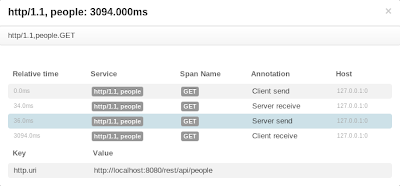
If we click on any particular trace, the more detailed information will be shown, much resembling client <-> server <-> databasechain.
Even more details are shown when we click on particular element in the tree.
Lastly, the bonus part is components / services dependency graph.
As we can see, all the data associated with the trace is here and follows hierarchical structure. The root and child traces are detected and shown, as well as timelines for client send/receive and server receive/send chains. Our example is quite naive and simple, but even like that it demonstrates how powerful and useful distributed system tracing is. Thanks to Zipkin guys.
The complete source code is available on GitHub.
- Sentry 监控 - Distributed Tracing 分布式跟踪
系列 1 分钟快速使用 Docker 上手最新版 Sentry-CLI - 创建版本 快速使用 Docker 上手 Sentry-CLI - 30 秒上手 Source Maps Sentry For ...
- Steeltoe之Distributed Tracing篇
Steeltoe里的分布式追踪功能与Spring Cloud Sleuth一样,支持在日志中记录追踪数据,或者上传到远端的服务,比如Zipkin. Logging 在Steeltoe中使用日志时需要引 ...
- spring-cloud/spring-cloud-sleuth github 项目 mark
97 Star639 Fork335 spring-cloud/spring-cloud-sleuth CodeIssues 5Pull requests 1Projects 0WikiInsigh ...
- Awesome Flask
Awesome Flask A curated list of awesome Flask resources and plugins Awesome Flask Framework Admin i ...
- Awesome Flask Awesome
A curated list of awesome Flask resources and plugins Awesome Flask Framework Admin interface Authen ...
- Build Telemetry for Distributed Services之Open Telemetry简介
官网链接:https://opentelemetry.io/about/ OpenTelemetry is the next major version of the OpenTracing and ...
- Build Telemetry for Distributed Services之OpenTracing实践
官网:https://opentracing.io/docs/best-practices/ Best Practices This page aims to illustrate common us ...
- Build Telemetry for Distributed Services之Open Telemetry来历
官网:https://opentelemetry.io/ github:https://github.com/open-telemetry/ Effective observability requi ...
- Build Telemetry for Distributed Services之OpenTracing简介
官网地址:https://opentracing.io/ What is Distributed Tracing? Who Uses Distributed Tracing? What is Open ...
随机推荐
- Sql Server中的事务隔离级别
数据库中的事物有ACID(原子性,一致性,隔离性,持久性)四个特性.其中隔离性是用来处理并发执行的事务之间的数据访问控制.SqlServer中提供了几种不同级别的隔离类型. 概念 Read UnCom ...
- SpringIoc 和 工厂模式(反射实现)
一.先演示 “简单工厂”: package org; interface Fruit { public void eat(); } class Apple implements Fruit { pub ...
- ETL流程概述及常用实现方法
ETL流程概述及常用实现方法 http://blog.csdn.net/btkuangxp/article/details/48224187 目录(?)[-] 1抽取作业 1手工开发抽取作业时候的常用 ...
- Java-Runoob-高级教程-实例-环境设置实例:3.Java 实例 - 如何执行指定class文件目录(classpath)?
ylbtech-Java-Runoob-高级教程-实例-环境设置实例:3.Java 实例 - 如何执行指定class文件目录(classpath)? 1.返回顶部 1. Java 实例 - 如何执行指 ...
- CFGym 101490J 题解
一.题目链接 http://codeforces.com/gym/101490 二.题面 三.题意 给你n个点,代表学生所在位置,n个点,代表老师所在位置.每个学生分配一个老师.让你找出一个最小的学生 ...
- 给iOS开发新手送点福利,简述UIPageControl的属性和用法
UIPageControl 1. numberOfPages // 设置有多少页 默认为0 [pageControl setNumberOfPages:kImageCount]; 2. cur ...
- struct to point
关键知识点:结构体--新数据类型定义及结构体变量的定义与初始化, 结构体指针变量的定义及相关应用. 结构体变量作函数参数 指向结构体变量的指针变量. 数组与结构体间的渊源始末, 当一个整体由多个数据构 ...
- django2.0表的ORM字段类型和展示
django2.0表的ORM字段类型和展示 思路整理 今天想给博客的文章添加增加一个分类字段 但是不知道这种后台字段生成的字段,样式怎么处理 后来找到了,就是在定义模型的字段定义的时候 决定样式 mo ...
- Fatal error: Cannot use object of type PHPExcel_RichText as array
Fatal error: Cannot use object of type PHPExcel_RichText as array 上传导入Excel的时候会出现此问题,问题的原因是Excel表格中有 ...
- Windows下cpu使用的监控
这里有一篇来自微软的文章,主要讲WPA如何使用,但是前面关于进程调度的介绍很给力,非常好的学习操作系统的材料: https://msdn.microsoft.com/en-us/library/jj6 ...