
jQuery实现全选、不选和反选功能
jQuery结合Font Awesome字体图标实现全选、不选和反选功能
Font Awesome字体图标链接地址:http://www.fontawesome.com.cn/faicons/
效果:
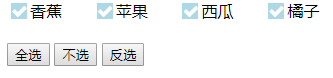
代码:
<!DOCTYPE html>

<html>

<head>

    <meta charset="UTF-8">

    <title></title>

    <link rel="stylesheet" type="text/css" href="font-awesome-4.7.0/css/font-awesome.min.css" />

    <style type="text/css">

        label {

            display: inline-flex;

            display: -webkit-inline-flex;

            position: relative;

            cursor: pointer;

            width: 6%;

        }

        .box {

            cursor: pointer;

            width: 16px;

            height: 16px;

            appearance: none;

            -webkit-appearance: none;

            -moz-appearance: none;

            border: 1px solid lightblue;

            background: lightblue;

        }

        .fa-check {

            position: absolute;

            top: 3px;

            left: 2px;

            color: #fff;

            border: none;

        }

    </style>

</head>

<body>

    <div class="wrapper">

        <label>

			<input type="checkbox" class="box"/>

			<span class="remeber">

				香蕉

			</span>

			<i class="fa fa-fw"></i>

		</label>

        <label class="wrapper">

			<input type="checkbox" class="box" />

			<span class="remeber">

				苹果

			</span>

			<i class="fa fa-fw"></i>

		</label>

        <label class="wrapper">

			<input type="checkbox" class="box"/>

			<span class="remeber">

				西瓜

			</span>

			<i class="fa fa-fw"></i>

		</label>

        <label class="wrapper">

			<input type="checkbox" class="box"/>

			<span class="remeber">

				橘子

			</span>

			<i class="fa fa-fw"></i>

		</label>

    </div>

    <br>

    <input type="button" name="" id="check-all" value="全选" />

    <input type="button" name="" id="check-no" value="不选" />

    <input type="button" name="" id="check-reverse" value="反选" />

    <script type="text/javascript" src="js/jquery-1.10.2.min.js"></script>

    <script type="text/javascript">

        $(function() {

            $('body').on("click", ".box", function() {

                $(this).parent().find('.fa').toggleClass('fa-check');

            });

            //全选

            $("#check-all").click(function() {

                $(".wrapper label i").each(function() {

                    $(this).addClass("fa-check");

                })

            });

            //不选

            $("#check-no").click(function() {

                $(".wrapper label i").each(function() {

                    $(this).removeClass("fa-check");

                })

            });

            //反选

            $("#check-reverse").click(function() {

                $(".wrapper label i").each(function() {

                    $(this).toggleClass("fa-check");

                })

            });

        })

    </script>

</body>

</html>
jQuery实现全选、不选和反选功能的更多相关文章
- jQuery实现全选、全不选、反选
如图,需要使用jQuery实现全选.全不选.反选功能: 核心代码: 全选 $("#check_all").click(function(){ $("input:check ...
- python: jquery实现全选 反选 取消
引入这个jquery-1.12.4.js jquery实现全选 反选 取消 <!DOCTYPE HTML PUBLIC "-//W3C//DTD HTML 4.01 Transitio ...
- jquery实现全选、反选、不选
<!DOCTYPE html><html lang="zh-CN"><head><meta charset="UTF-8&quo ...
- jquery的全选/全不选/反选以及attr添加checked属性失败的解决办法
如下图: <head> <title></title> <style type="text/css"> div { border: ...
- jquery checkbox全选,全不选,反选方法,jquery checkbox全选只能操作一次
jquery checkbox全选,全不选,反选方法, jquery checkbox全选只能操作一次, jquery checkbox全选只有第一次成功 >>>>>&g ...
- jquery 书写全选反选功能
书写一个后台管理中用到的全选反选功能.代码如下 <!DOCTYPE html> <html lang="en"> <head> <meta ...
- jquery实现全选、全不选、反选、获取选中的所有值总结
HTML 我们的页面上有一个歌曲列表,列出多行歌曲名称,并匹配复选框供用户选择,并且在列表下方有一排操作按钮. <!doctype html> <html> <head& ...
- jQuery实现全选、反选和不选功能
HTML 我们的页面上有一个歌曲列表,列出多行歌曲名称,并匹配复选框供用户选择,并且在列表下方有一排操作按钮. ? 1 2 3 4 5 6 7 8 9 10 11 12 13 <ul id=&q ...
- jquery实现全选/反选功能
<!DOCTYPE html><html><head> <meta http-equiv="Content-Type" content=& ...
- (转载)jquery实现全选、反选、获得所有选中的checkbox
举了7个不同的checkbox状态,和大家一一分享. 1.全选 $("#btn1").click(function(){ $("input[name='checkbox' ...
随机推荐
- Python爬虫教程-11-proxy代理IP,隐藏地址(猫眼电影)
Python爬虫教程-11-proxy代理IP,隐藏地址(猫眼电影) ProxyHandler处理(代理服务器),使用代理IP,是爬虫的常用手段,通常使用UserAgent 伪装浏览器爬取仍然可能被网 ...
- bootstrap-table 分页增删改查之一(增加 删除)
先上效果图 引入js文件 <!--js jquery --> <script type="text/javascript" src="${pageCon ...
- No value specified for 'Date'错误
今天使用 BeanUtils.copyProperties(m,n); 遇到 No value specified for 'Date' 这个错误,以前用的时候都不需要加 try 今天使用发现需 ...
- linux下pgAdmin4安装
首先到pgAdmin4官方网站下载安装包:https://www.pgadmin.org/download/ 我下载的是3.0; 到文件所在目录执行安装命令: sudo pip install ./p ...
- cocos ide使用binding-generator导出来的c++类
time:2015/03/19 cocos版本:3.2 描述:用了ide运行一个实例[1]的时候需要增加c++类,正确导出来之后,直接使用vs2012启动是没有问题的,但是使用ide启动却提示找不到模 ...
- H5 签到功能
Introduce(介绍) 用户签到的H5例子(css+jquery,无图片),由于网上找的的用户签到例子都不好,要不就是好多图片组成的,要不就大量冗余代码,所以特意做了个签到界面(移动端). Use ...
- 利用cobbler无人值守批量安装centos
准备: 至少两台机器,分别用作cobbler的服务端和安装测试端 准备一个iso的安装文件,最好是4G多的那个dvd包,以前用网易源上那个centos 6.4 x86_64 通过xen安装时就报错:N ...
- python 中logging的日志封装
因为最近在做平台,发现有同事,使用django封装了日志模块,看样子很简单,准备自己单独做了一个日志封装模板,对于python不熟练的我,封装部分参考了多个博主的内容,形成自己的日志模块,内容如下: ...
- 操作dict时避免出现KeyError的几种方法
在读取dict的key和value时,如果key不存在,就会触发KeyError错误,如: Python t = { ', ', ', } print(t['d']) 就会出现: <code c ...
- Codeforces441A_Valera and Antique Items(水题)
Valera and Antique Items time limit per test 1 second memory limit per test 256 megabytes input stan ...