
RoR - Nested Resources, Security ,pagination
root to: 'xxx' 默认root路径
Nested Resource:
Rails.application.routes.draw do

    resources :books do

        resources :notes # , only: [:create, :destroy]

    end

    root to: "books#index"

end
content_tag:
simple_format: Formats new lines as <br>
Authentication:
has_secure_password

#bcrypt-ruby(gemfile)

1. run bundle install

2. make sure password_digest is table column

3.account for password inside strong parameters list in the controller
HTTP Sessions and cookies:
HTTP is a stateless protocol:
1.即使来自同一个浏览器的每个新请求都不知道以前发出的请求。
2.这意味着,即使用户发出请求,他在所有后续请求中都将被视为未知。
Cookies and Sessions to the rescue(keep state)
Sessions in rails:
1.rails 中session 以hash形式来传播
2.服务器向浏览器发送一个cookie,其中包含浏览器存储的会话信息,并在所有后续请求(直到会话结束)时将其发送回服务器
Rails.application.routes.draw do

    resources :books do

        resources :notes, only: [:create, :destroy]

    end

    resources :sessions, only: [:new, :create, :destroy]

    root to: "books#index"

  get "/login" => "sessions#new", as: "login"
  delete "/logout" => "sessions#destroy", as: "logout"
end
session controller:
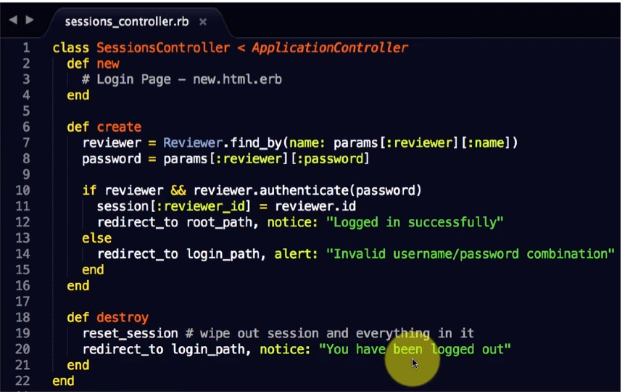
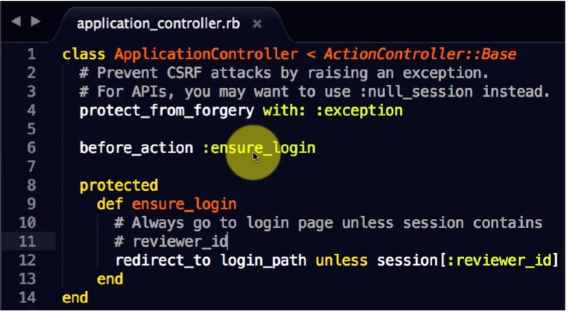
Authorization:
def logged_in?

    session[:reviewer_id] # nil is false

end

def current_user

    @current_user ||= Reviewer.find(session[:reviewer_id])

end
Pagination:
# include will_paginate gem

# use in controller

def index

    @books = current_user.books.paginate(page: params[:page], per_page: 10)

end

# use in html.erb

<%= will_paginate @books %>
ssl: in production.rb,
uncomment #config.fore_ssl = true
to use https
RoR - Nested Resources, Security ,pagination的更多相关文章
- Android Studio :enable vt-x in your bios security,已经打开还是报错的解决方法
quote: For Windows 10: First of all, install the intelhaxm-android.exe located in the folder SDK\ext ...
- 第二百零九节,jQuery EasyUI,Pagination(分页)组件
jQuery EasyUI,Pagination(分页)组件 学习要点: 1.加载方式 2.属性列表 3.事件列表 4.方法列表 本节课重点了解 EasyUI 中 Pagination(分页)组件的使 ...
- 如果你想设置无人自动升级,我们推荐你将这个值修改为security,它会告诉 yum 仅仅升级修复安全问题的软件包。
定期升级你的 CentOS 系统,是所有系统安全中最重要的措施之一.如果你不使用最新的安全补丁升级你的操作系统软件包,你将会让你的机器很容易被攻击. 如果你管理者多个 CentOS 机器,手动升级系统 ...
- SQL Tuning 基础概述06 - 表的关联方式:Nested Loops Join,Merge Sort Join & Hash Join
nested loops join(嵌套循环) 驱动表返回几条结果集,被驱动表访问多少次,有驱动顺序,无须排序,无任何限制. 驱动表限制条件有索引,被驱动表连接条件有索引. hints:use_n ...
- maven打包 springBoot 工程时,默认识别resources目录,习惯使用 resource 目录的需要手动指定静态资源目录
最近项目开发,发现springBoot项目在使用maven打包时,我们静态资源文件都放在resource目录下面,大致如下: 在使用maven打包时,发现静态资源没有打进去.原来springBoot默 ...
- 用Spring Security, JWT, Vue实现一个前后端分离无状态认证Demo
简介 完整代码 https://github.com/PuZhiweizuishuai/SpringSecurity-JWT-Vue-Deom 运行展示 后端 主要展示 Spring Security ...
- springboot中使用spring security,登录url就出现403错误
参考链接:https://segmentfault.com/q/1010000012743613 有两个controller,一个是所有用户可以访问的@RequestMapping("use ...
- Spring Boot 整合 Spring Security,用户登录慢
场景 Spring Boot + Spring Security搭建一个Web项目. 临时用了inMemoryAuthentication. @EnableWebSecurity public cla ...
- Spring Security,没有看起来那么复杂(附源码)
权限管理是每个项目必备的功能,只是各自要求的复杂程度不同,简单的项目可能一个 Filter 或 Interceptor 就解决了,复杂一点的就可能会引入安全框架,如 Shiro, Spring Sec ...
随机推荐
- SpringBoot入门基础
目录 SpringBoot入门 (一) HelloWorld. 2 一 什么是springboot 1 二 入门实例... 1 SpringBoot入门 (二) 属性文件读取... 16 一 自定义属 ...
- Python 爬虫 58同城
目标站点需求分析 获取各类产品的名字,地区,时间,价格 涉及的库 BeautifulSoup,requests,time,pymongo 获取各大类产品的链接 获取单页源码 解析单页源码 保存到文件中 ...
- 将DataTable转换为List<T>对象遇到问题:类型“System.Int64”的对象无法转换为类型“System.Int32”。
可以利用反射将DataTable转换为List<T>对象:原始链接http://www.jb51.net/article/67386.htm 但是该方法在DataTable里某个字段类型是 ...
- java实现http请求
String apiUrl = "https://api.seniverse.com/v3/weather/now.json?key=" + key + "&lo ...
- Matlab将多项式的系数设为0
符号运算时有些多项式的系数值接近于0,像这样 fun = 3.5753839759325595498222646101085e-49*x + 1.836709923159824231201150839 ...
- 关于pyCharm专业版的破解方法
用pycharm编写自动化脚本时,pycharm专业版的使用期限只有30天, 找到了pycharm破解方法. 破解码:{"licenseId":"145446792566 ...
- Oracle做insert或者update时未提交事务导致表锁定解决办法
//查看被锁定表有几个 select object_name,machine,s.sid,s.serial# from v$locked_object l,dba_objects o ,v$sessi ...
- stm32位操作详解
stm32位操作详解 STM32位操作原理 思想:把一个比特分成32位,每位都分配一个地址,这样就有32个地址,通过地址直接访问. 位操作基础 位运算 位运算的运算分量只能是整型或字符型数据,位运算把 ...
- 禁用JavaScript之后,你的网站表现如何?
一 最近要做一个新官网,需求评审完之后,考虑到官网都是纯静态页面,功能简单,操起vue-cli3几秒内创建好了项目脚手架,开发前,我打开了首页模板文件,看到下面这行字,有了一些思考-- <nos ...
- vscode断点调试本地客户端文件
一.安装chrome,安装vscode,打开vscode编辑器,安装插件Debugger for Chrome 二.新建文件 1.目录结构 . ├── index.html ├── index.js ...