
记事本:一些js案例以及DOM和BOM
<!DOCTYPE html>

<html lang="en">

<head>

    <meta charset="UTF-8">

    <title>dom</title>

    <style>

        .box{

            width: 100px;

            height: 100px;

            background-color: red;

        }

    </style>

</head>

<body>

<div class="box" id="hezi">

</div>

<button type="button" id="big">

    变大

</button>

<button type="button" id="small">

    变小

</button>

<button type="button" id="changeColor">

    变色

</button>

</body>

<script>

    var oBig = document.getElementById('big');

    var oSmall = document.getElementById('small');

    var oHezi = document.getElementById('hezi');

    oBig.onclick = function () {

        oHezi.style.width = '300px';

        oHezi.style.height = '400px';

    }

    oSmall.onclick = function () {

        oHezi.style.height = '20px';

        oHezi.style.width = '50px';

    }

    oChangeColor = document.getElementById('changeColor');

    oChangeColor.onclick = function () {

        oHezi.style.backgroundColor = '#666';

    }

</script>

</html>
getElementById函数可以通过ID名字去操作该标签
onclick事件:点击事件,在点击时,会触发该事件
<!DOCTYPE html>

<html lang="en">

<head>

    <meta charset="UTF-8">

    <title>购物车</title>

</head>

<style type="text/css">

    *{

        padding: 0;

        margin: 0;

    }

    .box{

        width: 500px;

        height: 90px;

        margin: 100px auto;

        background-color: rgba(255, 255, 0, 0.4);

        position: relative;

    }

    .car{

        width: 150px;

        height: 30px;

        background-color: #fff;

        position: absolute;

        left: 300px;

        border: 1px solid green;

        z-index: 9;

    }

    .shop{

        width: 310px;

        height: 70px;

        background-color: #fff;

        position: absolute;

        border: 1px solid green;

        left: 140px;

        top: 30px;

        display: none;

    }

</style>

<body>

<div class="box">

    <div class="car" id="mycar">我的购物车</div>

    <div class="shop t" id="shop"></div>

</div>

</body>

<script type="text/javascript">

    var myCar = document.getElementById('mycar');

    var shop = document.getElementById('shop');

    myCar.onmouseover = function () {

        shop.style.display = 'block';

        myCar.style.borderBottomWidth= '0';

    };

    myCar.onmouseout = function () {

        this.style.border = '1px solid green';

        shop.style.display = 'none';

    };

</script>

</html>
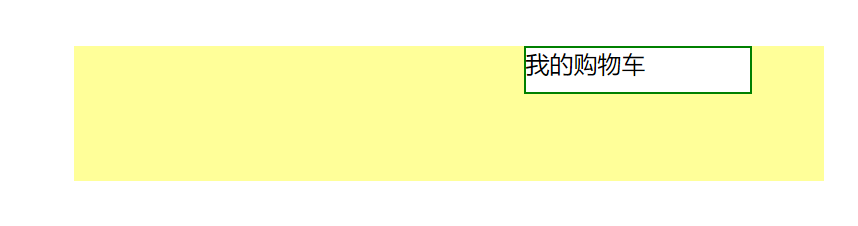
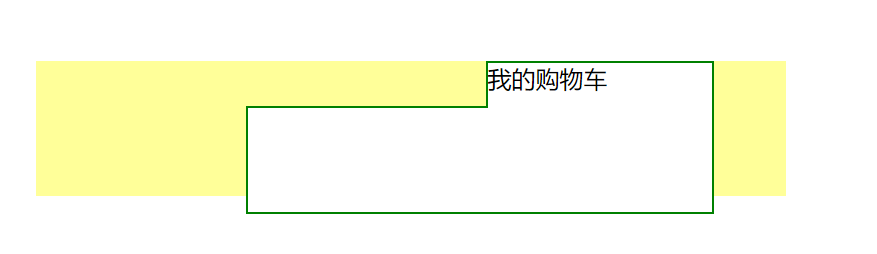
对于购物车:在触碰时会弹出这个操作,有两种写法。
一个是把要下面那个大块先隐藏,之后触碰的时候显示,
二是在触碰时,把类的属性添加进去。
<!DOCTYPE html>

<html lang="en">

<head>

    <meta charset="UTF-8">

    <title>hover</title>

    <style>

        button{

            margin: 10px;

            width: 100px;

            height: 40px;

            cursor: pointer;

        }

        .current{

            background-color: red;

        }

    </style>

</head>

<body>

<button>按钮1</button>

<button>按钮2</button>

<button>按钮3</button>

<button>按钮4</button>

<button>按钮5</button>

</body>

<script>

    var btnArray = document.getElementsByTagName("button");

    for(var i = 0; i < btnArray.length; i++){

        btnArray[i].onmouseover = function () {

            for(var j = 0; j < btnArray.length; j++){

                btnArray[j].className = '';

            }

            this.className = "current";

        }

    }

</script>

</html>

效果大致如此,思想是排异的思想,让按钮3亮起来很容易。
但是想再让按钮2亮起来,而按钮3变白,就需要用到这个代码了。
<!DOCTYPE html>

<html lang="en">

<head>

    <meta charset="UTF-8">

    <title>tab栏选项卡</title>

    <style type="text/css">

        .banner{

            width: 300px;

            height: 80px;

            background-color: red;

            margin: 0 auto;

        }

        .banner a{

            float: left;

            width: 100px;

            height: 80px;

            /*background-color: #fff;*/

            line-height: 80px;

            text-align: center;

        }

        .pic{

            background-color: red;

            width: 300px;

            height: 140px;

            margin: 0 auto;

        }

    </style>

</head>

<body>

<div class="banner">

    <a class="one">首页</a>

    <a class="sec">新闻</a>

    <a class="third">图片</a>

</div>

<div class="pic">

    <li class="pic1">首页内容</li>

    <li class="pic2">新闻内容</li>

    <li class="pic3">图片内容</li>

</div>

</body>

<script type="text/javascript">

    var o = document.getElementsByTagName('a');

    var b = document.getElementsByTagName('li');

    for(var i = 0; i < o.length; i++){

        // 增加一个属性 方便只有b调取

        o[i].index = i;

        o[i].onmouseover = function () {

            for(var j = 0; j < o.length; j++){

                o[j].style.backgroundColor = 'white';

                b[j].style.display = 'none';

            }

            this.style.backgroundColor = 'red';

            b[this.index].style.display = 'block';

        };

    }

</script>

</html>
这段代码要注意的是var是一个全局变量,即使,在内部写,在预编译的时候,也会变成一个全局变量,如果想要对某一个事件进行特殊的操作,做好把这个变量写成一个属性。
function Student() {

        this.name = 'easy';

        this.age = 20;

    }

    Student.prototype.alterName = function () {

      alert(this.name);

    };

    var stu1 = new Student();

    var stu2 = new Student();

    stu1.alterName();

    stu2.alterName();

    alert(stu1.alterName() == stu2.alterName());
定义对象最常用的方法,jQuery已经封装好了。
记事本:一些js案例以及DOM和BOM的更多相关文章
- 前端(十六)—— JavaScript盒子模型、JS动画、DOM、BOM
JS盒子模型.JS动画.DOM.BOM 一.JS盒模型 1.width | height parseInt(getComputedStyle(ele, null).getPropertyValue(' ...
- js 中的 DOM 和 BOM
BOM浏览器对象模型 概念:Browser Object Model 组成: Window:浏览器窗口对象 Navigator:浏览器对象 screen:显示器屏幕对象 His ...
- JS中的DOM与BOM
javascript组成: 1. ECMAScript 基本语法. 2. BOM (浏览器对象模型) 3. DOM (文档对象模型) 一)BOM(borwser Object Model) 浏览器对 ...
- python 全栈开发,Day52(关于DOM操作的相关案例,JS中的面向对象,定时器,BOM,client、offset、scroll系列)
昨日作业讲解: 京东购物车 京东购物车效果: 实现原理: 用2个盒子,就可以完整效果. 先让上面的小盒子向下移动1px,此时就出现了压盖效果.小盒子设置z-index压盖大盒子,将小盒子的下边框去掉, ...
- JS中的函数、Bom、DOM及JS事件
本期博主给大家带来JS的函数.Bom.DOM操作,以及JS各种常用的数据类型的相关知识,同时,这也是JavaScript极其重要的部分,博主将详细介绍各种属性的用法和方法. 一.JS中的函数 [函数的 ...
- 从零开始的JS生活(二)——BOM、DOM与JS中的事件
上回书说道,JS中变量.运算符.分支结构.循环和嵌套循环等内容.本回就由本K给大伙唠唠JS中的BOM.DOM和事件. 一."花心大萝卜"--BOM 1.震惊,FFF团为何对BOM举 ...
- JS中的函数、BOM和DOM操作
一.JS中的函数 [关于注释] /** [文档注释]:开头两个*.写在函数上方,在调用函数时可以看到文档上方的描述信息. */ // 单行注释 /* 多行注释 */ 1.函数的声明及调用 (1) ...
- day 52 js学习 DOM 和BOM
前戏 到目前为止,我们已经学过了JavaScript的一些简单的语法.但是这些简单的语法,并没有和浏览器有任何交互. 也就是我们还不能制作一些我们经常看到的网页的一些交互,我们需要继续学习BOM和DO ...
- JS(DOM 和 BOM)
JS(DOM 和 BOM) 常说的JS(浏览器执行的JS)包含两部分:1.JS基础知识(语法)(ECMA262标准)2.JS-Web-API(W3C标准) W3C 标准中关于 JS 的规定有:(只管定 ...
随机推荐
- Django学习笔记(3)--模板
模板 在实际的页面大多是带样式的HTML代码,而模板是一种带有特殊语法的html文件,这个html文件可以被django编译,可以传递参数进去, 实现数据动态化.在编译完成后,生成一个普通的html文 ...
- .NET core2.0 发布至IIS中
.NET CORE和asp.net 发布时不太一样,ASP.NET Core不再是由IIS工作进程(w3wp.exe)托管,而是使用自托管Web服务器(Kestrel)运行,IIS则是作为反向代理的角 ...
- Python--day07(数据类型转换、字符编码)
昨天内容回顾 1. 深浅拷贝: 值拷贝:直接赋值,原列表中任何值发生改变,新列表的值都会发生改变. 浅拷贝:通过copy()方法,原列表中存放值的地址没有发生改变,但内部的值发生改变,新列表也随之改 ...
- API简介
概述 API(Application Programming Interface),应用程序编程接口.Java API是一本程序员的 字典 ,是JDK中提供给我们使用的类的说明文档.这些类将底层的代码 ...
- Playfair 加密
题目真的好长但是意思很简单 89.加密 (15分)C时间限制:3 毫秒 | C内存限制:3000 Kb题目内容:一种Playfair密码变种加密方法如下:首先选择一个密钥单词(称为pair)(字母不重 ...
- 石家庄地铁系统开发(java web版)(一)
今天所完成的任务: 在Mysql数据库中创建了sjzsubstop表和sjzsubway表 sjzsubstop表用于录入所有站点名称和与之对应的stopid(作为主码) sjzsubway表用于录入 ...
- 深度学习识别CIFAR10:pytorch训练LeNet、AlexNet、VGG19实现及比较(三)
版权声明:本文为博主原创文章,欢迎转载,并请注明出处.联系方式:460356155@qq.com VGGNet在2014年ImageNet图像分类任务竞赛中有出色的表现.网络结构如下图所示: 同样的, ...
- 在ConoHa上Centos7环境下源码安装部署LNMP
本文记录了从源码,在Centos 7上手动部署LNMP环境的过程,为了方便以后对nginx和mariadb进行升级,这里采用yum的方式进行安装. 1.建立运行网站和数据库的用户和组 groupadd ...
- ILRuntime_NewbieGuide—导读
Welcome to the ILRuntime_NewbieGuide wiki! 入门篇:做个简单的案例 https://www.cnblogs.com/kerven/p/10237280.htm ...
- luogu P1602 Sramoc问题
嗯...这篇题解写的原因是一位大佬网友问我的题 本蒟蒻为了纪念下这一刻,就写了 我只会写一写基本思路,经不起推敲 还是大家凑活看吧 重点来了 在bfs时,队列里的每个元素由一个高精度的数和那个数模m的 ...