
Vue学习4:class与style绑定
说明:有些部分我只是相当于做一个学习笔记,加强记忆之用。所以可能阅读性不是那么强。如果有参考我这类博客的人,那么请见谅。
代码如下:
 <!DOCTYPE html>

 <html lang="en">

 <head>

     <meta charset="UTF-8">

     <title>vue5</title>

     <meta name="viewport" content="width=device-width, initial-scale=1">

     <!--<link rel="stylesheet" type="text/css" href="main.css"/>-->

     <script src="vue.js"></script>

 </head>

 <body>

 <!--class与style是html元素的属性,在vue中应该使用v-bind来设置样式属性-->

 <!--vue.js的v-bind专门对此做了加强,表达式的结果除了字符串,还可以是对象或者数组-->

 <div id="app">

     <!--这里:class等价于v-bind="class",使用了缩写-->

     <!--第一部分-->

     <!--1.为:class设置一个对象,从而可以切换class-->

     <div :class="{classA:isClassA}">this will be orange</div>

     <!--2.我们也可以在对象中传入更多的属性来切换多个class-->

     <!--hasError设置的样式覆盖了isClassA的字体颜色样式-->

     <div :class="{classA:isClassA, hasError:hasError}">this will be red</div>

     <!--3.我们也可以直接绑定数据里的一个对象-->

     <div :class="classObject">this will be same to the second</div>

     <!--4.我们可以绑定返回对象的计算属性;比较常用且强大-->

     <div :class="classObject1">this will be red</div>

     <!--5.我们可以为:class设置一个数组-->

     <div :class="[classB, classC]">this will be red</div>

     <!--6.使用三元表达式来切换class-->

     <div :class="[classB, isClassC? classC :'']">this is red too</div>

     <br>

     <!--第二部分-->

     <!--:style可以用来设置样式-->

     <div :style="{border:border,fontSize:fontSize+'px'}">this is style </div>

     <br>

     <!--:style绑定到样式对象-->

     <div :style="styleObject">this is style2</div>

     <br>

     <!--使用数组将多个样式对象运用到一个元素上-->

     <div :style="[style1,style2]">this is style3</div>

     <!--:style使用需要添加浏览器引擎前缀的css属性时,如transform时,vue.js会自动侦测并添加相关前缀-->

 </div>

 <style>

     #app .classA, #app .isClassA1{

         color: orange;

     }

     #app .hasError, #app .hasError1{

         color: red;

         font-size: 20px;

     }

 </style>

 <script>

     var vm=new Vue({

         el: '#app',

         data:{

             isClassA: true,

             hasError: true,

             classObject:{

                 isClassA1: true,

                 hasError1: true

             },

             classB: 'classA',

             classC: 'hasError',

             isClassC :true,

             border: '1px solid gold',

             fontSize: 20,

             styleObject:{

                 color: 'orange',

                 border: '1px solid black'

             },

             style1:{

                 color:'silver'

             },

             style2:{

                 border:'1px solid gold',

                 fontSize: '20px'

             }

         },

         computed:{

             classObject1:function(){

                 return {

                     classA: this.isClassA && !this.hasError,

                     hasError: this.hasError

                 }

             }

         }

     });

 </script>

 </body>

 </html>
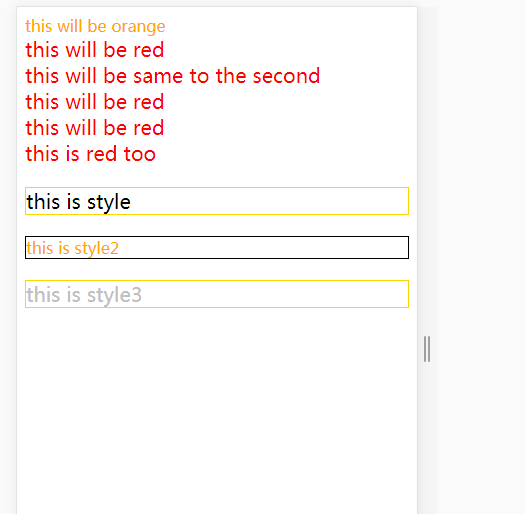
运行结果:
Vue学习4:class与style绑定的更多相关文章
- 关于vue.js中class与style绑定的学习
练习代码: html: <!DOCTYPE html><html lang="en"><head> <meta charset=" ...
- Vue.2.0.5-Class 与 Style 绑定
Class 与 Style 绑定 数据绑定一个常见需求是操作元素的 class 列表和它的内联样式.因为它们都是属性 ,我们可以用v-bind 处理它们:只需要计算出表达式最终的字符串.不过,字符串拼 ...
- Vue教程:Class 与 Style 绑定(四)
绑定 HTML Class 对象语法 ①.添加单个class: <div v-bind:class="{ active: isActive }"></div> ...
- vue学习笔记 样式 class style(五)
使用v-bind数据绑定class和style,v-bind:class可以与传统的class属性共存,其中可以用{}设置多个class,根据条件判断的语法是class名:条件,带-的class名需要 ...
- Vue学习笔记之表单绑定输入
vue的核心:声明式的指令和数据的双向绑定. 那么声明式的指令,已经给大家介绍完了.接下来我们来研究一下什么是数据的双向绑定? 另外,大家一定要知道vue的设计模式:MVVM M是Model的简写,V ...
- vue 学习三 v-model 表单绑定输入 以及修饰符的用处
v-model 指定使用过vue的同学都应该是很熟悉的了,这里就不多介绍,本章主要就是记录一些v-model非常实用的修饰符和对于v-model在html文本框,多行文本框,选择框,单选框,复选框上对 ...
- vue学习笔记(三)class和style绑定
前言 通过上一章的学习vue学习笔记(二)vue的生命周期和钩子函数,我们已经更近一步的知道了关于vue的一些知识,本篇博客将进一步探讨vue其它方面的内容,vue中关于class和style绑定,关 ...
- Vue学习(二):class与style绑定
<!DOCTYPE html> <html lang="en" xmlns:v-bind="http://www.w3.org/1999/xhtml&q ...
- Vue学习计划基础笔记(三)-class与style绑定,条件渲染和列表渲染
Class与style绑定.条件渲染和列表渲染 目标: 熟练使用class与style绑定的多种方式 熟悉v-if与v-for的用法,以及v-if和v-for一起使用的注意事项 class与style ...
随机推荐
- 从浏览器多进程到JS单线程,JS运行机制最全面的一次梳理
前言 来源:https://dailc.github.io/2018/01/21/js_singlethread_eventloop.html 见解有限,如有描述不当之处,请帮忙及时指出,如有错误,会 ...
- XIV Open Cup named after E.V. Pankratiev. GP of America
A. Ancient Diplomacy 建图,同色点间边权为$0$,异色点间边权为$1$,则等价于找一个点使得到它最短路最长的点的最短路最小,Floyd即可. 时间复杂度$O(n^3)$. #inc ...
- virtualbmc 使用
virtualbmc 介绍 通常情况下,我们要使用 IPMI必须使用有带外管理功能的物理机.但是在很多测试环境,我们使用的是虚拟机.virtualbmc是一个可以使用 IPMI命令来控制虚机的open ...
- [LeetCode] Rotate String 旋转字符串
We are given two strings, A and B. A shift on A consists of taking string A and moving the leftmost ...
- vscode + electron 提示:无法连接到legacy请采用inspector解决办法
首先,你的程序是可以直接运行的,在命令行中可以运行,只是在vsCode中,运行一段时间就被这个提示弹出. 解决方法: 先在launch.json 中加上"protocol":&qu ...
- java线程的学习
接口 Runable 属性:target 方法:void run() 类 Thread 方法:void start()用来启动一个线程 void run() 线程启动后执行的方法 Sting getN ...
- POJ 1324 Holedox Moving (状压BFS)
POJ 1324 Holedox Moving (状压BFS) Time Limit: 5000MS Memory Limit: 65536K Total Submissions: 18091 Acc ...
- 电子产品使用感受之——为什么我把Apple Watch S2 升级到了 S4?
2019.03.14 更新 最近在手表上安装了“摩拜单车”的APP,这绝对是一款使用体验加分的APP. 我每天上下班都要骑摩拜单车,但是每次掏出手机,首先FACE ID解锁屏幕,然后从上往下滑屏幕来触 ...
- mongodb 笔记
1.java驱动下的mongo操作 1.1 数据库连接 package com.mongodb.text; import java.net.UnknownHostException; import c ...
- APICloud · 跨越2018,技术改变世界
在APICloud发展轨迹中, 2018注定是疾速的一年, 更多的风口趋势和现象级应用背后, 是技术在推动着世界的加速转动. APICloud所提供的技术服务,在混合之力的驱动下不断完善升级,“让你的 ...