
5、AngularJS 直接绑定显示html ($sce、$sanitize服务)
1、直接使用$sce服务(angularjs中:$sce.trustAsHtml($scope.snippet)。html:ng-bind-html="snippet")
以下代码输出: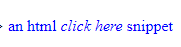
 <div ng-bind-html="snippet"></div>

 <script>

   angular.module('sanitizeExample', [])

   .controller('ExampleController', ['$scope', '$sce', function($scope, $sce) {

         //测试用字符串

              $scope.snippet =

                '<p style="color:blue">an html\n' +

                '<em onmouseover="this.textContent=\'PWN3D!\'">click here</em>\n' +

                'snippet</p>';

         //$sce 服务trustAsHtml 进行编译

              $scope.deliberatelyTrustDangerousSnippet = function() {

                return $sce.trustAsHtml($scope.snippet);

              };

      }]);

 </script>
2、使用angular-sanitize.js 模块中的$sanitize服务,信任字符串,直接显示html
以下代码输出: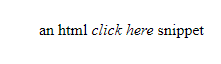
 <div ng-bind-html="snippet"></div>

 <script>

   angular.module('sanitizeExample', ['ngSanitize'])

   .controller('ExampleController', ['$scope', function($scope) {

         //测试用字符串

              $scope.snippet =

                '<p style="color:blue">an html\n' +

                '<em onmouseover="this.textContent=\'PWN3D!\'">click here</em>\n' +

                'snippet</p>';

      }]);

 </script>
3、整体demo代码:
<!DOCTYPE html>
<html lang="en">
<head>
<meta charset="UTF-8">
<meta name="viewport" content="width=device-width, initial-scale=1.0">
<meta http-equiv="X-UA-Compatible" content="ie=edge">
<title>Document</title>
</head>
<body ng-app="sanitizeExample">
<div ng-controller="ExampleController">
Snippet: <textarea ng-model="snippet" cols="60" rows="3"></textarea>
<table>
<tr>
<td>Directive</td>
<td>How</td>
<td>Source</td>
<td>Rendered</td>
</tr>
<tr id="bind-html-with-sanitize">
<td>ng-bind-html</td>
<td>Automatically uses $sanitize</td>
<td><pre><div ng-bind-html="snippet"><br/></div></pre></td>
<td><div ng-bind-html="snippet"></div></td>
</tr>
<tr id="bind-html-with-trust">
<td>ng-bind-html</td>
<td>Bypass $sanitize by explicitly trusting the dangerous value</td>
<td>
<pre><div ng-bind-html="deliberatelyTrustDangerousSnippet()"></div></pre>
</td>
<td><div ng-bind-html="deliberatelyTrustDangerousSnippet()"></div></td>
</tr>
<tr id="bind-default">
<td>ng-bind</td>
<td>Automatically escapes</td>
<td><pre><div ng-bind="snippet"><br/></div></pre></td>
<td><div ng-bind="snippet"></div></td>
</tr>
</table>
</div>
<script>
angular.module('sanitizeExample', ['ngSanitize'])
.controller('ExampleController', ['$scope', '$sce', function($scope, $sce) {
$scope.snippet =
'<p style="color:blue">an html\n' +
'<em onmouseover="this.textContent=\'PWN3D!\'">click here</em>\n' +
'snippet</p>';
$scope.deliberatelyTrustDangerousSnippet = function() {
return $sce.trustAsHtml($scope.snippet);
};
}]);
</script>
</body>
//修改为本地angular.js 相对地址
<script src="angular.min.js" type="text/javascript"></script>
<script src="angular-sanitize.js" type="text/javascript"></script>
</html>
5、AngularJS 直接绑定显示html ($sce、$sanitize服务)的更多相关文章
- angularjs 指令—— 绑定策略(@、=、&)
angularjs 指令—— 绑定策略(@.=.&) 引入主题背景:angular 的指令配置中的template可以直接使用硬编码写相应的代码,不过也可以根据变量,进行动态更新.那么需要用到 ...
- AngularJS进阶(十)AngularJS改变元素显示状态
AngularJS改变元素显示状态 前言 本文描述使用AngularJS提供的ng-show和ng-hide指令实现自动监听某布尔型变量来改变元素显示状态. 控制html元素显示和隐藏有n种方法:ht ...
- AngularJS参数绑定 --AngularJS
AngularJS参数绑定有三种方式.第一种插值表达式“{{}}”表示,第二种在标签中使用ng-bind属性表示,第三种针对input框(标签)的ng-module属性表示.针对三种参数绑定方式,设定 ...
- angular-ngSanitize模块-$sanitize服务详解
本篇主要讲解angular中的$sanitize这个服务.此服务依赖于ngSanitize模块. 要学习这个服务,先要了解另一个指令: ng-bing-html. 顾名思义,ng-bind-html和 ...
- 【AngularJS学习笔记】01 指令、服务和过滤器
AngularJS 指令是扩展的 HTML 属性,带有前缀 ng-. 比如: ng-app 指令初始化一个 AngularJS 应用程序.注意ng-app一般为空,如果值不为空,就得加这样一句代码va ...
- AngularJS进阶(四十)创建模块、服务
AngularJS进阶(四十)创建模块.服务 学习要点 使用模块构架应用 创建和使用服务 为什么要使用和创建服务与模块? 服务允许你打包可重用的功能,使之能在此应用中使用. 模块允许你打包可重用的功能 ...
- AngularJS路由系列(4)-- UI-Router的$state服务、路由事件、获取路由参数
本系列探寻AngularJS的路由机制,在WebStorm下开发.主要包括: ● UI-Router的$state服务● UI-Router的路由事件● UI-Router获取路由参数 Angular ...
- AngularJS事件绑定的使用详解
本文和大家分享的主要是AngularJS中事件绑定相关知识点,希望通过本文的分享,对大家学习和使用AngularJS有所帮助. 1.绑定事件:表达式.事件方法名: 2.绑定点击事件实例:显示.隐藏页面 ...
- AngularJS中实现显示或隐藏动画效果的3种方式
本篇体验在AngularJS中实现在"显示/隐藏"这2种状态切换间添加动画效果. 通过CSS方式实现显示/隐藏动画效果 思路: →npm install angular-anima ...
随机推荐
- Scss 与 Sass 是什么,他们的区别在哪里?
转载自:http://yunkus.com/difference-between-scss-sass/ 要想了解Scss 与 Sass 是什么以及他们的区别又在哪里,我们不过不先从他们各自的定义说起. ...
- qtpy.PythonQtError: No Qt bindings could be found
vnpy框架下No Qt bindings could be found 在 pycharm 里面出现 qtpy.PythonQtError: No Qt bindings could be f ...
- Web安全测试工具 Burp Suit 使用简介
参考文档: https://blog.csdn.net/gitchat/article/details/79168613 https://www.cnblogs.com/nieliangcai/p/6 ...
- LeetCode--029--两数相除(java)
给定两个整数,被除数 dividend 和除数 divisor.将两数相除,要求不使用乘法.除法和 mod 运算符. 返回被除数 dividend 除以除数 divisor 得到的商. 示例 1: 输 ...
- channels 2.x的使用
转载:https://www.vimiix.com/post/2018/07/26/channels2-tutorial/ 认识 Channels 之前,需要先了解一下 asgi ,全名:Asynch ...
- php实现ZIP压缩文件解压缩
测试使用了两个办法都可以实现: 第一个:需要开启配置php_aip.dll <?php //需开启配置 php_zip.dll //phpinfo(); header("Content ...
- redis 持久化文章分析的很到位
https://baijiahao.baidu.com/s?id=1611955931705092609&wfr=spider&for=pc
- form 表单提交、后台的统一处理
配合 form 提交后台 /ajaxSubmit/Submit等通过form提交springMvc下@RequestMapping("/save_oaflow_init")//Re ...
- Windows10 下安装 Apache2.4+PHP7.1+MySQL5.7
这个教程主要是分享如何快速组建WAMP开发环境,对于软件的详细配置,自行参考文档或搜索. Visual C++ Redistributable for Visual Studio 2015 下载地址: ...
- uva 10288 gailv
Problem F Coupons Input: standard input Output: standard output Time Limit: seconds Memory Limit: MB ...