
kettle5.4ODBC和OCI连接配置
1.kettle 5.4 使用JDBC连接的时候报错(测试不同的数据库,发现只是连接11gRAC 的时候会报JDBC的错误)
具体报错如下
java.sql.SQLException: 建数据库连接出现异常:

oracle.jdbc.driver.OracleDriver

jdbc:oracle:thin:@90.12.xx.xx:1521:orcl

ORCL_CON

Listener refused the connection with the following error:

ORA-12505, TNS:listener does not currently know of SID given in connect descriptor

The Connection descriptor used by the client was:

90.12.xx.xx:1521:orcl
使用sqlplus 进一步测定发现数据库功能正常,尝试其他的连接方式。
2.尝试用ODBC的方式连接:
管理工具-->数据源--用户DSN--添加--选择oracle驱动
在kettle上配置ODBC连接 测试OK!
3.尝试OCI的连接方式报错如下:
错误连接数据库 [Source_Db] : org.pentaho.di.core.exception.KettleDatabaseException:

        Error occurred while trying to connect to the database

        Error connecting to database: (using class oracle.jdbc.driver.OracleDriver)

        no ocijdbc11 in java.library.path

        org.pentaho.di.core.exception.KettleDatabaseException:

        Error occurred while trying to connect to the database

        Error connecting to database: (using class oracle.jdbc.driver.OracleDriver)

        no ocijdbc11 in java.library.path

            at org.pentaho.di.core.database.Database.normalConnect(Database.java:428)

            at org.pentaho.di.core.database.Database.connect(Database.java:358)

            at org.pentaho.di.core.database.Database.connect(Database.java:311)

            at org.pentaho.di.core.database.Database.connect(Database.java:301)

            at org.pentaho.di.core.database.DatabaseFactory.getConnectionTestReport(DatabaseFactory.java:80)

        主机名       :

        端口           : 1521

        数据库名:orcl
4.google 了一下采取以下方案解决:
在环境变量中设置:
ORACLE_HOME=D:\app\gssjcj\product\11.2.0\dbhome_1

TNS_ADMIN=D:\app\gssjcj\product\11.2.0\dbhome_1\NETWORK\ADMIN

PATH=%ORACLE_HOME%\BIN;%PATH%

tnsnames.ora contains:

J3_CX =

  (DESCRIPTION =

    (ADDRESS = (PROTOCOL = TCP)(HOST = 90.xx.xx.xx)(PORT = 1521))

    (CONNECT_DATA =

      (SERVER = DEDICATED)

      (SERVICE_NAME = orcl)

    )

  )

Copied OCIJDBC11.dll to the libswt\win64
配置OCI连接:
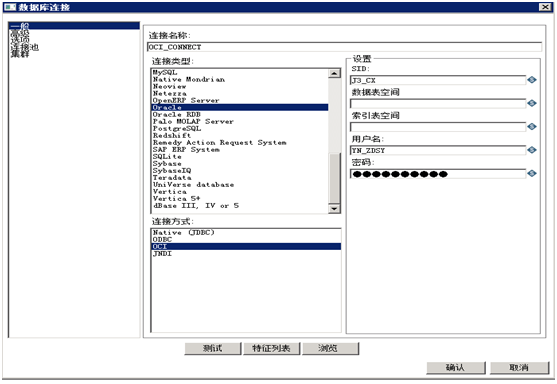
测试OK!
之后在http://community.pentaho.com/看到如下描述:
OCI
OCI uses the Oracle client installed on the client you're currently using. If you are using OCI and an Oracle Net8 client, the JDBC driver version used in Kettle needs to match your Oracle client version. PDI 2.5.0 shipped with version 10.1, 3.0.0 ships with version 10.2. You can either install that version of the Oracle client or change the JDBC driver in PDI if versions don't match up.
This is how you change the Oracle JDBC driver in Kettle. Replace files "ojdbc14.jar" and "orai18n.jar" in the directory libext/JDBC of your distribution with the files found in the $ORACLE_HOME/jdbc directory on your server or if the versions are different, with the JDBC driver that matches your Net8 client. For Oracle 11g the drivers are named ojdbc5.jar and ojdbc6.jar.
If you still have issues please remember that the DLL that Oracle uses to connect has to be in your path. If all else fails, try copying the ocijdbc10.dll (might be called different in different versions) to the libswt/win32 folder (or win64).
RAC (Real Application Cluster)
When dealing with a Real Application Cluster or other complex failover oracle situations, please define the connection like this:
· * Set to native (JDBC) connection type
· * Leave hostname and port empty (this is also working with a port setting of -1)
· * Set the database name to something like this...
(DESCRIPTION = (ADDRESS = (PROTOCOL = TCP)(HOST = host1-vip)(PORT =
1521))(ADDRESS = (PROTOCOL = TCP)(HOST = host2-vip)(PORT = 1521))(LOAD_BALANCE
= yes)(CONNECT_DATA =(SERVER = DEDICATED)(SERVICE_NAME =
db-service)(FAILOVER_MODE =(TYPE = SELECT)(METHOD = BASIC)(RETRIES = 180)(DELAY
= 5))))
or
(DESCRIPTION=(ADDRESS_LIST=(ADDRESS=(PROTOCOL=TCP)(HOST=PRIMARY_NODE_HOSTNAME)(PORT=1521))(ADDRESS=(PROTOCOL=TCP)(HOST=SECONDARY_NODE_HOSTNAME)(PORT=1521)))(CONNECT_DATA=(SERVICE_NAME=DATABASE_SERVICENAME)))
or
(DESCRIPTION=(FAILOVER=ON)(ADDRESS_LIST=(LOAD_BALANCE=ON)(ADDRESS=(PROTOCOL=TCP)(HOST=xxxxx)(PORT=1526))(ADDRESS=(PROTOCOL=TCP)(HOST=xxxx)(PORT=1526)))(CONNECT_DATA=(SERVICE_NAME=somesid)))
Note: This does only work with a
repository based system until 3.0.4. Beginning with 3.0.5 and 3.1 file based
systems do also support this.
kettle5.4ODBC和OCI连接配置的更多相关文章
- PLSQL Developer配置OCI连接远程数据库
转: PLSQL Developer配置OCI连接远程数据库 当前环境: 本机系统:Win7 32位 PLSQL版本:9.06 数据库版本:10.2 32位 下面开始具体操作. 1.在Oracle官网 ...
- 解决使用OCI连接oracle LNK2019: 无法解析的外部符号的问题
据我所知,在使用OCI连接Oracle时出现LNK2019: 无法解析的外部符号问题的情况有两种: 一.没有引入附加依赖项,右键项目->属性->配置属性->链接器->输入中添加 ...
- java oracle thin 和 oci 连接方式实现多数据库的故障切换
java oracle thin 和 oci 连接方式实现多数据库的故障切换 一.thin方式 该种方式简便易用非经常见. 当中URL为 jdbc:oracle:thin:@(DESCRIPTION= ...
- “连接配置中心失败,将无法进行正常管理”--腾讯通RTX管理器
[故障现象]: 腾讯通RTX管理器提示“连接配置中心失败,将无法进行正常管理” [解决办法]: 在系统服务中启动“RTX_ConfigCenter”服务即可. 文章收集自网络
- Nginx与Tomcat、Client之间请求的长连接配置不一致问题解决[转]
http://bert82503.iteye.com/blog/2152613 前些天,线上出现“服务端长连接与客户端短连接引起Nginx的Writing.Active连接数过高问题”,这个是由于“服 ...
- SharePoint服务器将连接配置数据库的连接字符串保存在什么地方?
经常有人问我这个问题,SharePoint服务器将连接配置数据库的连接字符串保存在什么地方?虽然其他SharePoint服务器场设置都是保存到了配置数据库里面,但连接配置数据库本身的连接字符串,肯定是 ...
- Android - 设置adb的usb连接配置
设置adb的usb连接配置 本文地址: http://blog.csdn.net/caroline_wendy 把须要測试的手机连接入电脑.通过系统查找USB连接配置,找到厂商ID: 把ID加入进ad ...
- Oracle BEQ方式连接配置
Oracle BEQ方式连接配置 服务端和客户端在同一台机器上,可以使用BEQ连接,BEQ连接可以理解为进程间直接通信,不需要走网络监听,性能更高. 可以参考MOS:How To Connect Us ...
- mongodb远程连接配置
mongodb远程连接配置如下: 1.修改配置文件mongodb.conf 命令:vim /etc/mongodb.conf 把 bind_ip=127.0.0.1 这一行注释掉或者是修改成 bind ...
随机推荐
- Python:字典的pop()方法
pop():移除序列中的一个元素(默认最后一个元素),并且返回该元素的值. 一)移除list的元素,若元素序号超出list,报错:pop index out of range(超出范围的流行指数): ...
- java代码throws异常
总结:抛出异常 package com.ds; //异常捕获 public class fdsg { private static void throwException() { try { Stri ...
- Linux keepalived与lvs的深入分析
一)概述 在本篇文章里,我们会涉及两部份内容,一个是LVS,另一个则是keepalived. 即我们用LVS和keepalived实现了负载均衡及高可用的服务器. LVS有实现三种IP负载均衡技术 ...
- 利用src.rpm包修改源码后重新制作rpm包
1. 下载 .src.rpm包.例:https://repos.fedorapeople.org/repos/openstack/EOL/openstack-grizzly/epel-6/openst ...
- jquery 键盘事件的使用方法详解
转自:https://www.jb51.net/article/123579.htm jQuery处理键盘事件有三个函数,根据事件发生的顺序分别是: jquery 代码: 1. keydown(); ...
- JAVA基础知识总结1(概述)
JAVA概述: 1991 年Sun公司的James Gosling等人开始开发名称为 Oak 的语言,希望用于控制嵌入在有线电视交换盒.PDA等的微处理器. 1994年将Oak语言更名为Java. J ...
- spring 4.0 JUnit简单的Controller测试
比Dao和Service的测试稍微复杂一点.还是先写一个BasicWebTest用来总体配置: @WebAppConfiguration @ContextConfiguration(locations ...
- jQuery菜单,导航与标签页
一:导航 网站导航栏是网站导航的第一层导航结构,我们可以使用HTML和jQuery来创建类似flash的动画效果 一:下拉式菜单 法一: <!DOCTYPE html PUBLIC " ...
- R: matrix & array 生成、操作矩阵、数组:
################################################### 问题:生成.操作矩阵 18.4.27 怎么生成矩阵 matrix.,,及其相关操作 ??? ...
- 《精通Spring4.X企业应用开发实战》读后感第五章(FactoryBean)