
SpringBoot发布WAR启动报错:Error assembling WAR: webxml attribute is required
Spring Boot发布war包流程:
1、修改web model的pom.xml
<packaging>war</packaging>
SpringBoot默认发布的都是jar,因此要修改默认的打包方式jar为war
2、修改web model的依赖(dependency)
        <dependency>

            <groupId>org.springframework.boot</groupId>

            <artifactId>spring-boot-starter-web</artifactId>

            <!-- 移除嵌入式tomcat插件,或者scope = provided

            <exclusions>

                <exclusion>

                    <groupId>org.springframework.boot</groupId>

                    <artifactId>spring-boot-starter-tomcat</artifactId>

                </exclusion>

            </exclusions>

            -->

        </dependency>

        <dependency>

            <groupId>org.springframework.boot</groupId>

            <artifactId>spring-boot-starter-tomcat</artifactId>

            <scope>provided</scope>

        </dependency>

        <!--<dependency>

            <groupId>javax.servlet</groupId>

            <artifactId>javax.servlet-api</artifactId>

            <scope>provided</scope>

        </dependency>-->
注意:
这里添加了起步依赖spring-boot-starter-web,因此,建议把起步依赖Spring-boot-starter-tomcat的scope设置为provided,原因很简单:我们的项目中可能会使用Filter等Servlet的api;
因此,不建议spring-boot-starter-web中移除嵌入式Spring-boot-starter-tomcat的起步依赖,因为这样就必须再单独添加servet-api的依赖
3、maven编译
不解释
启动时报错:Error assembling WAR: webxml attribute is required
很明显:webapp/WEB-INF下找不到web.xml
使用Spring开发,默认把所有的静态资源+界面view都放在resources下了,如下图:
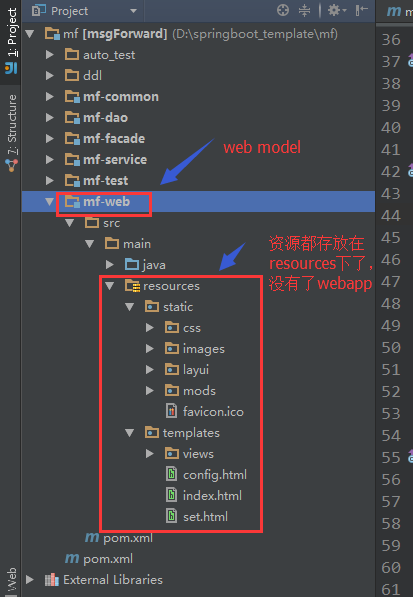
因此,webapp都不复存在了,更何况/WEB-INF和/WEB-INF/web.xml
解决方案:
            <!-- 没有web.xml文件的情况下构建WAR

            <plugin>

                <artifactId>maven-war-plugin</artifactId>

                <version>3.0.0</version>

            </plugin>

            -->

            <plugin>

                <artifactId>maven-war-plugin</artifactId>

                <version>2.6</version>

                <configuration>

                    <!--如果想在没有web.xml文件的情况下构建WAR,请设置为false。-->

                    <failOnMissingWebXml>false</failOnMissingWebXml>

                </configuration>

            </plugin>
1、使用maven-war-plugin3.0,解决了web.xml不存在无法构建war的问题
2、继续使用maven-war-plugin2.6,添加设置failOnMissingWebXml=false
搞定!
================================华丽的分割线====================================
但是,强烈不建议使用SpringBoot发布war包,原因有三:
1、默认的SpringBoot支持静态资源以jar包的方式发布部署
2、前后端分离,后端使用SpringBoot开发,前段就无所谓了,完全可以不依赖SpringBoot
3、在服务端加入Swagger插件,直接通过接口做测试,无需web界面

参考:
spring boot 用war包部署到tomcat下详细教程
SpringBoot发布WAR启动报错:Error assembling WAR: webxml attribute is required的更多相关文章
- Tomcat7.0.40注册到服务启动报错error Code 1 +connector attribute sslcertificateFile must be defined when using ssl with apr
Tomcat7.0.40 注册到服务启动遇到以下几个问题: 1.启动报错errorCode1 查看日志如下图: 解决办法: 这个是因为我的jdk版本问题,因为电脑是64位,安装的jdk是32位的所以会 ...
- android sdk启动报错error: could not install *smartsocket* listener: cannot bind to 127.0.0.1:5037:
android sdk启动报错error: could not install *smartsocket* listener: cannot bind to 127.0.0.1:5037: 问题原因: ...
- 008-SpringBoot发布WAR启动报错:Error assembling WAR: webxml attribute is required
一.Spring Boot发布war包流程: 1.修改web model的pom.xml <packaging>war</packaging> SpringBoot默认发布的都 ...
- 【maven 报错】maven项目执行maven install时报错Error assembling WAR: webxml attribute is required (or pre-existing WEB-INF/web.xml if executing in update mode)
在使用maven新建的web项目中,执行 执行如上的这两个操作,报错: [ERROR] Failed to execute goal org.apache.maven.plugins:maven-co ...
- springboot启动报错,Error starting ApplicationContext. To display the conditions report re-run your application with 'debug' enabled.
报错: Error starting ApplicationContext. To display the conditions report re-run your application with ...
- tomcat启动报错 ERROR o.a.catalina.session.StandardManager 182 - Exception loading sessions from persiste
系统:centos6.5 x86_64 jdk: 1.8.0_102 tomcat:8.0.37 tomcat 启动报错: ERROR o.a.catalina.session.StandardMan ...
- Tomcat启动报错ERROR:transport error 202:bind failed:Address already
昨天在服务器上拷贝了一个tomcat项目,修改了server.xml之后启动居然报错ERROR:transport error 202:bind failed:Address already,应该是远 ...
- Springboot集成ES启动报错
报错内容 None of the configured nodes are available elasticsearch.yml配置 cluster.name: fans node.name: no ...
- Idea启动报错 Error:java: System Java Compiler was not found in classpath
报错信息:Error:java: System Java Compiler was not found in classpath 使用IDEA启动的时候出现了这个错误,查找了很久,才找到解决办法 1. ...
随机推荐
- equals和等号的区别
如果是基本类型,等号比较的是数值.如果是引用类型,等号比较的是地址.而equals如果没有重写的话默认比较的是地址,可以重写equals来自定义比较两个对象的逻辑.
- telnet不能用,提示:-bash: telnet: command not found
1.[root@localhost ~]# telnet bash: telnet: command not found 2. 查询了是否安装Telnet包,结果如下: [root@localhos ...
- 《C#高效编程》读书笔记13-正确的初始化静态成员变量
在创建某个类型实例之前,就应该初始化该实例的所有静态成员变量.而C#为此提供了静态初始化器和静态构造函数. 静态构造函数是特殊的构造函数,将在其他所有方法执行之前以及变量或属性被第一次访问之前执行. ...
- 从今天开始学习Swift--关于Swift (转)
WWDC2014推出了新的编程语言,大家都站在了新的起跑线上,希望转发的本文能对园内的朋友一点介绍和帮助,如果大家对swift感兴趣,欢迎踊跃利用google. 原文地址:http://www.coc ...
- ngnix 反向代理
1 课程目标 掌握nginx+tomcat反向代理的使用方法. 掌握nginx作为负载均衡器的使用方法. 掌握nginx实现web缓存方法. 2 nginx介绍 2.1 ...
- CSS基础必备盒模型及清除浮动
盒模型 盒模型是有两种标准的,一个是标准模型,一个是IE模型. css如何设置两种模型 这里用到了CSS3 的属性 box-sizing /* 标准模型 */ box-sizing:content-b ...
- javascript中如何实现继承
javascript中如何实现继承 // 原型方式的'继承' function Person(name) { //定义一个Person的构造函数 this.name = name; //添加属性 } ...
- CSS透明度设置(兼容性)
一句话搞定透明背景! .transparent_class { filter:alpha(opacity=50); -moz-opacity:0.5; -khtml-opacity: 0.5; opa ...
- Android getRunningTasks和getRunningAppProcesses失效
Android 5.0以上的getRunningTasks失效,该方法可以获得在前台运行的系统进程.可以用getRunningAppProcesses方法暂时替代. android6.0以上的getR ...
- 【起航计划 020】2015 起航计划 Android APIDemo的魔鬼步伐 19 App->Dialog Dialog样式
这个例子的主Activity定义在AlertDialogSamples.java 主要用来介绍类AlertDialog的用法,AlertDialog提供的功能是多样的: 显示消息给用户,并可提供一到三 ...