
Entity Relationships
Entity Relationships:
Here, you will learn how entity framework manages the relationships between entities.
Entity framework supports three types of relationships, same as database: 1) One to One 2) One to Many, and 3) Many to Many.
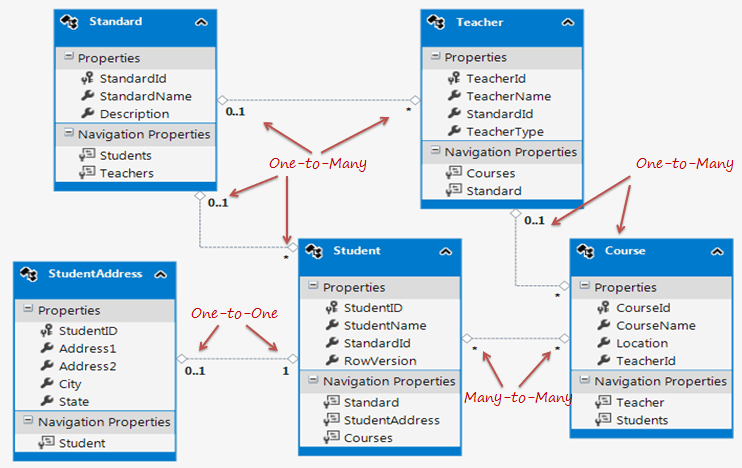
We have created an Entity Data Model for the SchoolDB database in the Create Entity Data Modelsection. The following figure shows the visual designer for that EDM with all the entities and relationships among them.
Let's see how each relation (association) is being managed by entity framework.
One-to-One Relationship:
As you can see in the above figure, Student and StudentAddress have a One-to-One relationship (zero or one). A student can have only one or zero address. Entity framework adds Student navigation property into StudentAddress entity and StudentAddress navigation entity into Student entity. Also, StudentAddress entity has StudentId property as PrimaryKey which makes it a One-to-One relationship.
The following code snippet shows Student and StudentAddress entity classes.
public partial class Student

{

    public Student()

    {

        this.Courses = new HashSet<Course>();

    }

    public int StudentID { get; set; }

    public string StudentName { get; set; }

    public Nullable<int> StandardId { get; set; }

    public byte[] RowVersion { get; set; }

    public virtual Standard Standard { get; set; }

    public virtual StudentAddress StudentAddress { get; set; }

    public virtual ICollection<Course> Courses { get; set; }

}

public partial class StudentAddress

{

    public int StudentID { get; set; }

    public string Address1 { get; set; }

    public string Address2 { get; set; }

    public string City { get; set; }

    public string State { get; set; }

    public virtual Student Student { get; set; }

}
As you can see in the above code, Student entity class includes StudentAddress navigation property and StudentAddress includes Student navigation property with foreign key property StudentId. This way EF handles one-to-one relationship between entities.
One-to-Many Relationship:
The Standard and Teacher entities have a One-to-Many relationship marked by multiplicity where 1 is for One and * is for many. This means that Standard can have many Teachers whereas Teacher can associate with only one Standard.
To represent this, The Standard entity has the collection navigation property Teachers (please notice that it's plural), which indicates that one Standard can have a collection of Teachers (many teachers). And Teacher entity has a Standard navigation property (Not a Collection) which indicates that Teacher is associated with one Standard. Also, it contains StandardId foreign key (StandardId is a PK in Standard entity). This makes it One-to-Many relationship.
The following code snippet shows Standard and Teacher entity class created by EDM.
public partial class Standard

{

    public Standard()

    {

        this.Students = new HashSet<Student>();

        this.Teachers = new HashSet<Teacher>();

    }

    public int StandardId { get; set; }

    public string StandardName { get; set; }

    public string Description { get; set; }

    public virtual ICollection<Student> Students { get; set; }

    public virtual ICollection<Teacher> Teachers { get; set; }

}

public partial class Teacher

{

    public Teacher()

    {

        this.Courses = new HashSet<Course>();

    }

    public int TeacherId { get; set; }

    public string TeacherName { get; set; }

    public Nullable<int> StandardId { get; set; }

    public Nullable<int> TeacherType { get; set; }

    public virtual ICollection<Course> Courses { get; set; }

    public virtual Standard Standard { get; set; }

}
As you can see in the above code snippet, Standard entity class has Teachers property of type ICollection, so that it can contain multiple Teacher objects. (It initializes Teachers property with HashSet<Teacher> in the constructor, so that you can add Teacher objects into collection without worrying about initializing it.)
Also, Teacher entity class includes Standard property with StandardId for foreign key property. Entity framework includes this foreign key property because we checked Include foreign key columns in the model in the EDM wizard while creating EDM in the Create Entity Data Model section.
Many-to-Many Relationship:
Student and Course have Many-to-Many relationships marked by * multiplicity. It means one Student can enrol for many Courses and also, one Course can be be taught to many Students.
The database design includes StudentCourse joining table which includes the primary key of both the tables (Student and Course table). Entity Framework represents many-to-many relationships by not having entityset for the joining table in CSDL, instead it manages this through mapping.
As you can see in the above figure, Student entity includes Courses property and Course entity includes Students property to represent many-to-many relationship between them.
The following code snippet shows Student and Course entity classes.
public partial class Student

{

    public Student()

    {

        this.Courses = new HashSet<Course>();

    }

    public int StudentID { get; set; }

    public string StudentName { get; set; }

    public Nullable<int> StandardId { get; set; }

    public byte[] RowVersion { get; set; }

    public virtual Standard Standard { get; set; }

    public virtual StudentAddress StudentAddress { get; set; }

    public virtual ICollection<Course> Courses { get; set; }

}

public partial class Course

{

    public Course()

    {

        this.Students = new HashSet<Student>();

    }

    public int CourseId { get; set; }

    public string CourseName { get; set; }

    public System.Data.Entity.Spatial.DbGeography Location { get; set; }

    public Nullable<int> TeacherId { get; set; }

    public virtual Teacher Teacher { get; set; }

    public virtual ICollection<Student> Students { get; set; }

}
Note: Entity framework supports many-to-many relationship only when the joining table (StudentCourse in this case) does NOT include any columns other than PKs of both the tables. If the join tables contain additional columns, such as DateCreated, then the EDM creates entity for middle table as well and you will have to manage CRUD operation for many-to-many entities manually.
Open EDM in XML view. You can see that SSDL has StudentCourse entityset, but CSDL doesn't have StudentCourse entityset. Instead, it's being mapped in the navigation property of the Student and Course entity. In MSL (C-S Mapping), it has mapping between Student and Course put into the StudentCourse table in <AssociationSetMapping/>
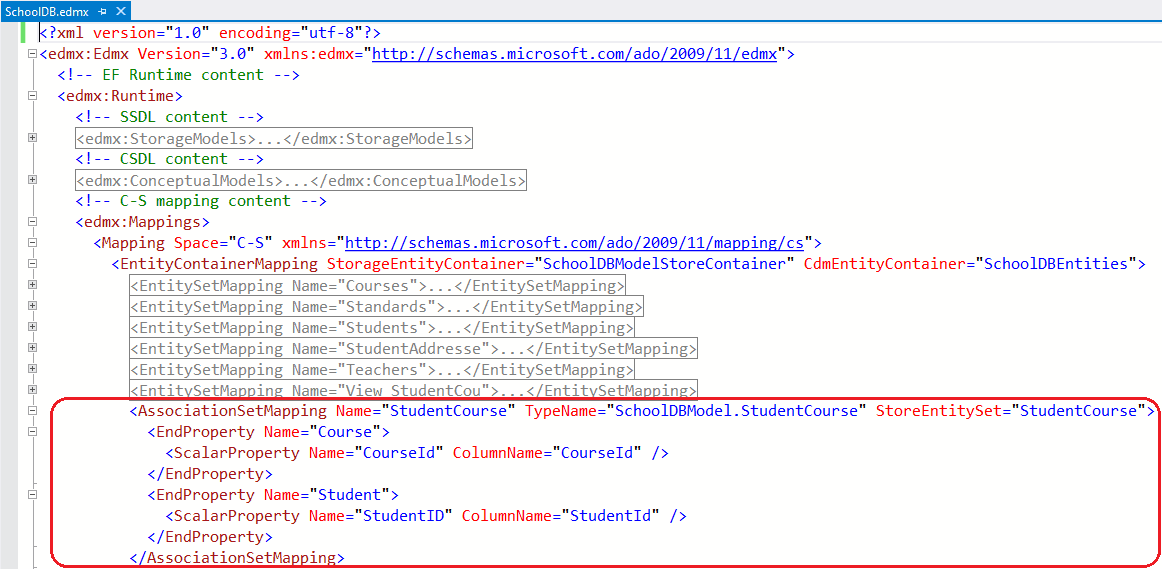
Thus, Many-to-Many relationship is being managed by C-S mapping in EDM. So when you add a Student in a Course or a Course in a Student entity and when you save it, it will then insert PK of the added student and course in StudentCourse table. So this mapping not only enables a convenient association directly between the two entities, but also manages querying, inserts, and updates across this joint.
Entity Graph:
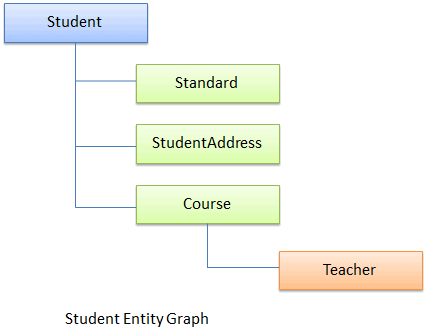
When an entity has a relationship with other entities, then the full object hierarchy is called an 'entity graph'. For example the following is a Student entity graph, that includes hierarchy of Student entity with Standard, StudentAddress & Course entities.
Entity Relationships的更多相关文章
- 实体之间的关系【Entity Relationships】(EF基础系列篇9)
Here, you will learn how entity framework manages the relationships between entities. Entity framewo ...
- EntityFramework 学习 一 Entity Relationships 实体的关系
下面,我们学习Entity Framework怎么管理实体间的关系 Entity Framework支持三种关系:一对一的关系.一对多的关系.多对多的关系 前面我们创建SchoolDB的实体数据模型, ...
- Entity Framework Tutorial Basics(9):Entity Relationships
这篇前面已经转载出来了,地址:http://www.cnblogs.com/purplefox2008/p/5646466.html
- EF(Entity Framework)系统学习系列
好久没写博客了,继续开启霸屏模式,好了,废话不多说,这次准备重新系统学一下EF,一个偶然的机会找到了一个学习EF的网站(http://www.entityframeworktutorial.net/) ...
- C#:ORM--实体框架EF(entity framework)(1)
本文来自:http://www.cnblogs.com/xuf22/articles/5513283.html 一.什么是ORM ORM(Object-relational mapping),中文翻译 ...
- JPA 教程
Entities An entity is a lightweight persistence domain object. Typically an entity represents a tabl ...
- 1.6.4 Uploading Structured Data Store Data with the Data Import Handler
1.使用DIH上传结构化数据 许多搜索应用索引结构化数据,如关系型数据库.DIH提供了一个这样的存储并索引结构化数据的机制.除了关系型数据库,solr可以索引来自HTTP的内容,基于数据源如RSS和A ...
- 一、Microsoft Dynamics CRM 4.0 SDK概述
Chapter 1. Microsoft Dynamics CRM 4.0 SDK Overview(SDK概述) You are probably reading this book because ...
- Java EE (4) -- Java EE 6 Java Persistence API Developer Certified Expert(1z0-898)
Overview of the Java Persistence API Describe the basics of Object Relational Mapping (ORM) Define t ...
随机推荐
- memcached使用libevent 和 多线程模式
一.libevent的使用 首先我们知道,memcached是使用了iblievet作为网络框架的,而iblievet又是单线程模型的基于linux下epoll事件的异步模型.因此,其基本的思想就是 ...
- BZOJ - 3631 松鼠的新家 (树链剖分)
题目链接 树链剖分基础题,路径权值修改+差分 #include<bits/stdc++.h> using namespace std; typedef long long ll; ; in ...
- docker 存储
[root@docker01 ~]# docker run --name b1 -v /data -it busybox / # ls bin data dev etc home proc root ...
- [Luogu2371][国家集训队]墨墨的等式
luogu 题意 给出\(n,a_i,B_{min},B_{max}\),求使得\(a_1x_1+a_2x_2+...+a_nx_n=B\)存在一组非负整数解的\(B\in[B_{min},B_{ma ...
- LoadRunner常见错误代码解决方案
一.LoadRunner26377错误 通常不是长度的问题,如果长度有问题就都出错了.应该是服务器返回的数据问题,导致没有找到这个参数. 26377错误的成因很多,总结最直接的结果就是No match ...
- python list和元祖
一,元祖 在python中元祖是只能查询和读取的一组数据,在()内的赋值就是元祖,只有查询和读取的功能: 1.len()方法:查询元祖有多少个元素 s = (') print(len(s)) 结果: ...
- ipad与iphone的屏幕分辨率
1.ipad分辨率,iphone 6 iPhone设备 尺寸 分辨率 点iPhone 3和3s 3.5英寸 (320×480) 3 ...
- minidump-DMP文件的生成和使用
转载地址点击打开链接 1.生成dmp的程序 #include <dbghelp.h> #pragma comment(lib, "dbghelp.lib") //设 ...
- SpringBoot之二:部署Spring Boot应用程序方式
衡量多种部署方式 Spring Boot应用程序有多种构建和运行方式,其中一些你已经使用过了. 在IDE中运行应用程序(涉及Spring ToolSuite或IntelliJ IDEA). 使用Mav ...
- 基于候选区域的深度学习目标检测算法R-CNN,Fast R-CNN,Faster R-CNN
参考文献 [1]Rich feature hierarchies for accurate object detection and semantic segmentation [2]Fast R-C ...