
Python——Numpy的random子库
NumPy的random子库
np.random.*
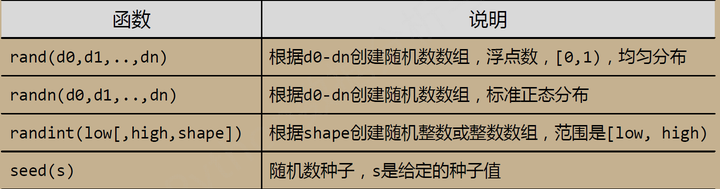
np.random.rand()
np.random.randn()
np.random.randint()
import numpy as np

a=np.random.rand(3,4,5)

a

Out[83]:

array([[[ 0.08662874,  0.82948848,  0.68358736,  0.85925231,  0.18250681],

        [ 0.62005734,  0.38014728,  0.85111772,  0.07739155,  0.9670788 ],

        [ 0.83148769,  0.98684984,  0.17931358,  0.78663687,  0.32991487],

        [ 0.41630481,  0.40143165,  0.39719115,  0.35902372,  0.80809515]],

       [[ 0.83119559,  0.84908059,  0.03704835,  0.99169556,  0.25103526],

        [ 0.54950967,  0.21890653,  0.50118637,  0.61440841,  0.33158322],

        [ 0.28599297,  0.6478492 ,  0.42480153,  0.64245498,  0.50198969],

        [ 0.87671252,  0.4551307 ,  0.18533867,  0.38861156,  0.98937246]],

       [[ 0.21903302,  0.76057185,  0.51972563,  0.28018995,  0.9267844 ],

        [ 0.49750795,  0.86679355,  0.60877593,  0.9502196 ,  0.63946047],

        [ 0.7766992 ,  0.51985393,  0.9756528 ,  0.57621679,  0.87955331],

        [ 0.6432478 ,  0.35046943,  0.91971312,  0.51282177,  0.13310527]]])

sn=np.random.randn(3,4,5)

sn

Out[86]:

array([[[-0.15116386,  0.85164049,  2.04232044,  0.5412239 , -0.65171862],

        [-0.23334418, -0.44215246, -1.19597071, -1.2189118 ,  0.02157593],

        [ 0.91657483,  0.2611884 ,  1.11715427, -1.02409543, -1.38927614],

        [-0.19741865, -0.15042967,  1.174679  ,  1.27795408, -0.31847884]],

       [[ 1.4637826 ,  1.43320029, -0.60038343,  1.39244389, -0.75747975],

        [ 0.52065785, -0.64790451, -0.32049525,  1.17868116, -0.05638849],

        [ 0.22874314,  0.68671056, -1.69309123, -0.54882906, -0.23721541],

        [-0.31578954, -0.44044017, -1.31905554,  2.13304617, -0.63259492]],

       [[ 0.23859545,  0.40294529, -0.2073546 , -0.90358886, -0.07341441],

        [-0.65382437, -0.21540712, -0.18190539, -1.32444175, -0.49808978],

        [ 0.68718048,  1.23431895,  0.01745539,  0.74168673,  2.06773505],

        [-2.61703882,  0.02591586, -0.45429583, -0.09624749, -0.44027003]]])

b=np.random.randint(100,200,(3,4))

b

Out[88]:

array([[133, 149, 151, 197],

       [160, 187, 108, 140],

       [139, 103, 168, 123]])

b=np.random.randint(100,200,(3,4))

b

Out[90]:

array([[166, 144, 136, 107],

       [106, 194, 175, 127],

       [115, 107, 132, 178]])

np.random.seed(10)

np.random.randint(100,200,(3,4))

Out[92]:

array([[109, 115, 164, 128],

       [189, 193, 129, 108],

       [173, 100, 140, 136]])

np.random.seed(10)

np.random.randint(100,200,(3,4))

Out[94]:

array([[109, 115, 164, 128],

       [189, 193, 129, 108],

       [173, 100, 140, 136]])

np.random.seed(5)

np.random.randint(100,200,(3,4))

Out[97]:

array([[199, 178, 161, 116],

       [173, 108, 162, 127],

       [130, 180, 107, 176]])

np.random.seed(5)

np.random.randint(100,200,(3,4))

Out[99]:

array([[199, 178, 161, 116],

       [173, 108, 162, 127],

       [130, 180, 107, 176]])
给定随机数组种子之后,产生的随机数组不变。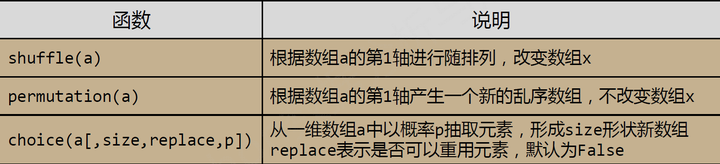
shuffle函数
import numpy as np

a=np.random.randint(100,200,(3,4))

a

Out[102]:

array([[115, 153, 180, 127],

       [144, 177, 175, 165],

       [147, 130, 184, 186]])

np.random.shuffle(a)

a

Out[104]:

array([[147, 130, 184, 186],

       [115, 153, 180, 127],

       [144, 177, 175, 165]])

np.random.shuffle(a)

a

Out[106]:

array([[147, 130, 184, 186],

       [115, 153, 180, 127],

       [144, 177, 175, 165]])

np.random.shuffle(a)

a

Out[108]:

array([[144, 177, 175, 165],

       [147, 130, 184, 186],

       [115, 153, 180, 127]])
shuffle函数随意调换两轴
permutation函数
a=np.random.randint(100,200,(3,4))

a

Out[110]:

array([[141, 162, 101, 182],

       [116, 178, 105, 158],

       [100, 180, 104, 136]])

np.random.permutation(a)

Out[111]:

array([[141, 162, 101, 182],

       [100, 180, 104, 136],

       [116, 178, 105, 158]])

a

Out[112]:

array([[141, 162, 101, 182],

       [116, 178, 105, 158],

       [100, 180, 104, 136]])
permutation 函数作用之后并不改变数组a
choice 函数,抽取
import numpy as np

b=np.random.randint(100,200,(8,))

b

Out[115]: array([127, 131, 102, 168, 138, 183, 119, 118])

np.random.choice(b,(3,2))

Out[116]:

array([[131, 183],

       [118, 138],

       [138, 183]])

np.random.choice(b,(3,2),replace=False)

#replace表示是否可以重复抽取,默认为False

Out[117]:

array([[102, 131],

       [127, 138],

       [183, 168]])

np.random.choice(b,(3,2),p=b/np.sum(b))

#p是随机概率,出现几率与数字大小成正比。

Out[118]:

array([[118, 127],

       [183, 183],

       [131, 183]])
import numpy as np

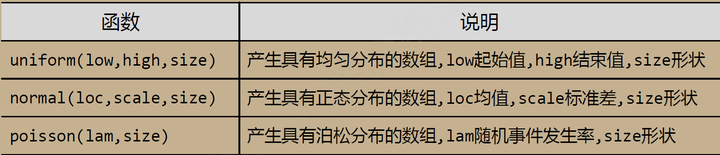
q=np.random.uniform(0,10,(3,4))

q

Out[122]:

array([[ 5.75413707,  5.79721399,  0.64506899,  1.7724613 ],

       [ 3.41527086,  6.08702583,  1.95474956,  1.21548467],

       [ 9.34679509,  3.10979918,  4.74316569,  0.62211558]])

n=np.random.normal(10,5,(3,4))

n

Out[124]:

array([[  5.46196987,   6.27937203,   9.22652647,  12.7923338 ],

       [  2.38821804,   5.53678405,  13.12062969,   5.9740824 ],

       [ 11.06140028,  12.46176925,  18.3372659 ,   0.47620034]])
参考文献:
https://zhuanlan.zhihu.com/p/26889091
Python——Numpy的random子库的更多相关文章
- NumPy的随机函数子库——numpy.random
NumPy的随机函数子库numpy.random 导入模块:import numpy as np 1.numpy.random.rand(d0,d1,...,dn) 生成一个shape为(d0,d1, ...
- 转---Python——numpy random类
numpy中利用random类获取随机数. numpy.random.random() 生成随机浮点数 默认为生成一个随机的浮点数,范围是在0.0~1.0之间,也可以通过参数size设置返回数据的si ...
- Python——NumPy数据存取与函数
1.数据csv文件存贮 1.1 CSV文件写入 CSV (Comma‐Separated Value, 逗号分隔值)CSV是一种常见的文件格式,用来存储批量数据 np.savetxt(frame, a ...
- python numpy库np.percentile用法说明
在python中计算一个多维数组的任意百分比分位数,此处的百分位是从小到大排列,只需用np.percentile即可…… a = range(1,101) #求取a数列第90%分位的数值 np.per ...
- CS231n课程笔记翻译1:Python Numpy教程
译者注:本文智能单元首发,翻译自斯坦福CS231n课程笔记Python Numpy Tutorial,由课程教师Andrej Karpathy授权进行翻译.本篇教程由杜客翻译完成,Flood Sung ...
- python numPy模块 与numpy里的数据类型、数据类型对象dtype
学习链接:http://www.runoob.com/numpy/numpy-tutorial.html 官方链接:https://numpy.org/devdocs/user/quickstart. ...
- Python numpy中矩阵的用法总结
关于Python Numpy库基础知识请参考博文:https://www.cnblogs.com/wj-1314/p/9722794.html Python矩阵的基本用法 mat()函数将目标数据的类 ...
- Python NumPy学习总结
一.NumPy简介 其官网是:http://www.numpy.org/ NumPy是Python语言的一个扩充程序库.支持高级大量的维度数组与矩阵运算,此外也针对数组运算提供大量的数学函数库.Num ...
- python numpy学习记录
numpy是一个python和矩阵相关的库,在机器学习中非常有用,记录下numpy的基本用法 numpy的数组类叫做ndarray也叫做数组,跟python标准库中的array.array不同,后者只 ...
随机推荐
- 网络编程 TCP学习
上传txt文本 通过socket向服务端发送数据 然后用serversocket 接收socket 通过流读取数据保存 服务端在发送确认信息并在client输出 client import java. ...
- Activity的启动流程分析
Activity是Android应用程序的四大组件之中的一个,负责管理Android应用程序的用户界面,一般一个应用程序中包括非常多个Activity,他们可能执行在一个进程中.也可能执行在不同的进程 ...
- window.name实现跨域数据传输
偶然间碰到个问题,通过JS给window.name赋值数组情况下,在firefox与chrome下会转换为字符串类型,在IE11下则显示正常.不说了,上图(firefox下): 代码: <scr ...
- smali 语法参考
原文见:http://www.blogjava.net/midea0978/archive/2012/01/04/367847.html Dalvik opcodes Author: Gabor Pa ...
- javascript 在js文件中获取路径
如果在*.js文件中获取当自己当前的路径是很重要的. 举个例子,如果一个css文件中引用图片,如background-img: url('./Images/bg.png').那么图片的路径,是相对于c ...
- two sum, three sum和four sum问题
1. two sum问题 给定一组序列:[-4 -6 5 1 2 3 -1 7],然后找出其中和为target的一对数 简单做法:两层循环遍历,时间复杂度为n^2 升级版:对给定的序列建立一个hash ...
- 《TomCat与Java Web开发技术详解》(第二版) 第五章节的学习总结 ---- Servlet的高级用法
这一章节主要是介绍了Servlet技术的一些高级用法,如下是我自己的整理归纳 1.下载文件:即获取服务器文件,并把文件写入反馈给客户端 ServletContext.getResourceAsStre ...
- UVA 10209
10209 - Is This Integration ? #include <stdio.h> #include <math.h> /* */ //多次错误都是因为我将PI定 ...
- php 在linux 用fopen() 函数打开,file_get_contents(),fread()函数 读取 另外一台服务器映射过来的文件 总是返回false,null的情况。
php 在linux 用fopen() 函数打开,fread()函数 读取 另外一台服务器映射过来的文件 总是返回false,null的情况. #获取平台类型 $type='android'; ...
- JSP指令用来设置整个JSP页面相关的属性
JSP 指令 JSP指令用来设置整个JSP页面相关的属性,如网页的编码方式和脚本语言. 语法格式如下: <%@ directive attribute="value" %&g ...