
React后台管理系统-首页Home组件
1.Home组件要显示用户总数、商品总数和订单总数,数据请求后端的 /manage/statistic/base_count.do接口,返回的是
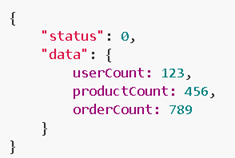
- this.state = {
- userCount : '-',
- productCount : '-',
- orderCount : '-'
- }
- //页面挂载之后请求数据
- componentDidMount(){
- this.loadCount();
- }
- loadCount(){
- //请求后端的接口
- _statistic.getHomeCount().then(res => {
- this.setState(res);
- }, errMsg => {
- _mm.errorTips(errMsg);
- });
- }
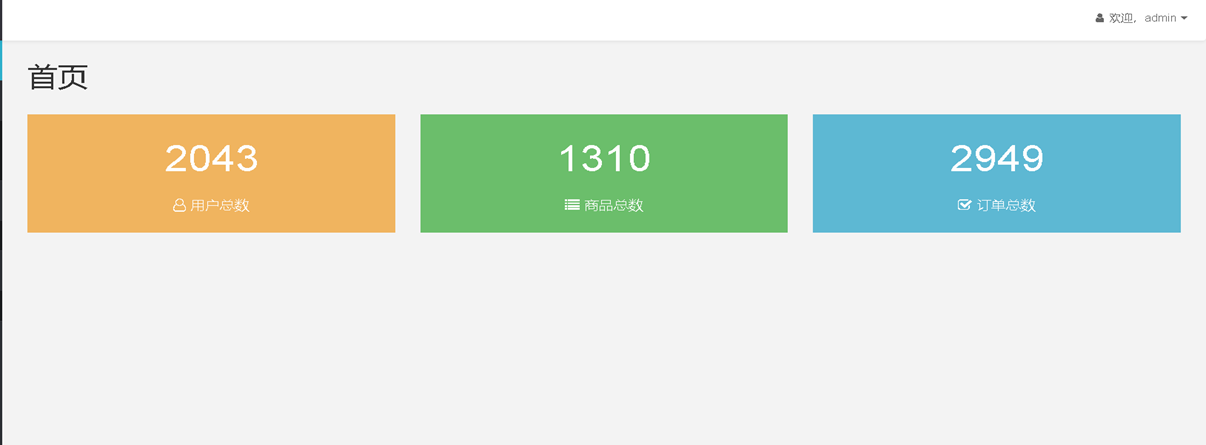
2.把数据渲染到页面上
- <div id="page-wrapper">
- <PageTitle title="首页" />
- <div className="row">
- <div className="col-md-4">
- <Link to="/user" className="color-box brown">
- <p className="count">{this.state.userCount}</p>
- <p className="desc">
- <i className="fa fa-user-o"></i>
- <span>用户总数</span>
- </p>
- </Link>
- </div>
- <div className="col-md-4">
- <Link to="/product" className="color-box green">
- <p className="count">{this.state.productCount}</p>
- <p className="desc">
- <i className="fa fa-list"></i>
- <span>商品总数</span>
- </p>
- </Link>
- </div>
- <div className="col-md-4">
- <Link to="/order" className="color-box blue">
- <p className="count">{this.state.orderCount}</p>
- <p className="desc">
- <i className="fa fa-check-square-o"></i>
- <span>订单总数</span>
- </p>
- </Link>
- </div>
- </div>
- </div>
React后台管理系统-首页Home组件的更多相关文章
- React后台管理系统-添加商品组件
引入了CategorySelector 二级联动组件.FileUploader图片上传组件和RichEditor富文本编辑组件 import React from 'react'; import MU ...
- React后台管理系统- rc-pagination分页组件封装
1.用户列表页面使用的rc-pagination分页组件 Github地址: https://github.com/react-component/pagination 2.安装 cnpm insta ...
- 《React后台管理系统实战 :一》:目录结构、引入antd、引入路由、写login页面、使用antd的form登录组件、form前台验证、高阶函数/组件
实战 上接,笔记:https://blog.csdn.net/u010132177/article/details/104150177 https://gitee.com/pasaulis/react ...
- 【共享单车】—— React后台管理系统开发手记:主页面架构设计
前言:以下内容基于React全家桶+AntD实战课程的学习实践过程记录.最终成果github地址:https://github.com/66Web/react-antd-manager,欢迎star. ...
- react后台管理系统路由方案及react-router原理解析
最近做了一个后台管理系统主体框架是基于React进行开发的,因此系统的路由管理,选用了react-router(4.3.1)插件进行路由页面的管理配置. 实现原理剖析 1.hash的方式 ...
- 《React后台管理系统实战 :三》header组件:页面排版、天气请求接口及页面调用、时间格式化及使用定时器、退出函数
一.布局及排版 1.布局src/pages/admin/header/index.jsx import React,{Component} from 'react' import './header. ...
- 《React后台管理系统实战 :二》antd左导航:cmd批量创建子/目录、用antd进行页面布局、分离左导航为单独组件、子路由、动态写左导航、css样式相对陷阱
一.admin页面布局及路由创建 0)cmd批量创建目录及子目录 //创建各个目录,及charts和子目录bar md home category product role user charts\b ...
- 【共享单车】—— React后台管理系统开发手记:UI菜单各个组件使用(Andt UI组件)
前言:以下内容基于React全家桶+AntD实战课程的学习实践过程记录.最终成果github地址:https://github.com/66Web/react-antd-manager,欢迎star. ...
- 【共享单车】—— React后台管理系统开发手记:AntD Form基础组件
前言:以下内容基于React全家桶+AntD实战课程的学习实践过程记录.最终成果github地址:https://github.com/66Web/react-antd-manager,欢迎star. ...
随机推荐
- Linux表面工作
https://www.cnblogs.com/welhzh/p/5899875.html 1.显示文本文件的内容 /etc/issue #登录前提示 /etc/motd #登录后提示 ssh ...
- 2018年12月30&31日
小结:昨天由于做的题目比较少,所以就和今天写在一块了,昨天学习了差分约束和树上差分,当然树上差分是用线段树来维护的,今天重点整理了博客\(233\),然后做了几个题. 一. 完成的题目: 洛谷P327 ...
- Django 01 django基本介绍及环境搭建
Django 01 django基本介绍及环境搭建 #http服务器 #用来接收用户请求,并将请求转发给web应用框架进行处理 #Web应用框架 #处理完请求后在发送给http服务器,http服务器在 ...
- 用POST方法上传文件
文件上传分为客户端和服务器端 客户端可以通过form表单进行上传 客户端使用html表单进行上传 enctype = "multipart/form-data"用来指定表单编码数据 ...
- redis常用
redis的key和string类型value限制均为512MB
- .db文件打开方式
有时在工作中,数据库格式db后缀的格式,直接是打不开的,所以我这里使用了数据库管理工具,步骤如下 1. 在电脑安装 Navicat Premium,安装后在桌面生成图标,点击图标打开程序. 2.打开程 ...
- python_魔法方法(二):算术运算
python2.2之后,对类和类型做了同意,将int().float().str().list().touple()这些BIF转换为工厂函数 >>> type(len) <cl ...
- Python 魔术方法及调用方式
魔术方法 调用方式 解释 __new__(cls [,...]) instance = MyClass(arg1, arg2) __new__ 在创建实例的时候被调用 __init__(self [, ...
- C# 用正则表达式判断字符串是否为纯数字
Regex regex = new System.Text.RegularExpressions.Regex("^(-?[0-9]*[.]*[0-9]{0,3})$"); stri ...
- 将本地代码添加到github
首先在github上创建一个仓库. 第一步:建立本地仓库 git init 关联远程仓库 git remote add origin https://github.com/tshua/***.git ...