
viewPager+Handler+Timer简单实现广告轮播效果
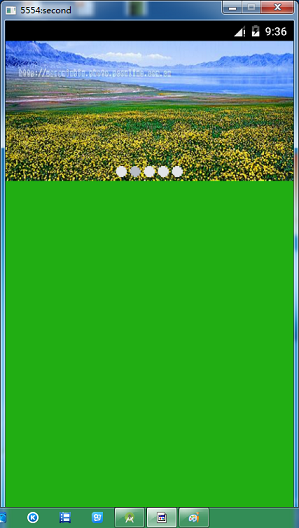
基本思想是在Avtivity中放一个ViewPager,然后通过监听去实现联动效果,代码理由详细的解释,我就不说了。
MainActivity.java
 package com.example.administrator.imageviewlunbodemo;

 import android.app.Activity;

 import android.os.Bundle;

 import android.os.Handler;

 import android.os.Message;

 import android.support.v4.view.PagerAdapter;

 import android.support.v4.view.ViewPager;

 import android.view.LayoutInflater;

 import android.view.View;

 import android.view.ViewGroup;

 import android.widget.ImageView;

 import java.util.ArrayList;

 import java.util.List;

 import java.util.Timer;

 import java.util.TimerTask;

 public class MainActivity extends Activity {

     private ViewPager myViewPager;

     private List<View> myContiontar = new ArrayList<>();   //viewPager的数据源

     private PagerAdapter myPagerAdapter;   //有了数据源,必然要有适配器

     private ImageView imageView1;

     private ImageView imageView2;

     private ImageView imageView3;

     private ImageView imageView4;

     private ImageView imageView5;

     private Timer mTimer;

     private Timertask mTimertask;

     @Override

     protected void onCreate(Bundle savedInstanceState) {

         super.onCreate(savedInstanceState);

         setContentView(R.layout.activity_main);

         initViews();  //初始化各种View

         myViewPager.setOnPageChangeListener(new ViewPager.OnPageChangeListener() {

             @Override

             public void onPageScrolled(int i, float v, int i2) {

             }

             @Override

             public void onPageSelected(int i) {

                 selectImageId(i);

             }

             @Override

             public void onPageScrollStateChanged(int i) {

             }

         });

         mTimertask = new Timertask();

         mTimer = new Timer();

         mTimer.schedule(mTimertask,0,2000);

 //        //启动时选择第一张图片

 //        imageView1.setBackgroundResource(R.drawable.wallet_coin_purse_guide_purse_dot_select);

     }

     //初始化各种View

     private void initViews(){

         // 先将xml文件 换成 view

         myViewPager = (ViewPager) findViewById(R.id.viewpager);

         imageView1 = (ImageView) findViewById(R.id.first_fragment_down_image1);

         imageView2 = (ImageView) findViewById(R.id.first_fragment_down_image2);

         imageView3 = (ImageView) findViewById(R.id.first_fragment_down_image3);

         imageView4 = (ImageView) findViewById(R.id.first_fragment_down_image4);

         imageView5 = (ImageView) findViewById(R.id.first_fragment_down_image5);

         //建立五个view 去获得四个ImageView

         View view1 = LayoutInflater.from(getApplicationContext()).inflate(R.layout.lunbo_image1, null);

         View view2 = LayoutInflater.from(getApplicationContext()).inflate(R.layout.lunbo_image2,null);

         View view3 = LayoutInflater.from(getApplicationContext()).inflate(R.layout.lunbo_image3, null);

         View view4 = LayoutInflater.from(getApplicationContext()).inflate(R.layout.lunbo_image4, null);

         View view5 = LayoutInflater.from(getApplicationContext()).inflate(R.layout.lunbo_image5,null);

         //加入到容器里面

         myContiontar.add(view1);

         myContiontar.add(view2);

         myContiontar.add(view3);

         myContiontar.add(view4);

         myContiontar.add(view5);

         //初始化 适配器

         myPagerAdapter = new PagerAdapter() {

             //返回显示多少项

             @Override

             public int getCount() {

                 return myContiontar.size();

             }

             @Override

             public boolean isViewFromObject(View view, Object o) {

                 return view == o;

             }

             //滑动切换时,移除当前组件

             @Override

             public void destroyItem(ViewGroup container, int position, Object object) {

                 container.removeView(myContiontar.get(position));

             }

             //没次滑动时生成的组件

             @Override

             public Object instantiateItem(ViewGroup container, int position) {

                 container.addView(myContiontar.get(position));

                 return myContiontar.get(position);

             }

         };

         //设置适配器

         myViewPager.setAdapter(myPagerAdapter);

     }

     //选择那个图片

     private void selectImageId(int i){

         initImageBackGround();

         switch (i){

             case 0:

                 imageView1.setBackgroundResource(R.drawable.wallet_coin_purse_guide_purse_dot_select);

                 break;

             case 1:

                 imageView2.setBackgroundResource(R.drawable.wallet_coin_purse_guide_purse_dot_select);

                 break;

             case 2:

                 imageView3.setBackgroundResource(R.drawable.wallet_coin_purse_guide_purse_dot_select);

                 break;

             case 3:

                 imageView4.setBackgroundResource(R.drawable.wallet_coin_purse_guide_purse_dot_select);

                 break;

             case 4:

                 imageView5.setBackgroundResource(R.drawable.wallet_coin_purse_guide_purse_dot_select);

                 break;

         }

     }

     //初始化 所有Image的背景

     private void initImageBackGround(){

         imageView1.setBackgroundResource(R.drawable.wallet_coin_purse_guide_purse_dot_normal);

         imageView2.setBackgroundResource(R.drawable.wallet_coin_purse_guide_purse_dot_normal);

         imageView3.setBackgroundResource(R.drawable.wallet_coin_purse_guide_purse_dot_normal);

         imageView4.setBackgroundResource(R.drawable.wallet_coin_purse_guide_purse_dot_normal);

         imageView5.setBackgroundResource(R.drawable.wallet_coin_purse_guide_purse_dot_normal);

     }

     int count = 0;

     private Handler mhandler = new Handler(){

         @Override

         public void handleMessage(Message msg) {

             super.handleMessage(msg);

             if (msg.what == 0x111){

                 //操作

                 count++;

                 myViewPager.setCurrentItem(count % 5);

             }

         }

     };

     //建立一个Timertask

     class Timertask extends TimerTask{

         @Override

         public void run() {

             mhandler.sendEmptyMessage(0x111);  //发送空消息

         }

     }

 }
主布局文件里面放了一个ViewPager和五个ImageView(就是那种小点点)
activity_main.xml
<LinearLayout

    xmlns:android="http://schemas.android.com/apk/res/android"

    xmlns:tools="http://schemas.android.com/tools"

    android:layout_width="match_parent"

    android:layout_height="match_parent"

    android:orientation="vertical"

    tools:context=".MainActivity">

    <FrameLayout

        android:layout_width="match_parent"

        android:layout_height="0dp"

        android:layout_weight="1"

        android:orientation="vertical"

        android:gravity="center|bottom">

        <android.support.v4.view.ViewPager

            android:id="@+id/viewpager"

            android:layout_width="match_parent"

            android:layout_height="match_parent">

        </android.support.v4.view.ViewPager>

        <LinearLayout

            android:layout_width="wrap_content"

            android:layout_height="wrap_content"

            android:layout_marginBottom="5dp"

            android:orientation="horizontal"

            android:layout_gravity="center|bottom">

            <ImageView

                android:id="@+id/first_fragment_down_image1"

                android:layout_width="wrap_content"

                android:layout_height="wrap_content"

                android:layout_marginLeft="2dp"

                android:layout_marginRight="2dp"

                android:background="@drawable/wallet_coin_purse_guide_purse_dot_normal"/>

            <ImageView

                android:id="@+id/first_fragment_down_image2"

                android:layout_width="wrap_content"

                android:layout_height="wrap_content"

                android:layout_marginLeft="2dp"

                android:layout_marginRight="2dp"

                android:background="@drawable/wallet_coin_purse_guide_purse_dot_normal"/>

            <ImageView

                android:id="@+id/first_fragment_down_image3"

                android:layout_width="wrap_content"

                android:layout_height="wrap_content"

                android:layout_marginLeft="2dp"

                android:layout_marginRight="2dp"

                android:background="@drawable/wallet_coin_purse_guide_purse_dot_normal"/>

            <ImageView

                android:id="@+id/first_fragment_down_image4"

                android:layout_width="wrap_content"

                android:layout_height="wrap_content"

                android:layout_marginLeft="2dp"

                android:layout_marginRight="2dp"

                android:background="@drawable/wallet_coin_purse_guide_purse_dot_normal"/>

            <ImageView

                android:id="@+id/first_fragment_down_image5"

                android:layout_width="wrap_content"

                android:layout_height="wrap_content"

                android:layout_marginLeft="2dp"

                android:layout_marginRight="2dp"

                android:background="@drawable/wallet_coin_purse_guide_purse_dot_normal"/>

        </LinearLayout>

    </FrameLayout>

    <ImageView

        android:layout_width="match_parent"

        android:layout_height="0dp"

        android:layout_weight="2.5"

        android:background="@color/fitst_fragment_image_color"/>

</LinearLayout>
在ViewPager中我创建了五个布局文件,都很简单,里面就只有一个ImageView去显示图片
images.xml
<?xml version="1.0" encoding="utf-8"?>

<LinearLayout

    xmlns:android="http://schemas.android.com/apk/res/android"

    android:orientation="vertical"

    android:layout_width="match_parent"

    android:layout_height="match_parent">

    <ImageView

        android:id="@+id/first_fragment_lunbo_image1"

        android:layout_width="match_parent"

        android:layout_height="match_parent"

        android:background="@drawable/image1"

        />

</LinearLayout>
然后在用Timer让它每隔2秒去发送一次消息,通知ViewPager更新,就形成了简单的图片轮播效果。
效果图:
viewPager+Handler+Timer简单实现广告轮播效果的更多相关文章
- 巧用ViewPager 打造不一样的广告轮播切换效果
一.概述 如果大家关注了我的微信公众号的话,一定知道我在5月6号的时候推送了一篇文章,文章名为Android超高仿QQ附近的人搜索展示(一),通过该文可以利用ViewPager实现单页显示多个Item ...
- Android使用ViewPager实现左右循环滑动及轮播效果
边界的时候会看到一个不能翻页的动画,可能影响用户体验.此外,某些区域性的ViewPager(例如展示广告或者公告之类的ViewPager),可能需要自动轮播的效果,即用户在不用滑动的情况下就能够看到其 ...
- JQuery简单实现图片轮播效果
很多页面都需要用到界面轮播,但是用原生js相对来说比较复杂,用jQuery实现效果比较迅速,写个简单的demo 1.首先在HTML页面要放置轮播图案位置插入div,这里写了轮播图片数量为3张,所以定义 ...
- 使用jQuery做简单的图片轮播效果
一.本特效主要用到的前端知识点 CSS中绝对定位(absolute)CSS实现垂直居中jQuery中简单的淡入淡出动画效果(fadeIn,fadeOut)定时器(setInterval,clear ...
- iOS回顾笔记(05) -- 手把手教你封装一个广告轮播图框架
html,body,div,span,applet,object,iframe,h1,h2,h3,h4,h5,h6,p,blockquote,pre,a,abbr,acronym,address,bi ...
- jQuery实现轮播效果(一) - 基础
前戏: XXXX年XX月XX日,经理交给我一个站点新闻资讯网页开发的活儿.我一个java程序猿,怎么完毕得了网页设计这样高端的活儿呢! 之前尽管有学过一点HTML.CSS的知识.可是在实际的使用中,把 ...
- Android 通过ViewFlipper实现广告轮播功能并可以通过手势滑动进行广告切换
为了实现广告轮播功能,在网上找了很多方法,有的效果很好,但是代码太麻烦,并且大多是用的viewpager,总之不是很满意. 于是看了一下sdk有个控件是ViewFlipper,使用比较方便,于是尝试了 ...
- 安卓开发笔记——自定义广告轮播Banner(实现无限循环)
关于广告轮播,大家肯定不会陌生,它在现手机市场各大APP出现的频率极高,它的优点在于"不占屏",可以仅用小小的固定空位来展示几个甚至几十个广告条,而且动态效果很好,具有很好的用户& ...
- android 项目学习随笔十六( 广告轮播条播放)
广告轮播条播放 if (mHandler == null) {//在此初始化mHandler , 保证消息不重复发送 mHandler = new Handler() { public void ha ...
随机推荐
- 学习总结 DML数据库增删改语句
insert into score t values('111','3-105',88)--插入一行数据 insert into score(sno,cno) values('111','3-105' ...
- 【Hibernate 8】Hibernate的调优方法:抓取策略
在上一篇博客中,介绍了Hibernate的缓存机制.合理的配置缓存,可以极大程度上优化Hibernate的性能.这篇博客,介绍另外一个调优方式:抓取策略. 一.什么是抓取策略 抓取策略(fetchin ...
- 【Hibernate 7】浅谈Hibernate的缓存机制
一.Hibernate缓存机制简介 对于Hibernate本身来说,它的缓存主要包括三部分:session缓存(一级缓存).二级缓存.查询缓存. 1.1,session缓存 随着session的关闭而 ...
- 重载(overload)、重写:覆盖(override)、重定义:遮蔽(redefine)、多态
同一域名空间,函数名相同,签名不同 编译期绑定确定绑定函数,也称为静态多态 重写:覆盖(override) 虚函数 子类空间,函数名相同,签名相同 重定义:遮蔽(redefine) 非虚函数,子类成员 ...
- 2016-03-15:关于VS中模块定义文件
1 def模块定义文件 在使用开源库libx265时,因x265项目的头文件x265中有如下的宏定义 #ifdef X265_API_IMPORTS #define X265_API __declsp ...
- 开源项目:FFmpeg
ffmpeg命令行使用 将JPG格式图片转成YUV420P格式: ffmpeg -i Z:\demo\pic.jpg -s 720x480 Z:\demo\pic.yuv 解码H265成YUV420 ...
- CentOS6.5 ssh远程连接缓慢解决方法
UseDNS no GSSAPIAuthentication no 1.适用命令及方案如下:[远程连接及执行命令]ssh -p22 root@10.0.0.19ssh -p22 root@10.0.0 ...
- 使用cnpm搭建企业内部私有NPM仓库
cnpm是企业内部搭建npm镜像和私有npm仓库的开源方案.它同时解决了现有npm架构的一些问题. 为什么企业需要私有NPM 主要有如下理由: 确保npm服务快速.稳定:对于企业来说,上线生产系统的时 ...
- XML内容作为String字符串读取报错
解决方案: 1.把头信息<?xml version='1.0' encoding='UTF-8'?>,但是内容会丢失部分: 2.用XmlDocument解析就OK. 正确代码: ...
- [转]基于AnyCAD的准双曲面齿轮建模
基于AnyCAD的准双曲面齿轮建模 作者:谨阳 (文章来源:http://www.opencascade.net/ask/?/article/6) 摘要:根据准双面齿轮的加工方法和传动特性,对准双面齿 ...