
MVC模式(Model View Controller)下实现数据库的连接,对数据的删,查操作
MVC模式(Model View Controller):
Model:DAO模型
View:JSP 在页面上填写java代码实现显示
Controller:Servlet
重定向和请求的转发:
若目标的相应页面不需要从request里面读取任何信息,则可以使用重定向,可以防止表单重复提交;
------------------------------------------------------------------------------------------------
Student.java类。里面封装了许多属性的信息;
package com.lanqiao.javatest;
public class Student {
private Integer id;
private String username;
private String password;
public Student() {
super();
}
public Student(Integer id, String username, String password) {
super();
this.id = id;
this.username = username;
this.password = password;
}
public Integer getId() {
return id;
}
public void setId(Integer id) {
this.id = id;
}
public String getUsername() {
return username;
}
public void setUsername(String username) {
this.username = username;
}
public String getPassword() {
return password;
}
public void setPassword(String password) {
this.password = password;
}
@Override
public String toString() {
return "Student [id=" + id + ", username=" + username + ", password=" + password + "]";
}
}
------------------------------------------------------------------------------------------------------
StudentDAO.java类。里面实现数据库的连接,和实现了对数据的查询和删除,可以修改一下实现增删的功能
public class StudentDAO {
//连接数据库并实现删除的方法
public void deleteId(Integer id){
Connection connection=null;
PreparedStatement preparedStatement=null;
String sql="delete from person where id=?";
try {
String driverClass="com.mysql.jdbc.Driver";
String url="jdbc:mysql:///test";
String user="root";
String password="lxn123";
Class.forName(driverClass);
connection=DriverManager.getConnection(url, user, password);
preparedStatement=connection.prepareStatement(sql);
preparedStatement.setInt(1, id);
preparedStatement.executeUpdate();
} catch (Exception e) {
}finally {
if (preparedStatement!=null) {
try {
preparedStatement.close();
} catch (SQLException e) {
// TODO Auto-generated catch block
e.printStackTrace();
}
}
if (connection!=null) {
try {
connection.close();
} catch (SQLException e) {
// TODO Auto-generated catch block
e.printStackTrace();
}
}
}
}
//连接数据库并且实现查询的方法
public List<Student> getAll(){
List<Student> list=new ArrayList<Student>();
//该方法获取连接数据库的方法
Connection connection=null;
PreparedStatement preparedStatement=null;
ResultSet resultSet=null;
String sql="select id,username,password from person";
try {
String driverClass="com.mysql.jdbc.Driver";
String url="jdbc:mysql:///test";
String user="root";
String password="lxn123";
Class.forName(driverClass);
connection=DriverManager.getConnection(url, user, password);
preparedStatement=connection.prepareStatement(sql);
resultSet=preparedStatement.executeQuery();
while(resultSet.next()){
int id=resultSet.getInt(1);
String username=resultSet.getString(2);
String password1=resultSet.getString(3);
Student student=new Student(id,username,password1);
list.add(student);
}
} catch (Exception e) {
e.printStackTrace();
}
finally {
if (resultSet!=null) {
try {
resultSet.close();
} catch (SQLException e) {
// TODO Auto-generated catch block
e.printStackTrace();
}
}
if (preparedStatement!=null) {
try {
preparedStatement.close();
} catch (SQLException e) {
// TODO Auto-generated catch block
e.printStackTrace();
}
}
if (connection!=null) {
try {
connection.close();
} catch (SQLException e) {
// TODO Auto-generated catch block
e.printStackTrace();
}
}
}
return list;
}
}
-----------------------------------------------------------------------------------------------
ListAllStudent.servlet类。实现了,调用上边的StudentDAO类里面的查询方法,设置属性的属性名字,和属性的值:request.setAttribute("student", students);再请求的转发到student.jsp页面,并超链接到test.jsp页面,student.jsp页面中插入java代码,实现查询的功能
public class ListAllStudent extends HttpServlet {
private static final long serialVersionUID = 1L;
protected void doGet(HttpServletRequest request, HttpServletResponse response)
throws ServletException, IOException {
StudentDAO studentDAO=new StudentDAO();
List<Student> students=studentDAO.getAll();
request.setAttribute("student", students);
//请求的转发
request.getRequestDispatcher("/students.jsp").forward(request, response);
}
}
------------------------------------------------------------------------------------------------
student.jsp页面实现数据库数据在页面上显示:
<%@page import="com.lanqiao.javatest.Student"%>
<%@page import="java.util.List"%>
<%@ page language="java" contentType="text/html; charset=UTF-8"
pageEncoding="UTF-8"%>
<!DOCTYPE html PUBLIC "-//W3C//DTD HTML 4.01 Transitional//EN" "http://www.w3.org/TR/html4/loose.dtd">
<html>
<head>
<meta http-equiv="Content-Type" content="text/html; charset=UTF-8">
<title>Insert title here</title>
</head>
<body>
<%
List<Student> list=(List<Student>)request.getAttribute("student");
%>
<table border="1" cellspacing="0" cellpadding="10">
<tr>
<th>Id</th>
<th>userName</th>
<th>password</th>
<th>Delete</th>
</tr>
<%for(Student student:list){%>
<tr>
<td><%=student.getId()%></td>
<td><%=student.getUsername()%></td>
<td><%=student.getPassword()%></td>
<td><a href="deleteStudent?id=<%=student.getId()%>">delete</a></td>
<tr>
<%}%>
</table>
</body>
</html>
------------------------------------------------------------------------------------------------
DeleteStudent.servlet类。通过student.jsp页面的超链接获取查询到的属性的id值,//String id=request.getParameter("id");调用StudentDAO类里面的删除的方法,已经实现的功能,在请求的转发到delete.jsp页面实现删除后的页面显示
public class DeleteStudent extends HttpServlet {
private static final long serialVersionUID = 1L;
protected void doGet(HttpServletRequest request, HttpServletResponse response) throws ServletException, IOException {
//获取超链接<a href="deleteStudent?id=<%=student.getId()%>">delete</a>里面id的值
String id=request.getParameter("id");
StudentDAO studentDAO=new StudentDAO();
//Integer.parseInt(id)将String类型的转化为Integer类型
studentDAO.deleteId(Integer.parseInt(id));
//请求的转发
request.getRequestDispatcher("/delete.jsp").forward(request, response);
}
}
----------------------------------------------------------------------------------------------
delete.jsp页面实现删除后显示的页面,并且超链接到开始查询的页面,查看删除后的数据
<%@ page language="java" contentType="text/html; charset=UTF-8"
pageEncoding="UTF-8"%>
<!DOCTYPE html PUBLIC "-//W3C//DTD HTML 4.01 Transitional//EN" "http://www.w3.org/TR/html4/loose.dtd">
<html>
<head>
<meta http-equiv="Content-Type" content="text/html; charset=UTF-8">
<title>Insert title here</title>
</head>
<body>
<h2>操作成功</h2>
<br><br>
<a href="listAllStudent">List All Student Page</a>
</body>
</html>
-----------------------------------------------------------------------------------------------
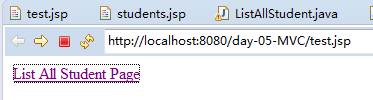
test.jsp页面实现查询的功能:
<%@ page language="java" contentType="text/html; charset=UTF-8"
pageEncoding="UTF-8"%>
<!DOCTYPE html PUBLIC "-//W3C//DTD HTML 4.01 Transitional//EN" "http://www.w3.org/TR/html4/loose.dtd">
<html>
<head>
<meta http-equiv="Content-Type" content="text/html; charset=UTF-8">
<title>Insert title here</title>
</head>
<body>
<a href="listAllStudent">List All Student Page</a>
</body>
</html>
-------------------------------------------------------------------------------------------------------
实现功能过程的截图:
页面实现一个链接:
点击链接后显示,查询到的数据库数据:

点击每一个表格后面的删除,实现删除的功能:
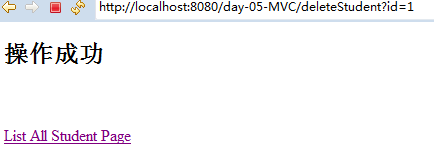
点击链接后,查出删除后,剩余的数据

数据库中数据未删除的数据时:

实现功能后是:

------------------------------------------------------------------------------------------------
在lib下面的web.xml文件,里面有两个配置和映射。通过配置和映射,可实现servlet类和jsp之间的关联
<?xml version="1.0" encoding="UTF-8"?>
<web-app xmlns:xsi="http://www.w3.org/2001/XMLSchema-instance" xmlns="http://java.sun.com/xml/ns/javaee" xsi:schemaLocation="http://java.sun.com/xml/ns/javaee http://java.sun.com/xml/ns/javaee/web-app_2_5.xsd" id="WebApp_ID" version="2.5">
<servlet>
<description></description>
<display-name>ListAllStudent</display-name>
<servlet-name>ListAllStudent</servlet-name>
<servlet-class>com.lanqiao.javatest.ListAllStudent</servlet-class>
</servlet>
<servlet-mapping>
<servlet-name>ListAllStudent</servlet-name>
<url-pattern>/listAllStudent</url-pattern>
</servlet-mapping>
<servlet>
<description></description>
<display-name>DeleteStudent</display-name>
<servlet-name>DeleteStudent</servlet-name>
<servlet-class>com.lanqiao.javatest.DeleteStudent</servlet-class>
</servlet>
<servlet-mapping>
<servlet-name>DeleteStudent</servlet-name>
<url-pattern>/deleteStudent</url-pattern>
</servlet-mapping>
</web-app>
MVC模式(Model View Controller)下实现数据库的连接,对数据的删,查操作的更多相关文章
- MVC(Model View Controller)框架
MVC框架 同义词 MVC一般指MVC框架 MVC全名是Model View Controller,是模型(model)-视图(view)-控制器(controller)的缩写,一种软件设计典范,用一 ...
- 深入浅出Java MVC(Model View Controller) ---- (JSP + servlet + javabean实例)
在DRP中终于接触到了MVC,感触是确实这样的架构系统灵活性不少,现在感触最深的就是使用tomcat作为服务器发布比IIS好多了,起码发布很简单,使用起来方便. 首先来简单的学习一下MVC的基础知识, ...
- Model View Controller (MVC) Overview
By Rakesh Chavda on Jul 01, 2015 What is MVC?Model View Controller is a type of user interface archi ...
- Model View Controller(MVC) in PHP
The model view controller pattern is the most used pattern for today’s world web applications. It ha ...
- What is the difference between Reactjs and Rxjs?--React is the V (View) in MVC (Model/View/Controller).
This is really different, React is view library; and Rxjs is reactive programming library for javasc ...
- ubuntu 下 mysql数据库的搭建 及 数据迁移
1.mysql的安装 我是使用apt-get直接安装的 :sudo apt-get install mysql-server sudo apt-get install mysql-client 2.配 ...
- (转载)Mac系统下利用ADB命令连接android手机并进行文件操作
Mac系统下利用ADB命令连接android手机并进行文件操作 标签: Mac adb android 2016-03-14 10:09 5470人阅读 评论(1) 收藏 举报 分类: Androi ...
- 设计模式 --- 模型-视图-控制器(Model View Controller)
模型-视图-控制器(Model-View-Controller,MVC)是Xerox PARC在20世纪80年代为编程语言Smalltalk-80发明的一种软件设计模式,至今已广泛应用于用户交互应用程 ...
- MVC设计模式((javaWEB)在数据库连接池下,实现对数据库中的数据增删改查操作)
设计功能的实现: ----没有业务层,直接由Servlet调用DAO,所以也没有事务操作,所以从DAO中直接获取connection对象 ----采用MVC设计模式 ----采用到的技术 .MVC设计 ...
随机推荐
- Jquery系列教程
最近想重新温习下Jquery,发现园子里有个很棒的系列教材,所以Mark下来. 转载自:http://www.cnblogs.com/zhangziqiu/tag/jQuery%E6%95%99%E7 ...
- (Factory method)工厂方法设计模式
定义: 1.) 工厂方法模式是用来封装对象的创建,通过让子类来决定创建的对象是什么,来达到将对象创建的过程封装的目的: 2.) 定义了一个创建对象的接口,但由子类决定要实例的泪是哪一个.工厂方法让类把 ...
- Xcode 遇到 App Transport Security has blocked a cleartext HTTP 错误
今天用Xcode 创建新项目用到 URL 发送请求时,报下面的错: “App Transport Security has blocked a cleartext HTTP (http://) re ...
- C++Primer 第十四章
//1.当运算符作用于类类型运算对象时,可以通过运算符重载重新定义该运算符的含义.明智的使用运算符重载能令程序更加易于编写和阅读. //2.重载的运算符是具有特殊名字的函数,它们由关键字operato ...
- objective-c底层: runtime机制
runtime是oc的真面目.oc底层的一套c语言API. unsigned int count; //获取属性列表 objc_property_t *propertyList = class_cop ...
- PostgreSQL Replication之第十章 配置Slony(5)
10.5 给复制添加表和管理的问题 一旦我们增加了此表到系统中,我们可以将它添加到复制设置.这样做有点复杂.首先,我们必须创建我们自己的新表集合并把这个和我们已经有的表合并.因此,过一段时间,我们将有 ...
- DIY小能手|别买电动滑板车了,咱做一台吧
!! http://www.shoudian.org/thread-316111-1-1.html http://www.jiequer.com/html/news/xinpin/2014/1218/ ...
- C++Builder生成的EXE如何在别的电脑上正常运行
Project --> Option --> Packages -->Runtime Packages --> Link with runtime packages 属性改为f ...
- WEB简单数据操作练习
主要学习代码: Login.aspx: <!--第一种方式--> <%-- <script type="text/javascript"> funct ...
- .NET: C#: StopWatch
StopWatch class is used for calculate the timespan for that procedure. In Debug Mode it will be very ...