
springmvc的3中路径风格
1.导入相应的jar包,文件放置情况
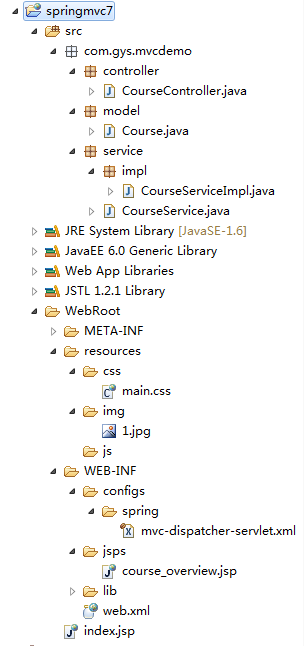
2.web.xml
 <?xml version="1.0" encoding="UTF-8"?>

 <web-app xmlns:xsi="http://www.w3.org/2001/XMLSchema-instance" xmlns="http://java.sun.com/xml/ns/javaee" xsi:schemaLocation="http://java.sun.com/xml/ns/javaee http://java.sun.com/xml/ns/javaee/web-app_3_0.xsd" id="WebApp_ID" version="3.0">

   <display-name>springmvc7</display-name>

   <welcome-file-list>

     <welcome-file>index.jsp</welcome-file>

   </welcome-file-list>

   <servlet>

       <servlet-name>mvc-dispatcher</servlet-name>

       <servlet-class>org.springframework.web.servlet.DispatcherServlet</servlet-class>

       <!-- DispatcherServlet对应的上下文配置,默认/WEB-INF/$servlet-name$-servlet.xml

           下面配置spring-mvc的核心配置文件

        -->

        <init-param>

            <param-name>contextConfigLocation</param-name>

            <param-value>/WEB-INF/configs/spring/mvc-dispatcher-servlet.xml</param-value>

        </init-param>

       <load-on-startup>1</load-on-startup>

   </servlet>

   <servlet-mapping>

       <servlet-name>mvc-dispatcher</servlet-name>

       <!-- mvc-dispatcher 拦截所有的请求 -->

       <url-pattern>/</url-pattern>

   </servlet-mapping>

 </web-app>
3.mvc-dispatcher-servlet.xml
 <?xml version="1.0" encoding="UTF-8"?>

 <beans xmlns="http://www.springframework.org/schema/beans"

     xmlns:xsi="http://www.w3.org/2001/XMLSchema-instance"

     xmlns:p="http://www.springframework.org/schema/p"

     xmlns:context="http://www.springframework.org/schema/context"

     xmlns:mvc="http://www.springframework.org/schema/mvc"

     xmlns:tx="http://www.springframework.org/schema/tx"

     xmlns:aop="http://www.springframework.org/schema/aop"

     xsi:schemaLocation="

         http://www.springframework.org/schema/beans

         http://www.springframework.org/schema/beans/spring-beans.xsd

         http://www.springframework.org/schema/context

         http://www.springframework.org/schema/context/spring-context.xsd

         http://www.springframework.org/schema/mvc

         http://www.springframework.org/schema/mvc/spring-mvc-3.2.xsd

         http://www.springframework.org/schema/tx

         http://www.springframework.org/schema/tx/spring-tx.xsd

         http://www.springframework.org/schema/aop

         http://www.springframework.org/schema/aop/spring-aop.xsd">

 <!-- 激活

      @Required

      @Autowired,jsr250's

      @PostConstruct,

      @PreDestroy and @ Resource等标注

  -->

 <context:annotation-config />

 <!--

     DispatcherServlet上下文,只搜索@Controller标注的类,不搜索其他标注的类

  -->

 <context:component-scan base-package="com.gys.mvcdemo">

     <context:include-filter type="annotation" expression="org.springframework.stereotype.Controller"/>

 </context:component-scan>

 <!--

     HandlerMapping无需配置,Spring MVC可以默认启动

  -->

  <!--

      扩充了注解驱动,可以将请求参数绑定到控制器参数

     启用基于annotation的handlerMapping.

   -->

 <mvc:annotation-driven />

 <!--

     静态资源处理,css,js,imgs

  -->

 <mvc:resources location="/resources/" mapping="/resources/**"/>

 <!-- 视图解析器 -->

 <bean class="org.springframework.web.servlet.view.InternalResourceViewResolver">

     <property name="viewClass" value="org.springframework.web.servlet.view.JstlView" />

     <property name="prefix" value="/WEB-INF/jsps/" />

     <property name="suffix" value=".jsp" />

 </bean>

 </beans>
Course.java
 package com.gys.mvcdemo.model;

 public class Course {

     //课程IDd

     private Integer courseId;

     //课程名称

     private String title;

 //图片路径

     private String imgPath;

     //学习人数

     private Integer learningNum;

     //课程时长

     private Long duration;

     //课程难度

     private Integer level;

     //课程描述

     private String levelDesc;

     //课程介绍

     private String descr;

     public Integer getCourseId() {

         return courseId;

     }

     public void setCourseId(Integer courseId) {

         this.courseId = courseId;

     }

     public String getTitle() {

         return title;

     }

     public void setTitle(String title) {

         this.title = title;

     }

     public String getImgPath() {

         return imgPath;

     }

     public void setImgPath(String imgPath) {

         this.imgPath = imgPath;

     }

     public Integer getLearningNum() {

         return learningNum;

     }

     public void setLearningNum(Integer learningNum) {

         this.learningNum = learningNum;

     }

     public Long getDuration() {

         return duration;

     }

     public void setDuration(Long duration) {

         this.duration = duration;

     }

     public Integer getLevel() {

         return level;

     }

     public void setLevel(Integer level) {

         this.level = level;

     }

     public String getLevelDesc() {

         return levelDesc;

     }

     public void setLevelDesc(String levelDesc) {

         this.levelDesc = levelDesc;

     }

     public String getDescr() {

         return descr;

     }

     public void setDescr(String descr) {

         this.descr = descr;

     }

 }
CourseService.java
 package com.gys.mvcdemo.service;

 import com.gys.mvcdemo.model.Course;

 public interface CourseService {

     Course getCoursebyId(Integer courseId);

 }
CourseServiceImpl.java
 package com.gys.mvcdemo.service.impl;

 import org.springframework.stereotype.Service;

 import com.gys.mvcdemo.model.Course;

 import com.gys.mvcdemo.service.CourseService;

 @Service("courseService")

 public class CourseServiceImpl implements CourseService{

     @Override

     public Course getCoursebyId(Integer courseId) {

         Course course=new Course();

         course.setCourseId(courseId);

         course.setTitle("深入浅出Java多线程");

         course.setImgPath("1.jpg");

         course.setLearningNum(123465);

         course.setLevel(2);

         course.setLevelDesc("中级");

         course.setDuration(7200L);

         course.setDescr("多线程是日常开发中的常用知识...........");

         return course;

     }

 }
CourseController.java
 package com.gys.mvcdemo.controller;

 import java.util.Map;

 import javax.servlet.http.HttpServletRequest;

 import javax.servlet.http.HttpServletResponse;

 import org.springframework.beans.factory.annotation.Autowired;

 import org.springframework.stereotype.Controller;

 import org.springframework.ui.Model;

 import org.springframework.web.bind.annotation.PathVariable;

 import org.springframework.web.bind.annotation.RequestMapping;

 import org.springframework.web.bind.annotation.RequestMethod;

 import org.springframework.web.bind.annotation.RequestParam;

 import com.gys.mvcdemo.model.Course;

 import com.gys.mvcdemo.service.CourseService;

 @Controller

 @RequestMapping("/courses")

 public class CourseController {

     private CourseService courseService;

     @Autowired

     public void setCourseService(CourseService courseService) {

         this.courseService = courseService;

     }

     // /courses/vies?courseId=123

     @RequestMapping(value="/view",method=RequestMethod.GET)

     public String viewCourse(Model model,@RequestParam("courseId") Integer courseId){

         Course course=courseService.getCoursebyId(courseId);

         model.addAttribute(course);

         return "course_overview";

     }

     // courses/view2/{courseId}

     @RequestMapping(value="/view2/{courseId}",method=RequestMethod.GET)

     public String viewCourse2(@PathVariable("courseId") Integer courseId,Map<String, Object> model){

         Course course=courseService.getCoursebyId(courseId);

         model.put("course",course);

         return "course_overview";

     }

     // courses/view3?courseId=3

     @RequestMapping("view3")

     public String viewCourse3(HttpServletRequest request,HttpServletResponse response){

         Integer courseId=Integer.valueOf(request.getParameter("courseId"));

         Course course=courseService.getCoursebyId(courseId);

         request.setAttribute("course", course);

         return "course_overview";

     }

 }
course_overview.jsp
 <%@ page language="java" import="java.util.*" pageEncoding="utf-8"%>

 <%

 String path = request.getContextPath();

 String basePath = request.getScheme()+"://"+request.getServerName()+":"+request.getServerPort()+path+"/";

 %>

 <!DOCTYPE HTML PUBLIC "-//W3C//DTD HTML 4.01 Transitional//EN">

 <html>

   <head>

     <base href="<%=basePath%>">

     <title>My JSP 'course_overview.jsp' starting page</title>

     <link rel="stylesheet" type="text/css" href="<%=request.getContextPath()%>/resources/css/main.css">

   </head>

   <body>

     <h2>id:${course.courseId }</h2>

     <h2>title:${course.title }</h2>

     <h2>imgPath:<img src="<%=path %>/resources/img/${course.imgPath }" /></h2>

     <h2>learningNum:${course.learningNum }</h2>

     <h2>duration:${course.duration }</h2>

     <h2>level:${course.level }</h2>

     <h2>levelDesc:${course.levelDesc }</h2>

      <h2>descr:${course.descr }</h2>

   </body>

 </html>
用三种路径测试:
http://localhost:8080/springmvc7/courses/view?courseId=1
http://localhost:8080/springmvc7/courses/view2/2
http://localhost:8080/springmvc7/courses/view3?courseId=3
springmvc的3中路径风格的更多相关文章
- springMvc web项目中restful风格的api路径中有小数点会被过滤后台拿不到最后一个小数点的问题
有两种解决方案: 1:在api路径中加入:.+ @RequestMapping("/findByIp/{ip:.+}") public Object test(@PathVaria ...
- springMvc中restful风格的api路径中把小数点当参数,SpringMvc中url有小数点
在springMvc web项目中restful风格的api路径中有小数点会被过滤后台拿不到最后一个小数点的问题, 有两种解决方案: 1:在api路径中加入:.+ @RequestMapping(&q ...
- SpringMVC(三)Restful风格及实例、参数的转换
个人博客网:https://wushaopei.github.io/ (你想要这里多有) 一.Restful风格 1.Restful风格的介绍 Restful 一种软件架构风格.设计风格,而不是 ...
- SpringMVC结合easyUI中datagird实现分页
SpringMVC结合easyUI中datagird实现分页 DataGrid以表格形式展示数据,并提供了丰富的选择.排序.分组和编辑数据的功能支持.轻量级,单元格合并.多列标题.冻结列和页脚只是其中 ...
- Java Web开发中路径问题小结
Java Web开发中,路径问题是个挺麻烦的问题,本文小结了几个常见的路径问题,希望能对各位读者有所帮助. (1) Web开发中路径的几个基本概念 假设在浏览器中访问了如下的页面,如图1所示: 图1 ...
- 11. java中路径/和\的区别
一般可以认为是"/"的作用等同于"\\"在java中路径一般用"/"windows中的路径一般用"\"linux.uni ...
- 解决SpringMVC拦截器中Request数据只能读取一次的问题
解决SpringMVC拦截器中Request数据只能读取一次的问题 开发项目中,经常会直接在request中取数据,如Json数据,也经常用到@RequestBody注解,也可以直接通过request ...
- quartusii开发过程中路径不能出现空格或中文
quartusii开发过程中路径不能出现空格或中文,否则软件出现.stf文件错误提示,开发环境搭建的时候也不能出现空格和中文,否则也会报错.
- Java Web 开发中路径相关问题小结
Java Web开发中路径问题小结 (1) Web开发中路径的几个基本概念 假设在浏览器中访问了如下的页面,如图1所示: 图1 Eclipse中目录结构如图2所示: 图2 那么针对这个站点的几个基本概 ...
随机推荐
- java读写文件大全
java读写文件大全 最初java是不支持对文本文件的处理的,为了弥补这个缺憾而引入了Reader和Writer两个类,这两个类都是抽象类,Writer中 write(char[] ch,int o ...
- ASP.net MVC3 报错"未找到视图“Index”或其母版视图,或没有视图引擎支持搜索的位置 "的解决方法
注意添加MVC3视图不能直接在View文件下新建视图,而是在控制器的Index 右击添加视图,就会在View下面产生一个Product文件夹(包含Index.cshtml) 就可以解决这个问题. 具体 ...
- .Net分布式缓存应用实例:Couchbase
转自:http://www.cnblogs.com/wu-jian Couchbase概述 Couchbase最早叫Membase,是由Memcached项目组的一些头目另立的山头. 2011年与Co ...
- sql数据库带补全终端命令
mysql pip install mycli pgsql pip install pgcli 都是python脚本,记录备忘.
- activiti自定义流程之自定义表单(三):表单列表及预览和删除
注:(1)环境配置:activiti自定义流程之自定义表单(一):环境配置 (2)创建表单:activiti自定义流程之自定义表单(二):创建表单 自定义表单创建成功,要拿到activiti中使用,自 ...
- C#使用ConditionalAttribute特性来实现代码调试
转自:http://www.csharpwin.com/csharpspace/10729r8541.shtml #if/#endif条件编译常用来由同一份源代码生成不同的结果文件,最常见的有debu ...
- 黄聪:WordPress 函数:add_filter()(添加过滤器)
add_filter() 可以挂载一个函数到指定的过滤器上. 用法 add_filter( $tag, $function_to_add, $priority, $accepted_args ); 参 ...
- 黄聪:C#操作xml SelectNodes,SelectSingleNode通过 xPath 定位class包含Contains的DIV
一. SelectNodes,SelectSingleNode总是返回NULL 下面以一个简单的xml为例: <?xml version="1.0"?> <mes ...
- 《黄聪:手机移动站SEO优化教程》1、为什么要做手机移动端网站
视频地址:http://v.youku.com/v_show/id_XNzE2Mzk3MjI4.html
- MVC之Razor语法
Razor是MVC3中才有的新的视图引擎.我们知道,在ASP.NET中,ASPX的视图引擎依靠<%和%>来调用C#指令.而MVC3以后有了一套新的使用@标记的Razor语法,使用起来更灵活 ...