
weiapi2.2 HelpPage自动生成接口说明文档和接口测试功能
在开发Webapi项目时每写完一个方法时,是不是需要添加相应的功能说明和测试案例呢?为了更简单方便的写说明接口文档和接口测试HelpPage提供了一个方便的途径。
她的大致原理是:在编译时会生成.dll程序集和.xml程序集说明文件,通过xml文件获取Controller名称、action名称、参数信息和备注信息等。这样接口说明文档就可以放到备注信息了,个人觉得确实粗暴简单 。那接口测试在哪呢?这里用到nuget第三方程序包:webapitestclient
先上效果图吧!
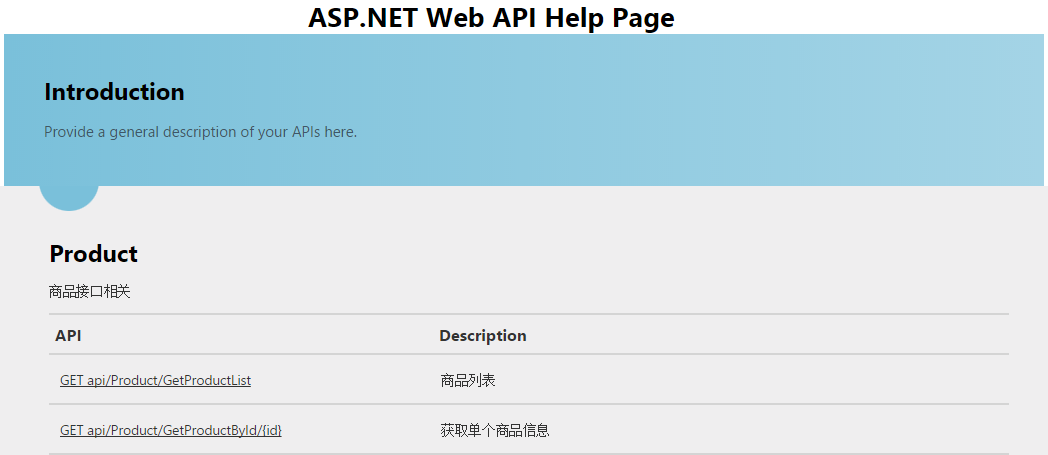


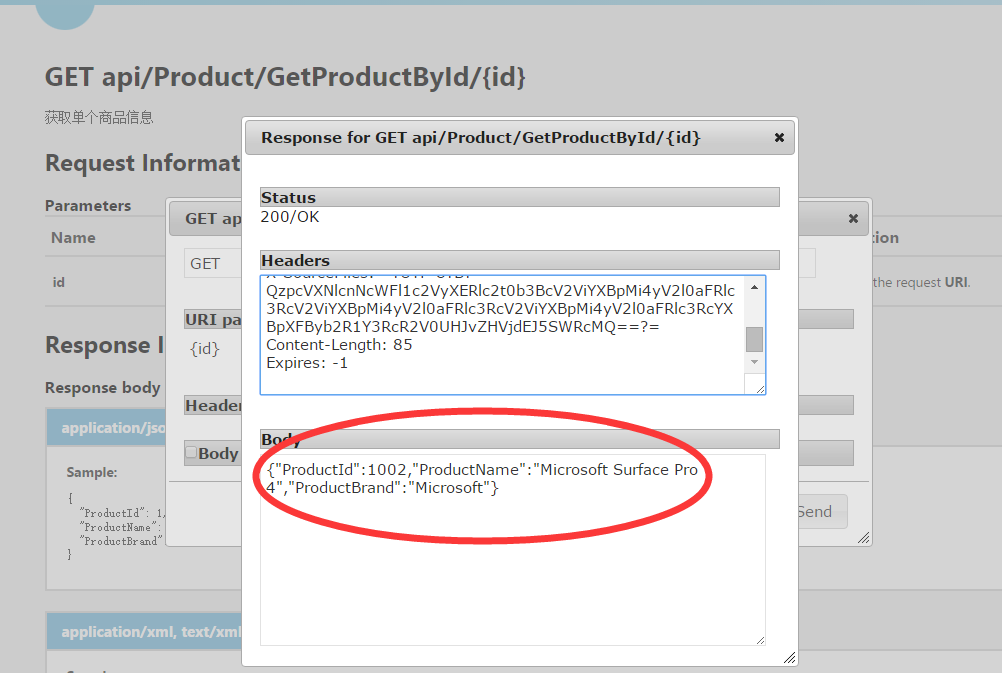
案例是用VS2013创建的,已创建好HelpPage,但wepapi版本是1.0 。wepapi2功能增强,为更上节奏进入nuget升级。

其他的互相依赖项也会升级!
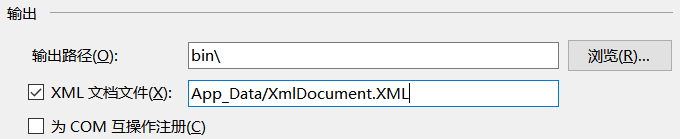
设置xml说明文档路径:


web项目属性设置生成的xml路径:
遗憾webapitestclient只支持最低版本的HelpPage,升级webapi还得修改部分代码!说明:webapi1可以获取action的备注说明但不能获取controller的备注说明 webapi2是可以。
升级后,XmlDocumentationProvider类需要会多出两个实现方法:Controller和action描述方法.
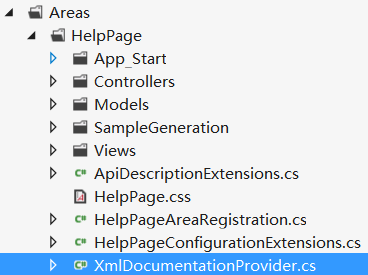
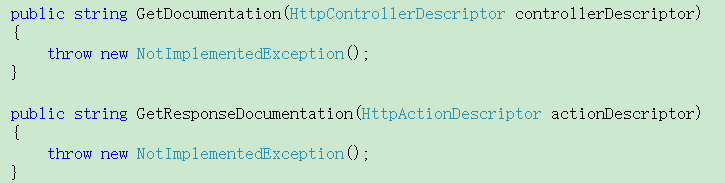
XmlDocumentationProvider.cs

public class XmlDocumentationProvider : IDocumentationProvider
    {
        private XPathNavigator _documentNavigator;
        private const string TypeExpression = "/doc/members/member[@name='T:{0}']";
        private const string MethodExpression = "/doc/members/member[@name='M:{0}']";
        private const string ParameterExpression = "param[@name='{0}']";

        /// <summary>
        /// Initializes a new instance of the <see cref="XmlDocumentationProvider"/> class.
        /// </summary>
        /// <param name="documentPath">The physical path to XML document.</param>
        public XmlDocumentationProvider(string documentPath="")
        {
            //if (documentPath.IsNullOrWhiteSpace())
            //    documentPath = HttpContext.Current.Server.MapPath(ConfigurationManager.AppSettings["webApiDescription"]);
            if (documentPath == null)
            {
                throw new ArgumentNullException("documentPath");
            }
            XPathDocument xpath = new XPathDocument(documentPath);
            _documentNavigator = xpath.CreateNavigator();
        }
        private XPathNavigator GetTypeNode(Type type)
        {
            string controllerTypeName = GetTypeName(type);
            string selectExpression = String.Format(CultureInfo.InvariantCulture, TypeExpression, controllerTypeName);
            return _documentNavigator.SelectSingleNode(selectExpression);
        }
        private static string GetTagValue(XPathNavigator parentNode, string tagName)
        {
            if (parentNode != null)
            {
                XPathNavigator node = parentNode.SelectSingleNode(tagName);
                if (node != null)
                {
                    return node.Value.Trim();
                }
            }

            return null;
        }
        public virtual string GetDocumentation(HttpControllerDescriptor controllerDescriptor)
        {
            XPathNavigator typeNode = GetTypeNode(controllerDescriptor.ControllerType);
            return GetTagValue(typeNode, "summary");
        }
        public virtual string GetDocumentation(HttpActionDescriptor actionDescriptor)
        {
            XPathNavigator methodNode = GetMethodNode(actionDescriptor);
            if (methodNode != null)
            {
                XPathNavigator summaryNode = methodNode.SelectSingleNode("summary");
                if (summaryNode != null)
                {
                    return summaryNode.Value.Trim();
                }
            }

            return null;
        }

        public virtual string GetDocumentation(HttpParameterDescriptor parameterDescriptor)
        {
            ReflectedHttpParameterDescriptor reflectedParameterDescriptor = parameterDescriptor as ReflectedHttpParameterDescriptor;
            if (reflectedParameterDescriptor != null)
            {
                XPathNavigator methodNode = GetMethodNode(reflectedParameterDescriptor.ActionDescriptor);
                if (methodNode != null)
                {
                    string parameterName = reflectedParameterDescriptor.ParameterInfo.Name;
                    XPathNavigator parameterNode = methodNode.SelectSingleNode(String.Format(CultureInfo.InvariantCulture, ParameterExpression, parameterName));
                    if (parameterNode != null)
                    {
                        return parameterNode.Value.Trim();
                    }
                }
            }

            return null;
        }

        public string GetResponseDocumentation(HttpActionDescriptor actionDescriptor)
        {
            XPathNavigator methodNode = GetMethodNode(actionDescriptor);
            return GetTagValue(methodNode, "returns");
        }

        private XPathNavigator GetMethodNode(HttpActionDescriptor actionDescriptor)
        {
            ReflectedHttpActionDescriptor reflectedActionDescriptor = actionDescriptor as ReflectedHttpActionDescriptor;
            if (reflectedActionDescriptor != null)
            {
                string selectExpression = String.Format(CultureInfo.InvariantCulture, MethodExpression, GetMemberName(reflectedActionDescriptor.MethodInfo));
                return _documentNavigator.SelectSingleNode(selectExpression);
            }

            return null;
        }

        private static string GetMemberName(MethodInfo method)
        {
            string name = String.Format(CultureInfo.InvariantCulture, "{0}.{1}", method.DeclaringType.FullName, method.Name);
            ParameterInfo[] parameters = method.GetParameters();
            if (parameters.Length != 0)
            {
                string[] parameterTypeNames = parameters.Select(param => GetTypeName(param.ParameterType)).ToArray();
                name += String.Format(CultureInfo.InvariantCulture, "({0})", String.Join(",", parameterTypeNames));
            }

            return name;
        }

        private static string GetTypeName(Type type)
        {
            if (type.IsGenericType)
            {
                // Format the generic type name to something like: Generic{System.Int32,System.String}
                Type genericType = type.GetGenericTypeDefinition();
                Type[] genericArguments = type.GetGenericArguments();
                string typeName = genericType.FullName;

                // Trim the generic parameter counts from the name
                typeName = typeName.Substring(0, typeName.IndexOf('`'));
                string[] argumentTypeNames = genericArguments.Select(t => GetTypeName(t)).ToArray();
                return String.Format(CultureInfo.InvariantCulture, "{0}{{{1}}}", typeName, String.Join(",", argumentTypeNames));
            }

            return type.FullName;
        }
    }
修改获取Controller信息:
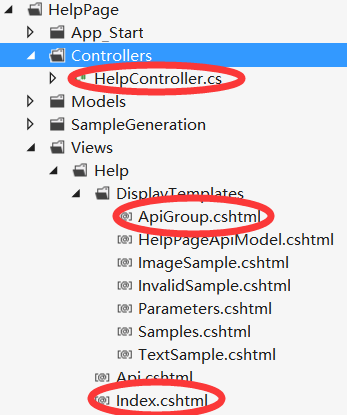
HelpController.cs
Index.cshtml
ApiGroup.cshtml
public ActionResult Index()
        {
            ViewBag.DocumentationProvider = Configuration.Services.GetDocumentationProvider();
            return View(Configuration.Services.GetApiExplorer().ApiDescriptions);
        }
@model Collection<ApiDescription>

@{
    ViewBag.Title = "ASP.NET Web API Help Page";

    // Group APIs by controller
    ILookup<System.Web.Http.Controllers.HttpControllerDescriptor, ApiDescription> apiGroups = Model.ToLookup(api => api.ActionDescriptor.ControllerDescriptor);
}

<header>
    <div class="content-wrapper">
        <div class="float-left">
            <h1>@ViewBag.Title</h1>
        </div>
    </div>
</header>
<div id="body">
    <section class="featured">
        <div class="content-wrapper">
            <h2>Introduction</h2>
            <p>
                Provide a general description of your APIs here.
            </p>
        </div>
    </section>
    <section class="content-wrapper main-content clear-fix">
        <!--遍历Controller -->
        @foreach (var group in apiGroups)
        {
            @Html.DisplayFor(m => group, "ApiGroup")
        }
    </section>
</div>
@model IGrouping<System.Web.Http.Controllers.HttpControllerDescriptor, ApiDescription>

@{
    var controllerDocumentation = ViewBag.DocumentationProvider != null ?
        ViewBag.DocumentationProvider.GetDocumentation(Model.Key) :
        null;
}
<!--Controller名称 -->
<h2 id="@Model.Key.ControllerName">@Model.Key.ControllerName</h2>
<!--Controller说明备注 -->
@if (!String.IsNullOrEmpty(controllerDocumentation))
{
    <p>@controllerDocumentation</p>
}
<table class="help-page-table">
    <thead>
        <tr><th>API</th><th>Description</th></tr>
    </thead>
    <tbody>
    <!--遍历Action -->
    @foreach (var api in Model)
    {
        <tr>
            <td class="api-name"><a href="@Url.Action("Api", "Help", new { apiId = api.GetFriendlyId() })">@api.HttpMethod.Method @api.RelativePath</a></td>
            <td class="api-documentation">
            @if (api.Documentation != null)
            {
                <p>@api.Documentation</p>
            }
            else
            {
                <p>No documentation available.</p>
            }
            </td>
        </tr>
    }
    </tbody>
</table>
效果如下:
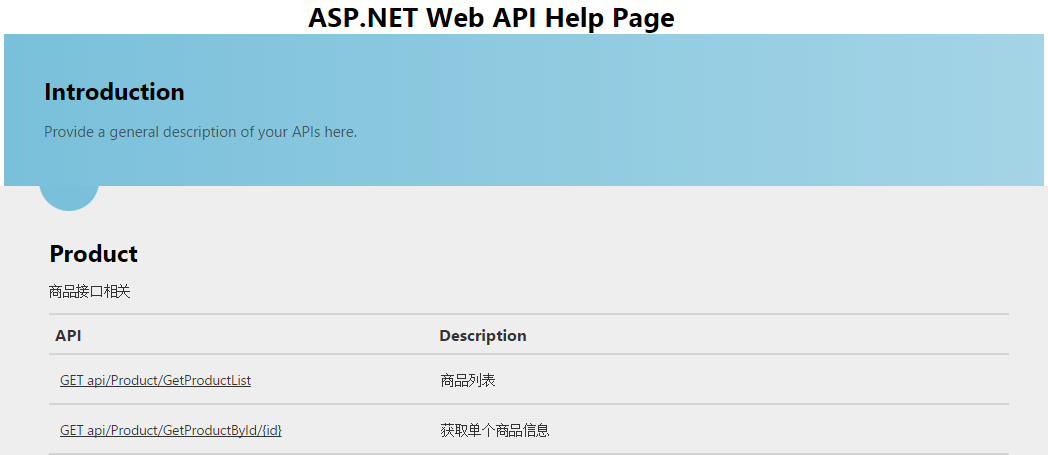
接下来添加接口测试功能.
nuget添加webapitestclient:

进入"获取单个商品信息"接口页面,会多出 "Test Api"按钮,也可以自己修改位置!

点击"Test Api"按钮 弹出调用窗口 :
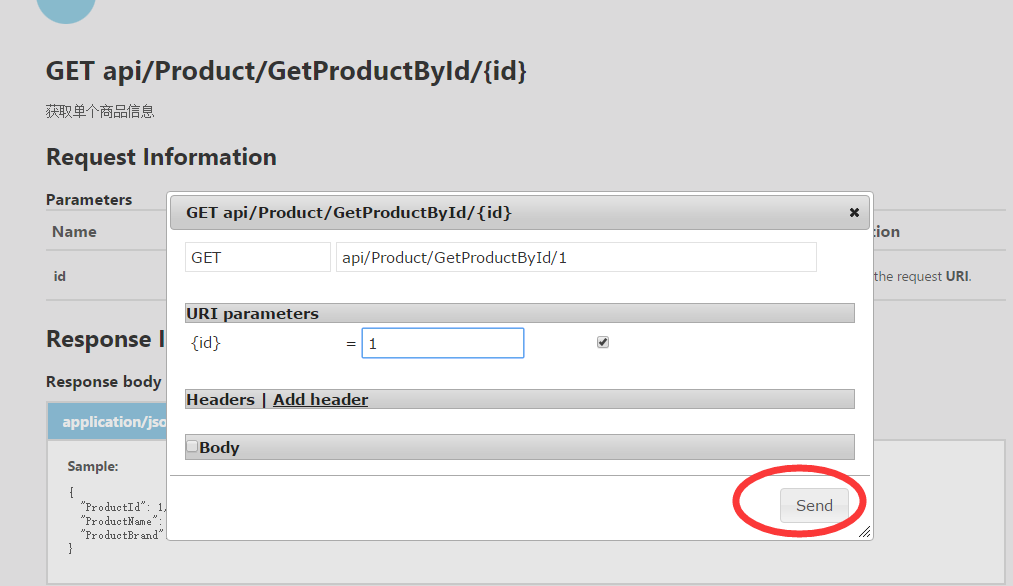
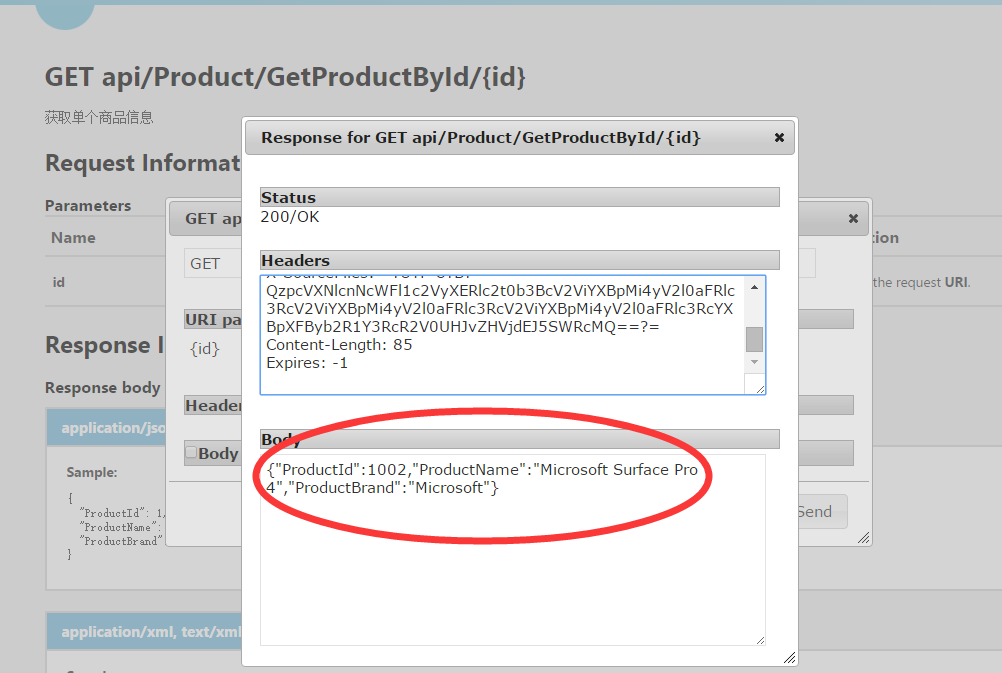
输入参数调用,输出json数据:
共享Demo
weiapi2.2 HelpPage自动生成接口说明文档和接口测试功能的更多相关文章
- Swagger(webapi自动生成接口说明文档)
1.引入Swagger.Net.UI和Swashbuckle包 2.卸载重复包Swagger.Net 3.多余的SwaggerUI文件夹 4.项目属性->勾选生成xml文档文件 5.添加类Swa ...
- .net core 使用swagger自动生成接口文档
前言 swagger是一个api文档自动生动工具,还集成了在线调试. 可以为项目自动生成接口文档, 非常的方便快捷 Swashbuckle.AspNetCore 是一个开源项目,用于生成 ASP.N ...
- Spring Boot(九)Swagger2自动生成接口文档和Mock模拟数据
一.简介 在当下这个前后端分离的技术趋势下,前端工程师过度依赖后端工程师的接口和数据,给开发带来了两大问题: 问题一.后端接口查看难:要怎么调用?参数怎么传递?有几个参数?参数都代表什么含义? 问题二 ...
- WebApi使用swagger ui自动生成接口文档
之前就写到.最近正在使用webapi.这里介绍一个实用的东西swageer ui现在开发都是前后端分开.我们这里是给前端提供api.有时候对于一个api的描述,并不想专门写一份文档.很浪费时间.swa ...
- drf07 过滤 排序 分页 异常处理 自动生成接口文档
4. 过滤Filtering 对于列表数据可能需要根据字段进行过滤,我们可以通过添加django-fitlter扩展来增强支持. pip install django-filter 在配置文件sett ...
- Spring Boot Swagger2自动生成接口文档
一.简介 在当下这个前后端分离的技术趋势下,前端工程师过度依赖后端工程师的接口和数据,给开发带来了两大问题: 1.问题一.后端接口查看难:要怎么调用?参数怎么传递?有几个参数?参数都代表什么含义? 2 ...
- Django框架深入了解_05 (Django中的缓存、Django解决跨域流程(非简单请求,简单请求)、自动生成接口文档)
一.Django中的缓存: 前戏: 在动态网站中,用户所有的请求,服务器都会去数据库中进行相应的增,删,查,改,渲染模板,执行业务逻辑,最后生成用户看到的页面. 当一个网站的用户访问量很大的时候,每一 ...
- Django rest_framework 自动生成接口文档
自动生成接口文档 REST framework可以自动帮助我们生成接口文档. 接口文档以网页的方式呈现. 自动接口文档能生成的是继承自APIView及其子类的视图. 1. 安装依赖 REST fram ...
- django自动生成接口文档
我们在实际项目中,会需要将我们的一些接口的信息返回给前端,便于前后端的交互,在实际使用中,这种自动生成接口文档的模块很多,我主要是用REST framework自动生成接口文档,这个需要用到的是cor ...
随机推荐
- 记一下ajax里get与post的异同
以下均为个人笔记,如有错误,欢迎指正 get与post在写法上来讲基本上差不多 $.ajax({ type:"get",//get data:data, success:funct ...
- Win7、win2008中让IIS7支持asp的方法
Win7或Windows server 2008中IIS7支持ASP+Access解决方法. 1. 让IIS7支持ASP Win7或Windows server 2008中IIS7是默认不安装的, ...
- php框架学习的步骤
一,选择一个合适的php框架 在国内,使用zf,ci和tp框架的人比较多,新手可以从中选一个去学习,新手不建议一开始就去学习zf,功力还不够深,学习zf会让你更迷茫. 二,选定一个php框架之后,如何 ...
- java基本概念
什么是环境变量? 环境变量通常是指在操作系统当中,用来指定操作系统运行时需要的一些参数.通常为一系列的键值对. path环境变量的作用 path环境变量是操作系统外部命令搜索路径 什么是外部命令搜索路 ...
- ED/EP系列1《简介》
电子存折(ED:ElectronicDeposit)一种为持卡人进行消费.取现等交易而设计的支持个人识别码(PIN)保护的金融IC卡应用.它支持圈存.圈提.消费和取现等交易. 电子钱包(EP:Elec ...
- 网站网页生成.shtml访问无法显示
网站换了服务器后发现shtml网页无法访问,原因是没有注册.shtml扩展名,解决方法如下 IIS6.0解析shtm,shtml文件由于IIS6.0的安全性较以前有特别大的改进,所以在很多功能默认情况 ...
- 机器学习相关——协同过滤
在现今的推荐技术和算法中,最被大家广泛认可和采用的就是基于协同过滤的推荐方法.本文将带你深入了解协同过滤的秘密.下面直接进入正题 1 什么是协同过滤 协同过滤是利用集体智慧的一个典型方法.要理解什么是 ...
- 解压vmlinuz和解压initrd(initramfs)
有时就算只得到一个Linux kernel的rpm包或者直接是编译后的vmlinuz和initrd的binary文件,也需要了解其中的一些细节,可能需要去查找这些binary有没有将我想要的patch ...
- [转]Ubuntu 12.04开机自动挂载Windows分区
[转]Ubuntu 12.04开机自动挂载Windows分区 http://www.cnblogs.com/A-Song/archive/2013/02/27/2935255.html 系统版本:Ub ...
- [转]"error while loading shared libraries: xxx.so.x" 错误的原因和解决办法
[转]"error while loading shared libraries: xxx.so.x" 错误的原因和解决办法 http://blog.csdn.net/sahuso ...