
docker容器命令(一)
容器命令
创建容器:
docker run
参数:
- -it 交互
- -d 后台
- –name 容器名
- -p 主机端口:容器端口 (主机端口映射到docker端口)
docker run --name centos1 -it centos /bin/bash
docker ps 显示容器信息
参数:
- -a
- -q 只显示容器id
[root@tanqi ~]# docker ps -a

CONTAINER ID   IMAGE          COMMAND           CREATED              STATUS                      PORTS     NAMES

8ad5b2b6854f   centos         "/bin/bash"       About a minute ago   Up About a minute                     centos1

3c45403d051a   centos         "/bin/bash"       14 minutes ago       Exited (0) 14 minutes ago             frosty_cannon

[root@tanqi ~]# docker ps

CONTAINER ID   IMAGE     COMMAND       CREATED              STATUS              PORTS     NAMES

8ad5b2b6854f   centos    "/bin/bash"   About a minute ago   Up About a minute             centos1

[root@tanqi ~]# docker ps -q

8ad5b2b6854f

[root@tanqi ~]# docker ps -aq

8ad5b2b6854f
- 启动容器
`docker start -i 容器id/容器名
Options:
-a, --attach Attach STDOUT/STDERR and forward signals
–detach-keys string Override the key sequence for detaching a container
-i, --interactive Attach container’s STDIN
- 进入容器
docker exec -it 容器id/容器名 /bin/bash#启动新终端
[root@tanqi ~]# docker exec -it centos1 /bin/bash
docker attach 容器id/容器名//进入容器直接进入正在执行
[root@tanqi ~]# docker attach centos1

[root@8ad5b2b6854f /]#
- 退出容器
exit退出并停止
crtl+P+Q 退出 不停止
- 从容器拷贝到主机
docker cp 容器id:容器路径 主机路径
[root@tanqi ~]# docker cp centos1:/home/test /root

[root@tanqi ~]# ls

dump.rdb  f1.txt  install.sh  study  test
-v 卷的技术
其他命令
- 后台创建启动容器:
docker run -d centos# 可能会停止 因为没有前台进程
- 日志
docker logs --tail 10 容器id/容器名//看后10条Options:
–details Show extra details provided to logs
-f, --follow Follow log output 新log会加
–since string Show logs since timestamp (e.g. 2013-01-02T13:23:37Z) or relative (e.g. 42m for
42 minutes)
-n, --tail string Number of lines to show from the end of the logs (default “all”)
-t, --timestamps Show timestamps
–until string Show logs before a timestamp (e.g. 2013-01-02T13:23:37Z) or relative (e.g. 42m
for 42 minutes)
[root@tanqi ~]# docker logs --tail 2 centos1

[root@8ad5b2b6854f home]# ls

test

[root@tanqi ~]# docker logs -f --tail 2 centos1

[root@8ad5b2b6854f home]# ls

test

...等待刷新
- 运行脚本
docker run -d 容器di /bin/sh -c "脚本语言"
- 进程信息
docker top 容器id/容器名
[root@tanqi ~]# docker top centos1

UID                 PID                 PPID                C                   STIME               TTY                 TIME                CMD

root                15054               15033               0                   15:30               pts/0               00:00:00            /bin/bash
- 元数据
docker inspect 容器id/容器名
小结
容器命令
创建容器:
docker run
参数
-it 交互
-d 后台
–name 容器名
docker run --name centos1 -it centos /bin/bash
docker ps 显示容器信息
参数:
- -a
- -q 只显示容器id
[root@tanqi ~]# docker ps -a

CONTAINER ID   IMAGE          COMMAND           CREATED              STATUS                      PORTS     NAMES

8ad5b2b6854f   centos         "/bin/bash"       About a minute ago   Up About a minute                     centos1

3c45403d051a   centos         "/bin/bash"       14 minutes ago       Exited (0) 14 minutes ago             frosty_cannon

[root@tanqi ~]# docker ps

CONTAINER ID   IMAGE     COMMAND       CREATED              STATUS              PORTS     NAMES

8ad5b2b6854f   centos    "/bin/bash"   About a minute ago   Up About a minute             centos1

[root@tanqi ~]# docker ps -q

8ad5b2b6854f

[root@tanqi ~]# docker ps -aq

8ad5b2b6854f
- 启动容器
`docker start -i 容器id/容器名
Options:
-a, --attach Attach STDOUT/STDERR and forward signals
–detach-keys string Override the key sequence for detaching a container
-i, --interactive Attach container’s STDIN
- 进入容器
docker exec -it 容器id/容器名 /bin/bash#启动新终端
[root@tanqi ~]# docker exec -it centos1 /bin/bash
docker attach 容器id/容器名//进入容器直接进入正在执行
[root@tanqi ~]# docker attach centos1

[root@8ad5b2b6854f /]#
- 退出容器
exit退出并停止
crtl+P+Q 退出 不停止
- 从容器拷贝到主机
docker cp 容器id:容器路径 主机路径
[root@tanqi ~]# docker cp centos1:/home/test /root

[root@tanqi ~]# ls

dump.rdb  f1.txt  install.sh  study  test
-v 卷的技术
其他命令
- 后台创建启动容器:
docker run -d centos# 可能会停止 因为没有前台进程
- 日志
docker logs --tail 10 容器id/容器名//看后10条Options:
–details Show extra details provided to logs
-f, --follow Follow log output 新log会加
–since string Show logs since timestamp (e.g. 2013-01-02T13:23:37Z) or relative (e.g. 42m for
42 minutes)
-n, --tail string Number of lines to show from the end of the logs (default “all”)
-t, --timestamps Show timestamps
–until string Show logs before a timestamp (e.g. 2013-01-02T13:23:37Z) or relative (e.g. 42m
for 42 minutes)
[root@tanqi ~]# docker logs --tail 2 centos1

[root@8ad5b2b6854f home]# ls

test

[root@tanqi ~]# docker logs -f --tail 2 centos1

[root@8ad5b2b6854f home]# ls

test

...等待刷新
- 运行脚本
docker run -d 容器di /bin/sh -c "脚本语言"
- 进程信息
docker top 容器id/容器名
[root@tanqi ~]# docker top centos1

UID                 PID                 PPID                C                   STIME               TTY                 TIME                CMD

root                15054               15033               0                   15:30               pts/0               00:00:00            /bin/bash
- 元数据
docker inspect 容器id/容器名
小结
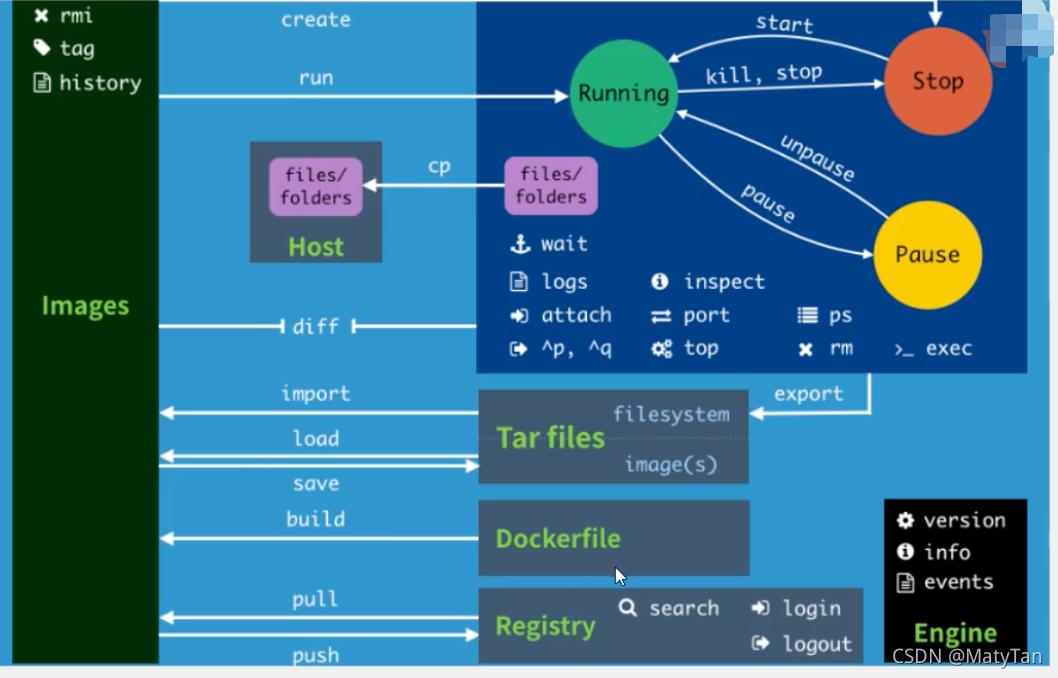
官网的图
docker容器命令(一)的更多相关文章
- docker容器命令2
docker容器命令2 启动守护式容器 docker run -d 镜像名字 [root@tzh ~]# docker images REPOSITORY TAG IMAGE ID CREATED S ...
- docker容器命令1
docker容器命令 新建并启动容器命令 docker run INAME(镜像名字) 语法:docker run [OPTIONS] INAME [COMMAND] 例子:docker run -i ...
- Docker容器命令
★根本前提:本地主机有镜像才能创建容器 ⒈docker run [Options] 镜像名称或镜像ID [Command] [Arg...] 用途:利用镜像创建容器实例 Options说明(常用):注 ...
- Docker 容器命令大全
容器命令: 命令 描述 attach 将本地标准输入,输出和错误流转到到正在运行的容器 build 从Dockerfile构建映像 commit 根据容器的更改创建新镜像 cp 在容器和本地文件系统之 ...
- docker 容器命令
语法docker run [OPTIONS] IMAGE [COMMAND] [ARG...] OPTIONS说明: -a stdin: 指定标准输入输出内容类型,可选 STDIN/STDOUT/ST ...
- kubectl&docker容器命令行窗口太小
#k8s kubectl exec -ti busybox env COLUMNS=$COLUMNS LINES=$LINES bash #k8s example kubectl exec -t ...
- 进入docker 容器命令行
#!/bin/bash CNAME=$1 CPID=$(docker inspect --format "{{.State.Pid}}" $CNAME) nsenter --tar ...
- docker的使用 一容器命令
Docker容器命令 前提 执行容器的前提是有镜像 . #创建并启动容器 docker run [options] images [command][args] // option 的说明 --nam ...
- Docker容器操作中常用命令集合
docker pull 从仓库获取所需要的镜像 docker images 显示本地已有的镜像. docker commit 提交更新后的副本. docker build 创建一个新的镜像 ADD 复 ...
随机推荐
- python编码问题:UnicodeDecodeError: 'gbk' codec can't decode byte 0xaf in position 68: illegal multibyte sequence
import yaml def test_yaml(): f = open('C:\hogwarts\Scripts\hogwarts-api\demo\yaml_data.yml') print(y ...
- Jmeter监控技术实战
性能测试中监控的意义 为性能分析提供依据 监控方案 serverAgent jmeter的插件,监控颗粒度不高,界面简陋 服务器中启动 jmeter中添加插件 Nmon Grafana 优秀监控方案所 ...
- flask_sqlalchemy 查询结果转dict 终极解决方案
之前为了学习Python,试着拿Flask作框架搞小网站,感觉还不错,基本就抛弃了PHP.前段时间做了一个微信小程序,想着yii框架拿来写几十个小接口是不是浪费了,就继续用flask写api了,哪想到 ...
- Rabbit 高级操作
Rabbit 高级操作 1.过期时间TTL 过期时间TTL表示可以对消息设置预期的时间,在这个时间内都可以被消费者接收获取:过了时间之后消息将自动被删除. RabbitMQ可以对消息和队列设置TTL. ...
- P3211-[HNOI2011]XOR和路径【高斯消元】
正题 题目链接:https://www.luogu.com.cn/problem/P3211 题目大意 一个\(n\)个点\(m\)条边的无向图,从\(1\)到\(n\)随机游走.求期望路径异或和. ...
- APScheduler(python 定时任务框架)最简单使用教程
有时候需要部署一些很简单的python定时任务,使用APScheduler是很好的选择.只需要简单的设置几个参数,就可以实现定时.定分甚至秒来跑. 第一步:用pip安装APScheduler pip ...
- 神器----IntelliJ IDEA基本配置
介绍 首先是百度百科对于 IDEA 的介绍 IDEA 全称 IntelliJ IDEA,是java编程语言开发的集成环境.IntelliJ在业界被公认为最好的java开发工具,尤其在智能代码助手.代码 ...
- MYSQL小版本升级(5.7.21至5.7.25)
1.环境确认 [root@mysql ~]# ps -ef |grep -i mysql root 9173 1 0 2020 ? 00:00:00 /bin/sh /mysql/data/mysql ...
- k8s deployment controller源码分析
deployment controller简介 deployment controller是kube-controller-manager组件中众多控制器中的一个,是 deployment 资源对象的 ...
- 活动回顾|ShardingSphere X openGauss,将会产生怎样的化学反应?
"ShardingSphere 作为 openGauss 生态的开源分布式数据库解决方案,将持续助力于 openGauss,满足千行百业广大客户分布式场景需求." 5月29日,由 ...