
python redis自带门神 lock 方法

redis 支持的数据结构比较丰富,自制一个锁也很方便,所以极少提到其原生锁的方法。但是在单机版redis的使用时,自带锁的使用还是非常方便的。自己有车还打啥滴滴顺风车是吧,本篇主要介绍redis-py模块中原生锁lock的相关方法。
使用场景:
- 多线程资源抢占
- 关键变量锁定
- 防止重复执行代码
基本使用
lock使用
ubuntu 安装redis
apt install redis-server
安装python redis-py模块
pip install redis
普通使用
import redis

# redis 线程池

pool = redis.ConnectionPool(host='localhost', port=6379, decode_responses=True)

r = redis.Redis(connection_pool=pool)

# 创建一个锁

lock = r.lock('mylock')

try:

    # 获取锁

    lock.acquire()

    print('get lock')

except:

    pass

finally:

    # 释放锁

    lock.release()
因为获取了锁之后一定要释放锁,所以用try except finally的错误捕获方法保证不管在获取锁之后是否发生错误,最后都会释放锁,这是安全使用锁的一种姿势。
例如,在如下例子中,当获取锁之后主动抛出异常,此时也能保证锁的正常释放。
lock = r.lock('mylock')

try:

    lock.acquire()

    print('get lock')

    raise

except:

    pass

finally:

    print('release lock')

    lock.release()
推荐使用 with 方法
推荐的使用方法是with,在文件操作,线程锁操作时经常使用with方法。在with的语法中,获取锁和释放锁都已经自动完成,所以是一种更加简洁和高效的使用方法。
with r.lock('mylock'):

    print('get lock')
with语句在执行代码之前加锁,在退出之前释放锁。具体来说就是实现了__enter__和__exit__方法,这些都可以在最后的源码中找答案,不仅能学到lock的方法,也能加深对with语法的理解。
lock支持的参数
lock 函数的定义:
def lock(self, name, timeout=None, sleep=0.1, blocking_timeout=None,

             lock_class=None, thread_local=True):
- name: 锁的名字
- timeout: 锁的生命周期。如果不设置锁就不会过期,直到被释放。默认不设置
- sleep: 当获取锁阻塞时,尝试获取锁循环的间隔时间,默认是睡眠间隔0.1s尝试
- blocking_timeout:当获取锁阻塞时,最长的等待时间,默认一直等待
- lock_class: 强制执行指定的锁实现
- thread_local:用来表示是否将token保存在线程本地。默认是保存在本地线程的,所以一个线程只能看到自己的token,而不能被另一个线程使用。比如有如下例子:
0s: 线程1获取到锁my-lock,设置过期时间是5s,token是abc。
1s:线程2尝试获取锁。
5s:线程1还没有完成,redis释放了锁。同时线程2获取了锁,并设置token是xyz
6s: 线程1执行完成,然后调用release()释放锁。如果token不是保存在本地,那么线程1将拿到token xyz,然后释放了线程2的锁
在某些用例中,有必要禁用线程本地存储。
例如,如果您有代码,其中一个线程获取一个锁,并将该锁实例传递给工作线程,以便稍后释放。
如果在这种情况下未禁用线程本地存储,那么工作线程将看不到获取锁的线程设置的令牌。
我们的假设是,这些情况并不常见,因此默认使用线程本地存储。
通过创建lock时传入参数来控制lock的一些属性,比如获取锁的最长等待时间,持有锁的最长时间等。
设置锁的生命周期
设置锁5s,拿到锁5s之内还能释放锁
>>> lock = r.lock('mylock_one', timeout=5)

>>>

>>> lock.acquire()

True

>>>

>>> lock.release()

>>>

>>>
设置锁2s,拿到锁2s之后,锁自动释放掉,再次释放就会报错。
>>>

>>>

>>>

>>> lock = r.lock('mylock_one', timeout=2)

>>>

>>> lock.acquire()

True

>>> lock.release()

Traceback (most recent call last):

  File "<stdin>", line 1, in <module>

  File "/home/ljk/.virtualenvs/work/lib/python3.7/site-packages/redis/lock.py", line 232, in release

    self.do_release(expected_token)

  File "/home/ljk/.virtualenvs/work/lib/python3.7/site-packages/redis/lock.py", line 238, in do_release

    raise LockNotOwnedError("Cannot release a lock"

redis.exceptions.LockNotOwnedError: Cannot release a lock that's no longer owned

>>>
设置阻塞等待的最长时间
当不设置最长等待时间时,会一直等待key的释放,当设置了最长等待时间,如果在time内key没有释放,那么就直接返回False,表示获取不到。
>>> lock = r.lock('mylock_one')

>>> lock = r.lock('mylock_one')

>>>

>>>

>>> lock.acquire()

True

>>>

>>> lock = r.lock('mylock_one', blocking_timeout=3)

>>> lock.acquire()

False

>>>
注意:需要说明的是 lock 方法针对的某一个key的获取,即获取某一个key作为锁的关键字,而不是获取某一个琐。这和下面的获取锁的方法acquire是有根本的区别的。
lock 的方法
lock拥有的方法并不是很多,所以用法不会花里胡哨。lock主要的方法如下:
- acquire:获取锁
- release:释放锁
- owned:key是否被该锁拥有,拥有返回True
- locked:锁是不是否被任何一个线程锁住,锁住返回True
acquire
acquire 就是获取锁的方法,原型如下:
def acquire(self, blocking=None, blocking_timeout=None, token=None):
最简单的使用
lock.acquire()
当锁已经被占用时再次请求,acquire默认会阻塞。

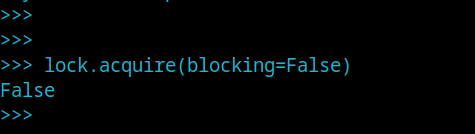
非阻塞使用
当设置了blocking=False时,表示拿不到锁时不阻塞,直接返回False
lock.acquire(blocking=False)
设置阻塞时长
当拿不到锁时可以设置阻塞的时长
lock.acquire(blocking_timeout=5)
5s之内拿不到锁的话,就会放弃尝试,返回False
owned
owned表示key :mylock_one是不是被该锁 lock 作为关键字。被锁定返回True,没有锁定返回False
>>> lock = r.lock('mylock_one')

>>>

>>> lock.owned()

False

>>>

>>> lock.acquire()

True

>>>

>>> lock.owned()

True

>>>
locked
是用来看锁是不是被占用,占用返回True,没有被占用返回False
>>> lock = r.lock('mylock_two')

>>>

>>> lock.locked()

False

>>>

>>> lock.acquire()

True

>>>

>>> lock.locked()

True

>>>
附录 lock 的源码
其实使用redis的字符串以及过期时间也是可以自己实现一个锁的,事实上lock的实现也确实是基于字符串来实现的。对于想要阅读优秀源码或更深入理解lock特性的同学来说,该源码是一个不错的学习资料。
import threading

import time as mod_time

import uuid

from redis.exceptions import LockError, LockNotOwnedError

from redis.utils import dummy

class Lock(object):

    """

    A shared, distributed Lock. Using Redis for locking allows the Lock

    to be shared across processes and/or machines.

    It's left to the user to resolve deadlock issues and make sure

    multiple clients play nicely together.

    """

    lua_release = None

    lua_extend = None

    lua_reacquire = None

    # KEYS[1] - lock name

    # ARGV[1] - token

    # return 1 if the lock was released, otherwise 0

    LUA_RELEASE_SCRIPT = """

        local token = redis.call('get', KEYS[1])

        if not token or token ~= ARGV[1] then

            return 0

        end

        redis.call('del', KEYS[1])

        return 1

    """

    # KEYS[1] - lock name

    # ARGV[1] - token

    # ARGV[2] - additional milliseconds

    # ARGV[3] - "0" if the additional time should be added to the lock's

    #           existing ttl or "1" if the existing ttl should be replaced

    # return 1 if the locks time was extended, otherwise 0

    LUA_EXTEND_SCRIPT = """

        local token = redis.call('get', KEYS[1])

        if not token or token ~= ARGV[1] then

            return 0

        end

        local expiration = redis.call('pttl', KEYS[1])

        if not expiration then

            expiration = 0

        end

        if expiration < 0 then

            return 0

        end

        local newttl = ARGV[2]

        if ARGV[3] == "0" then

            newttl = ARGV[2] + expiration

        end

        redis.call('pexpire', KEYS[1], newttl)

        return 1

    """

    # KEYS[1] - lock name

    # ARGV[1] - token

    # ARGV[2] - milliseconds

    # return 1 if the locks time was reacquired, otherwise 0

    LUA_REACQUIRE_SCRIPT = """

        local token = redis.call('get', KEYS[1])

        if not token or token ~= ARGV[1] then

            return 0

        end

        redis.call('pexpire', KEYS[1], ARGV[2])

        return 1

    """

    def __init__(self, redis, name, timeout=None, sleep=0.1,

                 blocking=True, blocking_timeout=None, thread_local=True):

        """

        Create a new Lock instance named ``name`` using the Redis client

        supplied by ``redis``.

        ``timeout`` indicates a maximum life for the lock.

        By default, it will remain locked until release() is called.

        ``timeout`` can be specified as a float or integer, both representing

        the number of seconds to wait.

        ``sleep`` indicates the amount of time to sleep per loop iteration

        when the lock is in blocking mode and another client is currently

        holding the lock.

        ``blocking`` indicates whether calling ``acquire`` should block until

        the lock has been acquired or to fail immediately, causing ``acquire``

        to return False and the lock not being acquired. Defaults to True.

        Note this value can be overridden by passing a ``blocking``

        argument to ``acquire``.

        ``blocking_timeout`` indicates the maximum amount of time in seconds to

        spend trying to acquire the lock. A value of ``None`` indicates

        continue trying forever. ``blocking_timeout`` can be specified as a

        float or integer, both representing the number of seconds to wait.

        ``thread_local`` indicates whether the lock token is placed in

        thread-local storage. By default, the token is placed in thread local

        storage so that a thread only sees its token, not a token set by

        another thread. Consider the following timeline:

            time: 0, thread-1 acquires `my-lock`, with a timeout of 5 seconds.

                     thread-1 sets the token to "abc"

            time: 1, thread-2 blocks trying to acquire `my-lock` using the

                     Lock instance.

            time: 5, thread-1 has not yet completed. redis expires the lock

                     key.

            time: 5, thread-2 acquired `my-lock` now that it's available.

                     thread-2 sets the token to "xyz"

            time: 6, thread-1 finishes its work and calls release(). if the

                     token is *not* stored in thread local storage, then

                     thread-1 would see the token value as "xyz" and would be

                     able to successfully release the thread-2's lock.

        In some use cases it's necessary to disable thread local storage. For

        example, if you have code where one thread acquires a lock and passes

        that lock instance to a worker thread to release later. If thread

        local storage isn't disabled in this case, the worker thread won't see

        the token set by the thread that acquired the lock. Our assumption

        is that these cases aren't common and as such default to using

        thread local storage.

        """

        self.redis = redis

        self.name = name

        self.timeout = timeout

        self.sleep = sleep

        self.blocking = blocking

        self.blocking_timeout = blocking_timeout

        self.thread_local = bool(thread_local)

        self.local = threading.local() if self.thread_local else dummy()

        self.local.token = None

        self.register_scripts()

    def register_scripts(self):

        cls = self.__class__

        client = self.redis

        if cls.lua_release is None:

            cls.lua_release = client.register_script(cls.LUA_RELEASE_SCRIPT)

        if cls.lua_extend is None:

            cls.lua_extend = client.register_script(cls.LUA_EXTEND_SCRIPT)

        if cls.lua_reacquire is None:

            cls.lua_reacquire = \

                client.register_script(cls.LUA_REACQUIRE_SCRIPT)

    def __enter__(self):

        # force blocking, as otherwise the user would have to check whether

        # the lock was actually acquired or not.

        if self.acquire(blocking=True):

            return self

        raise LockError("Unable to acquire lock within the time specified")

    def __exit__(self, exc_type, exc_value, traceback):

        self.release()

    def acquire(self, blocking=None, blocking_timeout=None, token=None):

        """

        Use Redis to hold a shared, distributed lock named ``name``.

        Returns True once the lock is acquired.

        If ``blocking`` is False, always return immediately. If the lock

        was acquired, return True, otherwise return False.

        ``blocking_timeout`` specifies the maximum number of seconds to

        wait trying to acquire the lock.

        ``token`` specifies the token value to be used. If provided, token

        must be a bytes object or a string that can be encoded to a bytes

        object with the default encoding. If a token isn't specified, a UUID

        will be generated.

        """

        sleep = self.sleep

        if token is None:

            token = uuid.uuid1().hex.encode()

        else:

            encoder = self.redis.connection_pool.get_encoder()

            token = encoder.encode(token)

        if blocking is None:

            blocking = self.blocking

        if blocking_timeout is None:

            blocking_timeout = self.blocking_timeout

        stop_trying_at = None

        if blocking_timeout is not None:

            stop_trying_at = mod_time.time() + blocking_timeout

        while True:

            if self.do_acquire(token):

                self.local.token = token

                return True

            if not blocking:

                return False

            next_try_at = mod_time.time() + sleep

            if stop_trying_at is not None and next_try_at > stop_trying_at:

                return False

            mod_time.sleep(sleep)

    def do_acquire(self, token):

        if self.timeout:

            # convert to milliseconds

            timeout = int(self.timeout * 1000)

        else:

            timeout = None

        if self.redis.set(self.name, token, nx=True, px=timeout):

            return True

        return False

    def locked(self):

        """

        Returns True if this key is locked by any process, otherwise False.

        """

        return self.redis.get(self.name) is not None

    def owned(self):

        """

        Returns True if this key is locked by this lock, otherwise False.

        """

        stored_token = self.redis.get(self.name)

        # need to always compare bytes to bytes

        # TODO: this can be simplified when the context manager is finished

        if stored_token and not isinstance(stored_token, bytes):

            encoder = self.redis.connection_pool.get_encoder()

            stored_token = encoder.encode(stored_token)

        return self.local.token is not None and \

            stored_token == self.local.token

    def release(self):

        "Releases the already acquired lock"

        expected_token = self.local.token

        if expected_token is None:

            raise LockError("Cannot release an unlocked lock")

        self.local.token = None

        self.do_release(expected_token)

    def do_release(self, expected_token):

        if not bool(self.lua_release(keys=[self.name],

                                     args=[expected_token],

                                     client=self.redis)):

            raise LockNotOwnedError("Cannot release a lock"

                                    " that's no longer owned")

    def extend(self, additional_time, replace_ttl=False):

        """

        Adds more time to an already acquired lock.

        ``additional_time`` can be specified as an integer or a float, both

        representing the number of seconds to add.

        ``replace_ttl`` if False (the default), add `additional_time` to

        the lock's existing ttl. If True, replace the lock's ttl with

        `additional_time`.

        """

        if self.local.token is None:

            raise LockError("Cannot extend an unlocked lock")

        if self.timeout is None:

            raise LockError("Cannot extend a lock with no timeout")

        return self.do_extend(additional_time, replace_ttl)

    def do_extend(self, additional_time, replace_ttl):

        additional_time = int(additional_time * 1000)

        if not bool(

            self.lua_extend(

                keys=[self.name],

                args=[

                    self.local.token,

                    additional_time,

                    replace_ttl and "1" or "0"

                ],

                client=self.redis,

            )

        ):

            raise LockNotOwnedError(

                "Cannot extend a lock that's" " no longer owned"

            )

        return True

    def reacquire(self):

        """

        Resets a TTL of an already acquired lock back to a timeout value.

        """

        if self.local.token is None:

            raise LockError("Cannot reacquire an unlocked lock")

        if self.timeout is None:

            raise LockError("Cannot reacquire a lock with no timeout")

        return self.do_reacquire()

    def do_reacquire(self):

        timeout = int(self.timeout * 1000)

        if not bool(self.lua_reacquire(keys=[self.name],

                                       args=[self.local.token, timeout],

                                       client=self.redis)):

            raise LockNotOwnedError("Cannot reacquire a lock that's"

                                    " no longer owned")

        return True
python redis自带门神 lock 方法的更多相关文章
- Effective Python之编写高质量Python代码的59个有效方法
这个周末断断续续的阅读完了<Effective Python之编写高质量Python代码 ...
- python操作日期和时间的方法
不管何时何地,只要我们编程时遇到了跟时间有关的问题,都要想到 datetime 和 time 标准库模块,今天我们就用它内部的方法,详解python操作日期和时间的方法.1.将字符串的时间转换为时间戳 ...
- 【python】多进程锁multiprocess.Lock
[python]多进程锁multiprocess.Lock 2013-09-13 13:48 11613人阅读 评论(2) 收藏 举报 分类: Python(38) 同步的方法基本与多线程相同. ...
- Python中optionParser模块的使用方法[转]
本文以实例形式较为详尽的讲述了Python中optionParser模块的使用方法,对于深入学习Python有很好的借鉴价值.分享给大家供大家参考之用.具体分析如下: 一般来说,Python中有两个内 ...
- python 面向对象之多态与绑定方法
多态与多态性 一,多态 1,多态指的是一类事物有多种形态(python里面原生多态) 1.1动物有多种形态:人,狗,猪 import abc class Animal(metaclass=abc.AB ...
- Python GIL(Global Interpreter Lock)
一,介绍 定义: In CPython, the global interpreter lock, or GIL, is a mutex that prevents multiple native t ...
- Python中防止sql注入的方法详解
SQL注入是比较常见的网络攻击方式之一,它不是利用操作系统的BUG来实现攻击,而是针对程序员编程时的疏忽,通过SQL语句,实现无帐号登录,甚至篡改数据库.下面这篇文章主要给大家介绍了关于Python中 ...
- Python安装模块的几种方法
一.方法1: 单文件模块 直接把文件拷贝到 $python_dir/Lib 二.方法2: 多文件模块,带setup.py 下载模块包,进行解压,进入模块文件夹,执行:python setup.py i ...
- Python GIL(Global Interpreter Lock)
一.介绍 In CPython, the global interpreter lock, or GIL, is a mutex that prevents multiple native threa ...
随机推荐
- finally方法体
1.资源释放 java7可以在try(创建资源对象,方法体结束之后自动释放) 2.finally中有返回
- XML基础——extensible markup language
一.xml概念 1.xml和html区别 其中,xml是纯文本文件,跨语言:浏览器有html解析器也有xml解析器: 2.和properties配置文件区别 二.xml语法 1.基本语法 三.xml组 ...
- python库--tensorflow--scope命名方式
方法 参数 说明 .name_scope() with...: name 在其下使用Variable, 变量名(V_n)前会被加上'name/...'且相同V_n会自动添加后缀加以区分, 使用ge ...
- Docker 网络类型
Docker 网络类型 前言 a. 本文主要为 Docker的视频教程 笔记. b. 环境为 CentOS 7.0 云服务器 c. 上一篇:docker-compose 的使用和负载均衡的初探 1. ...
- 一文搞懂如何使用Node.js进行TCP网络通信
摘要: 网络是通信互联的基础,Node.js提供了net.http.dgram等模块,分别用来实现TCP.HTTP.UDP的通信,本文主要对使用Node.js的TCP通信部份进行实践记录. 本文分享自 ...
- 【OI】计算分子量 Molar mass UVa 1586 题解
题目:(由于UVa注册不了,还是用vjudge) https://vjudge.net/problem/UVA-1586 详细说明放在了注释里面.原创. 破题点在于对于一个元素的组合(元素+个数),只 ...
- php超时报错: Maximum execution time of 300 seconds exceeded
php.ini里max_execution_time = 30,原因是这个脚本执行时间太小了,增加一些,或者改成0不限制 可以增加代码: set_time_limit(0);
- TP5指定讲师页面文章上下篇
控制器代码 // 查询上下篇 $courseIds = model('course') ->where([ 'isdel' => 0, 'teacherid' => $teacher ...
- 链式调用+对象属性与遍历+this指向+caller/callee
之前的作业: 提示: 在开发的时候尽量在函数内部将作用都给调用好,在外部就能够直接使用 链式调用: 正常这样是不行的,因为没有具体返回值: return 具体的对象,这样的才是链式操作,jquery ...
- disruptor笔记之四:事件消费知识点小结
欢迎访问我的GitHub https://github.com/zq2599/blog_demos 内容:所有原创文章分类汇总及配套源码,涉及Java.Docker.Kubernetes.DevOPS ...