
【阿菜用工具】利用 Web3.js 在 ganache 上部署以及调用智能合约
合约部署
要部署的合约
pragma solidity ^0.4.23;

contract  test  {

    uint256 value;

    function setValue(uint256 _value) public{

         value = _value;

    }

    function getValue() public returns (uint256){

        return value;

    }

    function () public payable{

    }

}
获取合约的ABI和bytecode
合约ABI
[

    {

      "payable": true,

      "stateMutability": "payable",

      "type": "fallback"

    },

    {

      "constant": false,

      "inputs": [

        {

          "name": "_value",

          "type": "uint256"

        }

      ],

      "name": "setValue",

      "outputs": [],

      "payable": false,

      "stateMutability": "nonpayable",

      "type": "function"

    },

    {

      "constant": false,

      "inputs": [],

      "name": "getValue",

      "outputs": [

        {

          "name": "",

          "type": "uint256"

        }

      ],

      "payable": false,

      "stateMutability": "nonpayable",

      "type": "function"

    }

]
合约bytecode
// add '0x' in front of the bytecode

0x608060405234801561001057600080fd5b5060dc8061001f6000396000f3006080604052600436106049576000357c0100000000000000000000000000000000000000000000000000000000900463ffffffff1680632096525514604b57806355241077146073575b005b348015605657600080fd5b50605d609d565b6040518082815260200191505060405180910390f35b348015607e57600080fd5b50609b6004803603810190808035906020019092919050505060a6565b005b60008054905090565b80600081905550505600a165627a7a72305820437e5b6f23c9e202f4188fde72ebdd65de3a5c7fca347bea516a2f576748a9240029
部署代码
const Web3 = require('web3')

// RPC SERVER

const web3 = new Web3('http://localhost:7545')

var Tx     = require('ethereumjs-tx').Transaction

// your account and private key

const account = '0x1275270073b7CA41Cd1a62736795f80f7b52487c'

const pk1 = '56a0717cbc04b0e47732d5be497ad57052594c03088b9ef889fefca107ffeecb'

const private_key = Buffer.from(pk1, 'hex')

// get the nonce of account

web3.eth.getTransactionCount(account, (err, txCount) => {

	// the bytecode of contract

  const data = "0x608060405234801561001057600080fd5b5060dc8061001f6000396000f3006080604052600436106049576000357c0100000000000000000000000000000000000000000000000000000000900463ffffffff1680632096525514604b57806355241077146073575b005b348015605657600080fd5b50605d609d565b6040518082815260200191505060405180910390f35b348015607e57600080fd5b50609b6004803603810190808035906020019092919050505060a6565b005b60008054905090565b80600081905550505600a165627a7a72305820437e5b6f23c9e202f4188fde72ebdd65de3a5c7fca347bea516a2f576748a9240029"

  // set transaction object

  const txObject = {

    nonce:    web3.utils.toHex(txCount),

    gasLimit: web3.utils.toHex(6721975),

    gasPrice: web3.utils.toHex(web3.utils.toWei('10', 'gwei')),

    data: data

  }

  // sign transaction

  const tx = new Tx(txObject)

  tx.sign(private_key)

  const serializedTx = tx.serialize()

  const raw = '0x' + serializedTx.toString('hex')

  // send transaction

  web3.eth.sendSignedTransaction(raw, (err, txHash) => {

    console.log('txHash:', txHash)

  })

})
运行结果

注意一个问题,和利用 truffle 部署的智能合约不同,直接用 Web3.js 部署的合约是不会显示在 ganache 的 Contract页面里的,也就是说,它存在,只是没显示。
合约调用
调用代码
var Tx     = require('ethereumjs-tx').Transaction

// search their github for the detail of usage of 'Common' class

const Common = require('ethereumjs-common').default

const Web3 = require('web3')

const web3 = new Web3('http://localhost:7545')

const account = '0x1275270073b7CA41Cd1a62736795f80f7b52487c'

const pk1 = '56a0717cbc04b0e47732d5be497ad57052594c03088b9ef889fefca107ffeecb'

const private_key = Buffer.from(pk1, 'hex')

const contractAddress = '0x6F20B2F0149A680116411a01d5Bc6D4B09E869F4'

const contractABI = [

    {

      "payable": true,

      "stateMutability": "payable",

      "type": "fallback"

    },

    {

      "constant": false,

      "inputs": [

        {

          "name": "_value",

          "type": "uint256"

        }

      ],

      "name": "setValue",

      "outputs": [],

      "payable": false,

      "stateMutability": "nonpayable",

      "type": "function"

    },

    {

      "constant": false,

      "inputs": [],

      "name": "getValue",

      "outputs": [

        {

          "name": "",

          "type": "uint256"

        }

      ],

      "payable": false,

      "stateMutability": "nonpayable",

      "type": "function"

    }

  ]

// initialize the contract object

const contract = new web3.eth.Contract(contractABI, contractAddress)

// call the setValue() function with parameter 123

const calldateABI = contract.methods.setValue(123).encodeABI()

// All of these network's params are the same than mainnets', except for name, chainId, and

// networkId, so we use the Common.forCustomChain method.

const customCommon = Common.forCustomChain(

  'mainnet',

  {

		// set the parameter as your ganache

    name: 'my-network',

    networkId: 5777,

    chainId: 1337,

  },

  'petersburg',

)

web3.eth.getTransactionCount(account, (err, count) => {

	const txObject = {

	    nonce:    web3.utils.toHex(count),

			// set the gas limit as same as of ganache's

	    gasLimit: web3.utils.toHex(6721975),

	    gasPrice: web3.utils.toHex(web3.utils.toWei('10', 'gwei')),

	    to: contractAddress,

		// contract.methods.<function name>(<parameter>).encodeABI()

	    data: contract.methods.setValue(123).encodeABI()

		}

	// We pass our custom Common object whenever we create a transaction

	const transaction = new Tx(txObject, { common: customCommon },)

	console.log('transaction:', transaction)

	// sign the transaction

	transaction.sign(private_key)

	console.log('transaction.sign:', transaction)

	// returns the rlp encoding of the transaction

	const serializedTx = transaction.serialize()

	const raw = '0x' + serializedTx.toString('hex')

	web3.eth.sendSignedTransaction(raw, (err, txHash) => {

    console.log('txHash:', txHash)

	if(err){

	    throw err;

		}

	})

})
运行结果
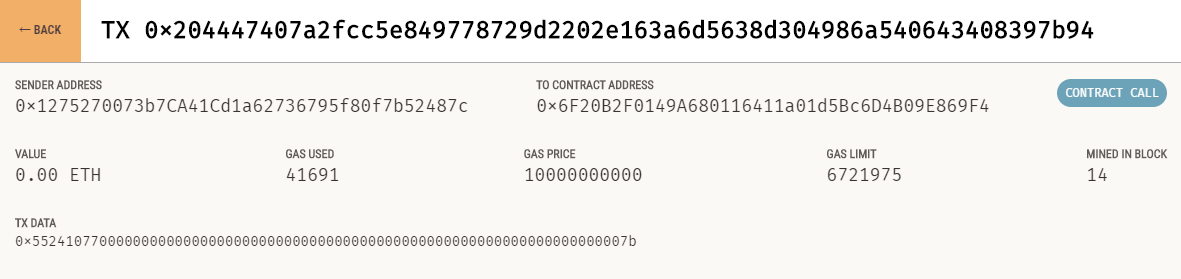
参考文章
【阿菜用工具】利用 Web3.js 在 ganache 上部署以及调用智能合约的更多相关文章
- web3.js编译Solidity,发布,调用全部流程(手把手教程)
web3.js编译Solidity,发布,调用全部流程(手把手教程) 下面教程是打算在尽量牵涉可能少的以太坊的相关工具,主要使用web3.js这个以太坊提供的工具包,来完成合约的编译,发布,合约方法调 ...
- 利用exif.js解决手机上传竖拍照片旋转90\180\270度问题
原文:https://blog.csdn.net/linlzk/article/details/48652635/ html5+canvas进行移动端手机照片上传时,发现ios手机上传竖拍照片会逆时针 ...
- 如何利用docker 构建golang线上部署环境
公司最近开发了一个项目是用golang 写的,现在要部署到线上环境去,又不想在服务器上装单独的golang,决定用docker 封装下,直接打到镜像里面,然后就直接在hub.docker.com上面搜 ...
- 【阿菜用工具】Slither:Solidity静态分析框架
工具简介 Slither 是一个 python3 开发,用于检测智能合约(solidity)漏洞的静态分析框架. Slither 的 Github 地址:https://github.com/cryt ...
- 以太坊 web3.js 文档翻译及说明
这些天,为了录制以太坊DAPP开发实战课程,我准备把web3文档全部翻译一下(并做适当的补充),目前web3.js 0.20.x 版本 已经翻译完成,欢迎大家前往查阅. 这里还几个实用DEMO,供大家 ...
- nodejs部署智能合约的方法-web3 0.20版本
参考:https://www.jianshu.com/p/7e541cd67be2 部署智能合约的方法有很多,比如使用truffle框架,使用remix-ide等,在这里的部署方法是使用nodejs一 ...
- 利用n 升级工具升级Node.js版本及在mac环境下的坑
一.利用n 升级Node.js 最近在用NPM安装一个nodejs工具时发现,我的nodejs的版本有些旧了.这不是大问题,只要升级就可以了,当然,重新从nodejs.org最新版本是一种方法,但我想 ...
- 利用tween.js算法生成缓动效果
在讲tween类之前,不得不提的是贝塞尔曲线了.首先,贝塞尔曲线是指依据四个位置任意的点坐标绘制出的一条光滑曲线.它在作图工具或动画中中运用得比较多,例如PS中的钢笔工具,firework中的画笔等等 ...
- 【转】利用 three.js 开发微信小游戏的尝试
前言 这是一次利用 three.js 开发微信小游戏的尝试,并不能算作是教程,只能算是一篇笔记吧. 微信 WeChat 6.6.1 开始引入了微信小游戏,初期上线了一批质量相当不错的小游戏.我在查阅各 ...
随机推荐
- Spring Boot WebFlux-09——WebFlux 集成测试及部署
第09课:WebFlux 集成测试及部署 前言 在日常工作中,免不了自测 UT,因为覆盖率不达标,是不允许提交测试,那怎么进行 WebFlux 项目的测试呢.@WebFluxTest 是 WebFlu ...
- CMD批处理(1)——批处理常用命令总结
echo 打开回显或关闭回显功能,或显示消息.如果没有任何参数,echo命令将显示当前的回显设置. 命令格式1:echo [{on|off}] 命令格式2:echo [message] 例.在命令 ...
- 旁路电容的PCB布局布线透彻详解(4)
原文地址点击这里: 前面使用了较多的篇幅介绍旁路电容的工作原理及其选择依据,我们已经能够为电路系统中相应的数字集成芯片选择合适的旁路电容,在实际应用过程中,旁路电容的PCB布局布线也会影响到高频噪声旁 ...
- 精尽Spring Boot源码分析 - 文章导读
该系列文章是笔者在学习 Spring Boot 过程中总结下来的,里面涉及到相关源码,可能对读者不太友好,请结合我的源码注释 Spring Boot 源码分析 GitHub 地址 进行阅读 Sprin ...
- python随机漫步
- 面向.NET开发人员的Dapr- actors 构建块
原文地址:https://docs.microsoft.com/en-us/dotnet/architecture/dapr-for-net-developers/actors The actor m ...
- 8、mysql乱码问题及字符集实战
8.1.mysql插入中文数据乱码案例: mysql建库的字符集为latin1,客户端的字符集为utf8; use lc; 1.查看库的编码: mysql> show create databa ...
- 22、oracle子查询
22.1.什么是子查询: 1.子查询就是在一条sql语句中嵌入select语句: 2.子查询可区分为关联子查询和非关联子查询,他们和主查询之间的执行顺序和关系是不同的: 22.2.关联子查询: 1.说 ...
- jquery 选择器 模糊匹配
根据name值匹配 1.查询前缀为aa的数据 $("div[name^='aa']"); 2.查询后缀为aa的所有div的jquery对象 $("div[name$='a ...
- vim 知识点小结
vim用法可以学习:vim用法 Vim修改tab为4个空格 vi /etc/vim/vimrc 添加:set ts=4 vim中翻页的快捷键:向上翻页 ctrl+b,向下翻页 ctrl+f vim替换 ...