
Ubuntu20.04 网络配置
Ubuntu20.04 网络配置
设置 ROOT 密码
- 先设置 root 密码,后面直接使用 root 用户操作
it@it:~$ sudo passwd root

[sudo] password for it:

New password:

Retype new password:

passwd: password updated successfully
网络管理工具 netplan
- 在 Ubuntu20.04 版本中使用 netplan 管理网络
- 在安装好的 Ubuntu20.04 中没有 networking 和 NetworkManage 服务
- netplan 配置文件:/etc/netplan/*.yaml ,文件名每个不一样
- netplan 示例文件: /usr/share/doc/netplan/example/ 目录下,在该目录下有各种示例文件,可以提供帮助
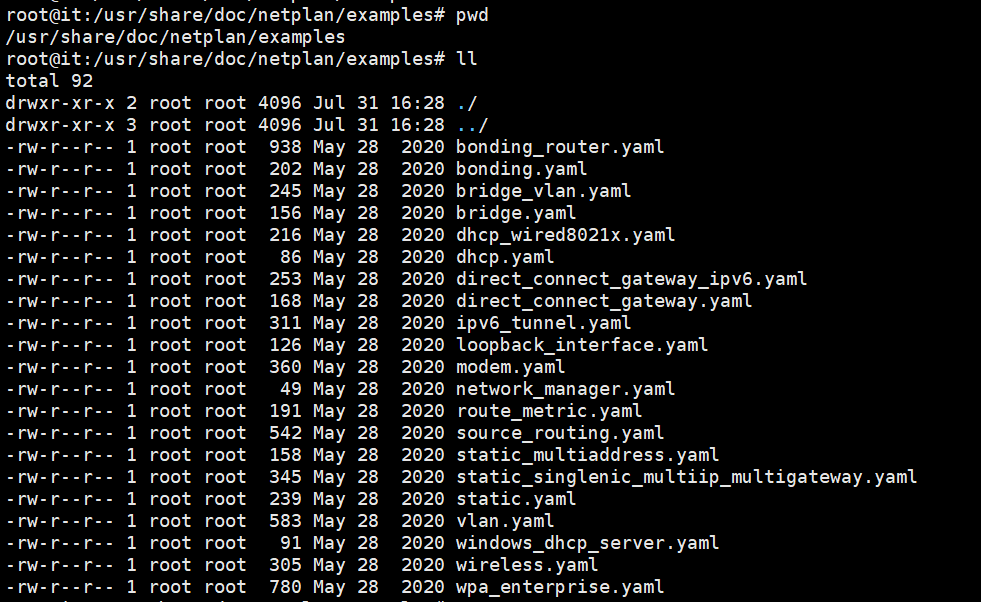
修改网卡配置
- 编辑网络配置文件
root@it:~# vim /etc/netplan/00-installer-config.yaml

# This is the network config written by 'subiquity'

network:

  ethernets:

    ens32:

      addresses:

      - 192.168.121.25/24

      gateway4: 192.168.121.2

      nameservers:

        addresses:

        - 8.8.8.8

  version: 2
- 加载刚刚修改的配置文件信息
root@it:~# netplan apply

root@it:~#
- 没有提示报错信息,说明配置成功
root@it:~# ip add

1: lo: <LOOPBACK,UP,LOWER_UP> mtu 65536 qdisc noqueue state UNKNOWN group default qlen 1000

    link/loopback 00:00:00:00:00:00 brd 00:00:00:00:00:00

    inet 127.0.0.1/8 scope host lo

       valid_lft forever preferred_lft forever

    inet6 ::1/128 scope host

       valid_lft forever preferred_lft forever

2: ens32: <BROADCAST,MULTICAST,UP,LOWER_UP> mtu 1500 qdisc fq_codel state UP group default qlen 1000

    link/ether 00:0c:29:16:8d:18 brd ff:ff:ff:ff:ff:ff

    inet 192.168.121.25/24 brd 192.168.121.255 scope global ens32

       valid_lft forever preferred_lft forever

    inet6 fe80::20c:29ff:fe16:8d18/64 scope link

       valid_lft forever preferred_lft forever
netplan 帮助信息
root@it:~# netplan help

usage: /usr/sbin/netplan  [-h] [--debug]  ...

Network configuration in YAML        #YAML中的网络配置

optional arguments:

  -h, --help  show this help message and exit        #显示此帮助信息并退出

  --debug     Enable debug messages        #启用调试消息

Available commands:

    help      Show this help message        #显示帮助信息

    apply     Apply current netplan config to running system         #应用当前netplan配置到运行系统

    generate  Generate backend specific configuration files from /etc/netplan/*.yaml       #从/etc/netplan/*.yaml中生成特定后端配置文件

    info      Show current netplan version and available features       #显示当前netplan版本和可用特性

    ip        Retrieve IP information from the system        #从系统中检索IP信息

    try       Try to apply a new netplan config to running system, with automatic rollback        #尝试将新的netplan配置应用到正在运行的系统,并自动回滚
- 启用调试信息
root@it:~# netplan --debug apply

** (generate:3189): DEBUG: 01:15:27.908: Processing input file /etc/netplan/00-installer-config.yaml..

** (generate:3189): DEBUG: 01:15:27.908: starting new processing pass

** (generate:3189): DEBUG: 01:15:27.908: We have some netdefs, pass them through a final round of validation

** (generate:3189): DEBUG: 01:15:27.908: ens32: setting default backend to 1

** (generate:3189): DEBUG: 01:15:27.908: Configuration is valid

** (generate:3189): DEBUG: 01:15:27.908: Generating output files..

** (generate:3189): DEBUG: 01:15:27.908: NetworkManager: definition ens32 is not for us (backend 1)

(generate:3189): GLib-DEBUG: 01:15:27.908: posix_spawn avoided (fd close requested)

DEBUG:netplan generated networkd configuration changed, restarting networkd

DEBUG:no netplan generated NM configuration exists

DEBUG:ens32 not found in {}

DEBUG:Merged config:

network:

  bonds: {}

  bridges: {}

  ethernets:

    ens32:

      addresses:

      - 192.168.121.25/24

      gateway4: 192.168.121.2

      nameservers:

        addresses:

        - 8.8.8.8

  vlans: {}

  wifis: {}

DEBUG:Skipping non-physical interface: lo

DEBUG:device ens32 operstate is up, not changing

DEBUG:{}

DEBUG:netplan triggering .link rules for lo

DEBUG:netplan triggering .link rules for ens32
Ubuntu20.04 网络配置的更多相关文章
- ubuntu20.04 apache2 配置安装ssl证书
1. 获取SSL证书 根据自己的网站服务器来获取不同的ssl证书,我的服务器是ubuntu20.04. 证书如下: 00_***.key ## 私钥文件 01_CERTIFICATE_***_***. ...
- ubuntu12.04网络配置
1.配置/etc/network/interfaces #静态IP地址 auto lo iface lo inet loopback #loopback虚拟网络设备,使TCP/IP能以127.0.0. ...
- Ubuntu16.04 网络配置
Ubuntu 网络配置 安装Ubuntu操作系统之后,为了通过Xshell连接主机,或者连接其他主机.需要进行如下网络配置和ssh服务配置. 1 网络配置 1.1 修改网络配置信息 sudo vi / ...
- ubuntu14.04 网络配置
流程分析: 在Ubuntu系统网络设备启动的流程中,会依赖/etc/network/interface的配置文件初始化网络接口,所以直接在/etc/network/interface之中配置好对应的d ...
- ubuntu 16.04 网络配置之虚拟网卡的配置
关于图形界面的配置,我这里就不多介绍了,这个很简单.这里介绍的是如何通过修改配置文件来实现虚拟网卡. 首先介绍ubuntu(我这里使用的是ubuntu-16.04)下虚拟网卡的配置 1.先用ifcon ...
- ubuntu 12.04网络配置之设置静态iP
step: 1.输入命令: sudo vi /etc/network/interfaces 看到如下内容: 2.追加以下内容: iface eth0 inet static address 192.1 ...
- ubuntu-server14.04 网络配置
一.启动网卡 ubuntu server 安装后,ifconfig 发现只有一个lo 和一个p1p1 网卡, 先查看服务器网卡:ifconfig -a ,发现有lo ,p1p1,p2p1,p3p1,p ...
- ubuntu server 18.04 网络配置
从17.10开始放弃在/etc/network/interfaces里固定IP的配置 配置文件是:/etc/netplan/50-cloud-init.yaml .用缩进来表示层级关系 冒号之后要有个 ...
- vmwareubuntu18.04网络配置
用vm安装ubuntu的时候要如果使用的是net模式,要确保vm的net服务和dhcp服务开启了,右键我的电脑-管理-服务和应用程序-服务找到对应的vm net服务和dhcp服务启动.
随机推荐
- 抗DDOS应急预案实践-生产环境总结-建议必看
一.首先摸清楚环境与资源 为DDoS应急预案提供支撑 所在的网络环境中,有多少条互联网出口?每一条带宽多少? 每一条互联网出口的运营商是否支持DDoS攻击清洗,我们是否购买,或可以紧急试用?当发生DD ...
- Webpack的基本配置和打包与介绍
1. 前言 1.1 Webpack是什么 可能有很多的小伙伴对于这个Webpack既熟悉又陌生,有一些刚开始接触vue的小伙伴在对项目进行打包的时候经常会使用到npm run build来进行打包,但 ...
- 「性能提升」扩展 Spring Cache 支持多级缓存
为什么多级缓存 缓存的引入是现在大部分系统所必须考虑的 redis 作为常用中间件,虽然我们一般业务系统(毕竟业务量有限)不会遇到如下图 在随着 data-size 的增大和数据结构的复杂的造成性能下 ...
- linux 查看cpu型号、memory
查看CPU信息(型号) [root@TX-220-60-211 supdev]# cat /proc/cpuinfo | grep name | cut -f2 -d: | uniq -c 40 In ...
- 安装电脑思考到了Java设计模式:建造者模式
目录 定义 意图 主要解决问题 何时使用 优缺点 结构 组装电脑的例子 定义 建造者模式是对象的创建型模式,可以将一个产品的内部表象与产品的生成过程分割开来,从而可以使一个建造过程生成具有不同的内部表 ...
- HTTP/1.1、HTTP/2、HTTP/3 演变
HTTP/1.1 相比 HTTP/1.0 提高了什么性能? 针对 HTTP/1.1 的性能瓶颈,HTTP/2 做了什么优化? HTTP/2 有哪些缺陷?HTTP/3 做了哪些优化? HTTP/1.1 ...
- 程序员的开源月刊《HelloGitHub》第61期
兴趣是最好的老师,HelloGitHub 让你对编程感兴趣! 简介 分享 GitHub 上有趣.入门级的开源项目. 内容包括:有趣.入门级的开源项目.开源书籍.实战项目.企业级项目等,让你在短时间内感 ...
- 1438. Longest Continuous Subarray With Absolute Diff Less Than or Equal to Limit
Given an array of integers nums and an integer limit, return the size of the longest continuous suba ...
- Android敲诈者病毒“安卓性能激活”分析(2015年9月版)
一.情况简介 前几天分析了论坛里的一个Android敲诈者病毒,感觉还是很有收获,后面有空多研究研究Android病毒.说句题外话, 根据前面分析的Android敲诈者病毒的隐藏手法,应该可以实现&q ...
- Windows中动态磁盘管理
目录 动态磁盘 基本磁盘和动态磁盘的转换 简单卷 跨区卷 带区卷 镜像卷 RAID-5卷 相关文章:硬盘分区形式(MBR.GPT).系统引导.文件系统.Inode和Block 动态磁盘 Windows ...