
基于Spring MVC + Spring + MyBatis的【密室逃脱游戏主题排行榜】
资源下载:
https://download.csdn.net/download/weixin_44893902/25706959
一、语言和环境
1. 实现语言:Java语言
2. 环境要求:eclipse/myeclipse /idea、maven、mysql
3. 使用技术:Spring、SpringMVC、MyBatis、连接池和 json 包自行选择
二、实现功能
密室逃脱游戏越来越受年轻人的喜欢,现在将各地密室游戏主题进行排名,评选2021年度最受玩家喜欢的密室主题。
说明:下列界面样式仅供参考,实际完成效果美观合理即可。
1、显示数据
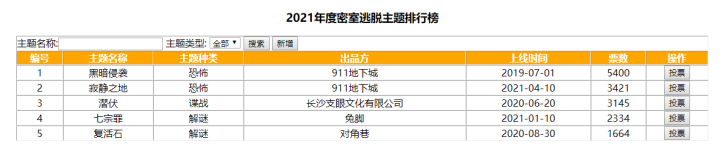
根据图1格式,显示t_games表中所有的数据,并且按照【票数】列进行降序排序,其实【主题种类】一列在t_games表存的是数字,需结合t_gamesType表中对应id值显示出种类文字。每行数据后面有一个投票按钮可向对应主题进行投票。
2、查询数据
可根据【主题名称】和【主题类型】进行数据查询。若【主题名称】为空,则按照【主题类型】查询,若【主题名称】不为空,则需要根据【主题名称】进行模糊查询并且也要结合【主题类型】查询。【主题类型】需是下拉框,且里面的选项是从数据库表t_gamesType中查询出来。如图所示。

3、投票功能
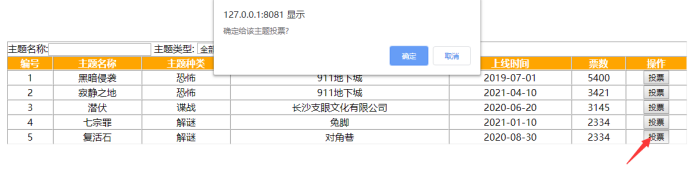
点击【操作】列中的投票按钮,弹出一个二次确认框,再次点击确定,可为对应的主题投票,投票成功后,该数据票数+1,如图所示:
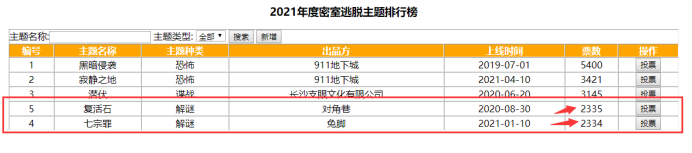
投票数据刷新后,若票数有变化,要按新的数据进行降序排序,如图所示:
4、新增主题
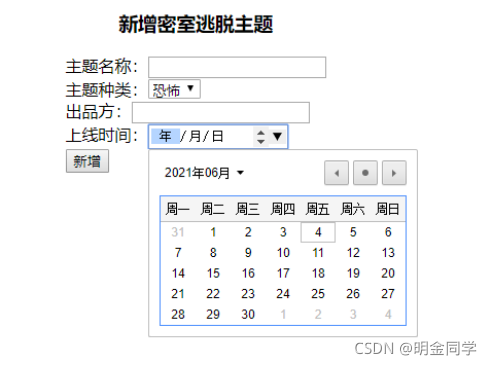
点击新增按钮,进入新增页面,主题种类中的选项需要去数据库中t_gamesType表查询,上线时间需要date控件,点击新增按钮后,将数据插入数据表中,新增主题票数默认为0,并返回主页面显示最新数据,如图所示:
三、数据库设计
1、创建数据库:gamesDB。
2、创建密室排行数据表(t_games)
结构如下:
表名:t_ games
实体名称:密室排行数据表
主键:id
| 序号 | 字段名称 | 字段说明 | 类型 | 位数 | 属性 | 备注 |
|---|---|---|---|---|---|---|
| 1 | id | 主键 | int | 11 | 非空 | id主键列,自增1 |
| 2 | gamesName | 密室主题名 | varchar | 50 | 非空 | |
| 3 | gamesType | 密室类型编号 | int | 11 | 非空 | 外键,t_gamesType表中id |
| 4 | producers | 出品方 | Varchar | 50 | 非空 | |
| 5 | uptime | 上线时间 | date | 非空 | ||
| 6 | votes | 票数 | int | 11 | 非空 | 默认值为0 |
四、推荐步骤
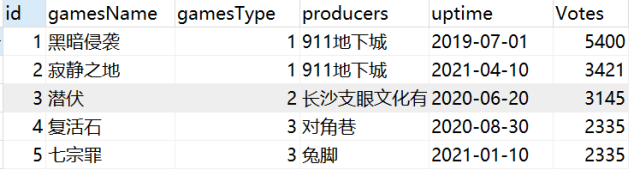
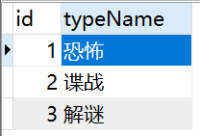
1、使用MySql创建数据库,创建对应的2张表,按照要求插入数据。
t_games表
t_gamesType表
2、使用开发工具创建项目,使用maven添加spring、springMVC、mybatis、连接池等相关依赖坐标。
3、完成MyBatis持久层功能操作,分别针对2个表完成对应的功能编写。
4、完成业务逻辑层接口、实现类的功能实现。
5、完成控制器对应的功能编写
6、创建界面分别和控制器进行交互实现相应的功能
7 斜体样式、部署项目到Tomcat,运行访问测试项目是否正常
五、实现代码
1、MySQL数据库
gamesdb.sql
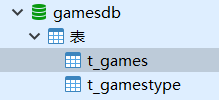
/*

Navicat MySQL Data Transfer

Date: 2021-07-27 20:29:20

*/

SET FOREIGN_KEY_CHECKS=0;

-- ----------------------------

-- Table structure for `t_games`

-- ----------------------------

DROP TABLE IF EXISTS `t_games`;

CREATE TABLE `t_games` (

  `id` int(11) NOT NULL AUTO_INCREMENT,

  `games_name` varchar(255) DEFAULT NULL,

  `games_type` int(11) DEFAULT NULL,

  `producers` varchar(255) DEFAULT NULL,

  `uptime` varchar(255) DEFAULT NULL,

  `votes` int(11) unsigned zerofill DEFAULT NULL,

  PRIMARY KEY (`id`)

) ENGINE=InnoDB AUTO_INCREMENT=6 DEFAULT CHARSET=utf8;

-- ----------------------------

-- Records of t_games

-- ----------------------------

INSERT INTO `t_games` VALUES ('1', '黑暗侵袭', '1', '911地下城', '2019-07-01', '00000005400');

INSERT INTO `t_games` VALUES ('2', '寂静之地', '1', '911地下城', '2021-04-10', '00000003421');

INSERT INTO `t_games` VALUES ('3', '潜伏', '2', '长沙支眼文化有限公司', '2020-06-20', '00000002339');

INSERT INTO `t_games` VALUES ('4', '复活石', '3', '对角巷', '2020-08-30', '00000002340');

INSERT INTO `t_games` VALUES ('5', '西游记', '1', '文化传媒', '2021-07-27', '00000000007');

-- ----------------------------

-- Table structure for `t_gamestype`

-- ----------------------------

DROP TABLE IF EXISTS `t_gamestype`;

CREATE TABLE `t_gamestype` (

  `id` int(11) NOT NULL AUTO_INCREMENT,

  `type_name` varchar(50) DEFAULT NULL,

  PRIMARY KEY (`id`)

) ENGINE=InnoDB AUTO_INCREMENT=4 DEFAULT CHARSET=utf8;

-- ----------------------------

-- Records of t_gamestype

-- ----------------------------

INSERT INTO `t_gamestype` VALUES ('1', '恐怖');

INSERT INTO `t_gamestype` VALUES ('2', '谍战');

INSERT INTO `t_gamestype` VALUES ('3', '解谜');
2、JAVA代码
gamesDB
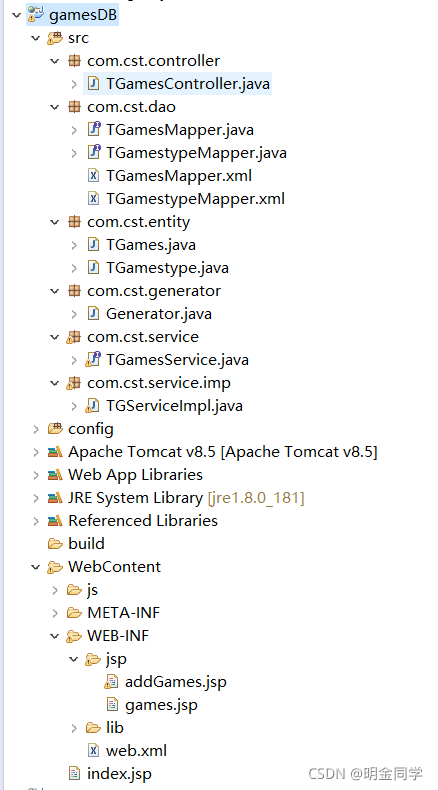
(1) com.cst.controller【控制层】
① TGamesController,java
package com.cst.controller;

import java.util.List;

import javax.annotation.Resource;

import org.springframework.stereotype.Controller;

import org.springframework.ui.Model;

import org.springframework.web.bind.annotation.RequestMapping;

import com.cst.entity.TGames;

import com.cst.service.TGamesService;

@Controller

public class TGamesController {

	@Resource

	TGamesService tGamesService;

	//查询所有数据,模糊查询

	@RequestMapping("/tGamesList")

	public String accountList(Model model,String keyword,String type){

		List<TGames> selectAll = tGamesService.selectAll(keyword,type);

		model.addAttribute("selectAll",selectAll);

		return "games";

	}

	//进入添加的方法

	@RequestMapping("/addGames")

	public String addAccount() {

		return "addGames";

	}

	//执行添加的操作

	@RequestMapping("/addGamesDo")

	public String addAccountDo(TGames games) {

		games.setVotes(0);

		int users = tGamesService.insert(games);

		if (users>0) {

			return "redirect:/tGamesList.do";

		}else {

			return "forward:/addGames.do";

		}

	}

	@RequestMapping("/updateGamesDo")

	public String updateGamesDo(Integer id,Integer votes) {

		TGames games=new TGames();

		int votes1=votes+1;

		games.setId(id);

		games.setVotes(votes1);

		tGamesService.updateByPrimaryKey(games);

		return "redirect:/tGamesList.do";

	}

}
(2) com.cst.dao【数据库访问层】
① TGamesMapper.java
package com.cst.dao;

import com.cst.entity.TGames;

import java.util.List;

import org.apache.ibatis.annotations.Param;

public interface TGamesMapper {

    int deleteByPrimaryKey(Integer id);

    int insert(TGames record);

    TGames selectByPrimaryKey(Integer id);

    List<TGames> selectAll(@Param("keyword")String keyword,@Param("type")String type);

    int updateByPrimaryKey(TGames record);

}
② TGamestypeMapper.java
package com.cst.dao;

import com.cst.entity.TGamestype;

import java.util.List;

public interface TGamestypeMapper {

    int deleteByPrimaryKey(Integer id);

    int insert(TGamestype record);

    TGamestype selectByPrimaryKey(Integer id);

    List<TGamestype> selectAll();

    int updateByPrimaryKey(TGamestype record);

}
③ TGamesMapper.xml
<?xml version="1.0" encoding="UTF-8" ?>

<!DOCTYPE mapper PUBLIC "-//mybatis.org//DTD Mapper 3.0//EN" "http://mybatis.org/dtd/mybatis-3-mapper.dtd" >

<mapper namespace="com.cst.dao.TGamesMapper" >

  <resultMap id="BaseResultMap" type="com.cst.entity.TGames" >

    <id column="id" property="id" jdbcType="INTEGER" />

    <result column="games_name" property="gamesName" jdbcType="VARCHAR" />

    <result column="games_type" property="gamesType" jdbcType="INTEGER" />

    <result column="producers" property="producers" jdbcType="VARCHAR" />

    <result column="uptime" property="uptime" jdbcType="VARCHAR" />

    <result column="votes" property="votes" jdbcType="INTEGER" />

    <result column="type_name" property="typeName" jdbcType="VARCHAR" />

  </resultMap>

  <delete id="deleteByPrimaryKey" parameterType="java.lang.Integer" >

    delete from t_games

    where id = #{id,jdbcType=INTEGER}

  </delete>

  <insert id="insert" parameterType="com.cst.entity.TGames" >

    insert into t_games (id, games_name, games_type,

      producers, uptime, votes

      )

    values (#{id,jdbcType=INTEGER}, #{gamesName,jdbcType=VARCHAR}, #{gamesType,jdbcType=INTEGER},

      #{producers,jdbcType=VARCHAR}, #{uptime,jdbcType=VARCHAR}, #{votes,jdbcType=INTEGER}

      )

  </insert>

  <update id="updateByPrimaryKey" parameterType="com.cst.entity.TGames" >

    update t_games

    set votes = #{votes,jdbcType=INTEGER}

    where id = #{id,jdbcType=INTEGER}

  </update>

  <select id="selectByPrimaryKey" resultMap="BaseResultMap" parameterType="java.lang.Integer" >

    select id, games_name, games_type, producers, uptime, votes

    from t_games

    where id = #{id,jdbcType=INTEGER}

  </select>

  <select id="selectAll" resultMap="BaseResultMap" >

    select g.id, games_name, type_name, producers, uptime, votes

    from t_games g,t_gamestype t where g.games_type=t.id

    <if test="keyword!=null and keyword!=''">

		and games_name like concat('%', #{keyword}, '%')

	</if>

	<if test="type!=null and type!=''">

		and type_name=#{type}

	</if>

	order by votes desc

  </select>

</mapper>
④ TGamestypeMapper.xml
<?xml version="1.0" encoding="UTF-8" ?>

<!DOCTYPE mapper PUBLIC "-//mybatis.org//DTD Mapper 3.0//EN" "http://mybatis.org/dtd/mybatis-3-mapper.dtd" >

<mapper namespace="com.cst.dao.TGamestypeMapper" >

  <resultMap id="BaseResultMap" type="com.cst.entity.TGamestype" >

    <id column="id" property="id" jdbcType="INTEGER" />

    <result column="type_name" property="typeName" jdbcType="VARCHAR" />

  </resultMap>

  <delete id="deleteByPrimaryKey" parameterType="java.lang.Integer" >

    delete from t_gamestype

    where id = #{id,jdbcType=INTEGER}

  </delete>

  <insert id="insert" parameterType="com.cst.entity.TGamestype" >

    insert into t_gamestype (id, type_name)

    values (#{id,jdbcType=INTEGER}, #{typeName,jdbcType=VARCHAR})

  </insert>

  <update id="updateByPrimaryKey" parameterType="com.cst.entity.TGamestype" >

    update t_gamestype

    set type_name = #{typeName,jdbcType=VARCHAR}

    where id = #{id,jdbcType=INTEGER}

  </update>

  <select id="selectByPrimaryKey" resultMap="BaseResultMap" parameterType="java.lang.Integer" >

    select id, type_name

    from t_gamestype

    where id = #{id,jdbcType=INTEGER}

  </select>

  <select id="selectAll" resultMap="BaseResultMap" >

    select id, type_name

    from t_gamestype

  </select>

</mapper>
(3) com.cst.entity 【存放实体的包】
① TGames.java
package com.cst.entity;

public class TGames {

    private Integer id;

    private String gamesName;

    private Integer gamesType;

    private String producers;

    private String uptime;

    private Integer votes;

    private String typeName;

    public String getTypeName() {

        return typeName;

    }

    public void setTypeName(String typeName) {

        this.typeName = typeName == null ? null : typeName.trim();

    }

    public Integer getId() {

        return id;

    }

    public void setId(Integer id) {

        this.id = id;

    }

    public String getGamesName() {

        return gamesName;

    }

    public void setGamesName(String gamesName) {

        this.gamesName = gamesName == null ? null : gamesName.trim();

    }

    public Integer getGamesType() {

        return gamesType;

    }

    public void setGamesType(Integer gamesType) {

        this.gamesType = gamesType;

    }

    public String getProducers() {

        return producers;

    }

    public void setProducers(String producers) {

        this.producers = producers == null ? null : producers.trim();

    }

    public String getUptime() {

        return uptime;

    }

    public void setUptime(String uptime) {

        this.uptime = uptime == null ? null : uptime.trim();

    }

    public Integer getVotes() {

        return votes;

    }

    public void setVotes(Integer votes) {

        this.votes = votes;

    }

}
② TGamestype.java
package com.cst.entity;

public class TGamestype {

    private Integer id;

    private String typeName;

    public Integer getId() {

        return id;

    }

    public void setId(Integer id) {

        this.id = id;

    }

    public String getTypeName() {

        return typeName;

    }

    public void setTypeName(String typeName) {

        this.typeName = typeName == null ? null : typeName.trim();

    }

}
(4) com.cst.generator【实体类自动生成包】
① Generator.java
package genter;

import java.io.IOException;

import java.io.InputStream;

import java.sql.SQLException;

import java.util.ArrayList;

import java.util.List;

import org.mybatis.generator.api.MyBatisGenerator;

import org.mybatis.generator.config.Configuration;

import org.mybatis.generator.config.xml.ConfigurationParser;

import org.mybatis.generator.exception.InvalidConfigurationException;

import org.mybatis.generator.exception.XMLParserException;

import org.mybatis.generator.internal.DefaultShellCallback;

public class Generator {

/*

 * targetRuntime="MyBatis3Simple", 不生成Example

 */

public void generateMyBatis() {

	//MBG执行过程中的警告信息

	List<String> warnings = new ArrayList<String>();

	//当生成的代码重复时,覆盖原代码

	boolean overwrite = true ;

	String generatorFile = "/generatorConfig.xml";

	//String generatorFile = "/generator/generatorConfigExample.xml";

	//读取MBG配置文件

	InputStream is = Generator.class.getResourceAsStream(generatorFile);

	ConfigurationParser cp = new ConfigurationParser(warnings);

	Configuration config;

	try {

		config = cp.parseConfiguration(is);

		DefaultShellCallback callback = new DefaultShellCallback(overwrite);

		//创建MBG

		MyBatisGenerator myBatisGenerator = new MyBatisGenerator(config, callback, warnings);

		//执行生成代码

		myBatisGenerator.generate(null);

	} catch (IOException e) {

		e.printStackTrace();

	} catch (XMLParserException e) {

		e.printStackTrace();

	} catch (InvalidConfigurationException e) {

		e.printStackTrace();

	} catch (SQLException e) {

		e.printStackTrace();

	} catch (InterruptedException e) {

		e.printStackTrace();

	}

	for (String warning : warnings) {

		System.out.println(warning);

	}

}

public static void main(String[] args) {

	Generator generator = new Generator();

	generator.generateMyBatis();

}

}
(5) com.cst.service【与页面进行交互】
① TGamesService.java
package com.cst.service;

import java.util.List;

import com.cst.entity.TGames;

import com.cst.entity.TGamestype;

public interface TGamesService {

	    int insert(TGames record);

	    List<TGames> selectAll(String keyword,String type);

	    int updateByPrimaryKey(TGames record);

}
(6) com.cst.service.imp【service的实现类】
① TGServiceImpl.java
package com.cst.service.imp;

import java.util.List;

import javax.annotation.Resource;

import org.springframework.stereotype.Service;

import com.cst.dao.TGamesMapper;

import com.cst.entity.TGames;

import com.cst.entity.TGamestype;

import com.cst.service.TGamesService;

@Service

public class TGServiceImpl implements TGamesService{

	@Resource

	TGamesMapper tgamesMapper;

	@Override

	public List<TGames> selectAll(String keyword,String type) {

		// TODO Auto-generated method stub

		List<TGames> tGamesList=tgamesMapper.selectAll(keyword,type);

		return tGamesList;

	}

	@Override

	public int insert(TGames record) {

		// TODO Auto-generated method stub

		int add=tgamesMapper.insert(record);

		return add;

	}

	@Override

	public int updateByPrimaryKey(TGames record) {

		// TODO Auto-generated method stub

		int updateByPrimaryKey = tgamesMapper.updateByPrimaryKey(record);

		return updateByPrimaryKey;

	}

}
3、JSP页面
(1) Index.jsp【设置默认打开页面】
<%@ page language="java" contentType="text/html; charset=utf-8"

    pageEncoding="utf-8"%>

<!DOCTYPE html>

<html>

<head>

<meta charset="utf-8">

<title>Insert title here</title>

</head>

<body>

<%

	String path=request.getContextPath();

	String basePath = request.getScheme()+"://"+request.getServerName()+":"+request.getServerPort()+path;

%>

<script type="text/javascript">

window.location.href="<%=basePath%>/tGamesList.do";

</script>

</body>

</html>
(2) games.jsp【主页面】
<%@ page language="java" contentType="text/html; charset=UTF-8" pageEncoding="UTF-8"%>
<%@ taglib uri="http://java.sun.com/jsp/jstl/core" prefix="c" %>
<!DOCTYPE html PUBLIC "-//W3C//DTD HTML 4.01 Transitional//EN" "http://www.w3.org/TR/html4/loose.dtd">
<html>
<head>
<meta http-equiv="Content-Type" content="text/html; charset=UTF-8">
<title>Insert title here</title>
<%
String path = request.getContextPath();
String basePath = request.getScheme()+"://"+request.getServerName()+":"+request.getServerPort()+path;
%>
<style>
.wrap{
width: 80%;
margin: 0 auto;
}
h1 {
width:40%;
margin:0 auto;
}
a{
text-decoration: none;
}
p{
text-align: right;
}
h2{
position:relative;
left:40%;
}
tr:hover{
background: orange;
}
img{
width:100%;
height:100%;
}
</style>
</head>
<body>
<div style="width: 70%;margin: 0 auto;">
<h2>2021年密室逃脱主题排行榜</h2>
<fieldset>
<legend>搜索</legend>
<div style="margin:10px">
<form action="tGamesList.do" >
主题名称:<input type="text" name="keyword" id="keyword" value="" />
类型:<select name="type">
<option selected="selected" value="">请选择</option>
<option value="恐怖">恐怖</option>
<option value="谍战">谍战</option>
<option value="解谜">解谜</option>
</select>
<input type="submit" value="搜索"/>
<a href="addGames.do"><input type="button" value="新增"/></a>
</form>
</div>
</fieldset>
<hr/>
<table width="100%" border="1px" cellpadding="5" cellspacing="0">
<tr style="background-color: gray;">
<td width="10%" align="center" >编号</td>
<td width="15%" align="center">主题名称</td>
<td width="10%" align="center">主题种类</td>
<td width="20%" align="center">出品方</td>
<td width="15%" align="center">上线时间</td>
<td width="10%" align="center">票数</td>
<td align="center" width="15%">操作</td>
</tr>
<c:forEach items="${selectAll}" var="games">
<tr align="center">
<td>
${games.id}
</td>
<td>
${games.gamesName}
</td>
<td>
${games.typeName}
</td>
<td>
${games.producers}
</td>
<td>
${games.uptime}
</td>
<td>
${games.votes}
</td>
<td>
<a href="#" onclick="delAccount(${games.id},${games.votes})">投票</a>
</td>
</tr>
</c:forEach>
<tr style="text-align: center;background-color: white;">
<td colspan="6"></td>
<td>
共计${selectAll.size()}条数据
</td>
</tr>
</table>
</div>
</body>
<script src="<%=request.getContextPath()%>/js/jquery-1.9.1.min.js"></script>
<script type="text/javascript">
function delAccount(id,votes) {
if(confirm("确定投票吗?")){
location.href="updateGamesDo.do?id="+id+"&votes="+votes;
}
}
</script>
</html>
(3) addGames.jsp【添加页面】
<%@ page language="java" contentType="text/html; charset=UTF-8"

    pageEncoding="UTF-8"%>

<html>

	<head>

		<meta charset="UTF-8">

		<title></title>

		<style type="text/css">

			body{

				width: 100%;

			}

			.wrap_table{

				width: 40%;

				margin: 0 auto;

				text-align: center;

			}

			table{

				text-align: center;

				margin: 0 auto;

			}

		</style>

	</head>

	<body>

		<div class="wrap_table">

		<h2>新增密室逃脱主题</h2>

			<form action="addGamesDo.do" method="post">

				<table border="1" cellspacing="" cellpadding="">

				<tr>

					<td>名称:</td>

					<td><input type="text" name="gamesName" id="name" value="" /></td>

				<tr>

					<td>类型</td>

					<td>

						<select name="gamesType">

							<option selected="selected" value="">请选择</option>

							<option value="1">恐怖</option>

							<option value="2">谍战</option>

							<option value="3">解谜</option>

					</select>

					</td>

				</tr>

				<tr>

					<td>出品方:</td>

					<td><input type="text" name="producers" id="producers" value="" /></td>

				</tr>

				<tr>

					<td>上线时间:</td>

					<td><input type="date" name="uptime" id="number" value="" /></td>

				</tr>

				<tr>

					<td colspan="2">

						<input type="button" name="" id="button" onclick="addAccount()" value="确定" />

						<input type="reset" name="" id="" value="重置" />

					</td>

				</tr>

			</table>

			</form>

		</div>

	<script type="text/javascript">

		function addAccount() {

			var name = document.getElementById("name").value;

			var number = document.getElementById("number").value;

			var money = document.getElementById("producers").value;

			var button = document.getElementById("button");

			console.log(button)

			if(name==""){

				alert("名称不能为空!");

				return false;

			}else if(number==""){

				alert("日期不能为空!");

				return false;

			}else if(money==""){

				alert("出品方不能为空!");

				return false;

			}else{

				button.setAttribute("type","submit");

			}

		}

	</script>

	</body>

</html>
(4) web.xml【xml配置】
<?xml version="1.0" encoding="UTF-8"?>

<web-app xmlns:xsi="http://www.w3.org/2001/XMLSchema-instance" xmlns="http://xmlns.jcp.org/xml/ns/javaee" xsi:schemaLocation="http://xmlns.jcp.org/xml/ns/javaee http://xmlns.jcp.org/xml/ns/javaee/web-app_3_1.xsd" id="WebApp_ID" version="3.1">

  <display-name>gamesDB</display-name>

  <welcome-file-list>

    <welcome-file>index.html</welcome-file>

    <welcome-file>index.htm</welcome-file>

    <welcome-file>index.jsp</welcome-file>

    <welcome-file>default.html</welcome-file>

    <welcome-file>default.htm</welcome-file>

    <welcome-file>default.jsp</welcome-file>

  </welcome-file-list>

   <!--spring容器  -->

  <context-param>

  	<param-name>contextConfigLocation</param-name>

  	<param-value>classpath:spring/applicationContext-*.xml</param-value>

  </context-param>

  <!-- 监听器,加载spring配置 -->

  <listener>

  	<listener-class>org.springframework.web.context.ContextLoaderListener</listener-class>

  </listener>

  <!-- 前端控制器 -->

	<servlet>

		<servlet-name>springmvc</servlet-name>

		<servlet-class>org.springframework.web.servlet.DispatcherServlet</servlet-class>

		<init-param>

			<param-name>contextConfigLocation</param-name>

			<param-value>classpath:spring/spring-mvc.xml</param-value>

		</init-param>

		<load-on-startup>1</load-on-startup>

	</servlet>

	<servlet-mapping>

		<servlet-name>springmvc</servlet-name>

		<url-pattern>*.do</url-pattern>

	</servlet-mapping>

	<!-- 设置post请求的字符编码过滤器 -->

  <filter>

        <filter-name>CharacterEncodingFilter</filter-name>

        <filter-class>org.springframework.web.filter.CharacterEncodingFilter</filter-class>

        <init-param>

            <param-name>encoding</param-name>

            <param-value>UTF-8</param-value>

        </init-param>

    </filter>

    <filter-mapping>

        <filter-name>CharacterEncodingFilter</filter-name>

        <url-pattern>/*</url-pattern>

    </filter-mapping>

</web-app>
基于Spring MVC + Spring + MyBatis的【密室逃脱游戏主题排行榜】的更多相关文章
- 基于Spring MVC + Spring + MyBatis的【医院就诊挂号系统】
资源下载:https://download.csdn.net/download/weixin_44893902/21727306 一.语言和环境 1.实现语言: JAVA语言. 2.环境要求: MyE ...
- Spring、Spring MVC、MyBatis
Spring.Spring MVC.MyBatis整合文件配置详解 使用SSM框架做了几个小项目了,感觉还不错是时候总结一下了.先总结一下SSM整合的文件配置.其实具体的用法最好还是看官方文档. Sp ...
- 转载 Spring、Spring MVC、MyBatis整合文件配置详解
Spring.Spring MVC.MyBatis整合文件配置详解 使用SSM框架做了几个小项目了,感觉还不错是时候总结一下了.先总结一下SSM整合的文件配置.其实具体的用法最好还是看官方文档. ...
- spring MVC、mybatis配置读写分离
spring MVC.mybatis配置读写分离 1.环境: 3台数据库机器,一个master,二台slave,分别为slave1,slave2 2.要实现的目标: ①使数据写入到master ②读数 ...
- spring mvc与mybatis收集到博客
mybaits-spring 官方教程 http://mybatis.github.io/spring/zh/ SpringMVC 基础教程 框架分析 http://blog.csdn.net/swi ...
- 搭建Spring、Spring MVC、Mybatis和Freemarker
搭建Spring.Spring MVC.Mybatis和Freemarker 1.pom文件 <project xmlns="http://maven.apache.org/POM/4 ...
- Spring Mvc和Mybatis的多数据库访问配置过程
Spring Mvc 加Mybatis的多数据库访问源配置访问过程如下: 在applicationContext.xml进行配置 <?xml version="1.0" en ...
- freemarker + spring mvc + spring + mybatis + mysql + maven项目搭建
今天说说搭建项目,使用freemarker + spring mvc + spring + mybatis + mysql + maven搭建web项目. 先假设您已经配置好eclipse的maven ...
- IDEA下创建Maven项目,并整合使用Spring、Spring MVC、Mybatis框架
项目创建 本项目使用的是IDEA 2016创建. 首先电脑安装Maven,接着打开IDEA新建一个project,选择Maven,选择图中所选项,下一步. 填写好GroupId和ArtifactId, ...
随机推荐
- 零基础学习java------day27-28---------电影评分数据案例,. RPC案例
一. 电影评分数据案例 movie:电影id rate:用户评分 timeStamp:评分时间 uid:用户id 简化数据: 需求: (1)每个用户评分最高的3部电影 (2)每个用户评分的平均值 ( ...
- JavaScript设计模式,单例模式!
单例设计模式:保证一个类仅有一个实例,并且提供一个访问它的全局访问点.有些对象只需要一个,这时可用单例模式. 传统的单例模式 和new 创建对象的调用不一样 调用者要调用xxx.getInstance ...
- 100个Shell脚本——【脚本1】打印形状
[脚本1]打印形状 一.脚本 打印等腰三角形.直角三角形.倒直角三角形.菱形 #!/bin/bash #等腰三角形 read -p "Please input the length:&quo ...
- java poi导出多sheet页
/** * @Title: exportExcel * @Description: 导出Excel的方法 * @param workbook * @param sheetNum (sheet的位置,0 ...
- shell 截取字符串实例教程
本节内容:shell字符串截取方法 1,去掉字符串最左边的字符 [root@jbxue ~]$ vi test.sh 1 STR="abcd" 2 STR=${STR#" ...
- 团队协作项目——SVN的使用
参考文献:https://www.cnblogs.com/rwh871212/p/6955489.html 老师接了一个新项目,需要团队共同完成开发任务,因此需要SVN.SVN是C/S架构: 1.服务 ...
- python使用gitlab-api
目录 一.简介 二.示例 讲解 配置文件方式存储token 其它返回 三.其它操作 一.简介 公司使用gitlab 来托管代码,日常代码merge request以及其他管理是交给测试,鉴于操作需经常 ...
- shell脚本 微信/钉钉验证登录服务器
一.简介 登录用户需要二次验证码进行验证 可以配合 监控用户登录,发送通知给企业微信/钉钉 来使用 脚本放到/etc/profile.d/ 目录,登录的时候自动触发 二.微信脚本 1.需要修改Crop ...
- <转>android 解析json数据格式
json数据格式解析我自己分为两种:一种是普通的,一种是带有数组形式的: 普通形式的:服务器端返回的json数据格式如下:{"userbean":{"Uid": ...
- javascript中的12种循环遍历方法
1.for (自定义条件) 循环 let arr = [1,2,3]; for(let i =0;i<arr.length;i++){ console.log(i,arr[i]) } 2.for ...