
maven中profiles使用详解
使用的场景
常常遇到一些项目中多环境切换的问题。比如在开发过程中用到开发环境,在测试中使用测试环境,在生产中用生产环境的情况。springboot中提供了 spring.profile.active的方式来实现多环境的切换,通过设置环境变量和启动参数的方式。但是这样做终究不能一劳永逸,要么需要修改yml文件,要么需要记得启动的时候带上参数。而利用maven的profiles,可以减少很多工作。让我们通过几个例子一步步的掌握使用maven的profiles属性。
快速上手
pom.xml文件设置
<profiles>

        <profile>

            <!--不同环境Profile的唯一id-->

            <id>dev</id>

            <properties>

                <!--profiles.active是自定义的字段(名字随便起),自定义字段可以有多个-->

                <profiles.active>dev</profiles.active>

            </properties>

        </profile>

        <profile>

            <id>prod</id>

            <properties>

                <profiles.active>prod</profiles.active>

            </properties>

            <activation>

                <activeByDefault>true</activeByDefault>

            </activation>

        </profile>

        <profile>

            <id>test</id>

            <properties>

                <profiles.active>test</profiles.active>

            </properties>

        </profile>

</profiles>
目录结构。
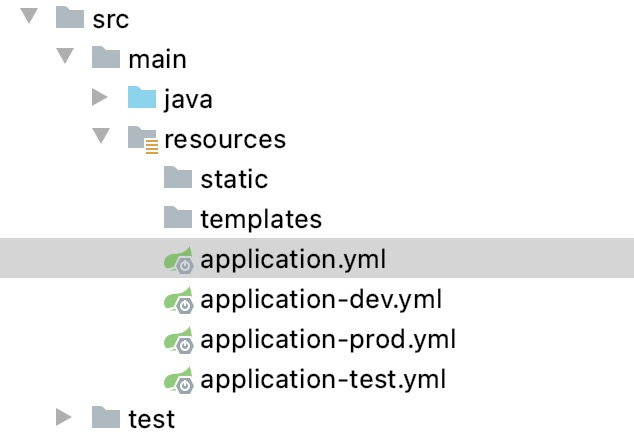
application.yml
spring:

  profiles:

    active: @profiles.active@
application-dev.yml中代码如下
server:

  port: 7091
其他几个文件我只是把端口号进行了修改,方便打包看不同的效果。
maven打包与激活profiles
你可以执行命令
mvn clean package -Ptest
然后启动jar包,可以看到jar包启动的是test的配置,如果换成-Pdev启动的就是dev包的端口。
默认启动方式
如果不带-Ptest,启动的是 prod的端口。因为在profiles中我们看到有配置默认的选项。
 <activation>

  <activeByDefault>true</activeByDefault>

</activation>
settings.xml中使用activeProfiles指定
<activeProfiles>

     <activeProfile>profileTest1</activeProfile>

</activeProfiles>
通过IDEA的可视化的方式
当然如果使用IDEA工具进行开发,还可以使用可视化的方式进行打包。
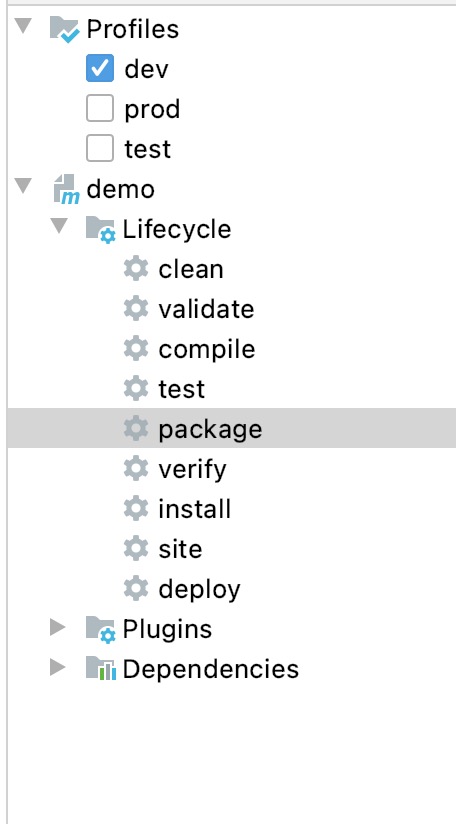
更高级的玩法
通过和pom结合的方式设置动态参数
如果我们希望通过docker-maven-plugin插件,把编译好的jar打包成docker并且传入相应的开发、测试、生产的服务器中去。这个时候,我们就需要根据不同的条件去传入不同的服务器。
在profiles中我们可以做以下定义
 <profiles>

        <profile>

            <id>dev</id>

            <properties>

                <profile.id>dev</profile.id>

                <docker.host>http://dev.demo.com:2375</docker.host>

            </properties>

            <activation>

                <activeByDefault>true</activeByDefault>

            </activation>

        </profile>

        <profile>

            <id>test</id>

            <properties>

                <profile.id>test</profile.id>

                <docker.host>http://test.demo.com375</docker.host>

            </properties>

        </profile>

        <profile>

            <id>prod</id>

            <properties>

                <profile.id>prod</profile.id>

                <docker.host>http://prod.demo.com:2375</docker.host>

            </properties>

        </profile>

    </profiles>
而在build控件中我们可以使用以下配置
<build>

  <plugins>

     <plugin>

                <groupId>com.spotify</groupId>

                <artifactId>docker-maven-plugin</artifactId>

                <version>1.1.0</version>

                <executions>

                    <execution>

                        <id>build-image</id>

                        <phase>package</phase>

                        <goals>

                            <goal>build</goal>

                        </goals>

                    </execution>

                </executions>

                <configuration>

                    <imageName>demo/${project.artifactId}</imageName>

                    <imageTags>

                        <imageTag>${project.version}-${current.time}</imageTag>

                        <imageTag>latest</imageTag>

                    </imageTags>

                    <forceTags>true</forceTags>

                    <dockerHost>${docker.host}</dockerHost>

                    <forceTags>true</forceTags>

                    <baseImage>java:8</baseImage>

                    <entryPoint>["java", "-jar", "/${project.build.finalName}.jar"]</entryPoint>

                    <resources>

                        <resource>

                            <targetPath>/</targetPath>

                            <directory>${project.build.directory}</directory>

                            <include>${project.build.finalName}.jar</include>

                        </resource>

                    </resources>

                </configuration>

            </plugin>

  </plugins>

</build>
其中 ${project.artifactId} 和${project.version}是关于节点下面和的引用。${current.time}是在build-helper-maven-plugin定义的,我们回头再研究。
${docker.host}则是我们在profiles中定义的,可以随着我们选择不同的profile,把jar包build成不同的docker镜像,并传入指定服务器。
通过和yml结合设置动态参数
除了可以在pom中设置动态参数,使得其根据profile的不同选择不同的参数。还可以通过设置不同的profile,让yml选择不同的参数。这点和快速上手的例子有点相似。具体如下:
设置profiles
<profiles>

        <profile>

            <id>dev</id>

            <properties>

                <profile.id>dev</profile.id>

                <eureka.url>http://127.0.0.1:8001/eureka</eureka.url>

            </properties>

            <activation>

                <activeByDefault>true</activeByDefault>

            </activation>

        </profile>

        <profile>

            <id>test</id>

            <properties>

                <profile.id>test</profile.id>

                <eureka.url>http://base-registry:8001/eureka</eureka.url>

            </properties>

        </profile>

        <profile>

            <id>prod</id>

            <properties>

                <profile.id>prod</profile.id>

                <eureka.url>http://base-registry:8001/eureka</eureka.url>

            </properties>

        </profile>

        <profile>

            <id>new</id>

            <properties>

                <profile.id>new</profile.id>

                <eureka.url>http://base-registry:8001/eureka</eureka.url>

            </properties>

        </profile>

    </profiles>
我们在profile中设置了一个eureka.url的属性,就可以在yml中直接调用。
eureka:

  client:

    service-url:

      defaultZone: @eureka.url@

    registry-fetch-interval-seconds: 10

  instance:

    prefer-ip-address: true
在IDEA调试和启动的时候,一般会报错如下:
org.yaml.snakeyaml.scanner.ScannerException: while scanning for the next token

found character ‘@’ that cannot start any token.
解决方法就是引入yaml.sankeyaml的jar包
<dependency>

            <groupId>org.yaml</groupId>

            <artifactId>snakeyaml</artifactId>

</dependency>
打包不同的资源
在profile打包yml文件的时候,如果我们解压了jar包,会发现还是把所有的application-profile.yml文件给打包进去了。这个可以通过设置打包参数,只打包需要的application文件。
 <profiles>

        <profile>

            <id>dev</id>

            <properties>

                <env>dev</env>

            </properties>

            <activation>

                <activeByDefault>true</activeByDefault>

            </activation>

        </profile>

        <profile>

            <id>prd</id>

            <properties>

                <env>prd</env>

            </properties>

        </profile>

    </profiles>

    <build>

        <finalName>springmvc</finalName>

        <resources>

            <resource>

                <directory>src/main/java</directory>

                <includes>

                    <include>*.xml</include>

                </includes>

            </resource>

            <resource>

                <directory>src/main/resources</directory>

                <excludes>

                    <exclude>dev/*</exclude>

                    <exclude>prd/*</exclude>

                </excludes>

            </resource>

            <resource>

                <directory>src/main/resources/${env}</directory>

            </resource>

        </resources>

    </build>
目录结构如下:
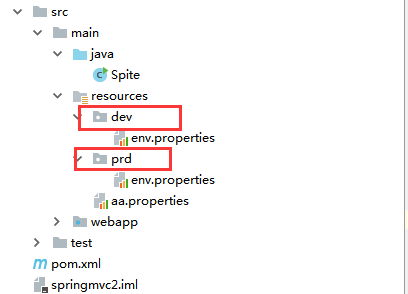
maven中profiles使用详解的更多相关文章
- maven中scope标签详解
前言 最近在做itoo的pom优化工作,发现对于maven依赖管理中的scope标签还是有不明白的地方,所以今天就来总结一下这方面的知识,scope在maven的依赖管理中主要负责项目的部署 mave ...
- Maven中POM.XML详解
转自https://blog.csdn.net/jariwsz/article/details/19554137 我们先看一个简单的例子: <project xmlns="http:/ ...
- maven 中的mirror详解
一.前言 今天同事遇到个问题,本来公司是有maven私服的,但同事觉得上面有些东西下载不到,于是在自己本地的maven配置中加了: <mirrors> <mirror> < ...
- maven中的Exclusions详解
依赖关系:Project-A>Project-B>Project-C,但是Project-A不依赖Project-C,在Project-A中的POM.xml应该进行如下配置: <de ...
- Maven中的dependency详解
<dependency> <groupId>junit</groupId> <artifactId>junit</artifactId> & ...
- Maven依赖中的scope详解,在eclipse里面用maven install可以编程成功,到服务器上用命令执行报VM crash错误
Maven依赖中的scope详解 项目中用了<scope>test</scope>在eclipse里面用maven install可以编译成功,到服务器上用命令执行报VM cr ...
- Maven pom.xml文件详解
Maven pom.xml文件详解 一.简介 POM全称是Project Object Model,即项目对象模型. pom.xml是maven的项目描述文件,它类似与antx的project.xml ...
- Maven配置文件setting.xml详解
注:本文来源于:大话JAVA的那些事 <Maven配置文件setting.xml详解> <?xml version="1.0" encoding="UT ...
- oracle中imp命令详解 .
转自http://www.cnblogs.com/songdavid/articles/2435439.html oracle中imp命令详解 Oracle的导入实用程序(Import utility ...
随机推荐
- python学习第四天:python基础(字符编码和乱码到底咋回事儿)
字符编码 这得从字符编码开始说起: 字符串也是一种数据类型,但是,字符串比较特殊的是还有一个编码问题.因为计算机只能处理数字,如果要处理文本,就必须先把文本转换为数字才能处理. 最早的计算机在设计时采 ...
- Sentry 开发者贡献指南 - SDK 开发(事件负载)
内容整理自官方开发文档 系列 Docker Compose 部署与故障排除详解 1 分钟快速使用 Docker 上手最新版 Sentry-CLI - 创建版本 快速使用 Docker 上手 Sentr ...
- Java实习生常规技术面试题每日十题Java基础(四)
目录 1.String 和StringBuffer的区别. 2.数组有没有length()这个方法? String有没有length()这个方法? 3.final, finally, finalize ...
- C# 使用阿里云发送短信
最近有个项目,短信服务使用的是阿里云的,由于时间问题,没有手动去构造sign去发送,而是直接使用阿里云的SDK发送,所以这里算是做个笔记,或许以后还能用得到 首先,我们需要安装阿里云的SDK,推荐使用 ...
- MongoDB备份与恢复操作
1. 备份和恢复工具参数 * 几个重要参数: * mongodump * --polog:复制mongodump开始到结束过程中的所有oplog并输出到结果中.输出文件位于dump/oplog.bso ...
- 初识python: 类练习 - 老板&员工
需求: 1.员工具有姓名.年龄.能力值(能力值为100-年龄),可以工作,每工作一次,该员工的能力值-5,创建__str__方法,打印该员工的信息: 2.老板具有投资金额,工作量,员工列表.可以雇佣员 ...
- JS中void(0)操作符的使用
今天 在看源码时,发现这种写法 if(value === void(0)){ // } 以前没有见过这种写法,感觉就是判断一个变量是否有值,官网上是这样说的: void运算符 对给定的表达式进行求值, ...
- Cannot uninstall 'pyparsing'. It is a distutils installed project
我的环境: [root@ansible ~]# python -V Python 2.7.5 [root@ansible ~]# cat /etc/redhat-release CentOS Linu ...
- sqoop的使用之import导入到HDFS
原文链接: https://www.toutiao.com/i6772128429614563843/ 首先我们已经安装好sqoop了,如果没有安装好参考文档<快速搭建CDH-Hadoop-Hi ...
- 【从小白到专家】收官!Istio技术实践之九:路由控制与灰度发布
本期是Istio技术实践专题的最后一个模块,主题是Istio的路由控制与灰度发布.上一期我们讲到,虚拟服务(Virtual Service)以及目标规则(Destination Rule)是 Isti ...