
Java之Apache Commons-IO使用精讲
Commons IO是针对开发IO流功能的工具类库。
主要包括六个区域:
工具类——使用静态方法执行共同任务
输入——用于InputStream和Reader实现
输出——用于OutputStream和Writer实现
过滤器——各种文件过滤器实现
比较器——各种文件的java.util.Comparator实现
文件监听器——监听文件系统事件的组件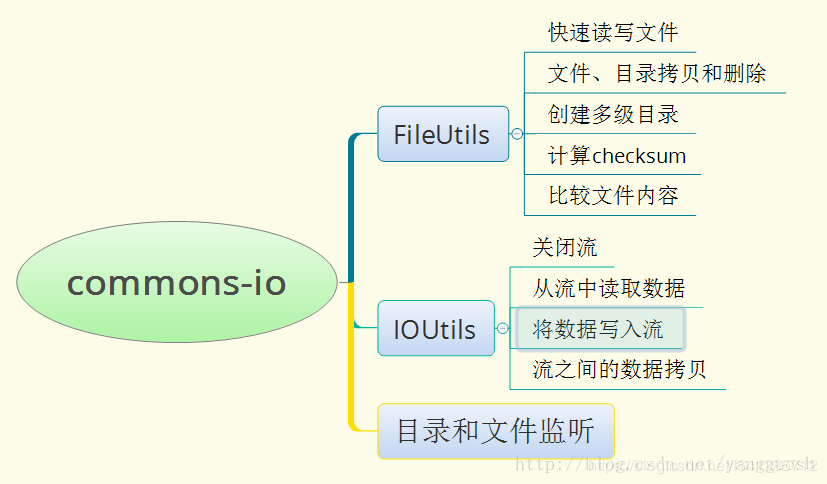
工具类
IOUtils
该工具类可能是平时使用得最多的工具类了。
IOUtils包含处理读、写和复制的工具方法。方法对InputStream、OutputStream、Reader和Writer起作用。
例如,从一个URL读取字节的任务,并且打印它们:
    public static void main(String[] args) throws Exception {

        //从网络上读取一个网页资源

        InputStream in = new URL("http://commons.apache.org").openStream();

        try {

            InputStreamReader inR = new InputStreamReader(in);

            BufferedReader buf = new BufferedReader(inR);

            String line;

            while ((line = buf.readLine()) != null) {

                System.out.println(line);

            }

        } finally {

            if (in != null) {

                in.close();

            }

        }

    }

//结果:

//控制台打印出了这个网页的所有内容
使用IOUtils:
    public static void main(String[] args) throws Exception {

        //从网络上读取一个网页资源

        try (InputStream in = new URL("http://commons.apache.org").openStream()) {

            System.out.println(IOUtils.toString(in, StandardCharsets.UTF_8));

        }

        //finally {

        //    IOUtils.closeQuietly(in);

        //}

    }
主要方式介绍:
buffer:一句话可以吧inputStream、outputStream、Reader、Witter等包装成带缓冲区的流,提高效率
closeQuietly:可以关闭各种流、socket等任何closeable的实例(不过官方推荐使用try-with-resources来代替)
contentEquals:比较两个InputStream或者两个Reader里面的内容(字节流)是否完全相同
    public static void main(String[] args) throws Exception {

        try (InputStream in1 = new URL("http://commons.apache.org").openStream(); InputStream in2 = new URL("http://commons.apache.org").openStream()) {

            System.out.println(in1.equals(in2)); //false

            System.out.println(IOUtils.contentEquals(in1, in2)); //true

        }

    }
备注:contentEqualsIgnoreEOL(final Reader input1, final Reader input2) 该方法会忽略ignoring EOL characters
copy:流的互相拷贝。可以将输入流拷到输出流。copy(final InputStream input, final OutputStream output, final int bufferSize),Reader拷贝到Writer等等
copyLarge:当你的流拷贝的是大文件(一般大于2G级别),请使用此方法拷贝
lineIterator:BufferedReader 通常在只有读到空格或者换行符时才会结束读取,攻击者很容易构内存攻击导致系统瘫痪,出于安全考虑这里推荐使用io包的LineIterator,并且其在性能上也优于普通流。
lineIterator(final InputStream input, final Charset encoding)

lineIterator(final InputStream input, final String encoding)

lineIterator(final Reader reader)
    public static void main(String[] args) throws Exception {

        try (InputStream in1 = new URL("http://commons.apache.org").openStream()) {

            LineIterator lineIterator = IOUtils.lineIterator(in1, StandardCharsets.UTF_8);

            while (lineIterator.hasNext()) {

                lineIterator.nextLine();

            }

            lineIterator.close();

        }

    }
read、readFully:把输入流的东西读取添加到第二个参数中的字节数组里

readLines:不解释

resourceToByteArray、resourceToString:直接传入一个文件的路径,读取进来

toBufferedInputStream:把普通的inputStream转换成带缓冲区的,返回一个新的InputStream

toByteArray:吧输入流转换到字节数组

toCharArray:

toInputStream:吧字符、字符串等等直接读到流里

toString:强大的方法,可以吧各种输出流读成一个串

write、writeChunked、writeLines:把传入的字节数组,写入到输出流里(可指定编码)
各种常用的常量:
public static final char DIR_SEPARATOR_UNIX = '/';

public static final char DIR_SEPARATOR_WINDOWS = '\\';

/**

    * The system directory separator character.  系统文件夹的分隔符 通用的

    */

   public static final char DIR_SEPARATOR = File.separatorChar;

    /**

    * The Unix line separator string.  换行符

    */

   public static final String LINE_SEPARATOR_UNIX = "\n";

   //winows换行符

   public static final String LINE_SEPARATOR_WINDOWS = "\r\n";

    /**

    * The system line separator string.  通用的换行符

    */

   public static final String LINE_SEPARATOR;
FilenameUtils
FilenameUtils类包含工具方法不需要使用File对象就可以操作文件名。该类致力于屏蔽Unix和Windows之间的不同,避免这些环境之间的转换(例如,从开发到生产)。 开发在windows、生产在Linux
一般使用较少,这里不做过多介绍.
FileSystemUtils:2.6版本已经废弃。推荐使用JDK自己的FileStore代替
Java之Apache Commons-IO使用精讲的更多相关文章
- Caused by: java.lang.ClassNotFoundException: org.apache.commons.io.FileUtils
1.错误叙述性说明 警告: Could not create JarEntryRevision for [jar:file:/D:/MyEclipse/apache-tomcat-7.0.53/web ...
- java.lang.NoClassDefFoundError: org/apache/commons/io/output/DeferredFileOutputStream(转)
java.lang.NoClassDefFoundError: org/apache/commons/io/output/DeferredFileOutputStream 使用Tomcat的Manag ...
- java.lang.NoClassDefFoundError: org/apache/commons/io/output/DeferredFileOutputStream
java.lang.ClassNotFoundException: org.apache.commons.io.output.DeferredFileOutputStream at org.apach ...
- Tomcat中使用commons-io-2.5发生的错误java.lang.ClassNotFoundException: org.apache.commons.io.IOUtils
关键词:IntelliJ IDEA.Tomcat.commons-io-2.5.jar.java.lang.ClassNotFoundException: org.apache.commons.io. ...
- 报错:maven:java.lang.NoClassDefFoundError: org/apache/commons/io/Charsets
运行报错: maven:java.lang.NoClassDefFoundError: org/apache/commons/io/Charsets 找不到Charsets这个类 上网查了以后,是因为 ...
- java.lang.NoClassDefFoundError: org/apache/commons/io/output/DeferredFileOutputStream异常解决方法
使用Tomcat部署Servlet程序时,单步调试跟踪到: List<FileItem> itemList = sfu.parseRequest(request); 总是会报错:Java. ...
- Java (四)APACHE Commons IO 复制文件
上一篇:Java (三)APACHE Commons IO 常规操作 例1:复制文件 1 import java.io.File; 2 import java.io.IOException; 3 4 ...
- Java (三)APACHE Commons IO 常规操作
上一篇:Java (二)基于Eclipse配置Commons IO的环境 例1:查看文件.文件夹的长度(大小). 1 import java.io.File; 2 3 import org.apach ...
- Java 利用Apache Commons Net 实现 FTP文件上传下载
package woxingwosu; import java.io.BufferedInputStream; import java.io.BufferedOutputStream; import ...
- apache commons io包基本功能
1. http://jackyrong.iteye.com/blog/2153812 2. http://www.javacodegeeks.com/2014/10/apache-commons-io ...
随机推荐
- Spring RestTemplate 之put、delete请求
●PUT请求:在RestTemplate中,PUT请求可以通过put方法调用,put方法的参数和前面介绍的postForEntity方法的参数基本一致,只是put方法没有返回值而已.举一个简单的例子, ...
- springboot-5-持久层技术
整合mybatis 流程: 导入依赖: 除了mybaits还有mysql和jdbc依赖 <!--mybatis--> <dependency> <groupId>o ...
- php使用curl模拟post请求
废话不多说,直接上代码,做个笔记. $url="http://localhost/header_server.php"; $body = array("mobile&qu ...
- 利用 PGO 提升 .NET 程序性能
引子 .NET 6 开始初步引入 PGO.PGO 即 Profile Guided Optimization,通过收集运行时信息来指导 JIT 如何优化代码,相比以前没有 PGO 时可以做更多以前难以 ...
- SSM和Maven整合
项目架构如图 applicationContext.xml还有其他文件一起放进resources下 jsp,js,等文件放在webapp下
- javascript里面的document.getElementById
一.getElementById:获取对 ID 标签属性为指定值的第一个对象的引用,它有 value 和 length 等属性 1.获取当前页面的值input标签值:var attr1=documen ...
- SQL之case when then用法_之二
select CustomerNo, Name, Sex, Birthday, IDType, IDNo, validityday, case (null ) when '1' then '高级VIP ...
- javascript获取焦点对象ID
document.activeElement 方法:if(document.activeElement.id="textbox1") { }
- Centos 7 安装mysql5.7 nginx tomcat
- python编写DDoS攻击脚本
python编写DDoS攻击脚本 一.什么是DDoS攻击 DDoS攻击就是分布式的拒绝服务攻击,DDoS攻击手段是在传统的DoS攻击基础之上产生的一类攻击方式.单一的DoS攻击一般是采用一对一方式的, ...