
ython学习笔记(接口自动化框架 V2.0)
这个是根据上次框架版本进行的优化
用python获取excel文件中测试用例数据
通过requets测试接口、并使用正则表达式验证响应信息内容
生成xml文件测试报告
版本更新内容:
1. 整理了CreateTest.test_main()流程逻辑
2. 优化了testcase.xls文件格式
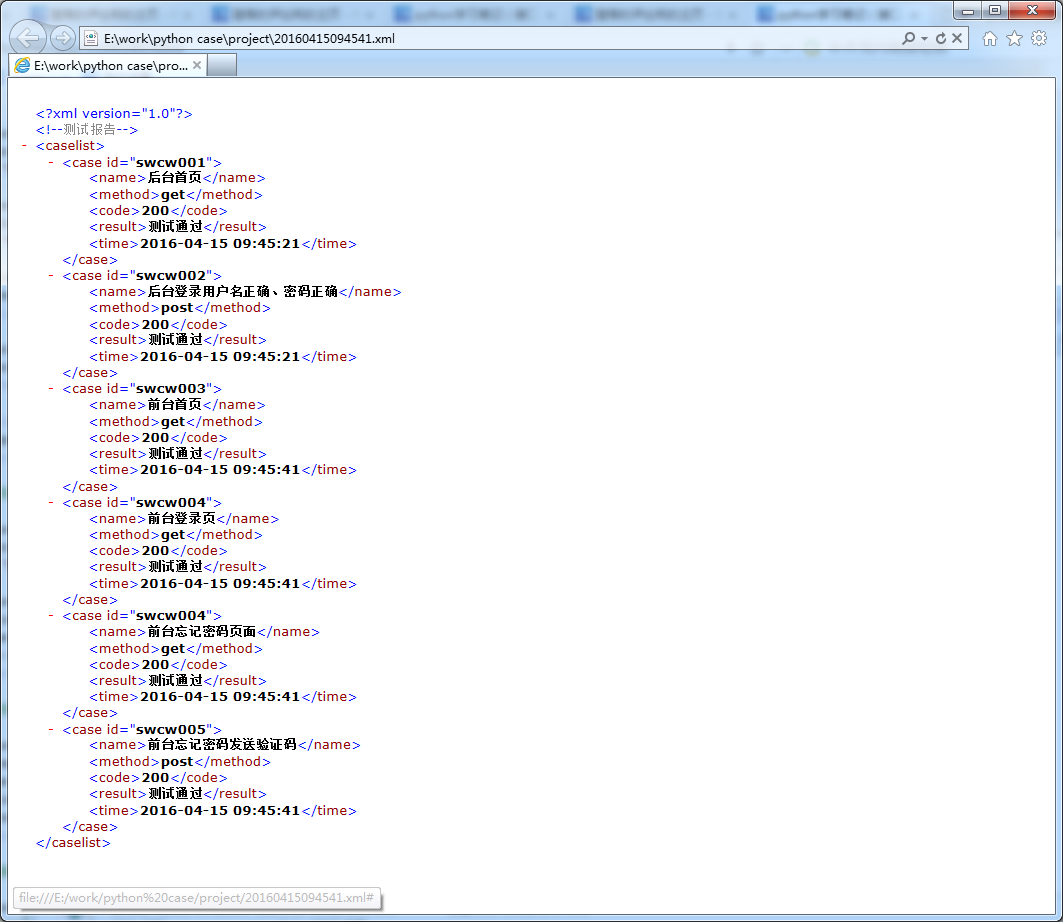
3. 添加了生成XML文件测试报告
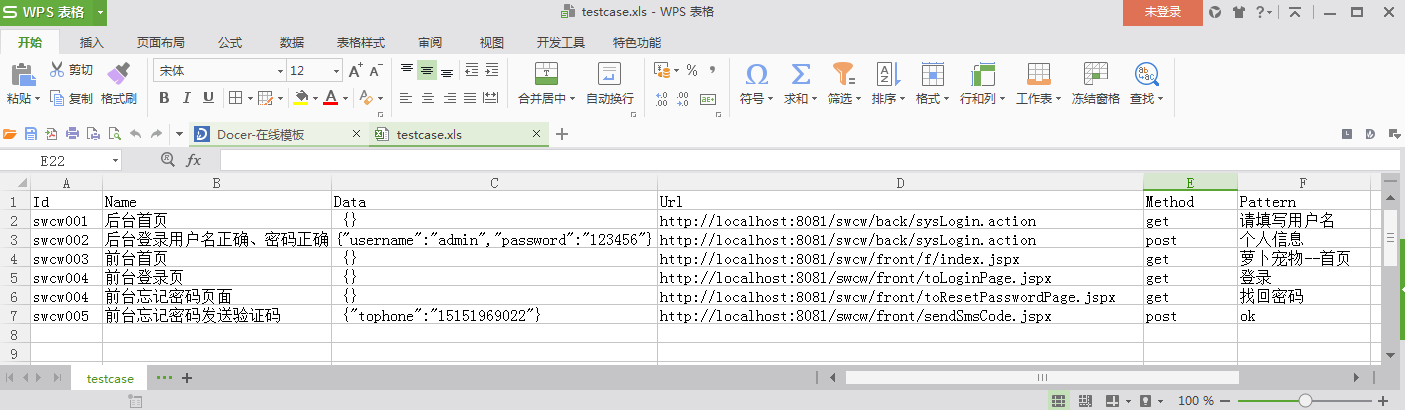
#!/usr/bin/env python

# -*- coding: utf_8 -*-

# 获取测试用例文件excel

import xlrd

import json

class CreateExcel:

    def __init__(self):

        pass

    @classmethod

    def open_excel(cls):

        path = "testcase.xls"

        workbook = xlrd.open_workbook(path)

        table = workbook.sheets()[0]

        return table

    # 获取sheet

    @classmethod

    def get_nrows(cls, table):

        nrows = table.nrows

        return nrows

    # 获取行号

    @classmethod

    def get_id(cls, table, nrows):

        testid = []

        for i in range(1, nrows):

            testid.append(table.cell(i, 0).value)

        return testid

    @classmethod

    def get_name(cls, table, nrows):

        testname = []

        for i in range(1, nrows):

            testname.append(table.cell(i, 1).value)

        return testname

    # 获取用例name

    @classmethod

    def get_data(cls, table, nrows):

        testdata = []

        for i in range(1, nrows):

            try:

                data = json.loads(table.cell(i, 2).value)

                testdata.append(data)

            except ValueError:

                testdata.append(None)

        return testdata

    # 获取data接口参数

    @classmethod

    def get_url(cls, table, nrows):

        testurl = []

        for i in range(1, nrows):

            testurl.append(table.cell(i, 3).value)

        return testurl

    # 获取接口测试url

    @classmethod

    def get_method(cls, table, nrows):

        testmethod = []

        for i in range(1, nrows):

            testmethod.append(table.cell(i, 4).value)

        return testmethod

    # 获取接口测试method

    @classmethod

    def get_pattern(cls, table, nrows):

        testpattern = []

        for i in range(1, nrows):

            testpattern.append(table.cell(i, 5).value)

        return testpattern

    # 获取接口期望响应结果
#!/usr/bin/env python

# -*- coding: utf_8 -*-

# 测试核心组件

import requests

import re

from datetime import datetime

from createexcel import CreateExcel

from xml.dom import minidom

import sys

class CreateTest:

    reload(sys)

    sys.setdefaultencoding("utf-8")

    # 避免字符串写入文件出错

    def __init__(self):

        pass

    @classmethod

    def test_api(cls, method, url, data):

        global results

        try:

            if method == "post":

                results = requests.post(url, data)

            if method == "get":

                results = requests.get(url, data)

            return results

        except Exception.__bases__:

            print "服务器访问失败"

    # 接口函数

    @classmethod

    def test_on(cls):

        print "用例执行开始"

    @classmethod

    def test_close(cls):

        print "用例执行结束"

    @classmethod

    def test_result(cls, pa):

        global report

        try:

            pattern = re.compile(pa)

            match = pattern.search(testresults.text)

            if match.group() == pa:

                report = "测试通过"

        except AttributeError:

            report = "测试失败"

        return report

    # 正则表达式检测

    @classmethod

    def test_http(cls, code):

        print "请求返回状态码: ", code

    @classmethod

    def test_time(cls):

        nowtime = datetime.today()

        time = nowtime.strftime("%Y-%m-%d %H:%M:%S")

        return time

    # 获取当前时间转化字符串

    @classmethod

    def test_report(cls):

        nowtime = datetime.today()

        reportime = nowtime.strftime("%Y%m%d%H%M%S")

        reportname = reportime + ".xml"

        return reportname

    # 获取测试报告文件名称

    @classmethod

    def test_main(cls):

        global testresults

        table = CreateExcel.open_excel()

        nrows = CreateExcel.get_nrows(table)

        xml = minidom.Document()

        xml.appendChild(xml.createComment("测试报告"))

        caselist = xml.createElement("caselist")

        xml.appendChild(caselist)

        for i in range(0, nrows - 1):

            testid = CreateExcel.get_id(table, nrows)[i]

            testname = CreateExcel.get_name(table, nrows)[i]

            testdata = CreateExcel.get_data(table, nrows)[i]

            testurl = CreateExcel.get_url(table, nrows)[i]

            testmethod = CreateExcel.get_method(table, nrows)[i]

            testpattern = CreateExcel.get_pattern(table, nrows)[i]

            # 执行测试

            CreateTest.test_on()

            testresults = CreateTest.test_api(testmethod, testurl, testdata)

            testcode = str(testresults.status_code)

            try:

                CreateTest.test_http(testresults.status_code)

            except AttributeError:

                pass

            CreateTest.test_close()

            # 执行结束

            # 生成xml文件

            case = xml.createElement("case")

            case.setAttribute("id", testid)

            # 输入用例ID

            name = xml.createElement("name")

            name.appendChild(xml.createTextNode(testname))

            # 输入用例名称

            method = xml.createElement("method")

            method.appendChild(xml.createTextNode(testmethod))

            # 输入接口类型

            code = xml.createElement("code")

            code.appendChild((xml.createTextNode(testcode)))

            # 输入用例返回状态码

            result = xml.createElement("result")

            result.appendChild(xml.createTextNode(CreateTest.test_result(testpattern)))

            # 输入用例测试结果

            time = xml.createElement("time")

            time.appendChild(xml.createTextNode(CreateTest.test_time()))

            # 输入用例执行时间

            case.appendChild(name)

            case.appendChild(method)

            case.appendChild(code)

            case.appendChild(result)

            case.appendChild(time)

            caselist.appendChild(case)

            # xml文件生成结束

        filename = file(CreateTest.test_report(), "w+")

        # 生成以当前时间命名的测试报告文件

        xml.writexml(filename)

        filename.close()

        # 关闭文件

if __name__ == '__main__':

    CreateTest.test_main()
下面是测试入口:
#!/usr/bin/env python

# -*- coding: utf_8 -*-

# ****************************************************************

# interface.py

# Author     : ChenLei

# Version    : 2.0

# Date       : 2016-4-15

# ****************************************************************

import time

from createtest import CreateTest

start = time.clock()

CreateTest.test_main()

end = time.clock()

print "接口自动化脚本运行时间:%.03f seconds" % (end - start)
运行后自动生成 当前时间的xml文件 如下:
除非注明,本博客文章均为原创,转载请以链接形式标明本文地址
本文地址:http://www.cnblogs.com/cllovewxq/p/5394549.html
ython学习笔记(接口自动化框架 V2.0)的更多相关文章
- python学习笔记(接口自动化框架 V2.0)
这个是根据上次框架版本进行的优化 用python获取excel文件中测试用例数据 通过requets测试接口.并使用正则表达式验证响应信息内容 生成xml文件测试报告 版本更新内容: 1. 整理了Cr ...
- 接口自动化 基于python+Testlink+Jenkins实现的接口自动化测试框架[V2.0改进版]
基于python+Testlink+Jenkins实现的接口自动化测试框架[V2.0改进版] by:授客 QQ:1033553122 由于篇幅问题,,暂且采用网盘分享的形式: 下载地址: [授客] ...
- python学习笔记(接口自动化框架 V1.0)
之前是利用python自带的unittest测试框架 这次自己设计一个 之后再一点点往里面加功能 (ps:当然这个框架真的是很简单..很简单...很简单...) excel文件格式: #!/usr/b ...
- 接口自动化 [授客]基于python+Testlink+Jenkins实现的接口自动化测试框架V3.0
基于python+Testlink+Jenkins实现的接口自动化测试框架V3.0 by:授客 QQ:1033553122 博客:http://blog.sina.com.cn/ishou ...
- 转载:python + requests实现的接口自动化框架详细教程
转自https://my.oschina.net/u/3041656/blog/820023 摘要: python + requests实现的接口自动化框架详细教程 前段时间由于公司测试方向的转型,由 ...
- python + requests实现的接口自动化框架详细教程
前段时间由于公司测试方向的转型,由原来的web页面功能测试转变成接口测试,之前大多都是手工进行,利用postman和jmeter进行的接口测试,后来,组内有人讲原先web自动化的测试框架移驾成接口的自 ...
- go语言,golang学习笔记2 web框架选择
go语言,golang学习笔记2 web框架选择 用什么go web框架比较好呢?能不能推荐个中文资料多的web框架呢? beego框架用的人最多,中文资料最多 首页 - beego: 简约 & ...
- 并发编程学习笔记(15)----Executor框架的使用
Executor执行已提交的 Runnable 任务的对象.此接口提供一种将任务提交与每个任务将如何运行的机制(包括线程使用的细节.调度等)分离开来的方法.通常使用 Executor 而不是显式地创建 ...
- mybatis学习笔记之基础框架(2)
mybatis学习笔记之基础框架(2) mybatis是一个持久层的框架,是apache下的顶级项目. mybatis让程序将主要精力放在sql上,通过mybatis提供的映射方式,自由灵活生成满足s ...
随机推荐
- 重磅|Apache ShardingSphere 5.0.0 即将正式发布
Apache ShardingSphere 5.0.0 GA 版在经历 5.0.0-alpha 及 5.0.0-beta 接近两年时间的研发和打磨,终于将在 11 月份与大家正式见面! 11 月 10 ...
- PCB各层介绍
在PCB设计中用得比较多的图层: mechanical 机械层 keepout layer 禁止布线层 Signal layer 信号层 Internal plane layer 内部电源/接地层 t ...
- mac 工作区
https://www.zhihu.com/question/20917614 http://www.bjhee.com/mission-control.html 窗口切换 https://sspai ...
- 开源一个由.netcore/.net framework4.6开发的saas微商城+独立部署版本微小程序商城
一.项目介绍 开源一款基于.NET4.6开发的一款完整的微信商城SAAS平台,前端支持小程序.h5,由前端商城,商户管理后台,平台管理后台三大块组成,sass功能完善,支持商户拖拽式零代码创建并提交上 ...
- 菜鸡的Java笔记 - java 反射机制
反射机制 1.观察 Class 类的使用 2.利用反射改善工程设计模式 3.反射操作类结构 content (内容) 1. ...
- JVM核心——JVM运行和类加载全过程
1.类加载全过程 (1)类加载机制 JVM把class文件加载到内存,并对数据进行校验.解析和初始化,最终形成JVM可以直接使用的Java类型的过程. 加载 将class文件字节码内容加载到内存中,并 ...
- Android LayoutInflater(布局填充器)
先来看一下LayoutInflater的基本用法吧,它的用法非常简单,首先需要获取到LayoutInflater的实例,有两种方法可以获取到,第一种写法如下: LayoutInflater layou ...
- [cf1515I]Phoenix and Diamonds
将$n$类物品按照价值为第一关键字(从大到小).质量为第二关键字(从小到大)排序,此时贪心策略即依次贪心选(排序后)第$i$类的物品(其中$i$从1到$n$) 为了方便,排序后第$i$类物品质量.价值 ...
- page_fault_in_nonpaged_area异常解决方案(已解决)
电脑在运行虚拟机的时候异常重启,多次打开结果一样,问了客服告诉我导致蓝屏的原因很多,可能是驱动不兼容,系统,或其他.{没点有用的} 百度到这个方案: 打开->此电脑->右键属性->高 ...
- 贪心/构造/DP 杂题选做Ⅱ
由于换了台电脑,而我的贪心 & 构造能力依然很拉跨,所以决定再开一个坑( 前传: 贪心/构造/DP 杂题选做 u1s1 我预感还有Ⅲ(欸,这不是我在多项式Ⅱ中说过的原话吗) 24. P5912 ...