
ython学习笔记(接口自动化框架 V2.0)
这个是根据上次框架版本进行的优化
用python获取excel文件中测试用例数据
通过requets测试接口、并使用正则表达式验证响应信息内容
生成xml文件测试报告
版本更新内容:
1. 整理了CreateTest.test_main()流程逻辑
2. 优化了testcase.xls文件格式
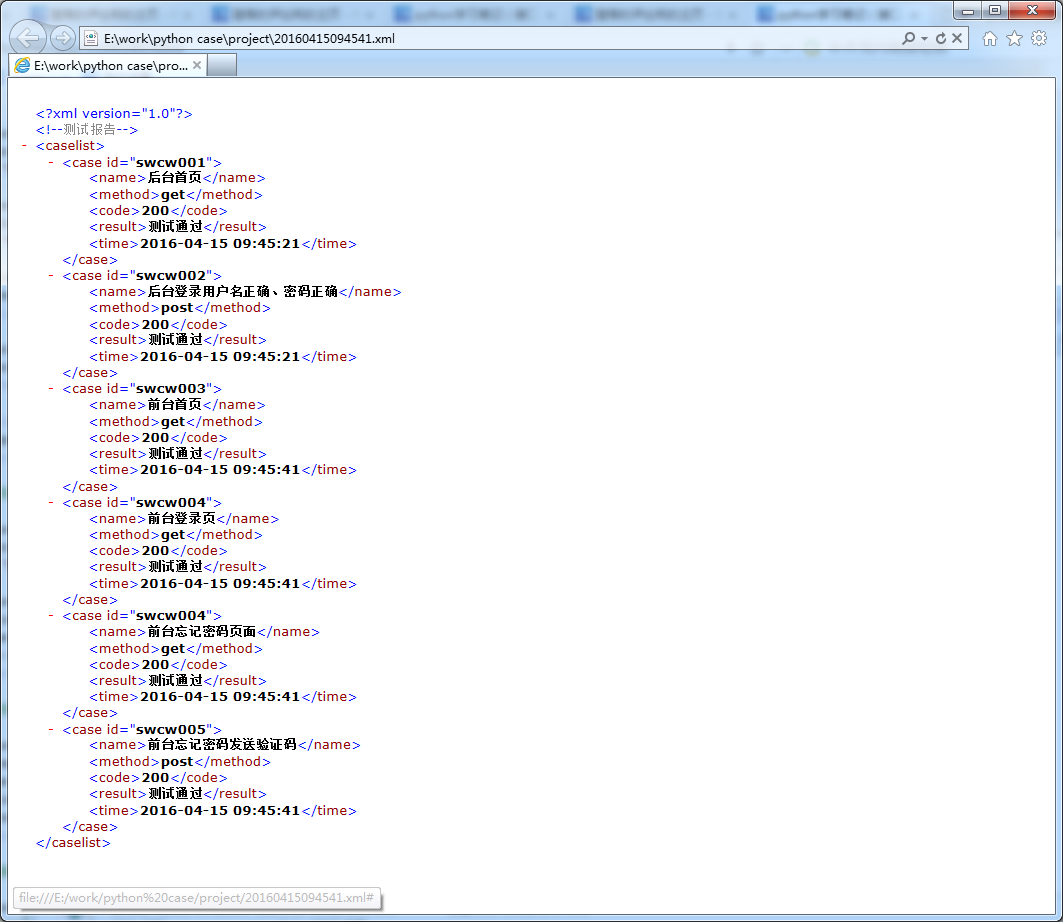
3. 添加了生成XML文件测试报告
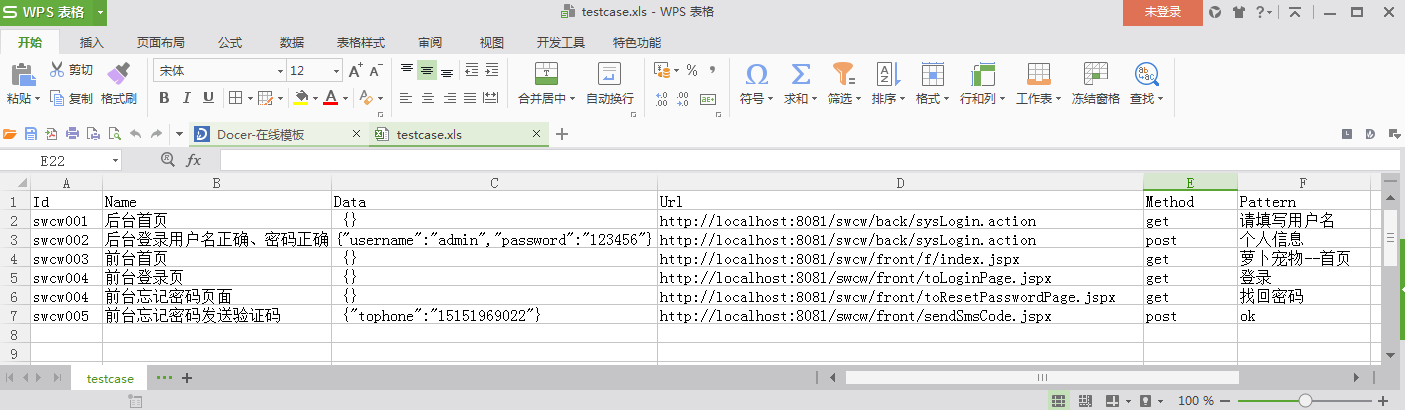
#!/usr/bin/env python

# -*- coding: utf_8 -*-

# 获取测试用例文件excel

import xlrd

import json

class CreateExcel:

    def __init__(self):

        pass

    @classmethod

    def open_excel(cls):

        path = "testcase.xls"

        workbook = xlrd.open_workbook(path)

        table = workbook.sheets()[0]

        return table

    # 获取sheet

    @classmethod

    def get_nrows(cls, table):

        nrows = table.nrows

        return nrows

    # 获取行号

    @classmethod

    def get_id(cls, table, nrows):

        testid = []

        for i in range(1, nrows):

            testid.append(table.cell(i, 0).value)

        return testid

    @classmethod

    def get_name(cls, table, nrows):

        testname = []

        for i in range(1, nrows):

            testname.append(table.cell(i, 1).value)

        return testname

    # 获取用例name

    @classmethod

    def get_data(cls, table, nrows):

        testdata = []

        for i in range(1, nrows):

            try:

                data = json.loads(table.cell(i, 2).value)

                testdata.append(data)

            except ValueError:

                testdata.append(None)

        return testdata

    # 获取data接口参数

    @classmethod

    def get_url(cls, table, nrows):

        testurl = []

        for i in range(1, nrows):

            testurl.append(table.cell(i, 3).value)

        return testurl

    # 获取接口测试url

    @classmethod

    def get_method(cls, table, nrows):

        testmethod = []

        for i in range(1, nrows):

            testmethod.append(table.cell(i, 4).value)

        return testmethod

    # 获取接口测试method

    @classmethod

    def get_pattern(cls, table, nrows):

        testpattern = []

        for i in range(1, nrows):

            testpattern.append(table.cell(i, 5).value)

        return testpattern

    # 获取接口期望响应结果
#!/usr/bin/env python

# -*- coding: utf_8 -*-

# 测试核心组件

import requests

import re

from datetime import datetime

from createexcel import CreateExcel

from xml.dom import minidom

import sys

class CreateTest:

    reload(sys)

    sys.setdefaultencoding("utf-8")

    # 避免字符串写入文件出错

    def __init__(self):

        pass

    @classmethod

    def test_api(cls, method, url, data):

        global results

        try:

            if method == "post":

                results = requests.post(url, data)

            if method == "get":

                results = requests.get(url, data)

            return results

        except Exception.__bases__:

            print "服务器访问失败"

    # 接口函数

    @classmethod

    def test_on(cls):

        print "用例执行开始"

    @classmethod

    def test_close(cls):

        print "用例执行结束"

    @classmethod

    def test_result(cls, pa):

        global report

        try:

            pattern = re.compile(pa)

            match = pattern.search(testresults.text)

            if match.group() == pa:

                report = "测试通过"

        except AttributeError:

            report = "测试失败"

        return report

    # 正则表达式检测

    @classmethod

    def test_http(cls, code):

        print "请求返回状态码: ", code

    @classmethod

    def test_time(cls):

        nowtime = datetime.today()

        time = nowtime.strftime("%Y-%m-%d %H:%M:%S")

        return time

    # 获取当前时间转化字符串

    @classmethod

    def test_report(cls):

        nowtime = datetime.today()

        reportime = nowtime.strftime("%Y%m%d%H%M%S")

        reportname = reportime + ".xml"

        return reportname

    # 获取测试报告文件名称

    @classmethod

    def test_main(cls):

        global testresults

        table = CreateExcel.open_excel()

        nrows = CreateExcel.get_nrows(table)

        xml = minidom.Document()

        xml.appendChild(xml.createComment("测试报告"))

        caselist = xml.createElement("caselist")

        xml.appendChild(caselist)

        for i in range(0, nrows - 1):

            testid = CreateExcel.get_id(table, nrows)[i]

            testname = CreateExcel.get_name(table, nrows)[i]

            testdata = CreateExcel.get_data(table, nrows)[i]

            testurl = CreateExcel.get_url(table, nrows)[i]

            testmethod = CreateExcel.get_method(table, nrows)[i]

            testpattern = CreateExcel.get_pattern(table, nrows)[i]

            # 执行测试

            CreateTest.test_on()

            testresults = CreateTest.test_api(testmethod, testurl, testdata)

            testcode = str(testresults.status_code)

            try:

                CreateTest.test_http(testresults.status_code)

            except AttributeError:

                pass

            CreateTest.test_close()

            # 执行结束

            # 生成xml文件

            case = xml.createElement("case")

            case.setAttribute("id", testid)

            # 输入用例ID

            name = xml.createElement("name")

            name.appendChild(xml.createTextNode(testname))

            # 输入用例名称

            method = xml.createElement("method")

            method.appendChild(xml.createTextNode(testmethod))

            # 输入接口类型

            code = xml.createElement("code")

            code.appendChild((xml.createTextNode(testcode)))

            # 输入用例返回状态码

            result = xml.createElement("result")

            result.appendChild(xml.createTextNode(CreateTest.test_result(testpattern)))

            # 输入用例测试结果

            time = xml.createElement("time")

            time.appendChild(xml.createTextNode(CreateTest.test_time()))

            # 输入用例执行时间

            case.appendChild(name)

            case.appendChild(method)

            case.appendChild(code)

            case.appendChild(result)

            case.appendChild(time)

            caselist.appendChild(case)

            # xml文件生成结束

        filename = file(CreateTest.test_report(), "w+")

        # 生成以当前时间命名的测试报告文件

        xml.writexml(filename)

        filename.close()

        # 关闭文件

if __name__ == '__main__':

    CreateTest.test_main()
下面是测试入口:
#!/usr/bin/env python

# -*- coding: utf_8 -*-

# ****************************************************************

# interface.py

# Author     : ChenLei

# Version    : 2.0

# Date       : 2016-4-15

# ****************************************************************

import time

from createtest import CreateTest

start = time.clock()

CreateTest.test_main()

end = time.clock()

print "接口自动化脚本运行时间:%.03f seconds" % (end - start)
运行后自动生成 当前时间的xml文件 如下:
除非注明,本博客文章均为原创,转载请以链接形式标明本文地址
本文地址:http://www.cnblogs.com/cllovewxq/p/5394549.html
ython学习笔记(接口自动化框架 V2.0)的更多相关文章
- python学习笔记(接口自动化框架 V2.0)
这个是根据上次框架版本进行的优化 用python获取excel文件中测试用例数据 通过requets测试接口.并使用正则表达式验证响应信息内容 生成xml文件测试报告 版本更新内容: 1. 整理了Cr ...
- 接口自动化 基于python+Testlink+Jenkins实现的接口自动化测试框架[V2.0改进版]
基于python+Testlink+Jenkins实现的接口自动化测试框架[V2.0改进版] by:授客 QQ:1033553122 由于篇幅问题,,暂且采用网盘分享的形式: 下载地址: [授客] ...
- python学习笔记(接口自动化框架 V1.0)
之前是利用python自带的unittest测试框架 这次自己设计一个 之后再一点点往里面加功能 (ps:当然这个框架真的是很简单..很简单...很简单...) excel文件格式: #!/usr/b ...
- 接口自动化 [授客]基于python+Testlink+Jenkins实现的接口自动化测试框架V3.0
基于python+Testlink+Jenkins实现的接口自动化测试框架V3.0 by:授客 QQ:1033553122 博客:http://blog.sina.com.cn/ishou ...
- 转载:python + requests实现的接口自动化框架详细教程
转自https://my.oschina.net/u/3041656/blog/820023 摘要: python + requests实现的接口自动化框架详细教程 前段时间由于公司测试方向的转型,由 ...
- python + requests实现的接口自动化框架详细教程
前段时间由于公司测试方向的转型,由原来的web页面功能测试转变成接口测试,之前大多都是手工进行,利用postman和jmeter进行的接口测试,后来,组内有人讲原先web自动化的测试框架移驾成接口的自 ...
- go语言,golang学习笔记2 web框架选择
go语言,golang学习笔记2 web框架选择 用什么go web框架比较好呢?能不能推荐个中文资料多的web框架呢? beego框架用的人最多,中文资料最多 首页 - beego: 简约 & ...
- 并发编程学习笔记(15)----Executor框架的使用
Executor执行已提交的 Runnable 任务的对象.此接口提供一种将任务提交与每个任务将如何运行的机制(包括线程使用的细节.调度等)分离开来的方法.通常使用 Executor 而不是显式地创建 ...
- mybatis学习笔记之基础框架(2)
mybatis学习笔记之基础框架(2) mybatis是一个持久层的框架,是apache下的顶级项目. mybatis让程序将主要精力放在sql上,通过mybatis提供的映射方式,自由灵活生成满足s ...
随机推荐
- WSL2学习和使用汇集
接触WSL2过程中整理沉淀的一些知识点,大纲如下,内容比较多,详细内容参考https://www.yuque.com/wushifengcn/kb/mbg1b5 欢迎感兴趣者补充和提出问题,共同学习. ...
- 纯 CSS 自定义多行省略:从原理到实现
文字溢出怎么展示,你的需求是什么?单行还是多行?截断,省略,自定义样式,自适应高度?在这里你都能找到答案.接下来我会由浅入深,从原理到实现,带你一步步揭开多行省略的面纱.我们先从最简单的单行溢出省略开 ...
- 【Java】 List和Array转换
List转Array toArray 首先展示初学者容易犯的错误示例 List<String> strList = new ArrayList<>(); strList.add ...
- 注解@RunWith的作用
@RunWith就是一个运行器 @RunWith(JUnit4.class)就是指用JUnit4来运行 @RunWith(SpringJUnit4ClassRunner.class),让测试运行于Sp ...
- 【Azure 环境】用 PowerShell 调用 AAD Token, 以及调用Azure REST API(如资源组列表)
问题描述 PowerShell 脚本调用Azure REST API, 但是所有的API都需要进行权限验证.要在请求的Header部分带上Authorization参数,并用来对List Resour ...
- Java学习(十四)
玩云顶连跪一晚上,搞得心态有点崩了... 源计划5-4还是一星vn,吐了. 今天学习了伪元素: 语法是 :first-letter//元素的第一个字母的位置,如果:前不加元素,默认是#(即所有元素) ...
- Maven 源码解析:依赖调解是如何实现的?
系列文章目录(请务必按照顺序阅读): Maven 依赖调解源码解析(一):开篇 Maven 依赖调解源码解析(二):如何调试 Maven 源码和插件源码 Maven 依赖调解源码解析(三):传递依赖, ...
- [loj3346]交换城市
观察可得,$(x,y)$能相互到达当且仅当:1.$x$和$y$联通:2.$x$和$y$所在的连通块不为链 根据这个结论,可以二分枚举答案+暴力判定,复杂度$o(qm\log_{2}1e9)$,可以通过 ...
- c# Quartzs定时器的简单使用
使用背景: 首先想到倒计时,定时任务.大家想到的肯定就是定时器.那么定时器在web和winfrom程序中有着很大的作用.那在服务器端有没有像定时器一样的存在呢. 有了这些需求,我找到了第三方的组件 Q ...
- 洛谷 P5224 - Candies(循环卷积)
洛谷题面传送门 一道题解长度大概不到 1k 的题,可还是决定写篇题解,因为自己没有做出来( \(1004535809\) 好评( 首先这个 \(\equiv m\pmod{k}\) 有点把我们往单位根 ...