
SpringBoot 简易实现热搜邮件推送,妈妈再也不用担心我不了解国家大事了
1、前言
上班的时候,无聊的时候,偶尔跑去百度看下热搜,所以就萌生出这种想法,通过邮件推送的方式实现效果,首先找到百度热搜的页面 热搜,话不多说,直接开干。
2、环境准备
因为是个SpringBoot工程,所以怎么搭建就不详细地讲解了,不懂的同学麻烦自行百度,直接跳到依赖文件,需要的依赖分别是
pom.xml
<dependencies>

	<dependency>

		<groupId>org.springframework.boot</groupId>

		<artifactId>spring-boot-starter-data-jpa</artifactId>

	</dependency>

	<dependency>

		<groupId>org.springframework.boot</groupId>

		<artifactId>spring-boot-starter-web</artifactId>

	</dependency>

	<dependency>

		<groupId>org.springframework.boot</groupId>

		<artifactId>spring-boot-starter-test</artifactId>

		<scope>test</scope>

	</dependency>

	<!-- HttpClient 请求目标路径时会用到 -->

	<dependency>

		<groupId>org.apache.httpcomponents</groupId>

		<artifactId>httpclient</artifactId>

	</dependency>

	<!--Jsoup 解析页面数据时会用到 -->

	<dependency>

		<groupId>org.jsoup</groupId>

		<artifactId>jsoup</artifactId>

		<version>1.10.3</version>

	</dependency>

	<!-- 这个很重要,是阿里云邮件推送的包,邮件功能的实现就靠它了 -->

	<dependency>

		<groupId>com.aliyun</groupId>

		<artifactId>dm20151123</artifactId>

		<version>1.0.0</version>

	</dependency>

	<!-- 解析JSON数据时会用到 -->

	<dependency>

		<groupId>com.alibaba</groupId>

		<artifactId>fastjson</artifactId>

		<version>1.2.66</version>

	</dependency>

</dependencies>
阿里云 环境准备

按步骤依次设置
点击右边的新建域名,根据你购买的域名地址,填入即可
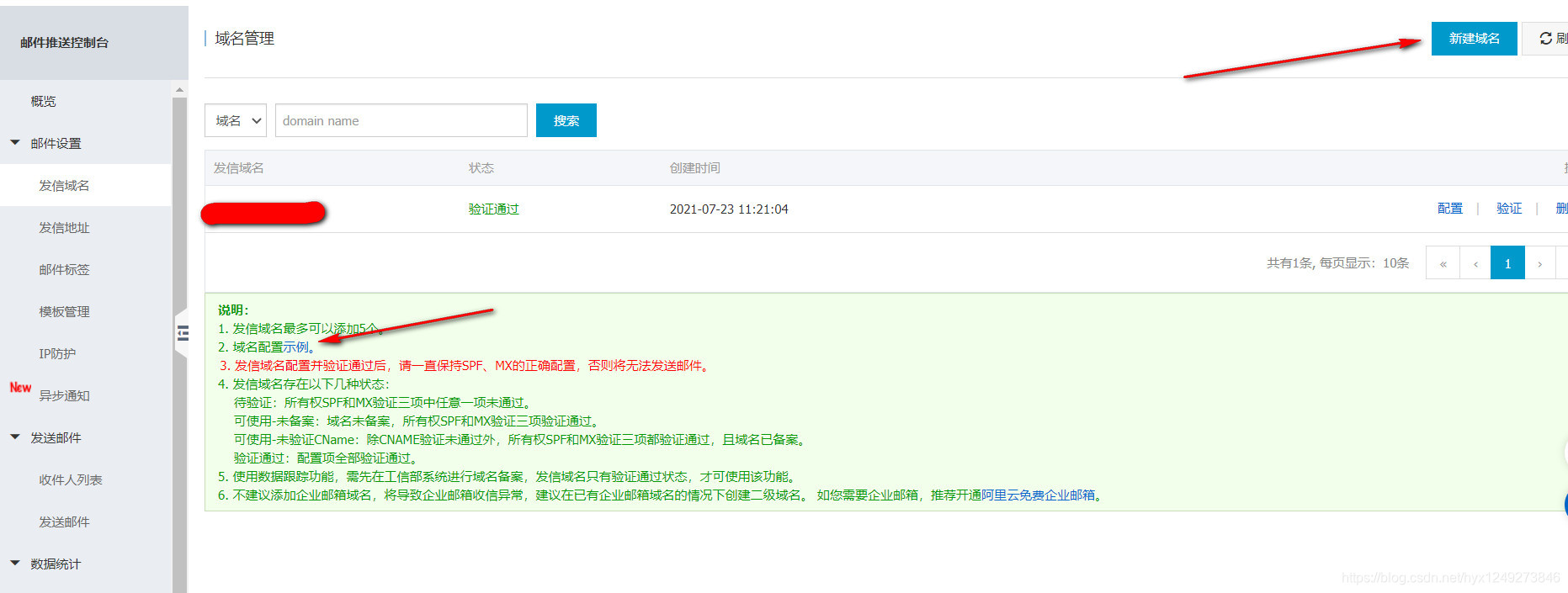
然后就是配置,这很重要,没有配置的话是不能发送邮件的,可根据图中箭头,配置实例来填入。
首先,在配置之前,你要在域名控制台将你的域名去进行DNS解析,如下图所示

附上我的例子

域名的处理之后,就是在上图邮件推送控制台,在你新创建的域名那里,点击配置,配置完毕之后,点击验证即可(参考下我的)

至于发信地址和邮件标签比较简单,为了省(tou)篇(lang)幅,就不一一赘述了,只要第一步设置好值就没什么大问题了
(这过程有什么不懂的,欢迎留言区提出)
3、代码展示
Email工具类(封装发送邮件的工具类)
import com.aliyun.dm20151123.*;

import com.aliyun.dm20151123.models.SingleSendMailRequest;

import com.aliyun.dm20151123.models.SingleSendMailResponse;

import com.aliyun.tea.TeaException;

import com.aliyun.teaopenapi.models.Config;

import org.slf4j.Logger;

import org.slf4j.LoggerFactory;

import org.springframework.stereotype.Component;

@Component

public class EmailUtils {

    private static final Logger logger = LoggerFactory.getLogger(EmailUtils.class);

    public static Client createClient(String accessKeyId, String accessKeySecret) throws Exception {

        Config config = new Config().setAccessKeyId(accessKeyId).setAccessKeySecret(accessKeySecret);

        config.endpoint = "dm.aliyuncs.com";

        return new Client(config);

    }

    public static void sendEmail(StringBuffer builder) throws Exception {

		//	这里的 accessKey, accessSecret是你在阿里云设置的,地址如下

		//	https://usercenter.console.aliyun.com/

        Client client = EmailUtils.createClient("accessKey", "accessSecret");

        SingleSendMailRequest singleSendMailRequest = new SingleSendMailRequest();

        try {

            singleSendMailRequest

                    .setAccountName("accountName")

                    .setAddressType(1)

                    .setReplyToAddress(true)

                    .setToAddress("email@163.com")

                    .setSubject("百度实时热搜")

                    .setHtmlBody(builder.toString());

            client.singleSendMail(singleSendMailRequest);

        } catch (TeaException e) {

            logger.error(e.getMessage());

        }

        logger.info("邮件发送成功!!!");

    }

}
Http工具类(封装发送http请求的工具类)
import org.apache.http.client.config.RequestConfig;

import org.apache.http.client.methods.CloseableHttpResponse;

import org.apache.http.client.methods.HttpGet;

import org.apache.http.impl.client.CloseableHttpClient;

import org.apache.http.impl.client.HttpClients;

import org.apache.http.impl.conn.PoolingHttpClientConnectionManager;

import org.apache.http.util.EntityUtils;

import org.springframework.stereotype.Component;

import java.io.IOException;

@Component

public class HttpUtils {

    private final PoolingHttpClientConnectionManager cm;

    public HttpUtils() {

        this.cm = new PoolingHttpClientConnectionManager();

        //  设置最大连接数

        this.cm.setMaxTotal(100);

        //  设置每个主机的最大连接数

        this.cm.setDefaultMaxPerRoute(10);

    }

    /**

     * 根据请求地址下载页面数据

     *

     * @param url

     * @return 页面数据

     */

    public String doGetHtml(String url) {

        //  获取HttpClient对象

        CloseableHttpClient httpClient = HttpClients.custom().setConnectionManager(this.cm).build();

        //  设置hTTPGet请求对象,设置url地址

        HttpGet httpGet = new HttpGet(url);

        //  设置请求信息

        httpGet.setConfig(this.getConfig());

        // 浏览器表示

        httpGet.addHeader("User-Agent", "Mozilla/5.0 (iPhone; CPU iPhone OS 11_0 like Mac OS X) AppleWebKit/604.1.38 (KHTML, like Gecko) Version/11.0 Mobile/15A372 Safari/604.1");

        // 传输的类型

        httpGet.addHeader("Cookie", "随意打开一个百度网站,在返回的请求地址里面添加cookie信息即可");

        httpGet.addHeader("Accept-Language", "zh-CN");

        CloseableHttpResponse response = null;

        try {

            //  使用HttpClient发起请求,获取响应

            response = httpClient.execute(httpGet);

            //  解析响应,返回结果

            if (response.getStatusLine().getStatusCode()==200) {

                //  判断响应Entity是否不为空,如果不为空就可以使用EntityUtils

                if (response.getEntity()!=null) {

                    return EntityUtils.toString(response.getEntity(), "utf8");

                }

            }

        } catch (IOException e) {

            e.printStackTrace();

        } finally {

            //  关闭response

            if (response!=null) {

                try {

                    response.close();

                } catch (IOException e) {

                    e.printStackTrace();

                }

            }

        }

        //  返回空字符串

        return "";

    }

    //  设置请求信息

    private RequestConfig getConfig() {

        return RequestConfig.custom()

                .setConnectTimeout(1000)    //  创建连接的最长时间

                .setConnectionRequestTimeout(500)   //  获取连接的最长时间

                .setSocketTimeout(10000)    //  数据传输的最长时间

                .build();

    }

}
Email工具类是我把阿里云SDK的代码进行封装,Http工具类就是简单封装了Http请求的方法,就不详细讲述了。
具体的实现类
@Component

public class BaiduCrawlerTask {

    private static final Logger logger = LoggerFactory.getLogger(BaiduCrawlerTask.class);

    @Autowired

    private HttpUtils httpUtils;

    @Autowired

    private EmailUtils emailUtils;

    private static final String CRAWLER_URL = "https://top.baidu.com/board?tab=realtime";

	//	每天 7,12,18,20,23点定时执行

    @Scheduled(cron = "0 0 7,12,18,20,23 * * ? ")

    //	@Scheduled(fixedDelay = 1000 * 1000) 可用这行先测试一遍,可以的话,再注释掉用上行的

    public void itemTask() throws Exception {

        String html = this.httpUtils.doGetHtml(CRAWLER_URL);

        this.parse(html);

    }

    private void parse(String html) throws Exception {

        Document doc = Jsoup.parse(html);

        // 对新闻数据进行处理

        String data = doc.select("._1mm2lDDa53WVJII6NKkYUu").first().childNodes().get(0).toString()

                .replace("<!--", "").replace("-->", "").substring(8);

        String resultJson = JSON.parseObject(data).getString("cards");

        JSONArray arrayJson = (JSONArray) JSONObject.parse(resultJson);

        Object content = ((JSONObject) arrayJson.get(0)).get("content");

        JSONArray contentArray = (JSONArray) content;

        String title = "";

        String word = "";

        String img = "";

        String hotScore = "";

        String desc = "";

        String rawUrl = "";

        StringBuilder builder = new StringBuilder();

        //	这里拼接成html,是因为如果我试过直接发文本信息,

        //  阿里云那边当成垃圾邮件给过滤掉,导致邮件发送失败

        builder.append("<html>\r\n")

                .append("<head>\r\n")

                .append("<meta charset=\"utf-8\">\r\n")

                .append("<title>百度实时热搜</title>\r\n")

                .append("</head>\r\n");

        int index = 1;

        for (Object obj : contentArray) {

            title = ((JSONObject) obj).get("query").toString();

            img = (((JSONObject) obj).get("img") == null) ? "" : ((JSONObject) obj).get("img").toString();

            hotScore = ((JSONObject) obj).get("hotScore").toString();

            desc = (((JSONObject) obj).get("desc") == null) ? "" : ((JSONObject) obj).get("desc").toString();

            rawUrl = ((JSONObject) obj).get("rawUrl").toString();

            builder.append("<div>")

                    .append("<p>")

                    .append(index)

                    .append("、")

                    .append("<a style=\"text-decoration:none;\" href=\"")

                    .append(rawUrl)

                    .append("\"")

                    .append(">")

                    .append(title)

                    .append("</a> - ")

                    .append("<span style=\"color:#ff0000;font-weight:bolder\">")

                    .append(hotScore)

                    .append("</span></p><p>")

                    .append(desc)

                    .append("</p>")

                    .append("<img src=\"")

                    .append(img)

                    .append("\"/>")

                    .append("</div>")

                    .append("\r\n");

            index++;

            if(index == 11){

                break;

            }

        }

        this.emailUtils.sendEmail(builder);

        builder.append("</body>").append("\r\n").append("</html>");

        logger.info("数据抓取完成");

    }

}
4、结果截图

对于编写过程中如果有什么疑问,欢迎留言。感谢观看,✿✿ヽ(°▽°)ノ✿
SpringBoot 简易实现热搜邮件推送,妈妈再也不用担心我不了解国家大事了的更多相关文章
- 解决.NET Core中MailKit无法使用阿里云邮件推送服务的问题
在博问中(.net core怎么实现邮件发送)知道了MailKit无法使用阿里云邮件推送服务发送邮件的问题,自已实测也遇到同样的问题,而用自己搭建的邮件服务器没这个问题. 于是,向阿里云提交了工单.. ...
- Laravel 下结合阿里云邮件推送服务
最近在学习laravel做项目开发,遇到注册用户推送邮件的问题,之前用java做的时候是自己代码写的,也就是用ECS推送邮件,但是现在转php的laravel了就打算用php的邮件发送功能来推送邮件, ...
- 用ASP.NET Core 1.0中实现邮件发送功能-阿里云邮件推送篇
在上篇中用MailKit实现了Asp.net core 邮件发送功能,但一直未解决阿里云邮件推送问题,提交工单一开始的回复不尽如人意,比如您的网络问题,您的用户名密码不正确等,但继续沟通下阿里云客户还 ...
- RedMine项目管理系统邮件推送设置(Windows环境)
RedMine项目管理系统有邮箱推送功能,当Bug,安全漏洞等内容被修改.解决.评论的时候,系统会通过邮件 及时的通知你的团队和客户.邮件通知的环节.形式.时间.接受人均可定制,功能十分实用. 下面是 ...
- wordpress使用阿里云邮件推送服务实现发送邮件
之前用腾迅云时,配置了wordpress是可以使用邮件服务的,然而到了阿里云,却无法使用了,有人说是因为阿里云关了25端口,但腾迅好像也关了. 百度看看有没有其他方法,最终让我找到个方法,可惜不是很完 ...
- Delphi阿里云邮件推送【支持单一发信、邮件批量发送和获取指定条件下的发送数据】
作者QQ:(648437169) 点击下载➨Delphi阿里云邮件推送 阿里云api文档 [Delphi阿里云邮件推送]支持SingleSendMail(单一发信接口). ...
- 记一次邮件推送的坑,c#基于smtp使用腾讯企业邮箱发送邮件总是失败的原因
今天在弄企业邮箱推送的东西,原版代码是这样的 public void SendEmail(string title, string content) { try { MailMessage mailM ...
- jenkins持续集成Allure生成报表+邮件推送
本次基于<jenkins 生成HTML报表,邮件推送>的基础上将生成HTML报表修改为Allure生成报表,可以参考官方文档:https://docs.qameta.io/allure/# ...
- Java Springboot webSocket简单实现,调接口推送消息到客户端socket
Java Springboot webSocket简单实现,调接口推送消息到客户端socket 后台一般作为webSocket服务器,前台作为client.真实场景可能是后台程序在运行时(满足一定条件 ...
随机推荐
- ajax传字符串时出现乱码问题的解决
字符乱码的解决: 第一种在@RequestMapping中添加 @RequestMapping(value="queryAllToTree",method=RequestMetho ...
- uwp 基础知识
(TitleId,DiaplayName,args,LogoUri,size); Obj.VisualElements.ShowNameOnSquare150x150Logo = true; if ( ...
- spring初始化源码浅析之关键类和扩展接口
目录 1.关键接口和类 1.1.关键类之 DefaultListableBeanFactory 1.2.关键类之XmlBeanDefinitionReader 1.3.关键类之ClassPathXml ...
- windows 10 + tensorflow-gpu 环境搭建
安装过程可基本按照ubuntu装法,参考https://www.cnblogs.com/xbit/p/9768238.html 其中: conda配置文件:C:\Users\Administrator ...
- leaflet加载离线OSM(OpenStreetMap)
本文为博主原创,如需转载需要署名出处. leaflet作为广为应用的开源地图操作的API,是非常受欢迎,轻量级的代码让使用者更容易操作. 废话不多说,下面直接给出范例. 首先在这个网站下载leafle ...
- 哲学家就餐问题-Java语言实现死锁避免
哲学家就餐问题-Java语言实现死锁避免 我死锁预防是至少破坏死锁产生的四个必要条件之一,带来的问题就是系统资源利用率低且不符合开发习惯,而死锁避免不是事先釆取某种限制措施破坏死锁的必要条件,只是注意 ...
- Java调用腾讯云短信接口,完成验证码的发送(不成功你来砍我!!)
一.前言 我们在一些网站注册页面,经常会见到手机验证码的存在,这些验证码一般的小公司都是去买一些大的厂家的短信服务,自己开发对小公司的成本花费太大了!今天小编就带着大家来学习一下腾讯云的短信接口,体验 ...
- Linux基础命令(基于CentOS7)
1.帮助相关命令 man 查看普通命令的帮助 --help 只能查看内置命令 info 查看一个命令的更多信息 type 查看是否为内置命令 2.关机重启 shutdown -h 关机 -r 重启 - ...
- noip模拟47
原版在 \(linux\) 本地写完没保存关机给没了-- 再简单写一下 \(t2\) 用 \(dp\) 转移 \(f[i]=\sum _ {j=last[a[i]]}^{i-1} f[j]\) 用前缀 ...
- NOIP模拟22「d·e·f」
T1:d 枚举. 现在都不敢随便打枚举了. 实际上我们只关注最后留下的矩阵中最小的长与宽即可. 所以我们将所有矩阵按a的降序排列. 从第\(n-m\)个开始枚举. 因为你最多拿 ...