
15 Windows编程——系统内置窗口子类型之button
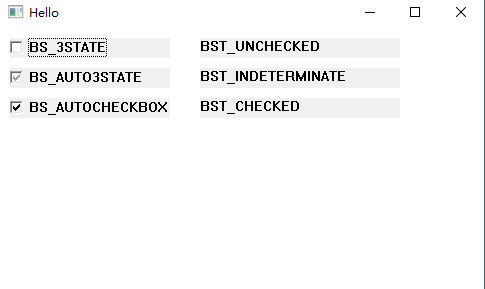
button子类型BS_3STATE、BS_AUTO3STATE、BS_AUTOCHECKBOX
源码
 #include<Windows.h>

 #include<Windowsx.h>

 LRESULT CALLBACK WindProc(HWND hwnd, UINT message, WPARAM wParam, LPARAM lParam);

 int WinMain(HINSTANCE hInst, HINSTANCE tmp, LPSTR szCmd, int nShow)

 {

     WNDCLASS WndClass;

     TCHAR* ClassName = TEXT("MyClass");

     HWND hwnd;

     MSG msg;

     WndClass.cbClsExtra = ;

     WndClass.cbWndExtra = ;

     WndClass.hbrBackground = (HBRUSH)(COLOR_WINDOW + );

     WndClass.hCursor = LoadCursor(NULL, IDC_ARROW);

     WndClass.hIcon = LoadIcon(NULL, IDI_APPLICATION);

     WndClass.hInstance = hInst;

     WndClass.lpfnWndProc = WindProc;

     WndClass.lpszClassName = ClassName;

     WndClass.lpszMenuName = NULL;

     WndClass.style = CS_VREDRAW | CS_HREDRAW;

     if (!RegisterClass(&WndClass))

     {

         MessageBox(NULL, TEXT("Gegister Class Fail!!"), TEXT("error"), MB_OK);

         return ;

     }

     //CreateWindow返回之前,会发送WM_CREATE消息

     hwnd = CreateWindow(ClassName, TEXT("Hello"), WS_OVERLAPPEDWINDOW, CW_USEDEFAULT, CW_USEDEFAULT, , , NULL, NULL, hInst, NULL);

     if (hwnd == NULL)

     {

         MessageBox(NULL, TEXT("Create Window Fail!!"), TEXT("error"), MB_OK);

         return ;

     }

     ShowWindow(hwnd, nShow);

     UpdateWindow(hwnd);

     while (GetMessage(&msg, NULL, , ))

     {

         TranslateMessage(&msg);

         DispatchMessage(&msg);

     }

     return ;

 }

 LRESULT CALLBACK WindProc(HWND hwnd, UINT message, WPARAM wParam, LPARAM lParam)

 {

     PAINTSTRUCT pt;

     static int check_status = ;

     static HWND button,button1, button2,statichwnd, statichwnd1, statichwnd2;

     HDC hdc;

     HBRUSH hBrush = CreateSolidBrush(RGB(, , ));

     switch (message)

     {

     case WM_CREATE:

         button = CreateWindow(TEXT("button"), TEXT("BS_3STATE"), WS_CHILD | WS_VISIBLE|BS_3STATE, , , , , hwnd, (HMENU), GetModuleHandle(NULL), NULL);

         statichwnd = CreateWindow(TEXT("static"), NULL, WS_CHILD | WS_VISIBLE, , , , , hwnd, (HMENU), GetModuleHandle(NULL), NULL);

         button1 = CreateWindow(TEXT("button"), TEXT("BS_AUTO3STATE"), WS_CHILD | WS_VISIBLE | BS_AUTO3STATE, , , , , hwnd, (HMENU), GetModuleHandle(NULL), NULL);

         statichwnd1 = CreateWindow(TEXT("static"), NULL, WS_CHILD | WS_VISIBLE, , , , , hwnd, (HMENU), GetModuleHandle(NULL), NULL);

         button2 = CreateWindow(TEXT("button"), TEXT("BS_AUTOCHECKBOX"), WS_CHILD | WS_VISIBLE | BS_AUTOCHECKBOX, , , , , hwnd, (HMENU), GetModuleHandle(NULL), NULL);

         statichwnd2 = CreateWindow(TEXT("static"), NULL, WS_CHILD | WS_VISIBLE, , , , , hwnd, (HMENU), GetModuleHandle(NULL), NULL);

         return ;

     case WM_SIZE:

         MoveWindow(button, , , , , TRUE);

         MoveWindow(statichwnd, , , , , TRUE);

         MoveWindow(button1, , , , , TRUE);

         MoveWindow(statichwnd1, , , , , TRUE);

         MoveWindow(button2, , , , , TRUE);

         MoveWindow(statichwnd2, , , , , TRUE);

         return ;

     case WM_COMMAND:

         //处理button按钮,手动点选按钮

         if (LOWORD(wParam)==)

         {

             switch (HIWORD(wParam))

             {

             case BN_CLICKED:

                 check_status++;

                 if (check_status %  == )

                 {

                     SendMessage((HWND)lParam, BM_SETCHECK, BST_CHECKED, NULL);

                     SetWindowText(statichwnd, TEXT("BST_CHECKED"));

                 }

                 else if (check_status %  == )

                 {

                     SendMessage((HWND)lParam, BM_SETCHECK, BST_INDETERMINATE, NULL);

                     SetWindowText(statichwnd, TEXT("BST_INDETERMINATE"));

                 }

                 else

                 {

                     SendMessage((HWND)lParam, BM_SETCHECK, BST_UNCHECKED, NULL);

                     SetWindowText(statichwnd, TEXT("BST_UNCHECKED"));

                 }

                 break;

             default:

                 break;

             }

         }

         //处理button1按钮,自动点选按钮

         else if (LOWORD(wParam) == )

         {

             switch (HIWORD(wParam))

             {

             case BN_CLICKED:

                 if (SendMessage(button1,BM_GETCHECK,NULL,NULL)==BST_CHECKED)

                 {

                     SetWindowText(statichwnd1, TEXT("BST_CHECKED"));

                 }

                 else if (SendMessage(button1, BM_GETCHECK, NULL, NULL) == BST_INDETERMINATE)

                 {

                     SetWindowText(statichwnd1, TEXT("BST_INDETERMINATE"));

                 }

                 else

                 {

                     SetWindowText(statichwnd1, TEXT("BST_UNCHECKED"));

                 }

                 break;

             default:

                 break;

             }

         }

         //处理button2按钮,自动点选按钮,这个按钮只有2种状态

         else if (LOWORD(wParam) == )

         {

             switch (HIWORD(wParam))

             {

             case BN_CLICKED:

                 if (SendMessage(button2, BM_GETCHECK, NULL, NULL) == BST_CHECKED)

                 {

                     SetWindowText(statichwnd2, TEXT("BST_CHECKED"));

                 }

                 else

                 {

                     SetWindowText(statichwnd2, TEXT("BST_UNCHECKED"));

                 }

                 break;

             default:

                 break;

             }

         }

         return ;

     case WM_DESTROY:

         PostQuitMessage();

         return ;

     default:

         break;

     }

     return DefWindowProc(hwnd, message, wParam, lParam);

 }
运行结果
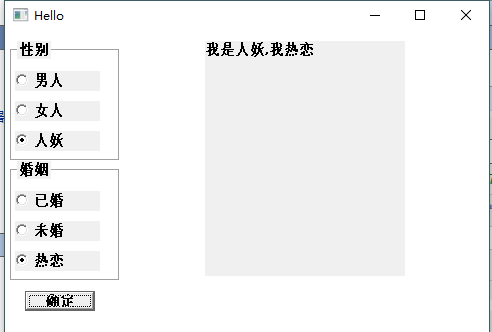
button子类型BS_AUTORADIOBUTTON、BS_GROUPBOX、BS_DEFPUSHBUTTON
源码
 #include<Windows.h>

 #include<WinUser.h>

 #include<tchar.h>

 #include<stdio.h>

 LRESULT CALLBACK WindProc(HWND hwnd, UINT message, WPARAM wParam, LPARAM lParam);

 int WinMain(HINSTANCE hInst, HINSTANCE tmp, LPSTR szCmd, int nShow)

 {

     WNDCLASS WndClass;

     TCHAR* ClassName = TEXT("MyClass");

     HWND hwnd;

     MSG msg;

     WndClass.cbClsExtra = ;

     WndClass.cbWndExtra = ;

     WndClass.hbrBackground = (HBRUSH)(COLOR_WINDOW + );

     WndClass.hCursor = LoadCursor(NULL, IDC_ARROW);

     WndClass.hIcon = LoadIcon(NULL, IDI_APPLICATION);

     WndClass.hInstance = hInst;

     WndClass.lpfnWndProc = WindProc;

     WndClass.lpszClassName = ClassName;

     WndClass.lpszMenuName = NULL;

     WndClass.style = CS_VREDRAW | CS_HREDRAW;

     if (!RegisterClass(&WndClass))

     {

         MessageBox(NULL, TEXT("Gegister Class Fail!!"), TEXT("error"), MB_OK);

         return ;

     }

     //CreateWindow返回之前,会发送WM_CREATE消息

     hwnd = CreateWindow(ClassName, TEXT("Hello"), WS_OVERLAPPEDWINDOW, CW_USEDEFAULT, CW_USEDEFAULT, , , NULL, NULL, hInst, NULL);

     if (hwnd == NULL)

     {

         MessageBox(NULL, TEXT("Create Window Fail!!"), TEXT("error"), MB_OK);

         return ;

     }

     ShowWindow(hwnd, nShow);

     UpdateWindow(hwnd);

     while (GetMessage(&msg, NULL, , ))

     {

         TranslateMessage(&msg);

         DispatchMessage(&msg);

     }

     return ;

 }

 LRESULT CALLBACK WindProc(HWND hwnd, UINT message, WPARAM wParam, LPARAM lParam)

 {

     PAINTSTRUCT pt;

     static int check_status = ;

     HDC hdc;

     static HWND radio1[], radio2[];

     static HWND defpushbutton;

     static HWND shwnd;

     static HWND group1, group2;

     TCHAR *r_str1 [] = {

         TEXT("男人"),TEXT("女人"),TEXT("人妖")};

     TCHAR *r_str2[] = {

         TEXT("已婚"),TEXT("未婚"),TEXT("热恋") };

     TCHAR buf[];

     int i;

     static int sex = ;

     static int marry = ;

     switch (message)

     {

     case WM_CREATE:

         for (i = ; i < ; i++)

         {

             radio1[i]= CreateWindow(TEXT("button"), r_str1[i], WS_CHILD | WS_VISIBLE | BS_AUTORADIOBUTTON, , , , , hwnd, (HMENU)(+i), GetModuleHandle(NULL), NULL);

         }

         for (i = ; i < ; i++)

         {

             radio2[i] = CreateWindow(TEXT("button"), r_str2[i], WS_CHILD | WS_VISIBLE | BS_AUTORADIOBUTTON, , , , , hwnd, (HMENU)( + i), GetModuleHandle(NULL), NULL);

         }

         group1= CreateWindow(TEXT("button"), TEXT("性别"), WS_CHILD | WS_VISIBLE | BS_GROUPBOX, , , , , hwnd, (HMENU)(), GetModuleHandle(NULL), NULL);

         group2 = CreateWindow(TEXT("button"), TEXT("婚姻"), WS_CHILD | WS_VISIBLE | BS_GROUPBOX, , , , , hwnd, (HMENU)(), GetModuleHandle(NULL), NULL);

         defpushbutton = CreateWindow(TEXT("button"), TEXT("确定"), WS_CHILD | WS_VISIBLE | BS_DEFPUSHBUTTON, , , , , hwnd, (HMENU)(), GetModuleHandle(NULL), NULL);

         shwnd = CreateWindow(TEXT("static"), NULL, WS_CHILD | WS_VISIBLE , , , , , hwnd, (HMENU)(), GetModuleHandle(NULL), NULL);

         return ;

     case WM_SIZE:

         for (i = ; i < ; i++)

         {

             MoveWindow(radio1[i], , +i*, , , TRUE);

         }

         for (i = ; i < ; i++)

         {

             MoveWindow(radio2[i], ,  + i * , , , TRUE);

         }

         MoveWindow(group1, , , , , TRUE);

         MoveWindow(group2, , , , , TRUE);

         SetWindowLong(radio1[], GWL_STYLE, (LONG)WS_CHILD | WS_VISIBLE | BS_AUTORADIOBUTTON | WS_GROUP);

         SetWindowLong(radio2[], GWL_STYLE, (LONG)WS_CHILD | WS_VISIBLE | BS_AUTORADIOBUTTON | WS_GROUP);

         MoveWindow(defpushbutton, , , , , TRUE);

         MoveWindow(shwnd, , , , , TRUE);

         return ;

     case WM_COMMAND:

         //HIWORD(wParam)控件通知码     lParam控件的窗口句柄

         if (HIWORD(wParam) == BN_CLICKED && (LPARAM)defpushbutton !=lParam)

         {

             if ((LPARAM)radio1[] == lParam)

             {

                 sex = ;

             }

             else if ((LPARAM)radio1[] == lParam)

             {

                 sex = ;

             }

             else if ((LPARAM)radio1[] == lParam)

             {

                 sex = ;

             }

             if ((LPARAM)radio2[] == lParam)

             {

                 marry = ;

             }

             else if ((LPARAM)radio2[] == lParam)

             {

                 marry = ;

             }

             else if ((LPARAM)radio2[] == lParam)

             {

                 marry = ;

             }

         }

         if ((LPARAM)defpushbutton == lParam)

         {

             if (sex ==  | marry == )

             {

                 _stprintf(buf, TEXT("请选择性别或婚姻状态"));

                 SetWindowText(shwnd, buf);

             }

             else

             {

                 _stprintf(buf, TEXT("我是%s,我%s"), r_str1[sex - ], r_str2[marry - ]);

                 SetWindowText(shwnd, buf);

             }

         }

         return ;

     case WM_DESTROY:

         PostQuitMessage();

         return ;

     default:

         break;

     }

     return DefWindowProc(hwnd, message, wParam, lParam);

 }
运行结果:
15 Windows编程——系统内置窗口子类型之button的更多相关文章
- 16 Windows编程——系统内置窗口子类型之edit、ComboBox、ownerbutton、listbox
edit类型的子窗口 ES_MULTILINE:多行输入文本框 窗口的消息: WL_COMMAND: EN_CHANGE:当edit窗口内的文本内容改变的时候,edit子窗口给父窗口发送一个WL_CO ...
- 13 Windows编程——系统内置窗口子类型之静态子窗口
静态子窗口类型 wndclass:static 源码 #include<Windows.h> #include<Windowsx.h> HINSTANCE G_h; LRESU ...
- 12 Windows编程——子窗口和系统内置窗口类“BUTTON”
创建子窗口类,使得子窗口有自己的处理过程. 子窗口类型WS_CHILD不能和WS_POPUP一起使用!为什么子窗口要有自己的处理过程?如果使用主窗口类来创建子窗口,那么子窗口和主窗口将公用窗口处理过程 ...
- 学习windows编程 day3 之窗口绘画一:点线绘制
#include <windows.h> #include <math.h> LRESULT CALLBACK WndProc(HWND hwnd, UINT message, ...
- Windows编程___创建窗口
创建Windows窗口不难,可以简要的概括为: 1,# 注册一个窗口类 填充WNDCLASS结构 书写窗口消息处理函数WinProc 2,# 创建一个窗口 填写基本的窗口信息 3,# 显示窗口 4,# ...
- 学习windows编程 day3 之窗口绘画二:边框绘制函数
#include <windows.h> LRESULT CALLBACK WndProc(HWND hwnd, UINT message, WPARAM wParam, LPARAM l ...
- Python学习15之python内置六大标准类型
1.六大标准类型:数值型,str,list,set,tuple,dic 2.数值型:int,float,bool,complex 3.区别: 1)数值型和str,tuple都是不可变类型 而list, ...
- windows 编程 —— 子窗口 与 子窗口控件
目录: 子窗口与主窗口的交互 子窗口控件 按钮类别 button 滚动条类别 scrollbar 静态类别 static 编辑框类别 edit 清单方块 listbox 子窗口与主窗口的交互 创建窗 ...
- 【Windows编程】入门篇——win 32窗口的hello word!
✍ Windows编程基础 1.Win 32应用程序基本类型 1) 控制台程序 不需要完善的windows窗口,可以使用DOS窗口方式显示 2) Win 32窗口程序 包含窗口的程序,可以通过窗 ...
随机推荐
- Python 环境搭建(Win 安装以及Mac OS 安装)
千里之行始于足下,今天我们先来学习 Python 环境搭建. 注意:本系列教程基于 Python 3.X Python 环境搭建 Win 安装 打开 Python 官网 https://www.pyt ...
- English Learning -- 0611--When Burnout Is a Sign You Should Leave Your Job
I like the following article from Harvard Business Review, as I ever experienced burnout at work. Ve ...
- dotnet core use MangoDB
安装MangoDB 同样我这边再次使用Docker, 方便快捷: # 拉取镜像 docker pull mongo # 运行镜像 docker run -d -p 37017:27017 --name ...
- RestTemplate对象的使用
- zend framework多模块多Layout配置
转自: http://blog.csdn.net/a82168506/article/details/10228011 上次接触zend framework已经很久远了,10年的事情了.最近在做一个项 ...
- ding
Import "shanhai.lua"Dim currHour,currMinute,currSecondDim mmRnd = 0Dim sumFor=Int(ReadUICo ...
- [WebAPI] - 使用 Ajax 提交 HTML Form Data 到 WebAPI 的方法
背景 根据HTTP标准,HTTP请求可以使用多种请求方法. HTTP 1.0 定义了三种请求方法:GET.POST 和 HEAD 方法.HTTP 1.1 新增了五种请求方法:OPTIONS.PUT.D ...
- python 之 前端开发( DOM操作)
11.47 DOM操作 查找节点: 11.471 直接查找 document.getElementById //根据ID获取唯一一个标签 document.getElementsByClassName ...
- 利用 nodejs 解析 m3u8 格式文件,并下 ts 合并为 mp4
利用 nodejs 解析 m3u8 格式文件,并下 ts 合并为 mp4 以前看视频的时候,直接找到 video标签,查看视频地址,然后下载下来.. 后来发现,好多 video 标签打开元素审查,如下 ...
- 匹配script标签及内容js代码的正则表达式
<script>[\s\S]+?</script>