
JS 仿支付宝input文本输入框放大组件
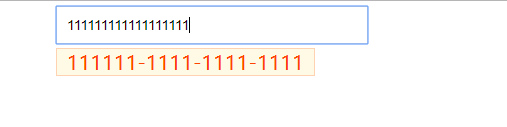
input输入的时候可以在后边显示数字放大镜
<!doctype html>

<html lang="en">

 <head>

  <meta charset="UTF-8">

  <title>JS 仿支付宝input文本输入框放大组件</title>

  <script src="js/jquery.min.js"></script>

  <style>

     * { margin: 0; padding: 0; border-width: 1px; }

     .parentCls {margin:5px 60px 0;}

     .js-max-input {border: solid 1px #ffd2b2; position:relative;background: #fffae5;padding: 0 10px 0 10px;font-size:20px;color: #ff4400}

     .inputElem4{ width: 300px; height: 36px; border: 1px solid #E0E0E0; padding-left: 10px; line-height: 36px; font-size: 14px; }

  </style>

 </head>

 <body>

    <div class="parentCls">

        <input type="text" class="inputElem4" autocomplete = "off" maxlength="18"/>

    </div>

     <script src="js/jq22.js"></script>

     <script>

         // 初始化

         $(function(){

            new TextMagnifier({

                inputElem: '.inputElem4',

                align: 'bottom',

                splitType: [6,4,4,4]

            });

         });

     </script>

 </body>

</html>
/**

 * JS 仿支付宝的文本输入框放大组件

 */

 function TextMagnifier(options) {

     this.config = {

        inputElem          :     '.inputElem',     // 输入框目标元素

        parentCls          :     '.parentCls',     // 目标元素的父类

        align              :     'right',            // 对齐方式有 ['top','bottom','left','right']四种 默认为top

        splitType          :     [3,4,4],          // 拆分规则

        delimiter          :     '-'                // 分隔符可自定义

     };

     this.cache = {

          isFlag  :  false

     };

     this.init(options);

 }

 TextMagnifier.prototype = {

     constructor: TextMagnifier,

     init: function(options) {

        this.config = $.extend(this.config,options || {});

        var self = this,

            _config = self.config,

            _cache = self.cache;

        self._bindEnv();

     },

     /*

      * 在body后动态添加HTML内容

      * @method _appendHTML

      */

     _appendHTML: function($this,value) {

         var self = this,

             _config = self.config,

             _cache = self.cache;

         var html = '',

             $parent = $($this).closest(_config.parentCls);

             if($('.js-max-input',$parent).length == 0) {

                html += '<div class="js-max-input"></div>';

                $($parent).append(html);

             }

             var value = self._formatStr(value);

             $('.js-max-input',$parent).html(value);

     },

     /*

      * 给目标元素定位

      * @method _position

      * @param target

      */

     _position: function(target){

        var self = this,

            _config = self.config;

        var elemWidth = $(target).outerWidth(),

            elemHeight = $(target).outerHeight(),

            elemParent = $(target).closest(_config.parentCls),

            containerHeight = $('.js-max-input',elemParent).outerHeight();

        $(elemParent).css({"position":'relative'});

        switch(true){

            case _config.align == 'top':

                $('.js-max-input',elemParent).css({'position':'absolute','top' :-elemHeight - containerHeight/2,'left':0});

                break;

            case _config.align == 'left':

                $('.js-max-input',elemParent).css({'position':'absolute','top' :0,'left':0});

                break;

            case _config.align == 'bottom':

                $('.js-max-input',elemParent).css({'position':'absolute','top' :elemHeight + 4 + 'px','left':0});

                break;

            case _config.align == 'right':

                $('.js-max-input',elemParent).css({'position':'absolute','top' :0,'left':elemWidth + 2 + 'px'});

                break;

        }

     },

     /**

      * 绑定事件

      * @method _bindEnv

      */

     _bindEnv: function(){

        var self = this,

            _config = self.config,

            _cache = self.cache;

        // 实时监听输入框值的变化

        $(_config.inputElem).each(function(index,item){

            $(item).keyup(function(e){

                var value = $.trim(e.target.value),

                    parent = $(this).closest(_config.parentCls);

                if(value == '') {

                    self._hide(parent);

                }else {

                    var html = $.trim($('.js-max-input',parent).html());

                    if(html != '') {

                        self._show(parent);

                    }

                }

                self._appendHTML($(this),value);

                self._position($(this));

            });

            $(item).unbind('focusin');

            $(item).bind('focusin',function(){

                var parent = $(this).closest(_config.parentCls),

                    html = $.trim($('.js-max-input',parent).html());

                if(html != '') {

                    self._show(parent);

                }

            });

            $(item).unbind('focusout');

            $(item).bind('focusout',function(){

                var parent = $(this).closest(_config.parentCls);

                self._hide(parent);

            });

        });

     },

     /**

      * 格式化下

      * @method _formatStr

      */

     _formatStr: function(str){

        var self = this,

            _config = self.config,

            _cache = self.cache;

        var count = 0,

            output = [];

        for(var i = 0, ilen = _config.splitType.length; i < ilen; i++){

            var s = str.substr(count,_config.splitType[i]);

            if(s.length > 0){

                output.push(s);

            }

            count+= _config.splitType[i];

        }

        return output.join(_config.delimiter);

     },

     /*

      * 显示 放大容器

      * @method _show

      */

     _show: function(parent) {

        var self = this,

            _config = self.config,

            _cache = self.cache;

        if(!_cache.isFlag) {

            $('.js-max-input',parent).show();

            _cache.isFlag = true;

        }

     },

     /*

      * 隐藏 放大容器

      * @method hide

      * {public}

      */

     _hide: function(parent) {

        var self = this,

            _config = self.config,

            _cache = self.cache;

        if(_cache.isFlag) {

            $('.js-max-input',parent).hide();

            _cache.isFlag = false;

        }

     }

 };
效果图
JS 仿支付宝input文本输入框放大组件的更多相关文章
- Text input(文本输入框)
Text input(文本输入框)是用来获得用户输入的绝佳方式. 你可以用如下方法创建: <input type="text"> 注意,input元素是自关闭的.
- 使用div模拟textarea,实现文本输入框高度自适应(附:js控制textarea实现文本输入框高度自适应)
一.使用textarea标签进行多行文本的输入有很多限制,比如不能实现高度自适应,会出现难看的滚动条等问题. HTML5中添加了一个新属性contenteditable,该属性可以让input,tex ...
- html禁止文本输入框记录输入记录,单击input出现输入过的记录
其实方法很简单,只需要在input文本输入框中加一条autocomplete="off"属性即可. <input type="text" name=&qu ...
- JS 文本输入框放大镜效果
JS 文本输入框放大镜效果 今天下午研究了下 "文本输入框放大镜效果" 当然KISSY官网也有这种组件 请看kissy demo 其实这种效果 对于很多童鞋来说 应该并不陌生!我今 ...
- [js开源组件开发]js文本框计数组件
js文本框计数组件 先上效果图: 样式可以自行调整 ,它的功能提供文本框的实时计数,并作出对应的操作,比如现在超出了,点击下面的按钮后,文本框会闪动两下,阻止提交.具体例子可以点击demo:http: ...
- js监听input等表单输入框的变化事件oninput
js监听input等表单输入框的变化事件oninput,手机页面开发中使用到文本框textarea输入字符监听文本框变化计算还可以输入多少字符,如果使用onkeyup的话是无法监听到输入法输入的文本变 ...
- 仿支付宝/微信的password输入框效果GridPasswordView解析
仿支付宝/微信的password输入框效果GridPasswordView解析,把一些设置和一些关键的地方列了出来,方便大家使用,可能能够省一部分的时间,也算是自己的积累吧. 1.password框能 ...
- 文本输入框input将输入转换为统一大小写
转载地址:http://blog.csdn.net/yieryi_/article/details/52078596 文本输入框input将输入转换为统一大小写,通常有两种方法:JS和CSS方法. 1 ...
- HTML中<input>參数,以及文本输入框,文本域的解说
<form> <input type="text/password" name="名称" value="文本" /> ...
随机推荐
- AES加密、解密(linux、window加密解密效果一致,支持中文)
转自: http://sunfish.iteye.com/blog/2169158 import java.io.UnsupportedEncodingException; import java.s ...
- Zuul【自定义Filter】
实际业务中,如果要自定义filter过滤器,只需集成ZuulFIlter类即可,该类是个抽象类,它实现了IZuulFIlter接口,我们需要实现几个方法,如下示例: import static org ...
- PAT(B) 1053 住房空置率(Java)统计
题目链接:1053 住房空置率 (20 point(s)) 题目描述 在不打扰居民的前提下,统计住房空置率的一种方法是根据每户用电量的连续变化规律进行判断.判断方法如下: 在观察期内,若存在超过一半的 ...
- 5-24 c++语言之【基础知识】
最近一段时间继续开始了c++的学习,作为c plus plus 难免会与c语言做一个对比,很明显的感受到c++语言注重代码的复用性和拓展性,而c语言更加注重其算法的高效性,这也是今后需要注意的地方,避 ...
- Webpack将静态资源拷贝并压缩至输出文件夹
就拿Vue项目来说,比如要将src/assets/js下的静态js文件,直接在public/index.html中引用: 这时候没有在项目中引用,不会经过wenpack的loader,也就不会自己打包 ...
- PB笔记之取项次最大值(即使用.describe(" evaluate('ITM_max',0) ") 获取列的最大值) 的条件
dw_1.describe(" evaluate('ITM_max',0) ") :使用 describe 配合 evaluate 取列的最大最小值(或其它表达式)时,必须在数据 ...
- linux下的打包与解包的简单总结
.tar 解包:tar xvf FileName.tar 打包:tar cvf FileName.tar DirName (注:tar是打包,不是压缩!) ---------------------- ...
- 在论坛中出现的比较难的sql问题:40(子查询 销售和历史库存)
原文:在论坛中出现的比较难的sql问题:40(子查询 销售和历史库存) 最近,在论坛中,遇到了不少比较难的sql问题,虽然自己都能解决,但发现过几天后,就记不起来了,也忘记解决的方法了. 所以,觉得有 ...
- 使用File类、StreamRead和StreamWrite读写数据、以及Path类操作文件路径和Directory
1.File类的概念: File类,是一个静态类,主要是来提供一些函数库用的.静态实用类,提供了很多静态的方法,支持对文件的基本操作,包括创建,拷贝,移动,删除和 打开一个文件. File类方法的参量 ...
- python多线程爬取斗图啦数据
python多线程爬取斗图啦网的表情数据 使用到的技术点 requests请求库 re 正则表达式 pyquery解析库,python实现的jquery threading 线程 queue 队列 ' ...