
[vsftpd] ubuntu14.04 ansible剧本安装vsftpd流程及报错排查
需求:
在ubuntu14.04机器上搭建ftp服务,ftp账号通过winscp软件登录后,仅可增删改/data/wwwroot目录。
一、安装步骤
1、apt 安装vsftpd
apt-get install vsftpd
2、设置ftp账号密码
passwd ftp -s "ftp passwd"
3、按需求更改/etc/vsftpd.conf
listen=YES  #被动模式

anonymous_enable=NO #不允许匿名用户登录FTP

local_enable=YES

write_enable=YES

local_umask=022

dirmessage_enable=YES

use_localtime=YES

xferlog_enable=YES

connect_from_port_20=YES

xferlog_file=/var/log/vsftpd.log

ftpd_banner=Welcome to blah FTP service.

chroot_local_user=YES

local_root=/data/wwwroot

chroot_list_file=/etc/vsftpd.chroot_list

secure_chroot_dir=/var/run/vsftpd/empty

pam_service_name=vsftpd

userlist_enable=YES

userlist_file=/etc/vsftpd.userlist  #仅供文件内的用户登录

userlist_deny=NO

pasv_enable=YES

pasv_min_port=40000  #最小端口

pasv_max_port=40050  #最大端口

port_enable=YES

#pasv_address=x.x.x.x

#pasv_addr_resolve=NO

allow_writeable_chroot=YES
4、设置开放目录的权限和属主
chown -R ftp:ftp /data/wwwroot

chmod 755 /data/wwwroot
5、重启vsftpd
service vsftpd start
6、本机测试
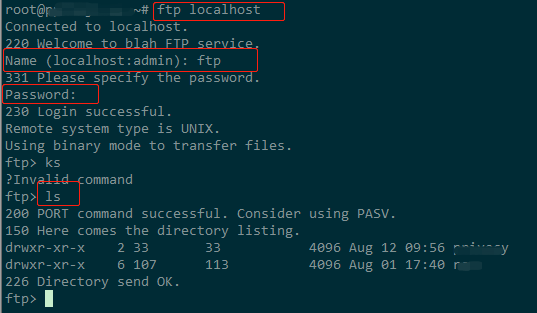
如果报错则根据报错信息进行检测
7、设置机器防火墙
开放端口: 21、20、pasv_min_port - pasv_max_port
8、winscp测试
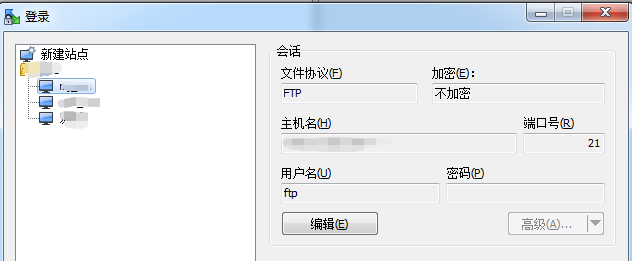
二、组织目录结构
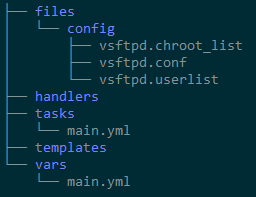
三、写ansible yaml剧本
tasks/main.yaml
---

 - name: Apt-get vsftpd

   apt:

    name: vsftpd

    update_cache: yes

 - name: Change name of vsftpd.conf orignal

   shell: cp vsftpd.conf vsftpd.conf.orig -f

   args:

     chdir: /etc

     warn: no

 - name: Modify pam check mod

   shell: sed -i "s@pam_shells.so@pam_nologin.so@g" /etc/pam.d/vsftpd    #fix 503  Login incorrect

 - name: Copy configs

   copy: src=config/ dest=/etc/ owner=root group=root mode=644

 - name: Set ftp passwd

   user: name=ftp password={{ftp_pass | password_hash('sha512')}} update_password=always

 - name: Set dir mode

   file: path=/data/wwwroot/PapaSG2/  owner=ftp  group=ftp  mode='0644'

 - name: Start vsftpd

   service: name=vsftpd  state=started
vsftpd.userlist
ftp
四、报错和解决方案
1、无法登录
1)检查账号、密码、防火墙、主目录
防火墙需要将 21,asv_min_port - pasv_max_port 端口都开放
主目录的权限需要设为755
2、530 Login incorrect
1)/etc/vsftpd.conf文件 将pam_service_name=vsftpd 修改为 pam_service_name=ftp
绕过了PAM,其实并不对,同理是将/etc/pam.d/vdstpd重命名
2)/etc/pam.d/vsftpd分析
# Standard behaviour for ftpd(8).

auth   required        pam_listfile.so item=user sense=deny file=/etc/ftpusers   @1

onerr=succeed

# Note: vsftpd handles anonymous logins on its own. Do not enable pam_ftp.so.

# Standard pam includes

@include common-account

@include common-session

@include common-auth

auth   required        pam_shells.so  @2
@1:/etc/ftpusers 中的用户禁止登陆,如果文件不存在在默认所有用户均允许登录. 所以确保用户没在这个文件内
@2:仅允许用户的shell为 /etc/shells 文件内的shell命令时,才能够成功。而创建ftp用户时,为了禁止ssh登录,一般多为/bin/false 、/usr/sbin/nologin 等,显然不是一个有效的bash,也就无法登录了。
解决方案:
确认ftp不在/etc/ftpusers, sed -i "s@pam_shells.so@pam_nologin.so@g" /etc/pam.d/vsftpd, 重启vsftpd
3、vsftpd respawning too fast, stopped
环境: ubuntu 12.04 vsftpd v2.3.5
>service vsftpd start
vsftpd start/pre-start, process 19503 #启动失败
>tail /var/log/syslog -n 10

>vsftpd #不能启动的时候可以直接启动,方便定位原因
500 OOPS: unrecognised variable in config file: allow_writeable_chroot
>grep allow_writeable_chroot /etc/vsftpd.conf
allow_writeable_chroot=YES
>sed -i "@allow_writeable_chroot=YES@#allow_writeable_chroot=YES@g" /etc/vsftpd.conf
>service vsftpd start
vsftpd start/running, process 19652
4、500 OOPS: child died
500 OOPS: vsftpd: refusing to run with writable root inside chroot ()
前者是默认报错,后者是更具体的报错,意思是不能使用chroot限制可写的根目录
环境: ubuntu 12.04 vsftpd v2.3.5
>ftp localhost
Connected to localhost.
220 Welcome to blah FTP service.
Name (localhost:root):
本来以为这样就Ok了,然后使用winscp去连接,却报错:500 OOPS: child died
1)有的解决方案是说关闭selinux,或者是开启ftp_home_dir 或者 tftpd_disable_trans
但是我使用的是云主机,本身selinux就是关闭的,基础项check过都是ok的
2)vsftpd从v2.3.5版本开始,取消了根目录的可写权限
看了下vsftpd的更新日志:
Add stronger checks for the configuration error of running with a writeable root directory inside a chroot(). This may bite people who carelessly turned on chroot_local_user but such is life.
解决方案A: > chmod a - w /$local_root
解决方案B:> echo "allow_writeable_chroot=YES" >> /etc/vsftpd.conf
A方案可行,可以将根目录包一层,不影响具体的业务使用
local_root设置为test, nginx root 设为t, t目录权限设为可写
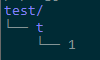
B方案,vsftpd启动失败,会报3号错。
但是网上也有说以下方案是ok的,也许是我这里安装vsftpd的问题。因为当前只需要可读就成了,就没往下测试。有兴趣的可以尝试下。
$ apt-get install python-software-properties

$ sudo add-apt-repository ppa:thefrontiergroup/vsftpd

$ sudo apt-get update

$ sudo apt-get install vsftpd

$ vim /etc/vsftpd.conf and add the following

  chroot_local_user=YES

  allow_writeable_chroot=YES

$ sudo service vsftpd restart
参考文档:
https://www.jianshu.com/p/91c7d4a115e0
[vsftpd] ubuntu14.04 ansible剧本安装vsftpd流程及报错排查的更多相关文章
- nvm安装node流程及报错解决
第一步:下载NVM下载nvm并解压 nvm-window 下载地址:https://github.com/coreybutler/nvm-windows/releases 下载文件,然后解压得到nvm ...
- Ubuntu14.04 Django Mysql安装部署全过程
Ubuntu14.04 Django Mysql安装部署全过程 一.简要步骤.(阿里云Ubuntu14.04) Python安装 Django Mysql的安装与配置 记录一下我的部署过程,也方便 ...
- Ubuntu14.04(64位)安装ATI_Radeon_R7_M265显卡驱动
电脑型号:Dell inspiron 14-5447 笔记本 显卡配置:集成显卡Intel核心显卡,Cpu是i5-4210U;独立显卡ATI_Radeon_R7_M265 网上关于ATI/Intel双 ...
- ubuntu14.04下手动安装eclipse
ubuntu14.04下手动安装eclipse 第一步: 安装jdk 第二步: 下载eclipse,假设下载的文件文件名为eclipse.tar.gz 第三步: 解压 sudo -zxvf ./ecl ...
- ubuntu14.04 下手动安装java jdk
ubuntu14.04 下手动安装java jdk 第一步: 下载jdk.tar.gz (这里假设下载的文件名为jdk.tar.gz) 第二步: 解压 sudo tar -zxvf ./jdk.tar ...
- ubuntu14.04下编译安装ambari-2.4.2.0
ubuntu14.04下编译安装ambari-2.4.2.0 编译前的准备工作 准备工作有: 系统参数 系统依赖(编译环境) 离线安装包 java环境 maven环境 Nodejs环境 git环境 a ...
- ubuntu14.04 64位 安装Tomcat
ubuntu14.04 64位 安装Tomcat 1 下载Tomcat 在htt://www.tomcat.apache.org官网上下载apache-tomcat-7.0.57.tar.gz 2 解 ...
- ubuntu14.04 64位 安装eclipse
ubuntu14.04 64位 安装eclipse 1 在官网上下载eclipse http://www.eclipse.org/downloads/下载eclipse-jee-luna-SR1-li ...
- ubuntu14.04 64位 安装JDK1.7
ubuntu14.04 64位 安装JDK1.7 1 新建文件夹 youhaidong@youhaidong:~$ sudo mkdir /usr/lib/jvm 2 解压文件 youhaidong@ ...
随机推荐
- Mac下Sublime Text3激活码
方法1: 终端中打开文件 /etc/hosts,插入如下语句 127.0.0.1 www.sublimetext.com 127.0.0.1 license.sublimehq.com 方法2: 在s ...
- VS.NET(C#)--2.2_事件
事件 事件 由用戶行为生成系统触发(事件处理程序).在ASP.NET中,对象可以触发事件.用户在浏览器对服务器控件的任何行为都可能触发事件,但是在服务器端处理. 页面和控件事件 它们继承自contro ...
- SQL Server邮件标识点
<br>---换行  :---空格 <H1></H1>---标题 --定义表格格式 N'<table border="1" ...
- SVM支持向量机实例
波士顿房价回归分析 1.导入波士顿房价数据集 ############################# svm实例--波士顿房价回归分析 ############################## ...
- VBA for循环
for循环是一种重复控制结构,它允许开发人员有效地编写需要执行特定次数的循环. 语法 以下是VBA中for循环的语法. For counter = start To end [Step stepcou ...
- aspx反射调用方法
string name = base.Request["action"]; ]); if (obj2 != null) { s = obj2.ToString(); } 传入方法名 ...
- SQLSEVER在存储过程或触发器中模糊查询拼接
declare @name nvarchar(50); declare @name_pin nvarchar(50); set @name_pin = '%'+@name +'%' 模糊查询: sel ...
- Excel导入+写入数据库
1.引用服务 2.前端 <h2>这里是上传Excel功能页面</h2> <div> <form action="/Improve_Excel/get ...
- 【DRF框架】路由组件
视图组件涉及的路由补充: from rest_framework.viewsets import ViewSetMixin 对路由进行了重新的分发,重写了as_view() 方法,重新封装了请求方法 ...
- RT-Thread--线程间通信
线程中通信 在裸机编程中,经常会使用全局变量进行功能间的通信,如某些功能可能由于一些操作而改变全局变量的值,另一个功能对此全局变量进行读取,根据读取到的全局变量值执行相应的动作,达到通信协作的目的: ...