
【Java】 BIO与NIO以及AIO分析
一.BIO与NIO以及AIO的概念
BIO是同步阻塞式的IO
NIO是同步非阻塞的IO (NIO1.0,JDK1.4)
AIO是非同步非阻塞的IO(NIO2.0,JDK1.7)
二.BIO简单分析
1.简单分析
BIO是阻塞的IO,原因在于accept和read会阻塞。所以单线程的BIO是无法处理并发的。
2.案例
服务端:
public class BioServer {

    public static void main(String[] args) throws IOException {//在开发中不要直接抛出去,有可能出现异常导致连接未关闭

        ServerSocket serverSocket = new ServerSocket();

        serverSocket.bind(new InetSocketAddress("127.0.0.1",9999));

        byte[] b = new byte[1024];

        StringBuilder sb = new StringBuilder();

        System.out.println("服务端正在等待连接......");

        Socket socketAccept = serverSocket.accept();//这里会阻塞

        System.out.println("有客户端连接成功");

        while (true){

            System.out.println("等待消息......");

            int read = socketAccept.getInputStream().read(b);//这里会阻塞

            System.out.println("共读取了"+read+"个字节");

            String str = new String(b);

            sb.append(str);

            System.out.println("读取的数据内容为: " + sb);

        }

    }

}
客户端:
public class BioClient {

    public static void main(String[] args) throws IOException {

        Socket socket = new Socket();

        Scanner scanner = new Scanner(System.in);

        socket.connect(new InetSocketAddress("127.0.0.1",9999));

        while(true){

            System.out.println("请输入内容");

            String next = scanner.next();

            socket.getOutputStream().write(next.getBytes());

        }

    }

}
测试如下:
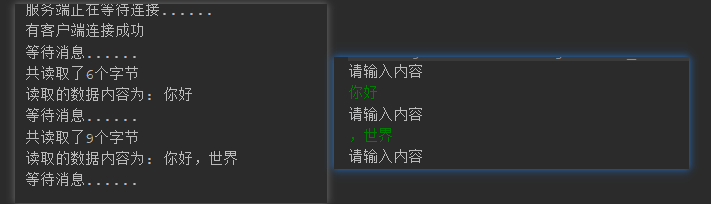
3.多线程下的BIO
多线程的BIO是可以处理并发的,但频繁的创建线程,运行线程以及销毁线程无疑是非常消耗资源的(即便可以使用线程池限制线程数量,但海量并发时,BIO的方式效率相比于NIO还是太低了)
下面是一个多线程的BIO案例:
服务端:
public class BioServerMultiThread {

    public static void main(String[] args) throws IOException {

        ServerSocket serverSocket = new ServerSocket();

        serverSocket.bind(new InetSocketAddress("127.0.0.1",9999));

        System.out.println("服务端正在等待连接......");

        while (true){

            Socket socketAccept = serverSocket.accept();//这里会阻塞

            System.out.println("有客户端连接成功");

            new Thread(new Runnable() {

                @Override

                public void run() {

                    try{

                        System.out.println("等待消息......");

                        String msg = "";

                        while (true){

                            byte[] b = new byte[1024];

                            int len = socketAccept.getInputStream().read(b);

                            if (len < 0){

                                continue;

                            }

                            msg = new String(b,0,len);

                            System.out.println(msg);

                        }

                    }catch (Exception e){

                        e.printStackTrace();

                    }

                }

            }).start();

        }

    }

}
客户端(创建多个客户端,代码相同):
public class BioClient1 {

    public static void main(String[] args) throws IOException {

        Socket socket = new Socket();

        Scanner scanner = new Scanner(System.in);

        socket.connect(new InetSocketAddress("127.0.0.1",9999));

        String className = "这是来自"+Thread.currentThread().getStackTrace()[1].getClassName()+"的消息";

        while(true){

            System.out.println("请输入内容");

            String next = scanner.next();

            socket.getOutputStream().write(className.getBytes());

            socket.getOutputStream().write(next.getBytes());

        }

    }

}
测试如下:
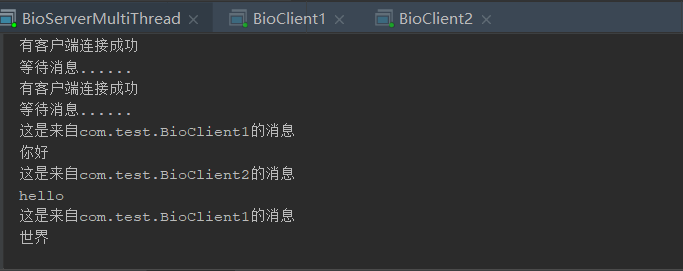
三.NIO简单分析
NIO是非阻塞IO,其原因在于数据准备就绪后,由选择器通知给服务端,而在数据准备完毕之前,服务器无需等待。
1.缓冲区
在BIO操作中,所有的数据都是以流的形式操作的,而在NIO中,则都是使用缓冲区来操作。
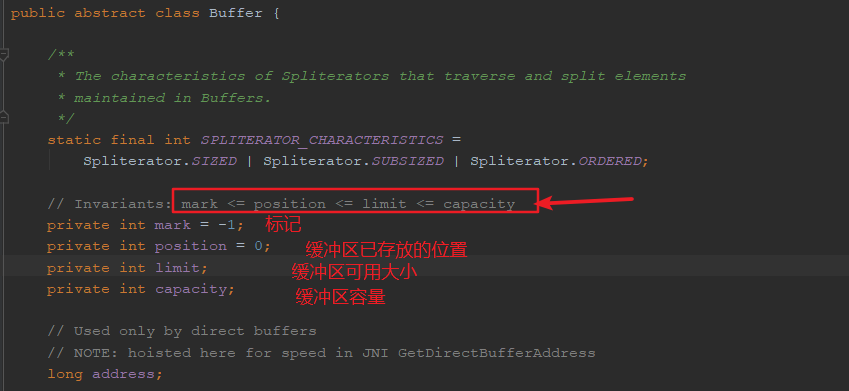
NIO中的缓冲区是Buffer类,它是java.nio包下的一个抽象类,详情可以查看JDK的API文档,例如下图

打开Buffer类,可以看到如下图(其中带有的方法可以查看JDK文档)
2.直接缓冲区和非直接缓冲区
直接缓冲区是指将缓冲区建立在物理内存中,通过allocateDirect方法建立(效率高,但不安全)
非直接缓冲区是指将缓冲区建立在JVM中,通过allocate方法建立(效率低,但安全)
3.管道
管道是NIO中传输数据的桥梁,它是java.nio包下的一个接口,若需查看其详细信息可以参考JDK的API文档,例如下图

4.使用NIO实现文件拷贝两种方式案例
直接缓冲区的方式:
    @Test

    public void test1() throws IOException {

        long statTime=System.currentTimeMillis();

        //创建管道

        FileChannel   inChannel=    FileChannel.open(Paths.get("E://test/aaa.txt"), StandardOpenOption.READ);

        FileChannel   outChannel=    FileChannel.open(Paths.get("E://test/bbb.txt"), StandardOpenOption.READ,StandardOpenOption.WRITE, StandardOpenOption.CREATE);

        //定义映射文件

        MappedByteBuffer inMappedByte = inChannel.map(FileChannel.MapMode.READ_ONLY,0, inChannel.size());

        MappedByteBuffer outMappedByte = outChannel.map(FileChannel.MapMode.READ_WRITE,0, inChannel.size());

        //直接对缓冲区操作

        byte[] dsf=new byte[inMappedByte.limit()];

        inMappedByte.get(dsf);

        outMappedByte.put(dsf);

        inChannel.close();

        outChannel.close();

        long endTime=System.currentTimeMillis();

        System.out.println("操作直接缓冲区耗时时间:"+(endTime-statTime));

    }
非直接缓冲区的方式:
 @Test

    public void test2() throws IOException {

        long statTime=System.currentTimeMillis();

        // 读入流

        FileInputStream fst = new FileInputStream("E://test/bbb.txt");

        // 写入流

        FileOutputStream fos = new FileOutputStream("E://test/ccc.txt");

        // 创建通道

        FileChannel inChannel = fst.getChannel();

        FileChannel outChannel = fos.getChannel();

        // 分配指定大小缓冲区

        ByteBuffer buf = ByteBuffer.allocate(1024);

        while (inChannel.read(buf) != -1) {

            // 开启读取模式

            buf.flip();

            // 将数据写入到通道中

            outChannel.write(buf);

            buf.clear();

        }

        // 关闭通道 、关闭连接

        inChannel.close();

        outChannel.close();

        fos.close();

        fst.close();

        long endTime=System.currentTimeMillis();

        System.out.println("操作非直接缓冲区耗时时间:"+(endTime-statTime));

    }
5.选择器(Selector)
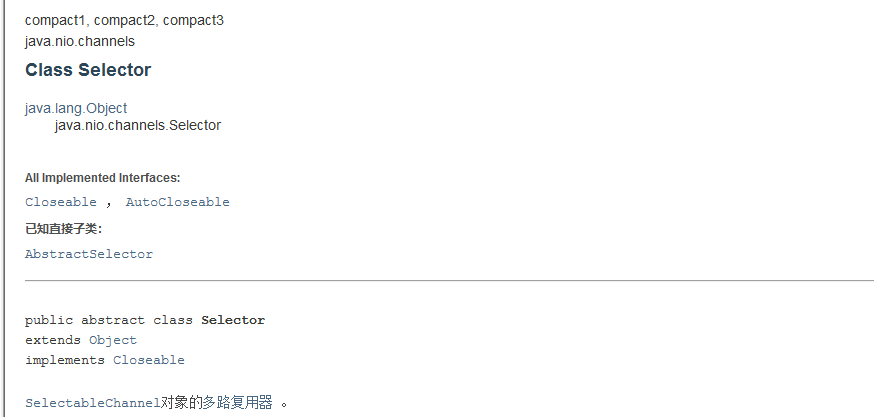
它是Java NIO核心组件中的一个,用于检查一个或多个NIO Channel(通道)的状态是否处于可读、可写。如此可以实现单线程管理多个channels,也就是可以管理多个网络链接。使用Selector的好处在于: 使用更少的线程来就可以来处理通道了, 相比使用多个线程,避免了线程上下文切换带来的开销。详细用法可以参考JDK的API文档
NIO服务端实现同步非阻塞代码如下
public class NioServer {

    public static void main(String[] args) throws IOException {

        ServerSocketChannel ssc = ServerSocketChannel.open();

        ssc.socket().bind(new InetSocketAddress("127.0.0.1", 9999));

        ssc.configureBlocking(false);//设置成非阻塞模型

        System.out.println("server started, listening on :" + ssc.getLocalAddress());

        Selector selector = Selector.open();

        ssc.register(selector, SelectionKey.OP_ACCEPT);

        while(true) {

            selector.select();

            Set<SelectionKey> keys = selector.selectedKeys();

            Iterator<SelectionKey> it = keys.iterator();

            while(it.hasNext()) {

                SelectionKey key = it.next();

                it.remove();

                handle(key);

            }

        }

    }

    private static void handle(SelectionKey key) {

        if(key.isAcceptable()) {

            try {

                ServerSocketChannel ssc = (ServerSocketChannel) key.channel();

                SocketChannel sc = ssc.accept();

                sc.configureBlocking(false);

                sc.register(key.selector(), SelectionKey.OP_READ );

            } catch (IOException e) {

                e.printStackTrace();

            } finally {

            }

        } else if (key.isReadable()) {

            SocketChannel sc = null;

            try {

                sc = (SocketChannel)key.channel();

                ByteBuffer buffer = ByteBuffer.allocate(512);

                buffer.clear();

                int len = sc.read(buffer);

                if(len != -1) {

                    System.out.println(new String(buffer.array(), 0, len));

                }

                ByteBuffer bufferToWrite = ByteBuffer.wrap("HelloClient".getBytes());

                sc.write(bufferToWrite);

            } catch (IOException e) {

                e.printStackTrace();

            } finally {

                if(sc != null) {

                    try {

                        sc.close();

                    } catch (IOException e) {

                        e.printStackTrace();

                    }

                }

            }

        }

    }

}
四.AIO简单分析
AIO(NIO2.0)和 NIO的主要区别是前者是异步的,而后者是同步的。(NIO每隔一段时间用Selector轮询查看是否有事件发生,而AIO是在等有事件发生的时候,Selector通知服务端)
与NIO不同,当进行读写操作时,AIO只须直接调用API的read或write方法即可。这两种方法均为异步的,对于读操作而言,当有流可读取时,操作系统会将可读的流传入read方法的缓冲区,并通知应用程序;对于写操作而言,当操作系统将write方法传递的流写入完毕时,操作系统主动通知应用程序。 即可以理解为,read/write方法都是异步的,完成后会主动调用回调函数。
AIO服务端简单案例如下
public class Server {

    public static void main(String[] args) throws Exception {

        final AsynchronousServerSocketChannel serverChannel = AsynchronousServerSocketChannel.open()

                .bind(new InetSocketAddress(8888));

        serverChannel.accept(null, new CompletionHandler<AsynchronousSocketChannel, Object>() {

            @Override

            public void completed(AsynchronousSocketChannel client, Object attachment) {

                serverChannel.accept(null, this);

                try {

                    System.out.println(client.getRemoteAddress());

                    ByteBuffer buffer = ByteBuffer.allocate(1024);

                    client.read(buffer, buffer, new CompletionHandler<Integer, ByteBuffer>() {

                        @Override

                        public void completed(Integer result, ByteBuffer attachment) {

                            attachment.flip();

                            System.out.println(new String(attachment.array(), 0, result));

                            client.write(ByteBuffer.wrap("HelloClient".getBytes()));

                        }

                        @Override

                        public void failed(Throwable exc, ByteBuffer attachment) {

                            exc.printStackTrace();

                        }

                    });

                } catch (IOException e) {

                    e.printStackTrace();

                }

            }

            @Override

            public void failed(Throwable exc, Object attachment) {

                exc.printStackTrace();

            }

        });

    }

}
【Java】 BIO与NIO以及AIO分析的更多相关文章
- [转帖]JAVA BIO与NIO、AIO的区别(这个容易理解)
JAVA BIO与NIO.AIO的区别(这个容易理解) https://blog.csdn.net/ty497122758/article/details/78979302 2018-01-05 11 ...
- Java BIO、NIO与AIO的介绍(学习过程)
Java BIO.NIO与AIO的介绍 因为netty是一个NIO的框架,所以在学习netty的过程中,开始之前.针对于BIO,NIO,AIO进行一个完整的学习. 学习资源分享: Netty学习:ht ...
- Java BIO、NIO、AIO 学习(转)
转自 http://stevex.blog.51cto.com/4300375/1284437 先来个例子理解一下概念,以银行取款为例: 同步 : 自己亲自出马持银行卡到银行取钱(使用同步IO时,Ja ...
- Java BIO、NIO、AIO 学习
正在学习<大型网站系统与JAVA中间件实践>,发现对BIO.NIO.AIO的概念很模糊,写一篇博客记录下来.先来说个银行取款的例子: 同步 : 自己亲自出马持银行卡到银行取钱(使用同步IO ...
- JAVA BIO与NIO、AIO的区别
IO的方式通常分为几种,同步阻塞的BIO.同步非阻塞的NIO.异步非阻塞的AIO. 一.BIO 在JDK1.4出来之前,我们建立网络连接的时候采用BIO模式,需要先在服务端启动一个ServerSock ...
- Java BIO、NIO、AIO 原理
先来个例子理解一下概念,以银行取款为例: 同步 : 自己亲自出马持银行卡到银行取钱(使用同步IO时,Java自己处理IO读写). 异步 : 委托一小弟拿银行卡到银行取钱,然后给你(使用异步IO时,Ja ...
- Java BIO、NIO、AIO 基础,应用场景
Java对BIO.NIO.AIO的支持: Java BIO : 同步并阻塞,服务器实现模式为一个连接一个线程,即客户端有连接请求时服务器端就需要启动一个线程进行处理,如果这个连接不做任何事情会造成不必 ...
- 【转】JAVA BIO与NIO、AIO的区别
Java中IO的模型分为三种,同步阻塞的BIO.同步非阻塞的NIO.异步非阻塞的AIO. BIO[同步阻塞] 在JDK1.4出来之前,我们建立网络连接的时候采用BIO模式,需要先在服务端启动一个Ser ...
- Java BIO、NIO、AIO
同步与异步 同步与异步的概念, 关注的是 消息通信机制 同步是指发出一个请求, 在没有得到结果之前该请求就不返回结果, 请求返回时, 也就得到结果了. 比如洗衣服, 把衣服放在洗衣机里, 没有洗好之前 ...
随机推荐
- 连接局域网mysql数据库
1.先确认mysql服务端端口在防火墙是否开放外网连接(添加): windows防火墙 >高级设置 >入站规则 >新建规则 >选择端口 >添加端口 >后面直接下一步 ...
- vue3.x版本安装element-ui、axios及echarts图表插件
项目中安装使用element-UI 命令行: vue add element 安装成功后,项目会自动将element-UI引入项目中,刷新项目即可 项目中安装使用axios数据请求 vue add a ...
- python解析模块(ConfigParser)使用方法
python解析模块(ConfigParser)使用方法 很多软件都有配置文件,今天介绍一下python ConfigParser模块解析配置文件的使用方法 测试配置文件test.conf内容如下: ...
- Centos7.2 搭建emqttd集群,添加自启动服务
关闭防火墙(可选):systemctl stop firewalld.service 1.安装依赖库> sudo yum -y install make gcc gcc-c++ kernel-d ...
- A simple dynamic library implemented in C# 4.0 to deal with XML structure
https://github.com/cardinals/XmlToObjectParser A simple dynamic library implemented in C# 4.0 to dea ...
- iis管理器的程序应用池中没有Asp.NET v4.0
然后 windows + r 输入 cmd 然后输入CD C:\Windows\Microsoft.NET\Framework64\v4.0.30319 然后 输入 aspnet_regiis.exe ...
- 爬取汽车之家新闻图片的python爬虫代码
import requestsfrom bs4 import BeautifulSouprespone=requests.get('https://www.autohome.com.cn/news/' ...
- 安装gnocchi
在控制节点上执行 #!/bin/bash MYSQL_ROOT_PASSWD='m4r!adbOP' GNOCCHI_PASSWD='gnocchi1234!' CEILOMETER_PASSWD=' ...
- 配置cinder-volume服务使用ceph作为后端存储
在ceph监视器上执行 CINDER_PASSWD='cinder1234!'controllerHost='controller'RABBIT_PASSWD='0penstackRMQ' 1.创建p ...
- cobaltr strike入门使用教程-1
前言 Cobalt Strike分为服务端和客户端两个部分从而实现分布式操作,协同作战.工具有linux和windows版本. 1.创建服务端 找到解压目录进入 ./teamserver [IP] [ ...