
Tkinter 之CheckButton复选框标签
一、参数说明
| 语法 | 作用 |
|---|---|
| Checkbutton(root,text='xxxx') | 复选框显示的文本 |
| Checkbutton(root,variable=id) | 通过变量的值确定哪些复选框被选中 |
| Checkbutton(root,variable=id,onvalue=1) | 复选框选中(有效)时变量的值 |
| Checkbutton(root,variable=id,onvalue=1,offvalue=0) | 复选框未选中(无效)时变量的值 |
| Checkbutton(root,variable=id,onvalue=1,offvalue=0,command=函数) | 复选框选中时执行的命令(函数) |
二、代码示例
import tkinter as tk

window = tk.Tk()

def main():

    global window

    window.title("CheckButton参数说明")

    winWidth = 600

    winHeight = 400

    # 获取屏幕宽高

    screenWidth = window.winfo_screenwidth()

    screenHeight = window.winfo_screenheight()

    x = int((screenWidth - winWidth) / 2)

    y = int((screenHeight - winHeight) / 2)

    # 设置窗口居中

    window.geometry("%sx%s+%s+%s" % (winWidth, winHeight, x, y))

    window.iconbitmap("./image/icon.ico")

    """checkbutton参数.

        Valid resource names: activebackground, activeforeground, anchor,

        background, bd, bg, bitmap, borderwidth, command, cursor,

        disabledforeground, fg, font, foreground, height,

        highlightbackground, highlightcolor, highlightthickness, image,

        indicatoron, justify, offvalue, onvalue, padx, pady, relief,

        selectcolor, selectimage, state, takefocus, text, textvariable,

        underline, variable, width, wraplength."""

    var1 = tk.IntVar()

    var2 = tk.IntVar()

    tk.Checkbutton(window, text="篮球", onvalue=1, offvalue=0,

                   variable=var1, command=callBack, activebackground="#f00",

                   foreground="#666").pack()

    tk.Checkbutton(window, text="足球", onvalue=1, offvalue=0,

                   variable=var2, command=callBack, activebackground="#f00",

                   foreground="#bbb").pack()

    window.mainloop()

def callBack():

    print(1)

if __name__ == '__main__':

    main()
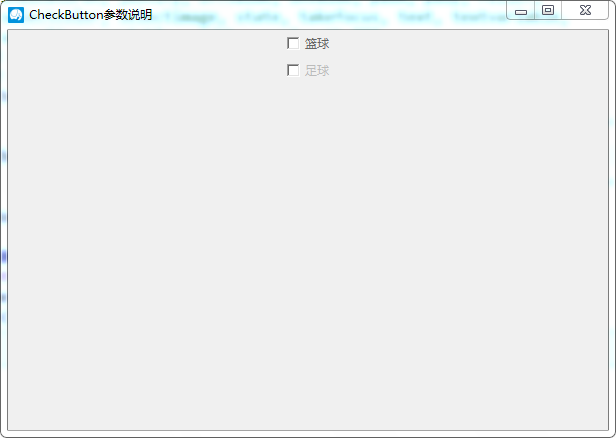
三、效果图
Tkinter 之CheckButton复选框标签的更多相关文章
- tkinter中checkbutton多选框控件和variable用法(六)
checkbutton控件 简单的实现多选: import tkinter wuya = tkinter.Tk() wuya.title("wuya") wuya.geometry ...
- 复选框input:checkbox
复选框 CreateTime--2017年6月5日14:04:55Author:Marydon 五.复选框 (一)语法 <input type="checkbox" /& ...
- python之tkinter使用-复选框操作
# tkinter复选框操作 import tkinter as tk root = tk.Tk() root.title('问卷调查') root.geometry('220x80') # 设置窗口 ...
- js之全选即点击全选标签可选择全部复选框
目标效果:网页全选功能,即点击全选标签可选择全部复选框 实现代码如下 <!DOCTYPE html> <html lang="en"> <head&g ...
- JAVA个人小程序GUI篇-收银(标签、按钮、复选框、下拉标、文本域、表格······)
如果用eclipse需先装载windowsbuild //导入包 import java.awt.BorderLayout; import java.awt.EventQueue; import ja ...
- spring mvc:常用标签库(文本框,密码框,文本域,复选框,单选按钮,下拉框隐藏于,上传文件等)
在jsp页面需要引入:<%@taglib uri="http://www.springframework.org/tags/form" prefix="form&q ...
- Spring MVC-表单(Form)标签-复选框集合(Checkboxes)示例(转载实践)
以下内容翻译自:https://www.tutorialspoint.com/springmvc/springmvc_checkboxes.htm 说明:示例基于Spring MVC 4.1.6. 以 ...
- Spring MVC-表单(Form)标签-复选框(Checkbox)示例(转载实践)
以下内容翻译自:https://www.tutorialspoint.com/springmvc/springmvc_checkbox.htm 说明:示例基于Spring MVC 4.1.6. 以下示 ...
- input check复选框选择后修改<a>标签超链接href
1. 给复选框添加onclick事件 获取标签id <tbody> <c:forEach var="file" items="${files}" ...
随机推荐
- H5新增input标签
1.电子邮件 <input type="email" name="email"/> 默认正则:输入内容必须有@符号,@后面必须有内容 2.搜索框 & ...
- 前端编译原理 笔记 -- BISON
前面总结的差不多了,这边记录下,零碎的相关阅读可以备忘的一些知识点 Bsion文档,下面是中文的地址 https://blog.csdn.net/chinamming/article/details ...
- zabbix推送内存监控单应用shell
利用top方式获取指定第三方的内存使用率 #!/bin/bash process=$1 if [ ! -z $process ];then cd /zabbix/zabbix-agent/script ...
- 易优cms后台RCE以及任意文件上传漏洞
前言 EyouCms是基于TP5.0框架为核心开发的免费+开源的企业内容管理系统,专注企业建站用户需求提供海量各行业模板,降低中小企业网站建设.网络营销成本,致力于打造用户舒适的建站体验.易优cms ...
- What is Verbose Garbage Collection (verbosegc) and How do I Enable it on WebLogic
问题描述: What is Verbose Garbage Collection (verbosegc) and How do I Enable it on WebLogic 问题分析: 通过添加gc ...
- iOS copy和mutableCopy 整理
copy 和 mutableCopy 你真的理解吗?最近发现很多面试者基本都不能很好地回答这个问题.所以整理一下. copy和mutableCopy的概念: copy 浅拷贝,不拷贝对象本身,仅仅是拷 ...
- stm32 视频小车
1111111111111111111111111111111111111111111111111111111111111111111111111111111111111111111111111111 ...
- centos 安装 kibana
因为我本机安装的 elasticsearch 是 6.2.4 版本,所以kibana也要安装对应的 6.2.4 版本 wget https://artifacts.elastic.co/downloa ...
- TLS1.3对CIP的影响(对密码套件的解释)
1.术语定义的即使(算法)Definition of terms (optional) Cipher Suite :通信数据保护规范,对TLS指定对端身份验证,关键技术机制,后续数据加密和数据验证机 ...
- kubernetes master节点部署(三)
一.部署kubernetes api服务 1.1.准备软件包 [root@linux-node1 ~]# cd /usr/local/src/kubernetes [root@linux-node1 ...