
高级UI-Palette
Google推出的Palette是用来调色的,正如其汉语意思一样,可以用来显示颜色,在显示图片的时候,会配合图片的色调来显示,这样就显得很融合,其实Palette可以分析出图片中的很多特性,例如主色调、鲜艳度、柔和度等
Palette获得的颜色
其主要的获取颜色方法如下:
获取主要颜色:getDominantColor()
获取柔和颜色:getMutedColor()
获取鲜艳颜色:getVibrantColor()
获取亮、柔和颜色:getLightMutedColor()
获取亮、鲜艳颜色:getLightVibrantColor()
获取暗、柔和颜色:getDarkMutedColor()
获取暗、鲜艳颜色:getDarkVibrantColor()
Palette实例
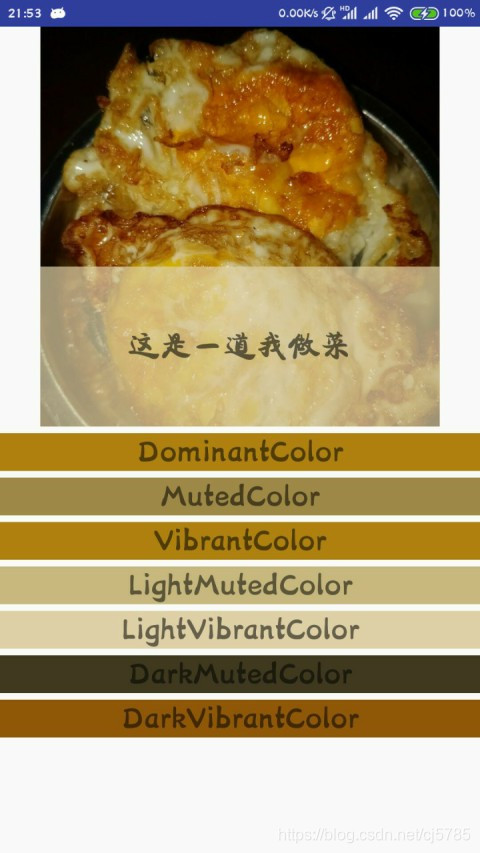
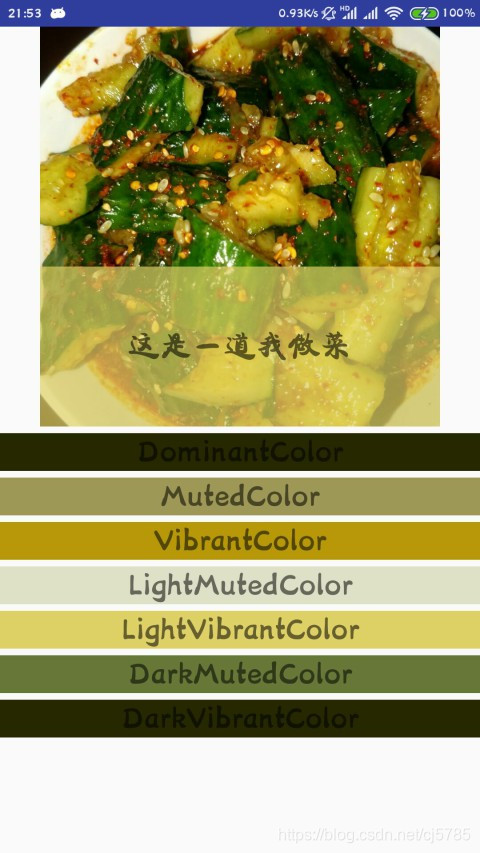
在一张图片中显示出获得的以上颜色,并以Google推荐的颜色显示在图片上
在手机中找到一张以前做的拍黄瓜的图片,还有煎鸡蛋的图片,这里就是用这两张图片来演示,代码没有任何变化,只是改变了ImageView里面的src源
在使用Palette要先导入依赖,25.4.0为版本号
implementation 'com.android.support:palette-v7:25.4.0'
贴出布局
<?xml version="1.0" encoding="utf-8"?>

<LinearLayout xmlns:android="http://schemas.android.com/apk/res/android"

    android:layout_width="match_parent"

    android:layout_height="match_parent"

    android:orientation="vertical">

    <RelativeLayout

        android:layout_width="match_parent"

        android:layout_height="300dp">

        <ImageView

            android:id="@+id/image_view"

            android:layout_width="300dp"

            android:layout_height="300dp"

            android:layout_centerInParent="true"

            android:src="@drawable/cuke" />

        <TextView

            android:id="@+id/text_view"

            android:layout_marginTop="5dp"

            android:layout_width="300dp"

            android:layout_height="120dp"

            android:layout_centerHorizontal="true"

            android:layout_alignBottom="@id/image_view"

            android:gravity="center"

            android:textSize="24sp"/>

    </RelativeLayout>

    <TextView

        android:id="@+id/text_view_1"

        android:layout_marginTop="5dp"

        android:layout_width="match_parent"

        android:layout_height="wrap_content"

        android:gravity="center"

        android:textSize="24sp"/>

    <TextView

        android:id="@+id/text_view_2"

        android:layout_marginTop="5dp"

        android:layout_width="match_parent"

        android:layout_height="wrap_content"

        android:gravity="center"

        android:textSize="24sp"/>

    <TextView

        android:id="@+id/text_view_3"

        android:layout_marginTop="5dp"

        android:layout_width="match_parent"

        android:layout_height="wrap_content"

        android:gravity="center"

        android:textSize="24sp"/>

    <TextView

        android:id="@+id/text_view_4"

        android:layout_marginTop="5dp"

        android:layout_width="match_parent"

        android:layout_height="wrap_content"

        android:gravity="center"

        android:textSize="24sp"/>

    <TextView

        android:id="@+id/text_view_5"

        android:layout_marginTop="5dp"

        android:layout_width="match_parent"

        android:layout_height="wrap_content"

        android:gravity="center"

        android:textSize="24sp"/>

    <TextView

        android:id="@+id/text_view_6"

        android:layout_marginTop="5dp"

        android:layout_width="match_parent"

        android:layout_height="wrap_content"

        android:gravity="center"

        android:textSize="24sp" />

    <TextView

        android:id="@+id/text_view_7"

        android:layout_marginTop="5dp"

        android:layout_width="match_parent"

        android:layout_height="wrap_content"

        android:gravity="center"

        android:textSize="24sp"/>

</LinearLayout>
然后在活动中使用
public class MainActivity extends AppCompatActivity {

    private ImageView imageView;

    private TextView textView1;

    private TextView textView2;

    private TextView textView3;

    private TextView textView4;

    private TextView textView5;

    private TextView textView6;

    private TextView textView7;

    private TextView textView;

    @Override

    protected void onCreate(final Bundle savedInstanceState) {

        super.onCreate(savedInstanceState);

        setContentView(R.layout.activity_main);

        imageView = (ImageView) findViewById(R.id.image_view);

        textView1 = (TextView) findViewById(R.id.text_view_1);

        textView2 = (TextView) findViewById(R.id.text_view_2);

        textView3 = (TextView) findViewById(R.id.text_view_3);

        textView4 = (TextView) findViewById(R.id.text_view_4);

        textView5 = (TextView) findViewById(R.id.text_view_5);

        textView6 = (TextView) findViewById(R.id.text_view_6);

        textView7 = (TextView) findViewById(R.id.text_view_7);

        textView = (TextView) findViewById(R.id.text_view);

        BitmapDrawable bitmapDrawable = (BitmapDrawable) imageView.getDrawable();

        Bitmap bitmap = bitmapDrawable.getBitmap();

        //同步方法,已弃用,可能造成线程阻塞

        //Palette palette = Palette.generate(bitmap);

        //异步

        Palette.from(bitmap).generate(new Palette.PaletteAsyncListener() {

            @Override

            public void onGenerated(Palette palette) {

                int dominantColor = palette.getDominantColor(Color.GRAY);

                textView1.setBackgroundColor(dominantColor);

                textView1.setText("DominantColor");

                int mutedColor = palette.getMutedColor(Color.GRAY);

                textView2.setBackgroundColor(mutedColor);

                textView2.setText("MutedColor");

                int vibrantColor = palette.getVibrantColor(Color.GRAY);

                textView3.setBackgroundColor(vibrantColor);

                textView3.setText("VibrantColor");

                int lightMutedColor = palette.getLightMutedColor(Color.GRAY);

                textView4.setBackgroundColor(lightMutedColor);

                textView4.setText("LightMutedColor");

                int lightVibrantColor = palette.getLightVibrantColor(Color.GRAY);

                textView5.setBackgroundColor(lightVibrantColor);

                textView5.setText("LightVibrantColor");

                int darkMutedColor = palette.getDarkMutedColor(Color.GRAY);

                textView6.setBackgroundColor(darkMutedColor);

                textView6.setText("DarkMutedColor");

                int darkVibrantColor = palette.getDarkVibrantColor(Color.GRAY);

                textView7.setBackgroundColor(darkVibrantColor);

                textView7.setText("DarkVibrantColor");

                //推荐颜色获取

                Palette.Swatch swatch = palette.getLightVibrantSwatch();

                //推荐的主色调

                int rgb = swatch.getRgb();

                //推荐的主体文字颜色

                int bodyTextColor = swatch.getBodyTextColor();

                //推荐的标题文字颜色

                int titleTextColor = swatch.getTitleTextColor();

                //颜色向量

                float[] hsl = swatch.getHsl();

                //得到该颜色在图片中的值

                int population = swatch.getPopulation();

                textView.setBackgroundColor(getTranslucentColor(0.7F, rgb));

                textView.setTextColor(bodyTextColor);

                textView.setText("这是一道我做的菜");

            }

        });

    }

    private int getTranslucentColor(float persent, int rgb) {

        //转化透明度

        int blue = rgb & 0xFF;

        int green = rgb >>> 8 & 0xFF;

        int red = rgb >>> 16 & 0xFF;

        int alpha = rgb >>> 24;

        alpha = Math.round(alpha * persent);

        return Color.argb(alpha, red, green, blue);

    }

}
运行结果如下
高级UI-Palette的更多相关文章
- firefox 扩展开发笔记(三):高级ui交互编程
firefox 扩展开发笔记(三):高级ui交互编程 前言 前两篇链接 1:firefox 扩展开发笔记(一):jpm 使用实践以及调试 2:firefox 扩展开发笔记(二):进阶开发之移动设备模拟 ...
- Android 高级UI设计笔记07:RecyclerView 的详解
1. 使用RecyclerView 在 Android 应用程序中列表是一个非常重要的控件,适用场合非常多,如新闻列表.应用列表.消息列表等等,但是从Android 一出生到现在并没有非常 ...
- iOS开发——高级UI&带你玩转UITableView
带你玩装UITableView 在实际iOS开发中UITableView是使用最多,也是最重要的一个控件,如果你不会用它,那别说什么大神了,菜鸟都不如. 其实关于UItableView事非常简单的,实 ...
- 高级UI晋升之自定义View实战(六)
更多Android高级架构进阶视频学习请点击:https://space.bilibili.com/474380680本篇文章将从Android 自定义属性动画&Camera动画来介绍自定义V ...
- 高级UI晋升之布局ViewGroup(四)
更多Android高级架构进阶视频学习请点击:https://space.bilibili.com/474380680本篇文章将从LinearLayout.RelativeLayout.FrameLa ...
- 高级UI晋升之常用View(三)中篇
更多Android高级架构进阶视频学习请点击:https://space.bilibili.com/474380680本篇文章将从ViewPager来介绍常用View:文章目录 一.简介 二.基本使用 ...
- 高级UI晋升之View渲染机制(二)
更多Android高级架构进阶视频学习请点击:https://space.bilibili.com/474380680 优化性能一般从渲染,运算与内存,电量三个方面进行,今天开始说聊一聊Android ...
- 高级UI晋升之触摸事件分发机制(一)
更多Android高级架构进阶视频学习请点击:https://space.bilibili.com/474380680 0. 前言 鉴于安卓分发机制较为复杂,故分为多个层次进行讲解,分别为基础篇.实践 ...
- Android 高级UI设计笔记21:Android SegmentView(分段选择控件)
1. 分段控制(SegmentView) 首先我们先看看什么是SegmentView的效果,如下: 分段控制这个View控件是ios7的分段控制,和QQ消息页面顶部的效果一样,android没有这个控 ...
- Android 高级UI设计笔记17:Android在非UI线程中显示Toast
1. 子线程的Toast怎么显示不出来? 因为Toast在创建的时候会依赖于一个Handler,并且一个Handler是需要有一个Looper才能够创建,而普通的线程是不会自动去创建一个Looper对 ...
随机推荐
- git 切换远程已有分支
本地分支a,且没有分支b,想要切换到远程以后分支b 1. git remote update origin --prune 更新本地分支列表与远程一致 2. git branch 查看本地所有分支,是 ...
- Luogu5072 [Ynoi2015]盼君勿忘 【莫队】
题目描述:对于一个长度为\(n\)的序列,\(m\)次询问\(l,r,p\),计算\([l,r]\)的所有子序列的不同数之和\(\mathrm{mod} \ p\). 数据范围:\(n,m,a_i\l ...
- 1827:【01NOIP提高组】Car的旅行路线
哇这些真题终于正经起来奥 刚看这道题很不自信觉得自己肯定不能建图成功甚至想过用贪心.. 后来一想发现建图还是蛮容易的,AI我是真的蠢 话说一本通真的很坑啊,把原题的保留1位改成了2 我把在洛谷AC的代 ...
- ICEM rpl文件简要讲解【转载】
转载自:http://blog.sina.com.cn/s/blog_90affd9801016xti.html 很多人问ICEM的rpl怎样录制的问题,为什么CFX调用时老是报错,这里开个帖子简单讲 ...
- LUA 在C函数中保存状态:registry、reference
1 背景 lua的值一般都是保存在栈里面,调用函数完毕值在栈会被清掉,从而被GC回收.但有时候C函数需要在函数体的作用域之外保存某些Lua数据,这些数据不能存放在栈里面,有没有全局变量之类的可以存放. ...
- String源码分析
前言:String类在日常开发过程中使用频率非常高,平时大家可能看过String的源码,但是真的认真了解过它么,笔者在一次笔试过程中要求写出String的equals方法,瞬间有点懵逼,凭着大致的理解 ...
- jumpserver 堡垒机环境搭建
jumpserver 堡垒机环境搭建(图文详解) https://blog.csdn.net/my_bai/article/details/62226474 http://docs.jumpser ...
- OpenResty之 limit.count 模块
原文: lua-resty-limit-traffic/lib/resty/limit/count.md 1. 示例 http { lua_shared_dict my_limit_count_sto ...
- TynSerial基本数据类型序列(还原)
TynSerial基本数据类型序列(还原) procedure TForm1.ToolButton17Click(Sender: TObject); var serial: TynSerial; be ...
- nginx里面的location 规则匹配
nginx location语法 ~ # 区分大小写的正则匹配 location ~ \.(gif|jpg|png|js|css)$ { #规则D } ~* # 不区分大小写的正则匹配(和~的功能相同 ...