
postgresql could not connect to server
问题:
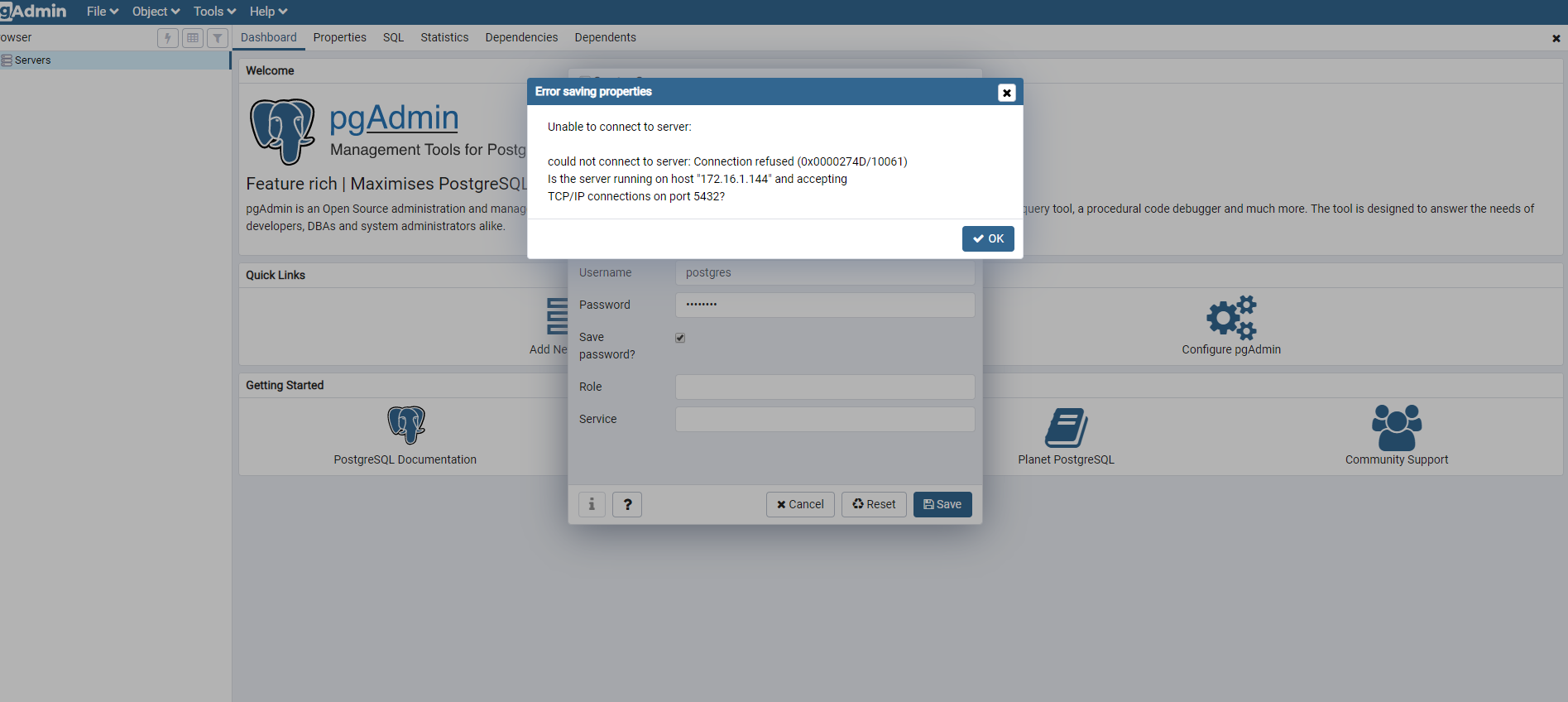
postgresql部署在linux上,在自己电脑上使用pgadmin连接出现could not connect to server错误
问题分析:
出现上述原因有3种情况
1.linux上的防火墙没有关闭
2.postgresql服务没有监听对应的ip与端口
3.没有设置认证规则
解决步骤:
1.查看是否postgresql服务没有监听对应的ip与端口
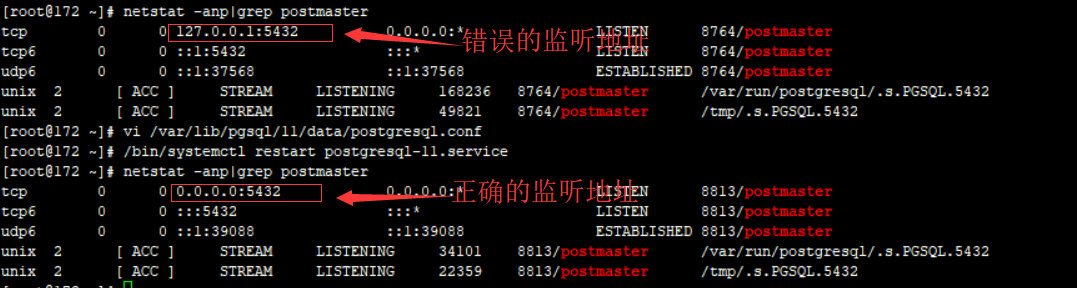
netstat -anp|grep postmast
下图第一个为127..0.0.1:5432代表postgresql监听127.0.0.1访问地址5432端口的tcp请求,这个是错误的应该127.0.0.0代表本机地址,其他远程将不能被监听到。
第二个为正确设置后的地址0.0.0.0代表任意地址。
2.如果出现上述问题,请设置postgresql.conf
vi /var/lib/pgsql/11/data/postgresql.conf
postgresql文件的路径不同版本会有不同,但是基本在此路径下,如果找不到可以使用以下命令
find / -name postgresql.conf
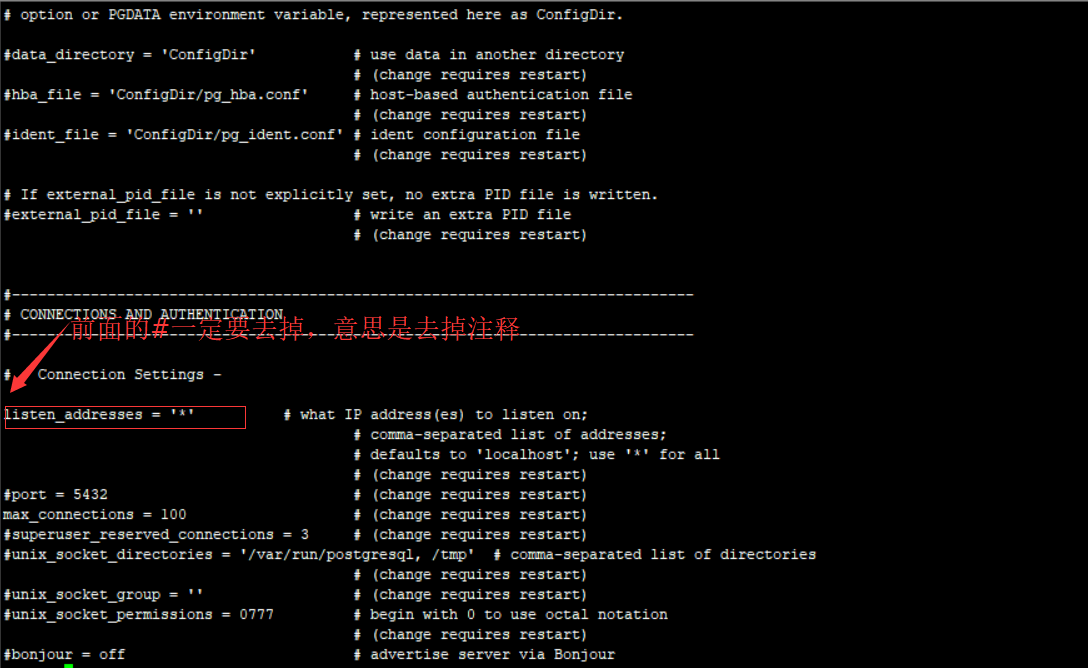
3.修改postgresql.conf中的listen_addresses地址
修改命令在此不做详细说明,自行查看linux命令,注意一定要去掉“#”注释,网上很多博客不写,会误以为不去掉#配置也能生效
4.添加任意地址的认证
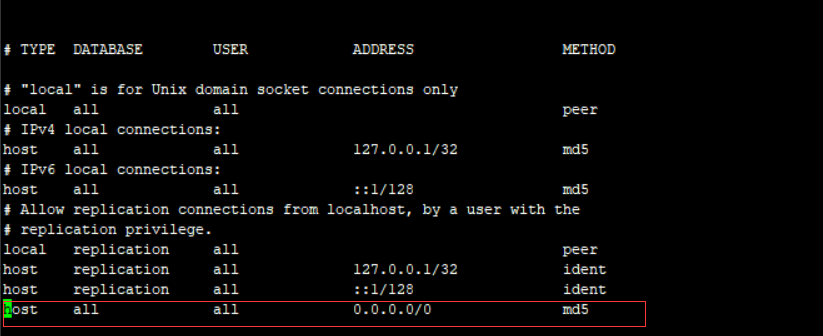
vi /var/lib/pgsql/11/data/pg_hba.conf
在最后一行加入“host all all 0.0.0.0/0 md5”,结果如下:
5.关闭防火墙(或者添加放行端口和协议)
systemctl stop firewalld.service

systemctl disable firewalld.service

systemctl status firewalld.service
6.重启服务
systemctl restart postgresql-11.service
总结
主要是设置防火墙,设置两个文件
postgresql could not connect to server的更多相关文章
- 问题解决:psql: could not connect to server: No such file or directory Is the server running locally and accepting connections on Unix domain socket "/var/run/postgresql/.s.PGSQL.5432"?
错误提示: psql: could not connect to server: No such file or directory Is the server running locally and ...
- postgresql connection failure:SQLSTATE[08006] [7] could not connect to server: Permission denied Is the server running on host "127.0.0.1" and accepting TCP/IP connections on port 5432?
PHP 程序无法连接到 CentOS 上的PostgreSQL,但是在 CentOS 服务器上却能正常运行 psql, 操作如下:多次重启 PG 数据库后发现 CGI 脚本无法连接数据库,但是可以使用 ...
- 问题解决:psql: could not connect to server: No such file or directory Is the server running locally and accepting connections on Unix domain socket "/var/run/postgresql/.s.PGSQL.5432"?
错误提示: psql: could not connect to server: No such file or directory Is the server running locally and ...
- “psql: could not connect to server: Connection refused” Error when connecting to remote database
问题: I am trying to connect to a postgres database installed in a remote server using the following c ...
- could not connect to server: Connection refused (0x0000274D/10061)
Oracle Linux 6.8 PostgreSQL Server IP: 192.168.10.220 Windows 7 x64 pgAdmin Custom Port IP: 192.168. ...
- docker 踩坑笔记之 psql: could not connect to server
最近在用docker跑rails,也遇到了一些坑,这里记录一下. 首先build项目: docker-compose build 然后就开始报错了: psql: could not connect t ...
- psql: could not connect to server: No such file or directory
postgresql报错: psql: could not connect to server: No such file or directory Is the server run ...
- SSH登录之后运行命令报错的解决办法-- Failed to connect to Mir: Failed to connect to server socket: No such file or directory
问题描述: Failed to connect to Mir: Failed to connect to server socket: No such file or directory 解决方案: ...
- LoadRunner执行过程报错“Failed to connect to server "xxx.xxx.xxx.xxx:xx":[10060] connetion time out”
执行性能测试过程中,LR报错: Action.c(6):Error -27796: Failed to connect to server "xxx.xxx.xxx.xxx:xx" ...
随机推荐
- Java ShellSort
Java ShellSort /** * <html> * <body> * <P> Copyright 1994-2018 JasonInternational ...
- 编译openwrt backfire过程中出现的问题
参考的步骤如链接: http://www.right.com.cn/forum/forum.php?mod=viewthread&tid=124604 在make menuconfig的时候出 ...
- Project Oberon
Project Oberon Project Oberon http://www.projectoberon.com/ Project Oberon 28.11.2018 / 11.12.2018 ...
- 数据库入门(mySQL):创建数据库
基于JetBrains DataGrip创建数据库.SQL语句创建数据库 MySQL数据库存储引擎和数据类型 创建数据库表及基本操作 导出数据库.删除数据库.导入数据库 一.基于JetBrains D ...
- JS 学习书籍电子版PDF下载
JavaScript权威指南(第6版)(中文版) 链接:https://pan.baidu.com/s/1H1v77UY-yh7oDxonRjd0GA 提取码:r3pu JavaScript DOM编 ...
- MySql Host is blocked because of many connection errors 问题的解决方法
错误日志: message from server: "Host '10.250.112.141' is blocked because of many connection errors; ...
- leetcode-29.两数相除(不用乘除法和mod)
如题,不用乘除法和mod实现两数相除. 这里引用一位clever boy 的解法. class Solution { public: int divide(int dividend, int divi ...
- 【leetcode】575. Distribute Candies
原题 Given an integer array with even length, where different numbers in this array represent differen ...
- springboot 部署到tomcat中,项目总是重新部署
tomcat目录中-conf文件夹下 <Host name="www.xxx.com" appBase="webapps" unpackWARs=&quo ...
- Vue 循环 [Vue warn]: Avoid using non-primitive value as key
页面中不添加 :key 索引的时候,会不停的提示虚线,但不影响使用 后来加了一个索引,加成了:key= "content" 从后台取出来的contents是一个list,里面有多 ...