
mysql router使用配置
mysql router使用配置
参考资料:
https://www.jianshu.com/p/7fc8d77bea59
一、架构图
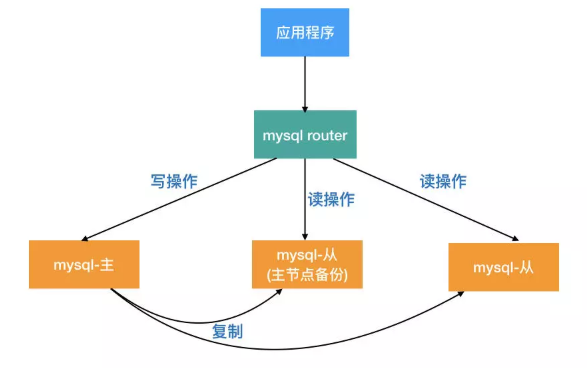
介绍:
- MySQL Router是处于应用client和dbserver之间的轻量级代理程序,它能检测,分析和转发查询到后端数据库实例,并把结果返回给client。是mysql-proxy的一个替代品。
- Router实现读写分离,程序不是直接连接数据库IP,而是固定连接到mysql router。MySQL Router对前端应用是透明的。应用程序把MySQL Router当作是普通的mysql实例,把查询发给MySQL Router,而MySQL Router会把查询结果返回给前端的应用程序。
- 从数据库服务器故障,业务可以正常运行。由MySQL Router来进行自动下线不可用服务器。程序配置不需要任何修改。
- 主数据库故障,由MySQL Router来决定主从自动切换,业务可以正常访问。程序配置不需要做任何修改。
二、读写分离原理
三、实验环境
| 编号 | 主机名 | IP | 角色 |
| 1 | db_shenji | 10.10.81.134 | mysql router |
| 2 | dba_test_001 | 10.10.50.60 | 主库 |
| 3 | dba_test_002 | 10.10.117.231 | 从库 |
四、MySQL-Router安装配置
1、主从搭建,此处省略
2、MySQL-Router配置
2.1、下载
[root@db_shenji ~]# cd /data/

[root@db_shenji data]# wget https://dev.mysql.com/get/Downloads/MySQL-Router/mysql-router-8.0.18-linux-glibc2.12-x86_64.tar.xz

[root@db_shenji data]# tar -Jxvf mysql-router-8.0.-linux-glibc2.-x86_64.tar.xz

[root@db_shenji data]# ln -s /data/mysql-router-8.0.-linux-glibc2.-x86_64 /usr/local/mysql-router
2.2、配置
[root@db_shenji data]# mkdir /etc/mysql-route/

[root@db_shenji data]# cp /usr/local/mysql-router/share/doc/mysqlrouter/sample_mysqlrouter.conf /etc/mysql-route/mysqlrouter.conf
修改后完整的内容
[DEFAULT]

# 日志存放目录

logging_folder = /data/log/mysql-route

# 插件存放目录

plugin_folder = /usr/local/mysql-router/lib/mysqlrouter

# 配置文件存放目录

config_folder = /etc/mysql-route

# 运行目录

runtime_folder = /var/run

[logger]

# 日志运行级别

level = debug

# 主节点故障转移配置

[routing:basic_failover]

# 写节点地址

bind_address=10.10.81.134

# 写节点端口

bind_port =

# 模式,读写

mode = read-write

# 主节点地址:默认情况下第一台主数据库为写主库,当第一台主数据库DOWN机后,第二台数据库被提升为主库

destinations = 10.10.50.60:,10.10.117.231:

# 从节点负载均衡配置

[routing:balancing]

# 绑定的IP地址

bind_address=10.10.81.134

# 监听的端口

bind_port =

# 连接超时时间

connect_timeout =

# 最大连接数

max_connections =

# 后端服务器地址

destinations = 10.10.117.231:

# 模式:读还是写

mode = read-only

[keepalive]

interval =
创建目录
mkdir -p /data/log/mysql-route

chown root:root /data/log/mysql-route/
启动方式
/usr/local/mysql-router/bin/mysqlrouter -c /etc/mysql-route/mysqlrouter.conf &
查看日志
[root@db_shenji ~]# tail -f /data/log/mysql-route/mysqlrouter.log

-- :: main DEBUG [7f48cf782720] Starting all plugins.

-- :: main DEBUG [7f48cc30e700]   plugin 'keepalive:' starting

-- :: main DEBUG [7f48cf782720]   plugin 'logger:' doesn't implement start()

-- :: keepalive INFO [7f48cc30e700] keepalive started with interval

-- :: keepalive INFO [7f48cc30e700] keepalive

-- :: main DEBUG [7f48cb90d700]   plugin 'routing:balancing' starting

-- :: main DEBUG [7f48caf0c700]   plugin 'routing:basic_failover' starting

-- :: main DEBUG [7f48cf782720] Running.

-- :: routing INFO [7f48cb90d700] [routing:balancing] started: listening on 10.10.81.134:, routing strategy = round-robin

-- :: routing INFO [7f48caf0c700] [routing:basic_failover] started: listening on 10.10.81.134:, routing strategy = first-available
登录验证
[root@db_shenji ~]# mysql -h 10.10.81.134 -uw -p'w' -P7001

Welcome to the MySQL monitor.  Commands end with ; or \g.

Your MySQL connection id is

Server version: 5.6.-84.1-log Source distribution

Copyright (c) , , Oracle and/or its affiliates. All rights reserved.

Oracle is a registered trademark of Oracle Corporation and/or its

affiliates. Other names may be trademarks of their respective

owners.

Type 'help;' or '\h' for help. Type '\c' to clear the current input statement.

mysql> show slave status\G;

Empty set (0.00 sec)

ERROR:

No query specified

mysql>

[root@db_shenji ~]# mysql -h 10.10.81.134 -uw -p'w' -P7002
Welcome to the MySQL monitor.  Commands end with ; or \g.
Your MySQL connection id is 8
Server version: 5.6.41-84.1-log Source distribution

Copyright (c) 2000, 2013, Oracle and/or its affiliates. All rights reserved.

Oracle is a registered trademark of Oracle Corporation and/or its
affiliates. Other names may be trademarks of their respective
owners.

Type 'help;' or '\h' for help. Type '\c' to clear the current input statement.

mysql> show slave status\G;
*************************** 1. row ***************************
               Slave_IO_State: Waiting for master to send event
                  Master_Host: 10.10.50.60
                  Master_User: repl
                  Master_Port: 3306
                Connect_Retry: 60
              Master_Log_File: mysql-bin.000021
          Read_Master_Log_Pos: 3512
               Relay_Log_File: relay-bin.000053
                Relay_Log_Pos: 354
        Relay_Master_Log_File: mysql-bin.000021
             Slave_IO_Running: Yes
            Slave_SQL_Running: Yes
              Replicate_Do_DB:
          Replicate_Ignore_DB:
           Replicate_Do_Table:
       Replicate_Ignore_Table:
      Replicate_Wild_Do_Table:
  Replicate_Wild_Ignore_Table:
                   Last_Errno: 0
                   Last_Error:
                 Skip_Counter: 0
          Exec_Master_Log_Pos: 3512
              Relay_Log_Space: 521
              Until_Condition: None
               Until_Log_File:
                Until_Log_Pos: 0
           Master_SSL_Allowed: No
           Master_SSL_CA_File:
           Master_SSL_CA_Path:
              Master_SSL_Cert:
            Master_SSL_Cipher:
               Master_SSL_Key:
        Seconds_Behind_Master: 0
Master_SSL_Verify_Server_Cert: No
                Last_IO_Errno: 0
                Last_IO_Error:
               Last_SQL_Errno: 0
               Last_SQL_Error:
  Replicate_Ignore_Server_Ids:
             Master_Server_Id: 1574144089
                  Master_UUID: 0501f340-0a94-11ea-ad2b-5254007dcbb3
             Master_Info_File: mysql.slave_master_info
                    SQL_Delay: 0
          SQL_Remaining_Delay: NULL
      Slave_SQL_Running_State: Slave has read all relay log; waiting for the slave I/O thread to update it
           Master_Retry_Count: 86400
                  Master_Bind:
      Last_IO_Error_Timestamp:
     Last_SQL_Error_Timestamp:
               Master_SSL_Crl:
           Master_SSL_Crlpath:
           Retrieved_Gtid_Set: 0501f340-0a94-11ea-ad2b-5254007dcbb3:10-5440876
            Executed_Gtid_Set: 0501f340-0a94-11ea-ad2b-5254007dcbb3:1-5440876,
137347eb-0a94-11ea-ad2b-525400dd43f8:1-531071
                Auto_Position: 0
1 row in set (0.00 sec)

ERROR:
No query specified

mysql>
mysql router使用配置的更多相关文章
- MySQL Router重装后重新连接集群进行引导出现的——此主机中之前已配置过的问题
问题出现的前因: 因为重新安装了MySQL Router,然后打算重新连接上目标集群进行MySQL Router的初始化引导,结果报错了! [root@linux666 system]# mysqlr ...
- MySQL Router 测试使用 转
MySQL Router 测试使用 . 特性 MySQL Router 并没有包括一些特别新的特性, 总体上看中规中矩, 不过 first-available 和插件两个特性挺有意思, 后续会进行讲解 ...
- MySQL Router实现MySQL的读写分离
1.简介 MySQL Router是MySQL官方提供的一个轻量级MySQL中间件,用于取代以前老版本的SQL proxy. 既然MySQL Router是一个数据库的中间件,那么MySQL Rout ...
- MySQL Router单点隐患通过Keepalived实现
目录 一.介绍 二.环境准备 三.安装步骤 3.1下载软件包,解压 3.2源码安装 3.3配置keepalived 3.4修改keepalived配置文件 3.5启动keepalived 3.6查看V ...
- 利用MySQL Router构建读写分离MGR集群
GreatSQL社区原创内容未经授权不得随意使用,转载请联系小编并注明来源. 目录 1. 部署MySQL Router 2. 启动mysqlrouter服务 3. 确认读写分离效果 4. 确认只读负载 ...
- MYSQL多实例配置方法 mysqld_multi方法
在实际的开发过程中,可能会需要在一台服务器上部署多个MYSQL实例,那建议使用MYSQL官方的解决方案 mysqld_multi 1.修改my.cnf 如一个定义两个实例的参考配置: [mysqld_ ...
- MySQL 安装 + 精简 + 配置
MySQL 安装 + 精简 + 配置 下载安装 从官网 下载 Community Edition MySQL 5.6 版本 精简 根目录下只留 [data/bin/share] , my-defaul ...
- Amoeba for MySQL读写分离配置
一. 安装和运行Amoeba 1. Amoeba for MySQL 架构: 2. 验证Java的安装Amoeba框架是基于Java SE1.5开发的,建议使用Java SE1.5以上的版本 ...
- [mysql]brew 安装 配置 操作 mysql(中文问题)
mac 下卸载mysqldmg mac下mysql的DMG格式安装内有安装文件,却没有卸载文件--很郁闷的事. 网上搜了一下,发现给的方法原来得手动去删. 很多文章记述要删的文件不完整,后来在stac ...
随机推荐
- [转帖]Xenix — 微软与UNIX的短暂爱恋
Xenix — 微软与UNIX的短暂爱恋 https://www.linuxdashen.com/xenix-微软与unix的短暂爱恋 原来微软曾经 干过那么牛B的 unix系统. 微软向外宣布Mic ...
- JavaScript--QuckStudy
Day1: 初识JS: https://www.liaoxuefeng.com/wiki/1022910821149312 >打印: alert('我要学JavaScript!'); >J ...
- C++ MinGW 配合 Sublime Text 搭建
本文主旨 使用MinGW 和 文本编辑器 Sublime Text,来搭建c++编译的平台. Sublime Text 安装 和 解除限制 http://rainss.cn/essay/1124.ht ...
- 取整math函数
floor(a); ceil(a);
- 使用django连接数据库 对数据库 增删改查
如果路由访问的时候出现 就把项目中的注释掉 登录功能 1 路由访问如果不加斜杠 会内部自动重定向加斜杠的路由 所有的静态文件(css,js,前端第三方类库)默认都放在static文件下 #静态文件配置 ...
- pyton 类(4) 静态方法
class Cat(): tag = ' 猫科动物 ' def __init__(self, name): self.name = name @staticmethod def breah(): pr ...
- redis发布订阅者
发布者pub.py import redis conn = redis.Redis(host='127.0.0.1', decode_responses=True) conn.publish(') 订 ...
- docker CMD 和 ENTRYPOINT 区别
昨天用Dockerfile来启动mongodb的集群,启动参数--replSet死活没执行,最后就决定研究一哈cmd和entrypoint.但是上网看了一些资料个人觉得讲的不好,还是没有说出根本的东西 ...
- 02 Go程序执行流程
一.把源码编译成二进制后执行 .go代码源文件 => go build => 可执行文件(.exe文件或者linux二进制文件) => 运行结果 二.对源码直接运行 .go源代码文件 ...
- echart tooltip问题(鼠标放上去显示所有和显示当个)
先看效果 两种方式只要修改一下 echat option里面tooltip的属性即可 第一种: tooltip : { show: true, trigger: 'item' // trigger: ...