
mysql router使用配置
mysql router使用配置
参考资料:
https://www.jianshu.com/p/7fc8d77bea59
一、架构图
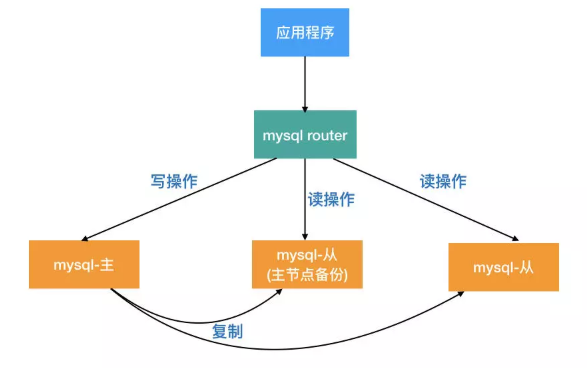
介绍:
- MySQL Router是处于应用client和dbserver之间的轻量级代理程序,它能检测,分析和转发查询到后端数据库实例,并把结果返回给client。是mysql-proxy的一个替代品。
- Router实现读写分离,程序不是直接连接数据库IP,而是固定连接到mysql router。MySQL Router对前端应用是透明的。应用程序把MySQL Router当作是普通的mysql实例,把查询发给MySQL Router,而MySQL Router会把查询结果返回给前端的应用程序。
- 从数据库服务器故障,业务可以正常运行。由MySQL Router来进行自动下线不可用服务器。程序配置不需要任何修改。
- 主数据库故障,由MySQL Router来决定主从自动切换,业务可以正常访问。程序配置不需要做任何修改。
二、读写分离原理
三、实验环境
| 编号 | 主机名 | IP | 角色 |
| 1 | db_shenji | 10.10.81.134 | mysql router |
| 2 | dba_test_001 | 10.10.50.60 | 主库 |
| 3 | dba_test_002 | 10.10.117.231 | 从库 |
四、MySQL-Router安装配置
1、主从搭建,此处省略
2、MySQL-Router配置
2.1、下载
[root@db_shenji ~]# cd /data/

[root@db_shenji data]# wget https://dev.mysql.com/get/Downloads/MySQL-Router/mysql-router-8.0.18-linux-glibc2.12-x86_64.tar.xz

[root@db_shenji data]# tar -Jxvf mysql-router-8.0.-linux-glibc2.-x86_64.tar.xz

[root@db_shenji data]# ln -s /data/mysql-router-8.0.-linux-glibc2.-x86_64 /usr/local/mysql-router
2.2、配置
[root@db_shenji data]# mkdir /etc/mysql-route/

[root@db_shenji data]# cp /usr/local/mysql-router/share/doc/mysqlrouter/sample_mysqlrouter.conf /etc/mysql-route/mysqlrouter.conf
修改后完整的内容
[DEFAULT]

# 日志存放目录

logging_folder = /data/log/mysql-route

# 插件存放目录

plugin_folder = /usr/local/mysql-router/lib/mysqlrouter

# 配置文件存放目录

config_folder = /etc/mysql-route

# 运行目录

runtime_folder = /var/run

[logger]

# 日志运行级别

level = debug

# 主节点故障转移配置

[routing:basic_failover]

# 写节点地址

bind_address=10.10.81.134

# 写节点端口

bind_port =

# 模式,读写

mode = read-write

# 主节点地址:默认情况下第一台主数据库为写主库,当第一台主数据库DOWN机后,第二台数据库被提升为主库

destinations = 10.10.50.60:,10.10.117.231:

# 从节点负载均衡配置

[routing:balancing]

# 绑定的IP地址

bind_address=10.10.81.134

# 监听的端口

bind_port =

# 连接超时时间

connect_timeout =

# 最大连接数

max_connections =

# 后端服务器地址

destinations = 10.10.117.231:

# 模式:读还是写

mode = read-only

[keepalive]

interval =
创建目录
mkdir -p /data/log/mysql-route

chown root:root /data/log/mysql-route/
启动方式
/usr/local/mysql-router/bin/mysqlrouter -c /etc/mysql-route/mysqlrouter.conf &
查看日志
[root@db_shenji ~]# tail -f /data/log/mysql-route/mysqlrouter.log

-- :: main DEBUG [7f48cf782720] Starting all plugins.

-- :: main DEBUG [7f48cc30e700]   plugin 'keepalive:' starting

-- :: main DEBUG [7f48cf782720]   plugin 'logger:' doesn't implement start()

-- :: keepalive INFO [7f48cc30e700] keepalive started with interval

-- :: keepalive INFO [7f48cc30e700] keepalive

-- :: main DEBUG [7f48cb90d700]   plugin 'routing:balancing' starting

-- :: main DEBUG [7f48caf0c700]   plugin 'routing:basic_failover' starting

-- :: main DEBUG [7f48cf782720] Running.

-- :: routing INFO [7f48cb90d700] [routing:balancing] started: listening on 10.10.81.134:, routing strategy = round-robin

-- :: routing INFO [7f48caf0c700] [routing:basic_failover] started: listening on 10.10.81.134:, routing strategy = first-available
登录验证
[root@db_shenji ~]# mysql -h 10.10.81.134 -uw -p'w' -P7001

Welcome to the MySQL monitor.  Commands end with ; or \g.

Your MySQL connection id is

Server version: 5.6.-84.1-log Source distribution

Copyright (c) , , Oracle and/or its affiliates. All rights reserved.

Oracle is a registered trademark of Oracle Corporation and/or its

affiliates. Other names may be trademarks of their respective

owners.

Type 'help;' or '\h' for help. Type '\c' to clear the current input statement.

mysql> show slave status\G;

Empty set (0.00 sec)

ERROR:

No query specified

mysql>

[root@db_shenji ~]# mysql -h 10.10.81.134 -uw -p'w' -P7002
Welcome to the MySQL monitor.  Commands end with ; or \g.
Your MySQL connection id is 8
Server version: 5.6.41-84.1-log Source distribution

Copyright (c) 2000, 2013, Oracle and/or its affiliates. All rights reserved.

Oracle is a registered trademark of Oracle Corporation and/or its
affiliates. Other names may be trademarks of their respective
owners.

Type 'help;' or '\h' for help. Type '\c' to clear the current input statement.

mysql> show slave status\G;
*************************** 1. row ***************************
               Slave_IO_State: Waiting for master to send event
                  Master_Host: 10.10.50.60
                  Master_User: repl
                  Master_Port: 3306
                Connect_Retry: 60
              Master_Log_File: mysql-bin.000021
          Read_Master_Log_Pos: 3512
               Relay_Log_File: relay-bin.000053
                Relay_Log_Pos: 354
        Relay_Master_Log_File: mysql-bin.000021
             Slave_IO_Running: Yes
            Slave_SQL_Running: Yes
              Replicate_Do_DB:
          Replicate_Ignore_DB:
           Replicate_Do_Table:
       Replicate_Ignore_Table:
      Replicate_Wild_Do_Table:
  Replicate_Wild_Ignore_Table:
                   Last_Errno: 0
                   Last_Error:
                 Skip_Counter: 0
          Exec_Master_Log_Pos: 3512
              Relay_Log_Space: 521
              Until_Condition: None
               Until_Log_File:
                Until_Log_Pos: 0
           Master_SSL_Allowed: No
           Master_SSL_CA_File:
           Master_SSL_CA_Path:
              Master_SSL_Cert:
            Master_SSL_Cipher:
               Master_SSL_Key:
        Seconds_Behind_Master: 0
Master_SSL_Verify_Server_Cert: No
                Last_IO_Errno: 0
                Last_IO_Error:
               Last_SQL_Errno: 0
               Last_SQL_Error:
  Replicate_Ignore_Server_Ids:
             Master_Server_Id: 1574144089
                  Master_UUID: 0501f340-0a94-11ea-ad2b-5254007dcbb3
             Master_Info_File: mysql.slave_master_info
                    SQL_Delay: 0
          SQL_Remaining_Delay: NULL
      Slave_SQL_Running_State: Slave has read all relay log; waiting for the slave I/O thread to update it
           Master_Retry_Count: 86400
                  Master_Bind:
      Last_IO_Error_Timestamp:
     Last_SQL_Error_Timestamp:
               Master_SSL_Crl:
           Master_SSL_Crlpath:
           Retrieved_Gtid_Set: 0501f340-0a94-11ea-ad2b-5254007dcbb3:10-5440876
            Executed_Gtid_Set: 0501f340-0a94-11ea-ad2b-5254007dcbb3:1-5440876,
137347eb-0a94-11ea-ad2b-525400dd43f8:1-531071
                Auto_Position: 0
1 row in set (0.00 sec)

ERROR:
No query specified

mysql>
mysql router使用配置的更多相关文章
- MySQL Router重装后重新连接集群进行引导出现的——此主机中之前已配置过的问题
问题出现的前因: 因为重新安装了MySQL Router,然后打算重新连接上目标集群进行MySQL Router的初始化引导,结果报错了! [root@linux666 system]# mysqlr ...
- MySQL Router 测试使用 转
MySQL Router 测试使用 . 特性 MySQL Router 并没有包括一些特别新的特性, 总体上看中规中矩, 不过 first-available 和插件两个特性挺有意思, 后续会进行讲解 ...
- MySQL Router实现MySQL的读写分离
1.简介 MySQL Router是MySQL官方提供的一个轻量级MySQL中间件,用于取代以前老版本的SQL proxy. 既然MySQL Router是一个数据库的中间件,那么MySQL Rout ...
- MySQL Router单点隐患通过Keepalived实现
目录 一.介绍 二.环境准备 三.安装步骤 3.1下载软件包,解压 3.2源码安装 3.3配置keepalived 3.4修改keepalived配置文件 3.5启动keepalived 3.6查看V ...
- 利用MySQL Router构建读写分离MGR集群
GreatSQL社区原创内容未经授权不得随意使用,转载请联系小编并注明来源. 目录 1. 部署MySQL Router 2. 启动mysqlrouter服务 3. 确认读写分离效果 4. 确认只读负载 ...
- MYSQL多实例配置方法 mysqld_multi方法
在实际的开发过程中,可能会需要在一台服务器上部署多个MYSQL实例,那建议使用MYSQL官方的解决方案 mysqld_multi 1.修改my.cnf 如一个定义两个实例的参考配置: [mysqld_ ...
- MySQL 安装 + 精简 + 配置
MySQL 安装 + 精简 + 配置 下载安装 从官网 下载 Community Edition MySQL 5.6 版本 精简 根目录下只留 [data/bin/share] , my-defaul ...
- Amoeba for MySQL读写分离配置
一. 安装和运行Amoeba 1. Amoeba for MySQL 架构: 2. 验证Java的安装Amoeba框架是基于Java SE1.5开发的,建议使用Java SE1.5以上的版本 ...
- [mysql]brew 安装 配置 操作 mysql(中文问题)
mac 下卸载mysqldmg mac下mysql的DMG格式安装内有安装文件,却没有卸载文件--很郁闷的事. 网上搜了一下,发现给的方法原来得手动去删. 很多文章记述要删的文件不完整,后来在stac ...
随机推荐
- ArrayList与LinkedList的区别,如何减少嵌套循环的使用
如果要减少嵌套循环的使用: 我们可以将需要在二重循环里面判断的条件放在一个Map的key里面: 在判断的时候只需要进行key是否存在,然后操作接下来的步骤: 这样子就会减少二重循环了,不会发生循环n* ...
- spark的安装步骤
官网:http://spark.apache.org/downloads.html 安装:tar -zxvf spark-2.4.3-bin-hadoop2.7.tgz#配置环境变量(vim ~/.b ...
- C#面向对象20 序列化和反序列化
序列化和反序列化 序列化是把一个内存中的对象的信息转化成一个可以持久化保存的形式,以便于保存或传输,序列化的主要作用是不同平台之间进行通信,常用的有序列化有json.xml.文件等 一.序列化为j ...
- HTML之美化盒子
1. 美化盒子 1.1. 美化文本 1.1.1. 字体大小[font-size]: 字符框的高度,可继承,默认值medium,16px.基准字号:浏览器设置的默认字体大小,通 ...
- 2 java开发环境的配置步骤
1 首先需要下载JDK(以java se development kit java标准版开发包) 8.0 如果只是单纯的运行java程序则只需要安装JRE(java runtime envirome ...
- linux 删除文件空间未释放问题
现象:我们测试环境上,导出数据文件时,由于作业报错,重复导出,空间使用到达100%,按理说,导出的文件时在相同的路径下,文件名也是一致的,会自动替换. 那么之前导出的文件会被删除,问题就出现在删除这一 ...
- [转]DELL PERC 系列阵列卡选型和用法指南
引用地址 https://www.sulabs.net/?p=895 DELL PERC 系列阵列卡选型和用法指南 2018年12月29日 Su 本文缘起于一位朋友在生产服务器硬件中,使用了错误的阵列 ...
- C# Monitor Wait()和Pulse()
C# Monitor Wait()和Pulse() 1.Monitor.Wait方法当线程调用 Wait 时,它释放对象的锁并进入对象的等待队列,对象的就绪队列中的下一个线程(如果有)获取锁并拥有 ...
- 第十章、logging模块
目录 第十章.logging模块 一.logging模块及日志框架 第十章.logging模块 一.logging模块及日志框架 导入方式 import logging 作用 写日志 模块功能 # V ...
- redis-cluster集群总结
Redis集群搭建 要想搭建一个最简单的Redis集群,那么至少需要6个节点:3个Master和3个Slave.为什么需要3个Master呢?如果你了解过Hadoop/Storm/Zookeeper这 ...