
RestTemplate 发送 get 请求使用误区 多个参数传值为null(转载)
首先看一下官方文档是怎么描述的,传递多个值的情况(注意例子中用到的@pathParam,一般要用@queryParam)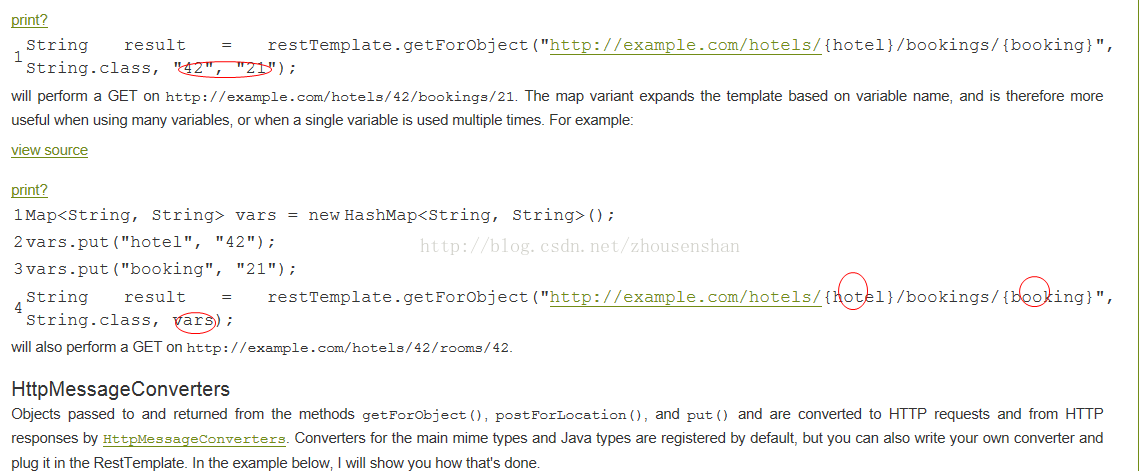
RestTemplate 实例
@Configuration

public class RestConfiguration {

    @Bean

    @ConditionalOnMissingBean({RestOperations.class, RestTemplate.class})

    public RestOperations restOperations() {

        SimpleClientHttpRequestFactory requestFactory = new SimpleClientHttpRequestFactory();

        requestFactory.setReadTimeout(5000);

        requestFactory.setConnectTimeout(5000);

        RestTemplate restTemplate = new RestTemplate(requestFactory);

        // 使用 utf-8 编码集的 conver 替换默认的 conver(默认的 string conver 的编码集为 "ISO-8859-1")

        List<HttpMessageConverter<?>> messageConverters = restTemplate.getMessageConverters();

        Iterator<HttpMessageConverter<?>> iterator = messageConverters.iterator();

        while (iterator.hasNext()) {

            HttpMessageConverter<?> converter = iterator.next();

            if (converter instanceof StringHttpMessageConverter) {

                iterator.remove();

            }

        }

        messageConverters.add(new StringHttpMessageConverter(Charset.forName("UTF-8")));

        return restTemplate;

    }

}
请求地址
get 请求 url 为
http://localhost:8080/test/sendSms?phone=手机号&msg=短信内容错误使用
@Autowired

private RestOperations restOperations;

public void test() throws Exception{

    String url = "http://localhost:8080/test/sendSms";

    Map<String, Object> uriVariables = new HashMap<String, Object>();

    uriVariables.put("phone", "151xxxxxxxx");

    uriVariables.put("msg", "测试短信内容");

    String result = restOperations.getForObject(url, String.class, uriVariables);

}
服务器接收的时候你会发现,接收的该请求时没有参数的
正确使用
@Autowired

private RestOperations restOperations;

public void test() throws Exception{

    String url = "http://localhost:8080/test/sendSms?phone={phone}&msg={phone}";

    Map<String, Object> uriVariables = new HashMap<String, Object>();

    uriVariables.put("phone", "151xxxxxxxx");

    uriVariables.put("msg", "测试短信内容");

    String result = restOperations.getForObject(url, String.class, uriVariables);

}
等价于
@Autowired

private RestOperations restOperations;

public void test() throws Exception{

    String url = "http://localhost:8080/test/sendSms?phone={phone}&msg={phone}";

    String result = restOperations.getForObject(url, String.class,  "151xxxxxxxx", "测试短信内容");

}
RestTemplate 发送 get 请求使用误区 多个参数传值为null(转载)的更多相关文章
- RestTemplate 发送 get 请求使用误区 多值为null
http://blog.csdn.net/zhousenshan/article/details/71055687 ****************************************** ...
- 使用RestTemplate发送post请求
最近使用RestTemplate发送post请求,遇到了很多问题,如转换httpMessage失败,中文乱码等,调了好久才找到下面较为简便的方法: RestTemplate restTemplate ...
- 使用RestTemplate发送post请求,请求头中封装参数
最近使用RestTemplate发送post请求,遇到了很多问题,如转换httpMessage失败.中文乱码等,调了好久才找到下面较为简便的方法: RestTemplate restTemplate ...
- JQuery发送ajax请求不能用数组作为参数
JQuery发送ajax请求不能用数组作为参数,否则会接收不到参数, 一.js代码如下: $('#delete-button').click(function(){ var select ...
- RestTemplate 发送post请求
springboot使用restTemplate post提交值 restTemplate post值 post提交有 FormData和Payload 两种形式: 第一种是formdata形式,在h ...
- JAVA发送POST请求携带JSON格式字符串参数
import org.apache.commons.lang.StringUtils; import org.apache.http.HttpEntity; import org.apache.htt ...
- 使用restTemplate发送post请求,传入参数是在requestBody请求体中,以json形式传输
@PostMapping public ResponseResult add(User user){ HttpHeaders httpHeaders = new HttpHeaders(); Medi ...
- RestTemplate发送GET请求
import org.springframework.web.client.RestTemplate; @Component @Slf4j public class JsSdkUtil { /** * ...
- jenkins构建自动执行jmeter 发送http请求,中间有替换参数路径
#在构建目录下创建jmeter目录,在这个目录下面执行jmeter性能测试mkdir -p $WORKSPACE/target/apache-jmeter-3.1/#复制jmeter文件到执行测试目录 ...
随机推荐
- 千星项目.Net Core 2.1移植填坑记--OpenAuth.Core诞生
背景 很早就有把OpenAuth.Net----最好用的.net权限管理工作流框架(好吧!我在吹牛
- IM开发者的零基础通信技术入门(二):通信交换技术的百年发展史(下)
1.系列文章引言 1.1 适合谁来阅读? 本系列文章尽量使用最浅显易懂的文字.图片来组织内容,力求通信技术零基础的人群也能看懂.但个人建议,至少稍微了解过网络通信方面的知识后再看,会更有收获.如果您大 ...
- python内置方法大全
数学运算 abs:求数值的绝对值 >>> abs(-2) 2 divmod:返回两个数值的商和余数 >>> divmod(5,2) (2, 1) >> ...
- 【Android Studio安装部署系列】三十二、Android模拟器Genymotion安装使用教程详解
版权声明:本文为HaiyuKing原创文章,转载请注明出处! 一.注册\登录 打开Genymotion官网,https://www.genymotion.com/ ,首先点击右上角的Sign in进行 ...
- Abp框架之执行Update-Database 命令系列错误
废话不多说,直接开门见山.首先的 第一个错误:一般都是,碰到这个问题不要慌,先不要急着去查看sql服务是否开启,首先按F5启动项目,报错之后直接终止项目,然后再执行Update-Database命令 ...
- springboot~application.properties和application.yml的使用
在springboot框架里进行项目开始时,我们在resource文件夹里可以存放配置文件,而格式可以有两种,properties和yml,前者是扁平的k/v格式,而后者是yml的树型结构,我们建议使 ...
- 【ASP.NET Core快速入门】(三)准备CentOS和Nginx环境
基本软件 VMware虚拟机 centos:http://isoredirect.centos.org/centos/7/isos/x86_64/CentOS-7-x86_64-Minimal-170 ...
- TensorFlow tutorial
代码示例来自https://github.com/aymericdamien/TensorFlow-Examples tensorflow先定义运算图,在run的时候才会进行真正的运算. run之前需 ...
- Vue源码解析(一):入口文件
在学习Vue源码之前,首先要做的一件事情,就是去GitHub上将Vue源码clone下来,目前我这里分析的Vue版本是V2.5.21,下面开始分析: 一.源码的目录结构: Vue的源码都在src目录下 ...
- asp.net mvc 简单项目框架的搭建(二)—— Spring.Net在Mvc中的简单应用
摘要:上篇写了如何搭建一个简单项目框架的上部分,讲了关于Dal和Bll之间解耦的相关知识,这篇来把后i面的部分说一说. 上篇讲到DbSession,现在接着往下讲. 首先,还是把一些类似的操作完善一下 ...