
Dubbo源码-Dubbo是如何随心所欲自定义XML标签的
叨叨
今天考虑了很久要不要写这篇文章。
距离《Dubbo源码》系列的开篇到现在已经快两个月时间了。当时是想着工作上的RPC框架使用存在一些让人头疼的问题,就来看看Dubbo给出了一套什么样的解决方案。
结果,写完第一篇没几天,工作上因为要赶一个项目的进度,关小黑屋了,前段时间刚放出来-_-!
琢磨着,做事不能半途而废。今天就又打开了Dubbo项目,pull下代码,在十多个子模块之间来回滚动,感觉都不是好惹的,一时不知道从哪下手了。再一想,Dubbo源码系列不能就这么唐突的出一篇就结束了啊。
行,思来想去,还是接着从上篇提到的dubbo-demo模块继续往下说……
正文
下面是dubbo-demo-provider模块下的dubbo-demo-provider.xml配置文件内容
<?xml version="1.0" encoding="UTF-8"?>

<!--

  Licensed to the Apache Software Foundation (ASF) under one or more

  contributor license agreements.  See the NOTICE file distributed with

  this work for additional information regarding copyright ownership.

  The ASF licenses this file to You under the Apache License, Version 2.0

  (the "License"); you may not use this file except in compliance with

  the License.  You may obtain a copy of the License at

      http://www.apache.org/licenses/LICENSE-2.0

  Unless required by applicable law or agreed to in writing, software

  distributed under the License is distributed on an "AS IS" BASIS,

  WITHOUT WARRANTIES OR CONDITIONS OF ANY KIND, either express or implied.

  See the License for the specific language governing permissions and

  limitations under the License.

  -->

<beans xmlns:xsi="http://www.w3.org/2001/XMLSchema-instance"

       xmlns:dubbo="http://dubbo.apache.org/schema/dubbo"

       xmlns="http://www.springframework.org/schema/beans"

       xsi:schemaLocation="http://www.springframework.org/schema/beans http://www.springframework.org/schema/beans/spring-beans-4.3.xsd

       http://dubbo.apache.org/schema/dubbo http://dubbo.apache.org/schema/dubbo/dubbo.xsd">

    <!-- provider's application name, used for tracing dependency relationship -->

    <dubbo:application name="demo-provider"/>

    <!-- use zookeeper registry center to export service -->

    <dubbo:registry address="zookeeper://127.0.0.1:2181"/>

    <!-- use dubbo protocol to export service on port 20880 -->

    <dubbo:protocol name="dubbo" port="20880"/>

    <!-- service implementation, as same as regular local bean -->

    <bean id="demoService" class="com.alibaba.dubbo.demo.provider.DemoServiceImpl"/>

    <!-- declare the service interface to be exported -->

    <dubbo:service interface="com.alibaba.dubbo.demo.DemoService" ref="demoService"/>

</beans>
注意:这里的dubbo:registry在上篇已经说明,有过改动,这里使用的是zookeeper的配置
dubbo-demo-provider与常见的xml文件有何不同
1、除了<bean id="demoService" ... 其他的标签我们日常都没有使用过
我们平常使用的xml都是在Spring框架下,所以可以看到熟悉的、 、等。那有没有想过,为什么定义一个标签就是生命一个bean,就能够在Spring上下文注册一个类的实例呢?其实,这些工作Spring在幕后都帮我们做好了,这个我在之前的《Spring读书笔记》系列有着重写过。
稍稍扫一眼Dubbo的代码,就会发现,Dubbo也是基于Spring开发的,使用了Spring的很多特性,但是鉴于自己的业务框架需求,需要做相应的拓展和定制化,实现一套自己的自定义XML标签。那么这些标签又是如何生效和被使用的呢
基于Spring的Schema提供自定义配置支持
在dubbo-demo-provider.xml中见到的那些标签也是基于Spring的Schema实现的一套自定义标签。
这一套流程主要包括以下几个步骤:
编写配置类和属性
编写XSD文件
编写spring.handlers和spring.schemas
编写DubboNamespaceHandler和DubboBeanDefinitionParser,主要负责标签解析
编写配置类和属性
针对dubbo-demo-provider中的<dubbo:application name="demo-provider"/>来说,该标签对应的配置类在dubbo-config-api模块下的ApplicationConfig。
package com.alibaba.dubbo.config;

import com.alibaba.dubbo.common.Constants;

import com.alibaba.dubbo.common.compiler.support.AdaptiveCompiler;

import com.alibaba.dubbo.common.logger.LoggerFactory;

import com.alibaba.dubbo.config.support.Parameter;

import java.util.ArrayList;

import java.util.List;

import java.util.Map;

/**

 * ApplicationConfig

 *

 * @export

 */

public class ApplicationConfig extends AbstractConfig {

    private static final long serialVersionUID = 5508512956753757169L;

    // application name

    private String name;

    // module version

    private String version;

    // application owner

    private String owner;

    // application's organization (BU)

    private String organization;

    // architecture layer

    private String architecture;

    // environment, e.g. dev, test or production

    private String environment;

    // Java compiler

    private String compiler;

    // logger

    private String logger;

    // registry centers

    private List<RegistryConfig> registries;

    // monitor center

    private MonitorConfig monitor;

    // is default or not

    private Boolean isDefault;

    // directory for saving thread dump

    private String dumpDirectory;

    private Boolean qosEnable;

    private Integer qosPort;

    private Boolean qosAcceptForeignIp;

    // customized parameters

    private Map<String, String> parameters;

    public ApplicationConfig() {

    }

    public ApplicationConfig(String name) {

        setName(name);

    }

    @Parameter(key = Constants.APPLICATION_KEY, required = true)

    public String getName() {

        return name;

    }

    public void setName(String name) {

        checkName("name", name);

        this.name = name;

        if (id == null || id.length() == 0) {

            id = name;

        }

    }

    @Parameter(key = "application.version")

    public String getVersion() {

        return version;

    }

    public void setVersion(String version) {

        this.version = version;

    }

    public String getOwner() {

        return owner;

    }

    public void setOwner(String owner) {

        checkMultiName("owner", owner);

        this.owner = owner;

    }

    public String getOrganization() {

        return organization;

    }

    public void setOrganization(String organization) {

        checkName("organization", organization);

        this.organization = organization;

    }

    public String getArchitecture() {

        return architecture;

    }

    public void setArchitecture(String architecture) {

        checkName("architecture", architecture);

        this.architecture = architecture;

    }

    public String getEnvironment() {

        return environment;

    }

    public void setEnvironment(String environment) {

        checkName("environment", environment);

        if (environment != null) {

            if (!("develop".equals(environment) || "test".equals(environment) || "product".equals(environment))) {

                throw new IllegalStateException("Unsupported environment: " + environment + ", only support develop/test/product, default is product.");

            }

        }

        this.environment = environment;

    }

    public RegistryConfig getRegistry() {

        return registries == null || registries.isEmpty() ? null : registries.get(0);

    }

    public void setRegistry(RegistryConfig registry) {

        List<RegistryConfig> registries = new ArrayList<RegistryConfig>(1);

        registries.add(registry);

        this.registries = registries;

    }

    public List<RegistryConfig> getRegistries() {

        return registries;

    }

    @SuppressWarnings({"unchecked"})

    public void setRegistries(List<? extends RegistryConfig> registries) {

        this.registries = (List<RegistryConfig>) registries;

    }

    public MonitorConfig getMonitor() {

        return monitor;

    }

    public void setMonitor(MonitorConfig monitor) {

        this.monitor = monitor;

    }

    public void setMonitor(String monitor) {

        this.monitor = new MonitorConfig(monitor);

    }

    public String getCompiler() {

        return compiler;

    }

    public void setCompiler(String compiler) {

        this.compiler = compiler;

        AdaptiveCompiler.setDefaultCompiler(compiler);

    }

    public String getLogger() {

        return logger;

    }

    public void setLogger(String logger) {

        this.logger = logger;

        LoggerFactory.setLoggerAdapter(logger);

    }

    public Boolean isDefault() {

        return isDefault;

    }

    public void setDefault(Boolean isDefault) {

        this.isDefault = isDefault;

    }

    @Parameter(key = Constants.DUMP_DIRECTORY)

    public String getDumpDirectory() {

        return dumpDirectory;

    }

    public void setDumpDirectory(String dumpDirectory) {

        this.dumpDirectory = dumpDirectory;

    }

    @Parameter(key = Constants.QOS_ENABLE)

    public Boolean getQosEnable() {

        return qosEnable;

    }

    public void setQosEnable(Boolean qosEnable) {

        this.qosEnable = qosEnable;

    }

    @Parameter(key = Constants.QOS_PORT)

    public Integer getQosPort() {

        return qosPort;

    }

    public void setQosPort(Integer qosPort) {

        this.qosPort = qosPort;

    }

    @Parameter(key = Constants.ACCEPT_FOREIGN_IP)

    public Boolean getQosAcceptForeignIp() {

        return qosAcceptForeignIp;

    }

    public void setQosAcceptForeignIp(Boolean qosAcceptForeignIp) {

        this.qosAcceptForeignIp = qosAcceptForeignIp;

    }

    public Map<String, String> getParameters() {

        return parameters;

    }

    public void setParameters(Map<String, String> parameters) {

        checkParameterName(parameters);

        this.parameters = parameters;

    }

}
在ApplicationConfig同级目录下,还包括其他出现在dubbo-demo-provider.xml中出现自定义标签类,如RegistryConfig、ProtocolConfig
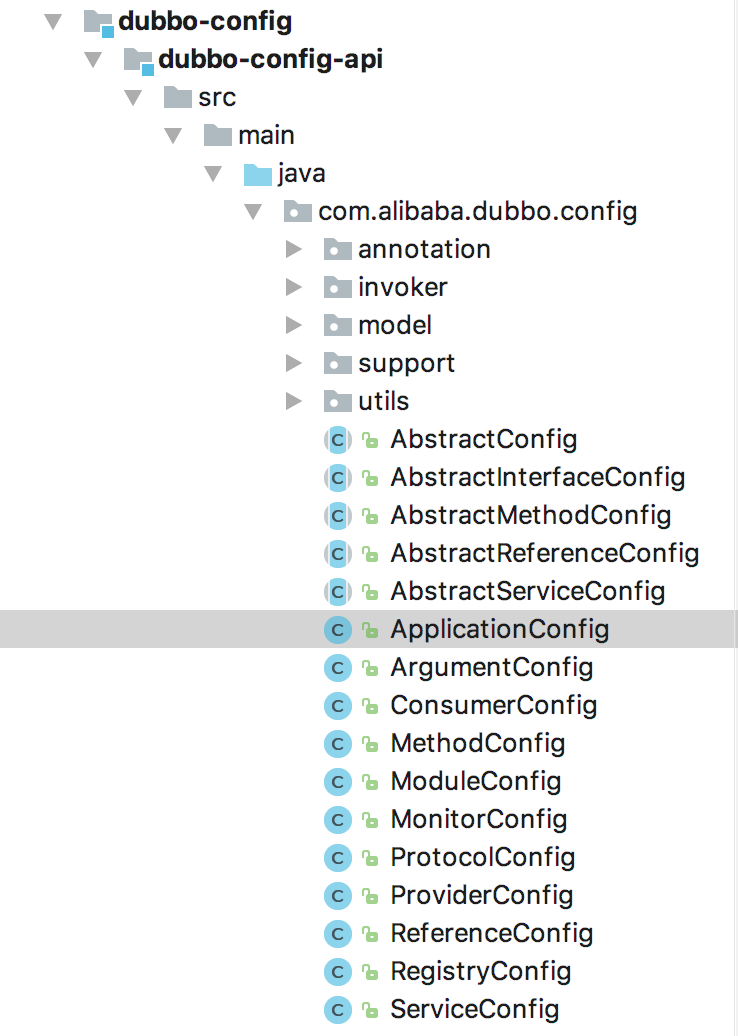
注意:<dubbo:application name="demo-provider"/>标签中的dubbo对应的声明在dubbo-demo-provider.xml中的xmlns:dubbo="http://dubbo.apache.org/schema/dubbo,这里的xmlns其实就是一个命名空间的概念。
编写XSD文件
XSD文件已经在dubbo-demo-provider文件中定义好了,dubbo.xsd在dubbo-config-spring模块下,内容较长,举Application为例
...

<xsd:element name="application" type="applicationType">

    <xsd:annotation>

        <xsd:documentation><![CDATA[ The application config ]]></xsd:documentation>

    </xsd:annotation>

</xsd:element>

...

<xsd:complexType name="applicationType">

    <xsd:sequence minOccurs="0" maxOccurs="unbounded">

        <xsd:element ref="parameter" minOccurs="0" maxOccurs="unbounded"/>

    </xsd:sequence>

    <xsd:attribute name="id" type="xsd:ID">

        <xsd:annotation>

            <xsd:documentation><![CDATA[ The unique identifier for a bean. ]]></xsd:documentation>

        </xsd:annotation>

    </xsd:attribute>

    <xsd:attribute name="name" type="xsd:string" use="required">

        <xsd:annotation>

            <xsd:documentation><![CDATA[ The application name. ]]></xsd:documentation>

        </xsd:annotation>

    </xsd:attribute>

    <xsd:attribute name="version" type="xsd:string">

        <xsd:annotation>

            <xsd:documentation><![CDATA[ The application version. ]]></xsd:documentation>

        </xsd:annotation>

    </xsd:attribute>

    <xsd:attribute name="owner" type="xsd:string">

        <xsd:annotation>

            <xsd:documentation><![CDATA[ The application owner name (email prefix). ]]></xsd:documentation>

        </xsd:annotation>

    </xsd:attribute>

    <xsd:attribute name="organization" type="xsd:string">

        <xsd:annotation>

            <xsd:documentation><![CDATA[ The organization name. ]]></xsd:documentation>

        </xsd:annotation>

    </xsd:attribute>

    <xsd:attribute name="architecture" type="xsd:string">

        <xsd:annotation>

            <xsd:documentation><![CDATA[ The architecture. ]]></xsd:documentation>

        </xsd:annotation>

    </xsd:attribute>

    <xsd:attribute name="environment" type="xsd:string">

        <xsd:annotation>

            <xsd:documentation><![CDATA[ The application environment, eg: dev/test/run ]]></xsd:documentation>

        </xsd:annotation>

    </xsd:attribute>

    <xsd:attribute name="compiler" type="xsd:string">

        <xsd:annotation>

            <xsd:documentation><![CDATA[ The java code compiler. ]]></xsd:documentation>

        </xsd:annotation>

    </xsd:attribute>

    <xsd:attribute name="logger" type="xsd:string">

        <xsd:annotation>

            <xsd:documentation><![CDATA[ The application logger. ]]></xsd:documentation>

        </xsd:annotation>

    </xsd:attribute>

    <xsd:attribute name="registry" type="xsd:string" use="optional">

        <xsd:annotation>

            <xsd:documentation><![CDATA[ The application registry. ]]></xsd:documentation>

        </xsd:annotation>

    </xsd:attribute>

    <xsd:attribute name="monitor" type="xsd:string" use="optional">

        <xsd:annotation>

            <xsd:documentation><![CDATA[ The application monitor. ]]></xsd:documentation>

        </xsd:annotation>

    </xsd:attribute>

    <xsd:attribute name="default" type="xsd:string" use="optional">

        <xsd:annotation>

            <xsd:documentation><![CDATA[ Is default. ]]></xsd:documentation>

        </xsd:annotation>

    </xsd:attribute>

</xsd:complexType>

...
代码中上面一部分代码<xsd:element name="application" type="applicationType">表示标签的名称
<xsd:attribute name="name" type="xsd:string" use="required">表示的是application标签的属性,与ApplicationConfig类的属性是一一对应的关系。这里表示有一个属性名为name,且是String类型,必填字段。
编写spring.handlers和spring.schemas
仅仅有上面的配置类和XSD文件还是无法让自定义标签工作,因为Spring还无法发现这些自定义标签,更别提让其发挥该有的作用了。
这时候,需要添加两个配置文件spring.handlers和spring.schemas,从文件字面意思就可以知道,这两个配置文件起到了贯通的作用。spring.handlers用于配置具体的解析类,下面会提到,spring.schemas用于指明schemas的文件路径。
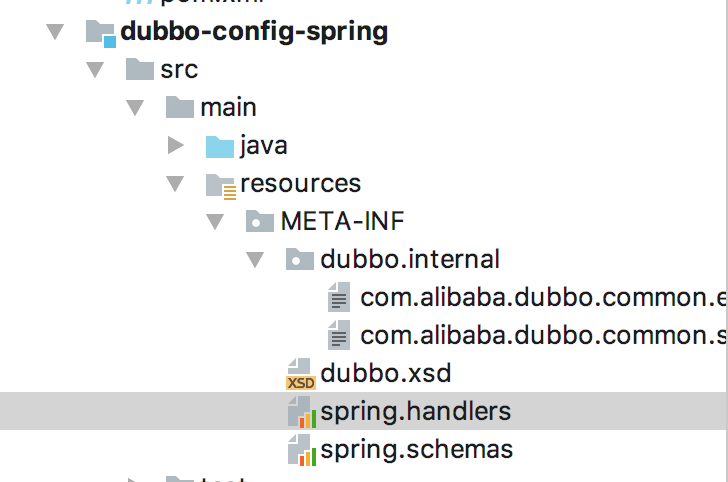
我们可以在dubbo-config-spring模块中看到这两个配置文件
Spring会在启动容器的时候加载META-INF目录下的这两个配置文件并加载对应的解析类。
编写DubboNamespaceHandler和DubboBeanDefinitionParser,主要负责标签解析
DubboNamespaceHandler类位于dubbo-config-spring模块下
/*

 * Licensed to the Apache Software Foundation (ASF) under one or more

 * contributor license agreements.  See the NOTICE file distributed with

 * this work for additional information regarding copyright ownership.

 * The ASF licenses this file to You under the Apache License, Version 2.0

 * (the "License"); you may not use this file except in compliance with

 * the License.  You may obtain a copy of the License at

 *

 *     http://www.apache.org/licenses/LICENSE-2.0

 *

 * Unless required by applicable law or agreed to in writing, software

 * distributed under the License is distributed on an "AS IS" BASIS,

 * WITHOUT WARRANTIES OR CONDITIONS OF ANY KIND, either express or implied.

 * See the License for the specific language governing permissions and

 * limitations under the License.

 */

package com.alibaba.dubbo.config.spring.schema;

import com.alibaba.dubbo.common.Version;

import com.alibaba.dubbo.config.ApplicationConfig;

import com.alibaba.dubbo.config.ConsumerConfig;

import com.alibaba.dubbo.config.ModuleConfig;

import com.alibaba.dubbo.config.MonitorConfig;

import com.alibaba.dubbo.config.ProtocolConfig;

import com.alibaba.dubbo.config.ProviderConfig;

import com.alibaba.dubbo.config.RegistryConfig;

import com.alibaba.dubbo.config.spring.ReferenceBean;

import com.alibaba.dubbo.config.spring.ServiceBean;

import org.springframework.beans.factory.xml.NamespaceHandlerSupport;

/**

 * DubboNamespaceHandler

 *

 * @export

 */

public class DubboNamespaceHandler extends NamespaceHandlerSupport {

    static {

        Version.checkDuplicate(DubboNamespaceHandler.class);

    }

    @Override

    public void init() {

        registerBeanDefinitionParser("application", new DubboBeanDefinitionParser(ApplicationConfig.class, true));

        registerBeanDefinitionParser("module", new DubboBeanDefinitionParser(ModuleConfig.class, true));

        registerBeanDefinitionParser("registry", new DubboBeanDefinitionParser(RegistryConfig.class, true));

        registerBeanDefinitionParser("monitor", new DubboBeanDefinitionParser(MonitorConfig.class, true));

        registerBeanDefinitionParser("provider", new DubboBeanDefinitionParser(ProviderConfig.class, true));

        registerBeanDefinitionParser("consumer", new DubboBeanDefinitionParser(ConsumerConfig.class, true));

        registerBeanDefinitionParser("protocol", new DubboBeanDefinitionParser(ProtocolConfig.class, true));

        registerBeanDefinitionParser("service", new DubboBeanDefinitionParser(ServiceBean.class, true));

        registerBeanDefinitionParser("reference", new DubboBeanDefinitionParser(ReferenceBean.class, false));

        registerBeanDefinitionParser("annotation", new AnnotationBeanDefinitionParser());

    }

}
是不是又看到了之前在dubbo-demo-provider.xml配置文件中看到那些标签。没错,真正给那些标签赋能的功能代码就在这里。
具体的解析工作交给了dubbo-config-spring模块下的DubboBeanDefinitionParser类,该类实现了Spring的BeanDefinitionParser接口,该类的一个核心方法就是parse()方法,其抽丝剥茧解析标签,加载bean的思路其实和之前在《Spring读书笔记》系列中介绍的一样。最终都是解析并转化为BeanDefinition对象并塞到Spring的上下文中,完成Bean的加载。
我们可以以debug模式启动dubbo-demo-provider模块中的Provider类,通过打断点,会发现首先会执行DubboNamespaceHandler类中的init方法,然后进入DubboBeanDefinitionParser类中的parse方法。
配合dubbo-demo-provider.xml配置文件中的<dubbo:registry address="zookeeper://127.0.0.1:2181"/>,我们在调试的时候发现解析后对应的BeanDefinition如下
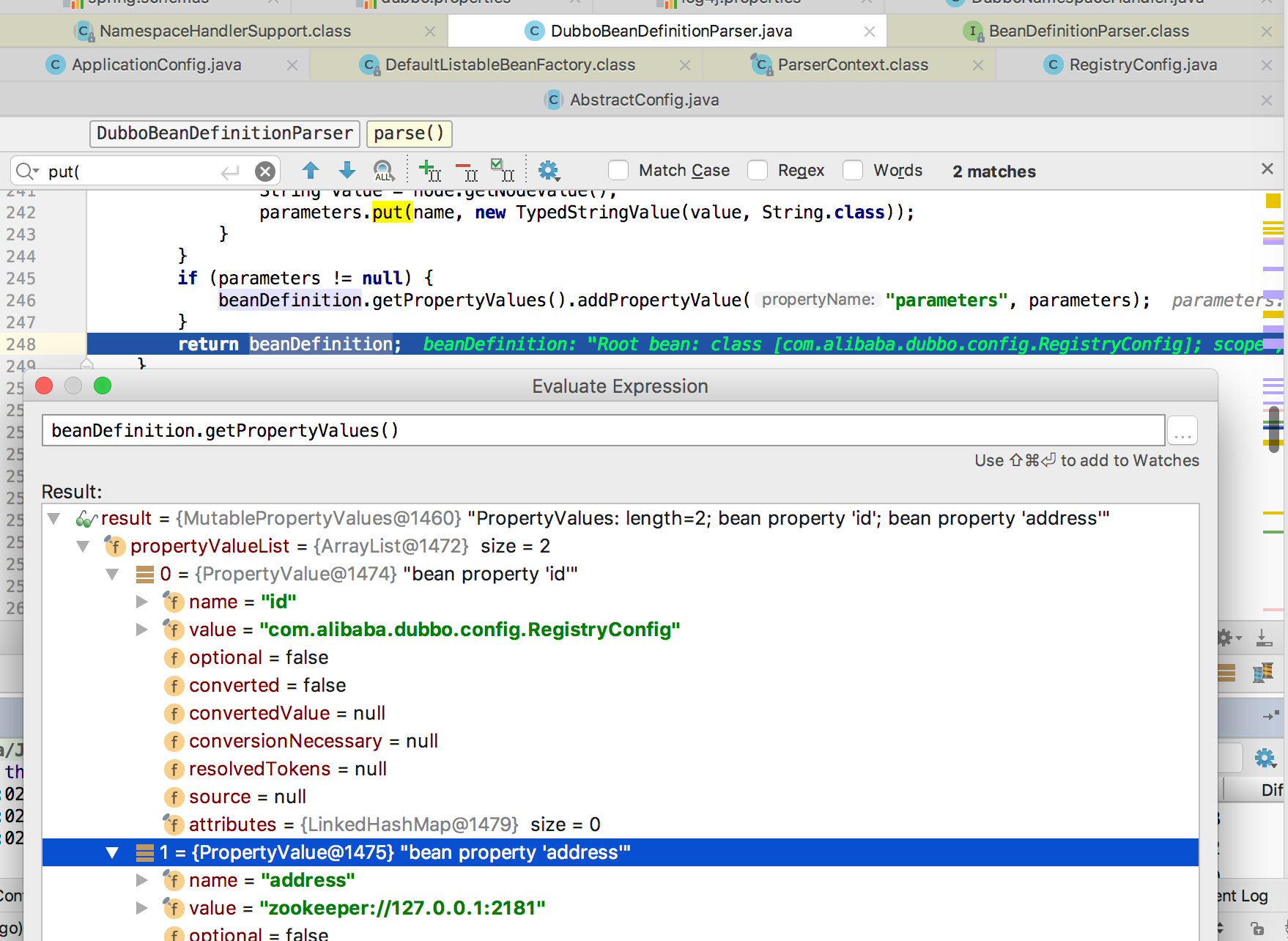
通过这样一个过程,就实现了将XML自定义的标签加载到Spring容器中,而不需要使用Spring自己的bean去定义。
明白了这个流程,后面看Dubbo的其他配置文件里面那些陌生的标签就不会蒙圈了。
如果您觉得阅读本文对您有帮助,请点一下“推荐”按钮,您的“推荐”将是我最大的写作动力!如果您想持续关注我的文章,请扫描二维码,关注JackieZheng的微信公众号,我会将我的文章推送给您,并和您一起分享我日常阅读过的优质文章。

Dubbo源码-Dubbo是如何随心所欲自定义XML标签的的更多相关文章
- Spring源码阅读笔记05:自定义xml标签解析
在上篇文章中,提到了在Spring中存在默认标签与自定义标签两种,并且详细分析了默认标签的解析,本文就来分析自定义标签的解析,像Spring中的AOP就是通过自定义标签来进行配置的,这里也是为后面学习 ...
- dubbo源码—dubbo自定义spring xml标签
dubbo为了和spring更好的集成,提供了一些xml配置标签,也就是自定义标签 spring自定义标签 spring自定义标签的方式如下: 设计配置属性和JavaBean 编写xsd文件,校验xm ...
- dubbo源码—dubbo简介
dubbo是一个RPC框架,应用方像使用本地service一样使用dubbo service.dubbo体系架构 上图中的角色: 最重要的是consumer.registry和provider con ...
- Spring源码阅读笔记04:默认xml标签解析
上文我们主要学习了Spring是如何获取xml配置文件并且将其转换成Document,我们知道xml文件是由各种标签组成,Spring需要将其解析成对应的配置信息.之前提到过Spring中的标签包括默 ...
- 6.2 dubbo在spring中自定义xml标签源码解析
在6.1 如何在spring中自定义xml标签中我们看到了在spring中自定义xml标签的方式.dubbo也是这样来实现的. 一 META_INF/dubbo.xsd 比较长,只列出<dubb ...
- Dubbo源码学习--服务发布(ServiceBean、ServiceConfig)
前面讲过Dubbo SPI拓展机制,通过ExtensionLoader实现可插拔加载拓展,本节将接着分析Dubbo的服务发布过程. 以源码中dubbo-demo模块作为切入口一步步走进Dubbo源码. ...
- dubbo源码解析五 --- 集群容错架构设计与原理分析
欢迎来我的 Star Followers 后期后继续更新Dubbo别的文章 Dubbo 源码分析系列之一环境搭建 博客园 Dubbo 入门之二 --- 项目结构解析 博客园 Dubbo 源码分析系列之 ...
- dubbo源码之服务发布与注册
服务端发布流程: dubbo 是基于 spring 配置来实现服务的发布的,对于dubbo 配置文件中看到的<dubbo:service>等标签都是服务发布的重要配置 ,对于这些提供可配置 ...
- dubbo源码分析(一)-从xml到我们认识的Java对象
项目中用的dubbo的挺多的,然后随着自己对dubbo的慢慢深入,自己也希望能够了解dubbo的底层实现,这半年来一直在看dubbo的源码,有点断断续续的,于是准备写一个dubbo源码系列的分析文章, ...
随机推荐
- JFinal开发环境搭建,JFinal开发案例
JFinal 是基于 Java 语言的极速 WEB + ORM 开发框架,其核心设计目标是开发迅速.代码量少.学习简单.功能强大.轻量级.易扩展.Restful.在拥有Java 语言所 ...
- Volley网络框架完全解析(缓存篇)
在上一篇中讲完了Volley框架怎么使用,那么这篇就来讲讲Volley框架的缓存机制 我们看Volley内部源码发现: Volley框架内部自己处理了DiskBasedCache硬盘缓存,但是没有处理 ...
- Android高效率编码-第三方SDK详解系列(一)——百度地图,绘制,覆盖物,导航,定位,细腻分解!
Android高效率编码-第三方SDK详解系列(一)--百度地图,绘制,覆盖物,导航,定位,细腻分解! 这是一个系列,但是我也不确定具体会更新多少期,最近很忙,主要还是效率的问题,所以一些有效的东西还 ...
- MIDle生命周期详解,以及工作原理
当MIDlet被应用程序管理器成功地初始化之后,就开始展开了它的生命周期.MIDlet的生命周期完全由应用程序管理器控制,也就是说,当MIDlet要从一个状态变成另外一个状态时,应用程序管理器会调用对 ...
- 面试之路(16)-归并排序详解(MergeSort)递归和非递归实现
归并排序的概念及定义 归并排序(Merge)是将两个(或两个以上)有序表合并成一个新的有序表,即把待排序序列分为若干个子序列,每个子序列是有序的.然后再把有序子序列合并为整体有序序列. 归并排序是建立 ...
- 使用padding后内容超出父级元素
解决方法:
- InnoDB存储引擎的总览
InnoDB存储引擎由Innobase Oy公司开发,后被Oracle收购.从MySQL5.5版本开始是默认的存储引擎. InnoDB支持ACID事务.提供行锁设计,支持MVCC.外键,一致性非锁定读 ...
- docker的安装和技巧
工作了有一段时间,开发环境中需要docker环境,但是docker一直不算很熟,之前一直是利用yum安装,但是yum安装真的很费劲,所以总结了一些经验给大家: 1,利用yum直接安装 官网是直接给了y ...
- Bootstrap 4,“未捕获错误:Bootstrap工具提示需要Tether(http://github.hubspot.com/tether/)”
如果出现了这个错误,我想你是没有引用tether文件,这在v4之前不需要单独引入的. https://cdnjs.cloudflare.com/ajax/libs/tether/1.4.0/js/te ...
- PhpStorm服务激活
日期 服务地址 状态 2018-03-15 http://idea.singee77.com/ 使用中