
.net core 从(本地)服务器获取APK文件并解析APK信息
1、apk解析除了使用客户端利用aapt.exe、unzip.exe开发客户端解析外,还可以直接利用服务进行解析
/// <summary>

/// 从本地服务器获取APK文件并解析APK信息

/// </summary>

/// <param name="fileName">APK文件的完整路径</param>

/// <returns></returns>

[HttpPost, HttpGet, HttpOptions, CorsOptions]

public IActionResult DecodeAPK(string fileName)

{

    if(fileName.IndexOf(".apk") == -1 && fileName.IndexOf(".zip") == -1)

    {

        return ErrorResult("未获取到APP上传路径!", 111111);

    }

    // 从服务器取文件

    if(!string.IsNullOrWhiteSpace(fileName))

    {

        fileName = fileName.Replace(@"\", @" / ");

        ApkInfo apk = new ApkInfo();

        // 处理apk信息

        try

            apk = ReadAPK.ReadApkFromPath(fileName);

        catch(Exception ex)

            return ErrorResult("APP上传失败!--> APK解析失败,失败原因为:" + ex.Message, 111150);

        return SuccessResult(apk, "APK解析成功");

    }

    else

        return ErrorResult("APP上传失败!--> 从服务器获取APK文件失败,请联系网站管理员!", 111151);

}
2、ReadAPK APK解析帮助类
/// <summary>

/// 读取APK信息

/// </summary>

public class ReadAPK

{

    /// <summary>

    /// 从上传apk的路径读取并解析apk信息

    /// </summary>

    /// <param name="path"></param>

    /// <returns></returns>

    public static ApkInfo ReadApkFromPath(string path)

    {

        byte[] manifestData = null;

        byte[] resourcesData = null;

        var manifest = "AndroidManifest.xml";

        var resources = "resources.arsc";

        //读取apk,通过解压的方式读取

        using(var zip = ZipFile.Read(path))

        {

            using(Stream zipstream = zip[manifest].OpenReader())

            {

                //将解压出来的文件保存到一个路径(必须这样)

                using(var fileStream = File.Create(manifest, (int) zipstream.Length))

                {

                    manifestData = new byte[zipstream.Length];

                    zipstream.Read(manifestData, 0, manifestData.Length);

                    fileStream.Write(manifestData, 0, manifestData.Length);

                }

            }

            using(Stream zipstream = zip[resources].OpenReader())

            {

                //将解压出来的文件保存到一个路径(必须这样)

                using(var fileStream = File.Create(resources, (int) zipstream.Length))

                {

                    resourcesData = new byte[zipstream.Length];

                    zipstream.Read(resourcesData, 0, resourcesData.Length);

                    fileStream.Write(resourcesData, 0, resourcesData.Length);

                }

            }

        }

        ApkReader apkReader = new ApkReader();

        ApkInfo info = apkReader.extractInfo(manifestData, resourcesData);

        return info;

    }

}
3、APK解析类
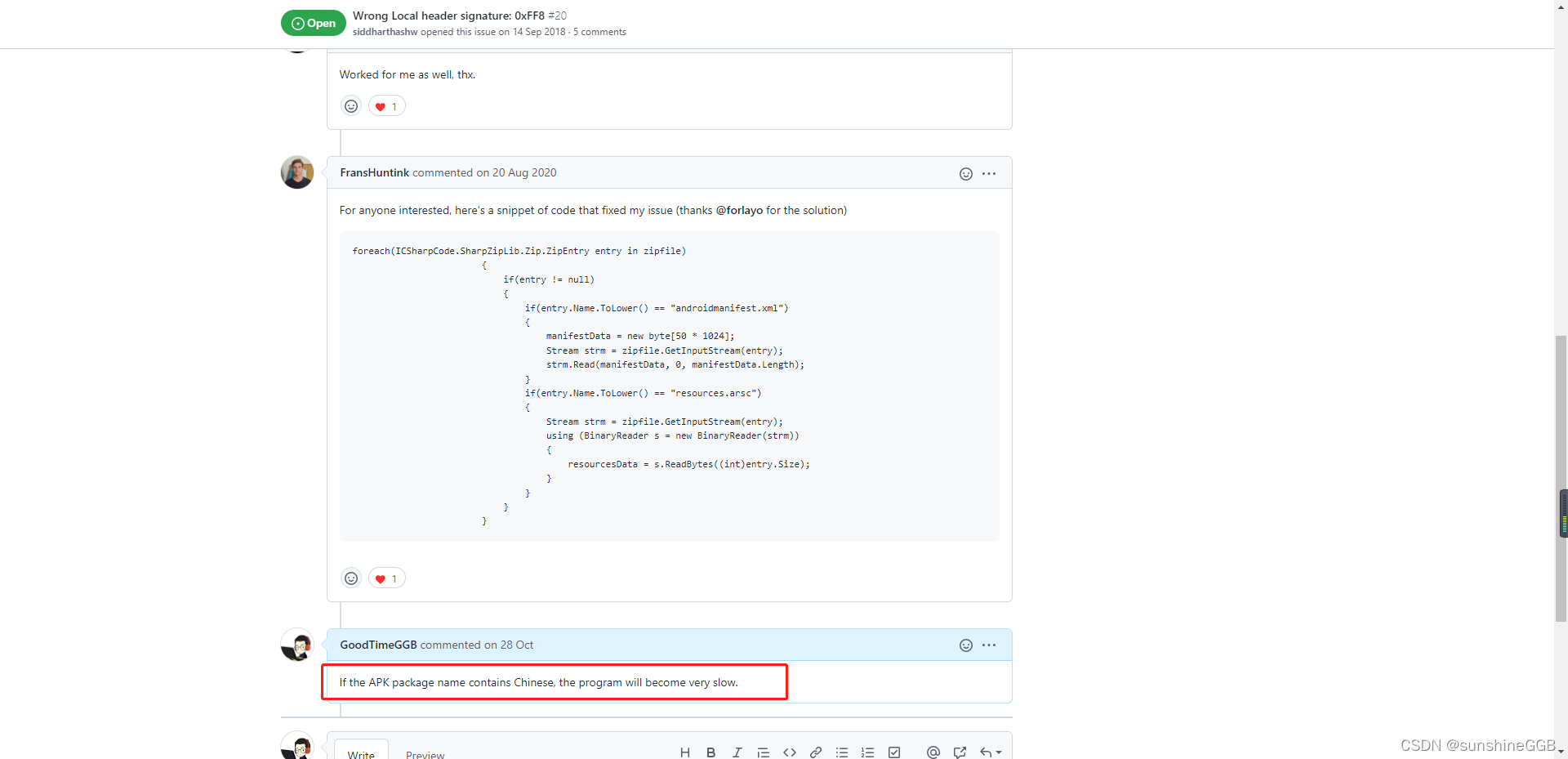
注:此段代码解析APK时,若APK包含中文会极其的卡顿,建议上传前先用Npinyin重命名再次上传,至于原因已提交GitHub,暂未得到回复,所以先自己重命名再上传吧
Wrong Local header signature: 0xFF8
public class ApkReader

{

    private static int VER_ID = 0;

    private static int ICN_ID = 1;

    private static int LABEL_ID = 2;

    String[] VER_ICN = new String[3];

    String[] TAGS = {

        "manifest", "application", "activity"

    };

    String[] ATTRS = {

        "android:", "a:", "activity:", "_:"

    };

    Dictionary < String, object > entryList = new Dictionary < String, object > ();

    List < String > tmpFiles = new List < String > ();

    public String fuzzFindInDocument(XmlDocument doc, String tag, String attr)

    {

        foreach(String t in TAGS)

        {

            XmlNodeList nodelist = doc.GetElementsByTagName(t);

            for(int i = 0; i < nodelist.Count; i++)

            {

                XmlNode element = (XmlNode) nodelist.Item(i);

                if(element.NodeType == XmlNodeType.Element)

                {

                    XmlAttributeCollection map = element.Attributes;

                    for(int j = 0; j < map.Count; j++)

                    {

                        XmlNode element2 = map.Item(j);

                        if(element2.Name.EndsWith(attr))

                        {

                            return element2.Value;

                        }

                    }

                }

            }

        }

        return null;

    }

    private XmlDocument initDoc(String xml)

    {

        XmlDocument retval = new XmlDocument();

        retval.LoadXml(xml);

        retval.DocumentElement.Normalize();

        return retval;

    }

    private void extractPermissions(ApkInfo info, XmlDocument doc)

    {

        ExtractPermission(info, doc, "uses-permission", "name");

        ExtractPermission(info, doc, "permission-group", "name");

        ExtractPermission(info, doc, "service", "permission");

        ExtractPermission(info, doc, "provider", "permission");

        ExtractPermission(info, doc, "activity", "permission");

    }

    private bool readBoolean(XmlDocument doc, String tag, String attribute)

    {

        String str = FindInDocument(doc, tag, attribute);

        bool ret = false;

        try

        {

            ret = Convert.ToBoolean(str);

        }

        catch

        {

            ret = false;

        }

        return ret;

    }

    private void extractSupportScreens(ApkInfo info, XmlDocument doc)

    {

        info.supportSmallScreens = readBoolean(doc, "supports-screens", "android:smallScreens");

        info.supportNormalScreens = readBoolean(doc, "supports-screens", "android:normalScreens");

        info.supportLargeScreens = readBoolean(doc, "supports-screens", "android:largeScreens");

        if(info.supportSmallScreens || info.supportNormalScreens || info.supportLargeScreens) info.supportAnyDensity = false;

    }

    public ApkInfo extractInfo(byte[] manifest_xml, byte[] resources_arsx)

    {

        string manifestXml = string.Empty;

        APKManifest manifest = new APKManifest();

        try

        {

            manifestXml = manifest.ReadManifestFileIntoXml(manifest_xml);

        }

        catch(Exception ex)

        {

            throw ex;

        }

        XmlDocument doc = new XmlDocument();

        doc.LoadXml(manifestXml);

        return extractInfo(doc, resources_arsx);

    }

    public ApkInfo extractInfo(XmlDocument manifestXml, byte[] resources_arsx)

    {

        ApkInfo info = new ApkInfo();

        VER_ICN[VER_ID] = "";

        VER_ICN[ICN_ID] = "";

        VER_ICN[LABEL_ID] = "";

        try

        {

            XmlDocument doc = manifestXml;

            if(doc == null) throw new Exception("Document initialize failed");

            info.resourcesFileName = "resources.arsx";

            info.resourcesFileBytes = resources_arsx;

            // Fill up the permission field  不需要返回,注释

            //extractPermissions(info, doc);

            // Fill up some basic fields

            info.minSdkVersion = FindInDocument(doc, "uses-sdk", "minSdkVersion");

            info.targetSdkVersion = FindInDocument(doc, "uses-sdk", "targetSdkVersion");

            info.versionCode = FindInDocument(doc, "manifest", "versionCode");

            info.versionName = FindInDocument(doc, "manifest", "versionName");

            info.packageName = FindInDocument(doc, "manifest", "package");

            int labelID;

            info.label = FindInDocument(doc, "application", "label");

            if(info.label.StartsWith("@")) VER_ICN[LABEL_ID] = info.label;

            else if(int.TryParse(info.label, out labelID)) VER_ICN[LABEL_ID] = String.Format("@{0}", labelID.ToString("X4"));

            // Fill up the support screen field  不需要返回,注释

            //extractSupportScreens(info, doc);

            if(info.versionCode == null) info.versionCode = fuzzFindInDocument(doc, "manifest", "versionCode");

            if(info.versionName == null) info.versionName = fuzzFindInDocument(doc, "manifest", "versionName");

            else if(info.versionName.StartsWith("@")) VER_ICN[VER_ID] = info.versionName;

            String id = FindInDocument(doc, "application", "android:icon");

            if(null == id)

            {

                id = fuzzFindInDocument(doc, "manifest", "icon");

            }

            if(null == id)

            {

                Debug.WriteLine("icon resId Not Found!");

                return info;

            }#

            region 获取APK名称的代码暂时注释, 运行时间太卡顿

            // Find real strings

            if(!info.hasIcon && id != null)

            {

                if(id.StartsWith("@android:")) VER_ICN[ICN_ID] = "@" + (id.Substring("@android:".Length));

                else VER_ICN[ICN_ID] = String.Format("@{0}", Convert.ToInt32(id).ToString("X4"));

                List < String > resId = new List < String > ();

                for(int i = 0; i < VER_ICN.Length; i++)

                {

                    if(VER_ICN[i].StartsWith("@")) resId.Add(VER_ICN[i]);

                }

                ApkResourceFinder finder = new ApkResourceFinder();

                info.resStrings = finder.processResourceTable(info.resourcesFileBytes, resId);

                if(!VER_ICN[VER_ID].Equals(""))

                {

                    List < String > versions = null;

                    if(info.resStrings.ContainsKey(VER_ICN[VER_ID].ToUpper())) versions = info.resStrings[VER_ICN[VER_ID].ToUpper()];

                    if(versions != null)

                    {

                        if(versions.Count > 0) info.versionName = versions[0];

                    }

                    else

                    {

                        throw new Exception("VersionName Cant Find in resource with id " + VER_ICN[VER_ID]);

                    }

                }

                List < String > iconPaths = null;

                if(info.resStrings.ContainsKey(VER_ICN[ICN_ID].ToUpper())) iconPaths = info.resStrings[VER_ICN[ICN_ID].ToUpper()];

                if(iconPaths != null && iconPaths.Count > 0)

                {

                    info.iconFileNameToGet = new List < String > ();

                    info.iconFileName = new List < string > ();

                    foreach(String iconFileName in iconPaths)

                    {

                        if(iconFileName != null)

                        {

                            if(iconFileName.Contains(@"/"))

                            {

                                info.iconFileNameToGet.Add(iconFileName);

                                info.iconFileName.Add(iconFileName);

                                info.hasIcon = true;

                            }

                        }

                    }

                }

                else

                {

                    throw new Exception("Icon Cant Find in resource with id " + VER_ICN[ICN_ID]);

                }

                if(!VER_ICN[LABEL_ID].Equals(""))

                {

                    List < String > labels = null;

                    if(info.resStrings.ContainsKey(VER_ICN[LABEL_ID])) labels = info.resStrings[VER_ICN[LABEL_ID]];

                    if(labels.Count > 0)

                    {

                        info.label = labels[0];

                    }

                }

            }#

            endregion

        }

        catch(Exception e)

        {

            throw e;

        }

        return info;

    }

    private void ExtractPermission(ApkInfo info, XmlDocument doc, String keyName, String attribName)

    {

        XmlNodeList usesPermissions = doc.GetElementsByTagName(keyName);

        if(usesPermissions != null)

        {

            for(int s = 0; s < usesPermissions.Count; s++)

            {

                XmlNode permissionNode = usesPermissions.Item(s);

                if(permissionNode.NodeType == XmlNodeType.Element)

                {

                    XmlNode node = permissionNode.Attributes.GetNamedItem(attribName);

                    if(node != null) info.Permissions.Add(node.Value);

                }

            }

        }

    }

    private String FindInDocument(XmlDocument doc, String keyName, String attribName)

    {

        XmlNodeList usesPermissions = doc.GetElementsByTagName(keyName);

        if(usesPermissions != null)

        {

            for(int s = 0; s < usesPermissions.Count; s++)

            {

                XmlNode permissionNode = usesPermissions.Item(s);

                if(permissionNode.NodeType == XmlNodeType.Element)

                {

                    XmlNode node = permissionNode.Attributes.GetNamedItem(attribName);

                    if(node != null) return node.Value;

                }

            }

        }

        return null;

    }

}
4、APK解析返回类
public class ApkInfo

{

    /// <summary>

    /// APK名称

    /// </summary>

    public string label

    {

        get;

        set;

    }

    /// <summary>

    /// APK版本号

    /// </summary>

    public string versionName

    {

        get;

        set;

    }

    /// <summary>

    /// APK版本编号

    /// </summary>

    public string versionCode

    {

        get;

        set;

    }

    /// <summary>

    /// APK支持的最小SDK版本

    /// </summary>

    public string minSdkVersion

    {

        get;

        set;

    }

    /// <summary>

    /// APK的目标SDK版本

    /// </summary>

    public string targetSdkVersion

    {

        get;

        set;

    }

    /// <summary>

    /// APK包名称

    /// </summary>

    public string packageName

    {

        get;

        set;

    }

    public static int FINE = 0;

    public static int NULL_VERSION_CODE = 1;

    public static int NULL_VERSION_NAME = 2;

    public static int NULL_PERMISSION = 3;

    public static int NULL_ICON = 4;

    public static int NULL_CERT_FILE = 5;

    public static int BAD_CERT = 6;

    public static int NULL_SF_FILE = 7;

    public static int BAD_SF = 8;

    public static int NULL_MANIFEST = 9;

    public static int NULL_RESOURCES = 10;

    public static int NULL_DEX = 13;

    public static int NULL_METAINFO = 14;

    public static int BAD_JAR = 11;

    public static int BAD_READ_INFO = 12;

    public static int NULL_FILE = 15;

    public static int HAS_REF = 16;

    // 其他不返回属性权限、其他资源文件等等

    public List < String > Permissions;

    public List < String > iconFileName;

    public List < String > iconFileNameToGet;

    public List < String > iconHash;

    public String resourcesFileName;

    public byte[] resourcesFileBytes;

    public bool hasIcon;

    public bool supportSmallScreens;

    public bool supportNormalScreens;

    public bool supportLargeScreens;

    public bool supportAnyDensity;

    public Dictionary < String, List < String >> resStrings;

    public Dictionary < String, String > layoutStrings;

    public static bool supportSmallScreen(byte[] dpi)

    {

        if(dpi[0] == 1) return true;

        return false;

    }

    public static bool supportNormalScreen(byte[] dpi)

    {

        if(dpi[1] == 1) return true;

        return false;

    }

    public static bool supportLargeScreen(byte[] dpi)

        {

            if(dpi[2] == 1) return true;

            return false;

        }

        //public byte[] getDPI()

        //{

        //    byte[] dpi = new byte[3];

        //    if (this.supportAnyDensity)

        //    {

        //        dpi[0] = 1;

        //        dpi[1] = 1;

        //        dpi[2] = 1;

        //    }

        //    else

        //    {

        //        if (this.supportSmallScreens)

        //            dpi[0] = 1;

        //        if (this.supportNormalScreens)

        //            dpi[1] = 1;

        //        if (this.supportLargeScreens)

        //            dpi[2] = 1;

        //    }

        //    return dpi;

        //}

    public ApkInfo()

    {

        hasIcon = false;

        supportSmallScreens = false;

        supportNormalScreens = false;

        supportLargeScreens = false;

        supportAnyDensity = true;

        versionCode = null;

        versionName = null;

        iconFileName = null;

        iconFileNameToGet = null;

        Permissions = new List < String > ();

    }

    private bool isReference(List < String > strs)

    {

        try

        {

            foreach(String str in strs)

            {

                if(isReference(str)) return true;

            }

        }

        catch(Exception e)

        {

            throw e;

        }

        return false;

    }

    private bool isReference(String str)

    {

        try

        {

            if(str != null && str.StartsWith("@"))

            {

                int.Parse(str, System.Globalization.NumberStyles.HexNumber);

                return true;

            }

        }

        catch(Exception e)

        {

            throw e;

        }

        return false;

    }

}
以上就是.net core 从(本地)服务器获取APK文件并解析APK信息的介绍,做此记录,如有帮助,欢迎点赞关注收藏!
.net core 从(本地)服务器获取APK文件并解析APK信息的更多相关文章
- [Android Pro] 查看 keystore文件的签名信息 和 检查apk文件中的签名信息
1: 查看 keystore文件的签名信息 keytool -list -v -keystore keystoreName -storepass keystorePassword 2: 检查apk文件 ...
- sublime text3在指定浏览器上本地服务器(localhost)运行文件(php)
昨天在使用sublime text3时,发现能在本地服务器上运行php文件,于是百度了一下有关知识, 终于成功了,今天总结一下. 首先要让sublime text3 出现侧边栏sidebar,不会的可 ...
- Ajax——从服务器获取各种文件
ajax.js内容 function ajax(url,fnWin,fnFaild){ //1.创建ajax对象 var xhr = window.XMLHttpRequest ? new XMLHt ...
- php自定义函数: 下载本地服务器的大文件
// 使用方法 $file_path = './a.zip'; // 只能是本地服务器文件, 多大的文件都支持!! down_file($file_path); // 函数参数: 服务器文件路径,下载 ...
- [转]sublime text3在指定浏览器上本地服务器(localhost)运行文件(php)
昨天在使用sublime text3时,发现能在本地服务器上运行php文件,于是百度了一下有关知识, 终于成功了,今天总结一下. 首先要让sublime text3 出现侧边栏sidebar,不会的可 ...
- 使用node建立本地服务器访问静态文件
最终目录结构 demo │ node_modules └───public │ │ index.html │ │ index.css │ └───index.js └───server.js 一.使用 ...
- sublime text3:sublime text3本地服务器方式运行文件
网址:https://blog.csdn.net/md1688/article/details/70562381 1.Ctrl + Shift +P,启动Sublime Text的命令行(如果没有需要 ...
- java从远程服务器获取PDF文件并后台打印(使用pdfFox)
一.java原生方式打印PDF文件 正反面都打印,还未研究出只打印单面的方法,待解决 public static void printFile(String path) throws Exceptio ...
- Android从网络中获取xml文件并解析数据
public class XmlwebData { @SuppressLint("UseValueOf") public static List<Person> get ...
- iOS - 音乐播放器需要获取音乐文件的一些数据信息(封装获取封面图片的类)
// // AVMetadataInfo.h // AVMetadata // // Created by Wengrp on 15/10/27. // Copyright © 2015年 Wengr ...
随机推荐
- API 如何选择 REST,GraphQL还是gRPC
关于API的演进 CORBA RDA XML-RPC SOAP REST JSON-RPC ODATA GraphQL gRPC gRPC是什么?
- 记一次hook mac地址实现伪装硬件码
1. 前言 好久没写文章了,工作比较忙,不过我还是对技术比较热爱,即使它不能给我带来利益,保持初心. 工作期间遇到一个问题,连接vpn的软件是校验机器硬件码,不是公司电脑不让使用vpn软件,上下班已经 ...
- 关于CSDN获取博客内容接口的x-ca-signature签名算法研究
前言 源码下载 不知道怎么就不通过了,这篇文章放出去几个月了,然后突然告诉我不行了,所以我打算换个平台(至少不能在一棵树吊死),垃圾审核 我最初想直接获取html博客,然后保存在本地,最后发布到别的博 ...
- docker给已存在的容器添加或修改端口映射
简述: 这几天研究了一下docker, 发现建立完一个容器后不能增加端口映射了,因为 docker run -p 有 -p 参数,但是 docker start 没有 -p 参数,让我很苦恼,无奈谷歌 ...
- kubernetes数据持久化PV-PVC详解(一)
官方文档地址: https://kubernetes.io/zh-cn/docs/concepts/storage/persistent-volumes/ 1. 什么是PV,PVC? 1.1 什么是P ...
- Blazor Server完美实现Cookie Authorization and Authentication
Blazor server-side application用Microsoft.AspNetCore.Identity.EntityFrameworkCore实现Authorization 和 Au ...
- SQL注入问题/触发器trigger/事务/事物隔离
SQL注入问题 本质:利用特殊符号的组合产生特殊的含义,从而避开正常的业务逻辑 select * from userinfo where name='jason' -- kasdjksajd' and ...
- hyperf 配置 https 访问
最近用hyperf写了支付系统,本地调试支付完成,打包上线部署,要解决https协议进行相应的访问,但是hyperf 官方没有找到相关的ssl配置说明.搜了一下soole还是有几个案例说明,据我的了解 ...
- Vm无法连接到虚拟机,请确保您有权限运行该程序、访问该程序使用的所有目录以及访问所有临时文件目录,未能将管道连接到虚拟机:所有的管道范例都在使用中解决方法
可能是杀掉进程导致 解决办法: 1.首先杀掉所有VM打头的任务. 2.删掉所有lck文件 3.VM文件夹内有一串很长的数字命名的文件夹或文件,删掉 4.发现被VMware-vmx.exe占用 5.打开 ...
- Jmeter 之随机控制器与随机顺序控制器
一.随机控制器 随机控制器相当于python 中的 random.choice(),随机选取其中的一个取样器(业务执行) 实例中随机运行了其中的一个请求 二.随机顺序控制器 随机顺序控制器相当于pyt ...