
【Azure 云服务】Azure Cloud Service (Extended Support) 云服务开启诊断日志插件 WAD Extension (Windows Azure Diagnostic) 无法正常工作的原因
问题描述
在Azure中国区上面创建一个云服务(外延支持)后,根据官方文档(在云服务(外延支持)中应用 Azure 诊断扩展: https://docs.azure.cn/zh-cn/cloud-services-extended-support/enable-wad),启用了WAD扩展来收集实例的Metrics信息到Stroage Account。根据官方的实例,配置好了公共配置 XML 文件(PublicWadConfig.xsd)和专用 XML 配置文件(PrivateConfig.xml)后,在Storage Account中却没有受到指标数据。
相应的配置文件为:
PublicWadConfig.xsd
<?xml version="1.0" encoding="utf-8"?>

<PublicConfig xmlns="http://schemas.microsoft.com/ServiceHosting/2010/10/DiagnosticsConfiguration">

  <WadCfg>

    <DiagnosticMonitorConfiguration overallQuotaInMB="25000">

      <PerformanceCounters scheduledTransferPeriod="PT1M">

        <PerformanceCounterConfiguration counterSpecifier="\Processor(_Total)\% Processor Time" sampleRate="PT1M" unit="percent" />

        <PerformanceCounterConfiguration counterSpecifier="\Memory\Committed Bytes" sampleRate="PT1M" unit="bytes"/>

      </PerformanceCounters>

      <EtwProviders>

        <EtwEventSourceProviderConfiguration provider="SampleEventSourceWriter" scheduledTransferPeriod="PT5M">

          <Event id="1" eventDestination="EnumsTable"/>

          <DefaultEvents eventDestination="DefaultTable" />

        </EtwEventSourceProviderConfiguration>

      </EtwProviders>

    </DiagnosticMonitorConfiguration>

  </WadCfg>

</PublicConfig>
PrivateConfig.xml
<?xml version="1.0" encoding="utf-8"?>

<PrivateConfig xmlns="http://schemas.microsoft.com/ServiceHosting/2010/10/DiagnosticsConfiguration">

  <StorageAccount name="stroage account name" key="xxxxxxxxxxxxxxxxxxxxxxxxxxxxxxxxxxxxxxxxxxxxxxxxxxxxxxxxxxx" />

</PrivateConfig>
执行的PowerShell命令为:
# 登录中国区Azure

Connect-AzAccount -Environment AzureChinaCloud

# 选择订阅号

Select-AzSubscription -Subscription 'xxxxxxxx-xxxx-xxxx-xxxx-xxxxxxxxxxxx'

# 如果没有安装az cloud service模块,用下面命令安装

Install-Module -Name Az.CloudService  -Scope CurrentUser -Repository PSGallery -Force

# Create WAD extension object

$storageAccountKey = Get-AzStorageAccountKey -ResourceGroupName "resource group name" -Name "storage account name"

$configFilePath = "PublicWadConfig.xsd"

$wadExtension = New-AzCloudServiceDiagnosticsExtension -Name "WADExtension" -ResourceGroupName "resource group name" -CloudServiceName "cloud service name" -StorageAccountName "csstorageaccounttest01" -StorageAccountKey $storageAccountKey[0].Value -DiagnosticsConfigurationPath $configFilePath -TypeHandlerVersion "1.5" -AutoUpgradeMinorVersion $true

# Add <privateConfig> settings

$wadExtension.ProtectedSetting = "<Insert WAD Private Configuration as raw string here>"

# Get existing Cloud Service

$cloudService = Get-AzCloudService -ResourceGroup "resource group name" -CloudServiceName "cloud service name"

# Add WAD extension to existing Cloud Service extension object

$cloudService.ExtensionProfile.Extension = $cloudService.ExtensionProfile.Extension + $wadExtension

# Update Cloud Service

$cloudService | Update-AzCloudService
在Cloud Service的Extension页面查看到WADExtention 已经配置好(状态为Success)。
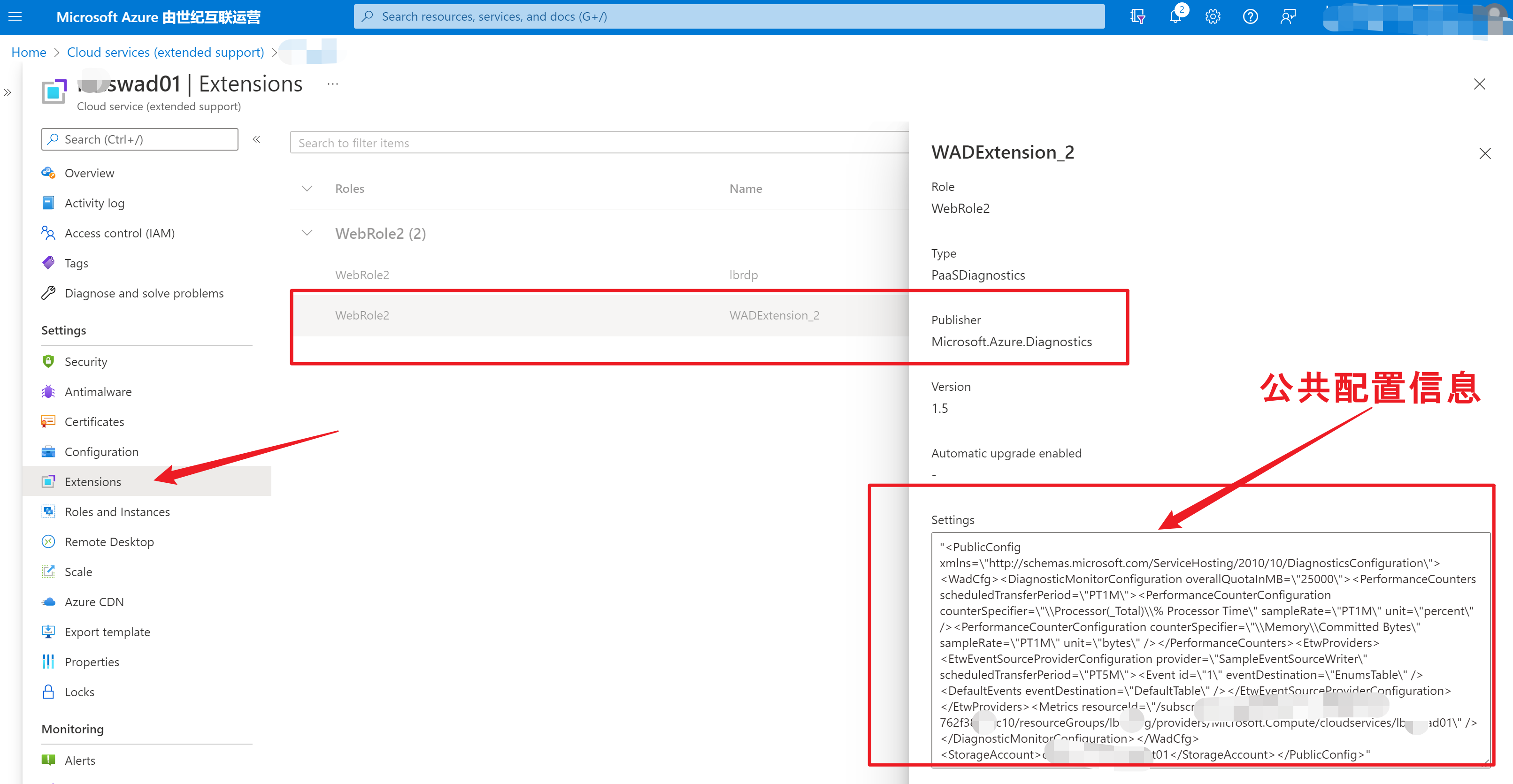
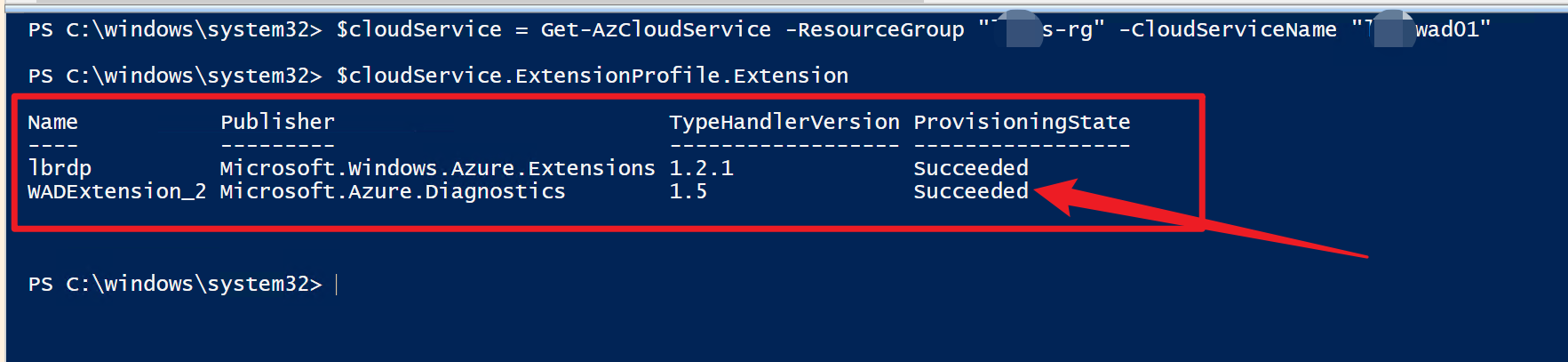
但是在配置的Storage Account中,却迟迟收集到不数据。
问题分析
为了分析这个问题,需要开启应用远程桌面扩展(RDP)查看 WAD插件的日志。相应日志的路径为:
C:\Resources\Directory\<guid>.<webroelx>.DiagnosticStore\WAD0107\Tables
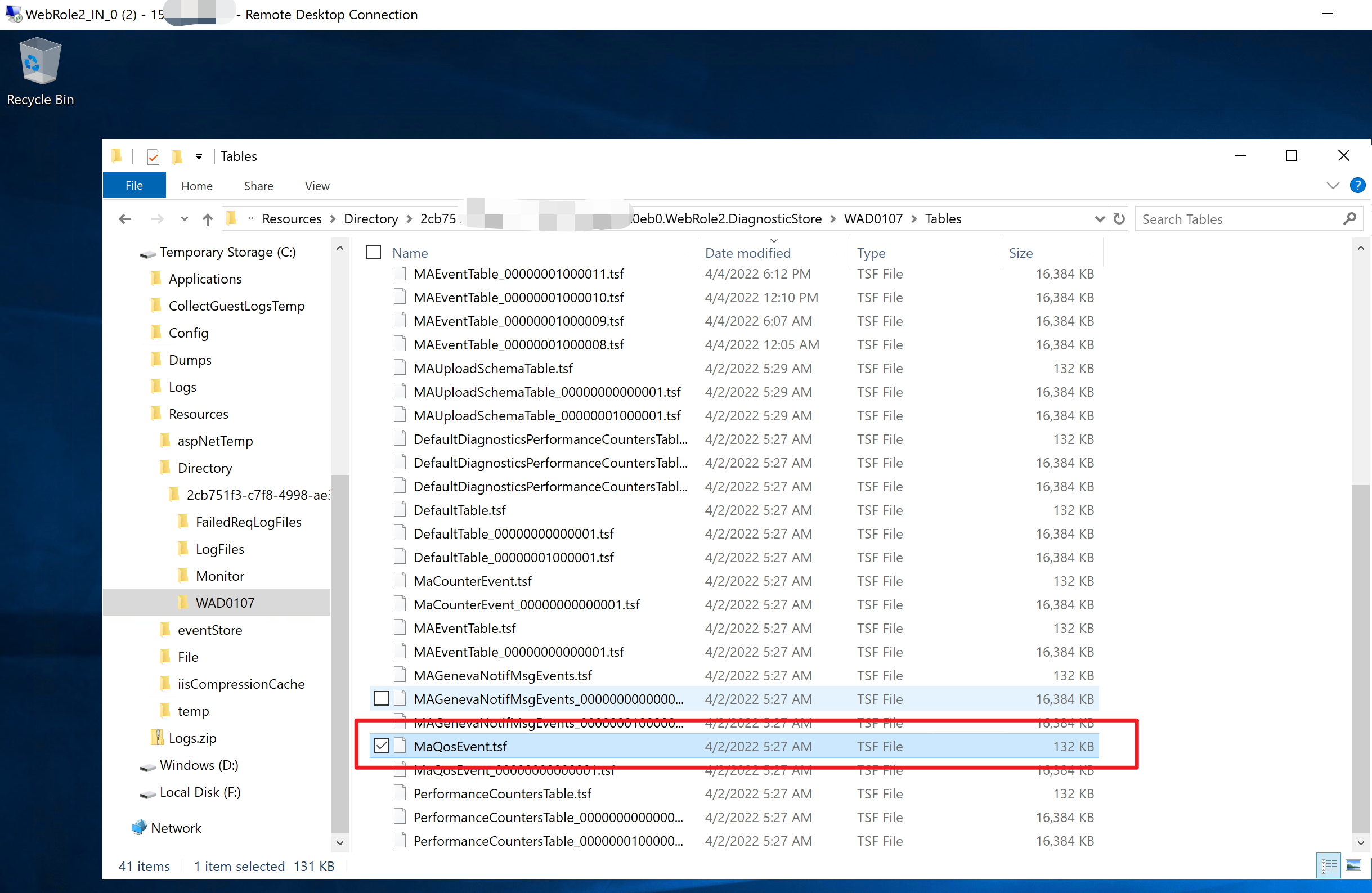
但日志文件为tsf格式,可以通过table2csv.exe 进行转换 (PS: table2csv.exe 文件路径位于 > D:\Packages\Plugins\Microsoft.Azure.Diagnostics.PaaSDiagnostics\<latest extension version>\Monitor\x64\table2csv.exe),使用 <PATH>\table2scv.exe maeventtable.tsf 命令把文件转换为csv格式后 ,即可查看日志内容:

在日志内容中发现:
WinHttpSendRequest failed; URL=https://********************.table.core.windows.net

Failed to send bytes to XTable WADPerformanceCountersTable as Xstore rejected the request; Status=12007

Retry:#0; failed to send out data; XTable WADPerformanceCountersTable; PartitionKey 0637848351000000000
因为中国区Storage Account的Endpoint与Global不一样,消息中发现的Endpoint为 core.windows.net, 而中国区的endpoint为 core.chinacloudapi.cn。由于在添加的配置文件中,并没有为Storage Account特别指定Endpoint,导致系统默认使用了Global地址。
所以解决问题的方案就是在PrivateConfig.xml文件中添加Endpoint [ endpoint="https://core.chinacloudapi.cn" ]。
问题解决
修改PrivateConfig文件,在StorageAccount 节点中添加 endpoint,修改后的文件为:
PrivateConfig.xml
<?xml version="1.0" encoding="utf-8"?>

<PrivateConfig xmlns="http://schemas.microsoft.com/ServiceHosting/2010/10/DiagnosticsConfiguration">

  <StorageAccount name="stroage account name" key="xxxxxxxxxxxxxxxxxxxxxxxxxxxxxxxxxxxxxxxxxxxxxxxxxxxxxxxxxxx" endpoint="https://core.chinacloudapi.cn" />

</PrivateConfig>
在Powershell的脚本中可以通过 Get-Content -Path privateConfig.xml 来获取上文内容,并赋值给 $wadExtension.ProtectedSetting。
完整的PowerShell脚本为:
Connect-AzAccount -Environment AzureChinaCloud

# 选择订阅号

Select-AzSubscription -Subscription 'xxxxxxxx-xxxx-xxxx-xxxx-xxxxxxxxxxxx'

# 如果没有安装az cloud service模块,用下面命令安装

Install-Module -Name Az.CloudService  -Scope CurrentUser -Repository PSGallery -Force

# Create WAD extension object

$storageAccountKey = Get-AzStorageAccountKey -ResourceGroupName "resource group name" -Name "storage account name"

$configFilePath = "PublicWadConfig.xsd"

$wadExtension = New-AzCloudServiceDiagnosticsExtension -Name "WADExtension" -ResourceGroupName "resource group name" -CloudServiceName "cloud service name" -StorageAccountName "csstorageaccounttest01" -StorageAccountKey $storageAccountKey[0].Value -DiagnosticsConfigurationPath $configFilePath -TypeHandlerVersion "1.5" -AutoUpgradeMinorVersion $true

# Add <privateConfig> settings

$wadExtension.ProtectedSetting = Get-Content -Path PrivateConfig.xml

# Get existing Cloud Service

$cloudService = Get-AzCloudService -ResourceGroup "resource group name" -CloudServiceName "cloud service name"

# Add WAD extension to existing Cloud Service extension object

$cloudService.ExtensionProfile.Extension = $cloudService.ExtensionProfile.Extension + $wadExtension

# Update Cloud Service

$cloudService | Update-AzCloudService
最终,通过 Microsoft Azure Storage Explorer工具查看Cloud Service的Metrics数据。
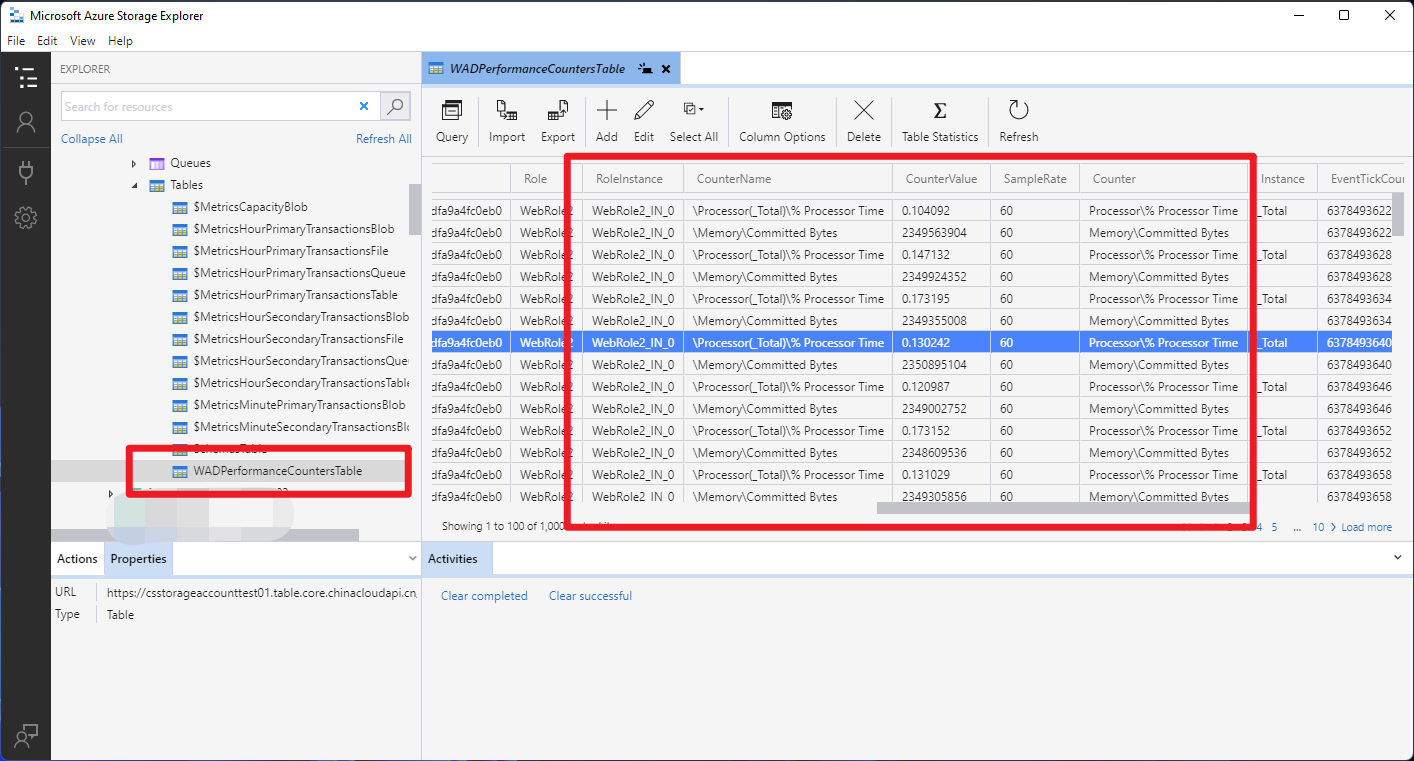
收集Metrics数据成功!
附件一:WAD Extension不允许使用重复的名称,所以可以通过名称过滤掉需要删除的Extension名称后,执行以下的脚本
# Get existing Cloud Service

$cloudService = Get-AzCloudService -ResourceGroup "your resource group" -CloudServiceName "cloud service name"

$cloudService.ExtensionProfile.Extension = $cloudService.ExtensionProfile.Extension | Where-Object { $_.Name -ne "WADExtension" }

# Update Cloud Service

$cloudService | Update-AzCloudService
参考资料
在云服务(外延支持)中应用 Azure 诊断扩展:https://docs.azure.cn/zh-cn/cloud-services-extended-support/enable-wad
Private Config Schem: https://docs.microsoft.com/en-us/azure/azure-monitor/agents/diagnostics-extension-schema-windows#example-configuration
"PrivateConfig" {

    "storageAccountName": "diagstorageaccount",

    "storageAccountKey": "{base64 encoded key}",

    "storageAccountEndPoint": "https://core.windows.net",

    "storageAccountSasToken": "{sas token}",

    "EventHub": {

        "Url": "https://myeventhub-ns.servicebus.windows.net/diageventhub",

        "SharedAccessKeyName": "SendRule",

        "SharedAccessKey": "{base64 encoded key}"

    },

    "AzureMonitorAccount": {

        "ServicePrincipalMeta": {

            "PrincipalId": "{Insert service principal client Id}",

            "Secret": "{Insert service principal client secret}"

        }

    },

    "SecondaryStorageAccounts": {

        "StorageAccount": [

            {

                "name": "secondarydiagstorageaccount",

                "key": "{base64 encoded key}",

                "endpoint": "https://core.windows.net",

                "sasToken": "{sas token}"

            }

        ]

    },

    "SecondaryEventHubs": {

        "EventHub": [

            {

                "Url": "https://myeventhub-ns.servicebus.windows.net/secondarydiageventhub",

                "SharedAccessKeyName": "SendRule",

                "SharedAccessKey": "{base64 encoded key}"

            }

        ]

    }

}
【Azure 云服务】Azure Cloud Service (Extended Support) 云服务开启诊断日志插件 WAD Extension (Windows Azure Diagnostic) 无法正常工作的原因的更多相关文章
- Windows Azure中WebSite 网站, Cloud Service 云服务,Virtual Machine 虚拟机的比较
在Windows Azure服务平台里,Web Site特点是: 在Windows Azure上构建高度可扩展的Web站点. 快速.轻松部署一个高度可扩展的云环境,并且可以从很小的规模开始. 使用您所 ...
- [Windows Azure] What is a cloud service?
What is a cloud service? When you create an application and run it in Windows Azure, the code and co ...
- 微软开放技术发布开源 Jenkins 插件以将 Windows Azure Blob 服务用的开作存储库
发布于 2014-02-10 作者 陈 忠岳 持续集成 (CI) 的历史源远流长, 其宗旨在于软件团队在敏捷环境中不断将他们的工作整合为持续构建.管理 CI 进程的工具已存在一段时间.过去几年中 ...
- Windows Azure Cloud Service (41) 修改云服务IIS托管管道模式为4.0经典模式
<Windows Azure Platform 系列文章目录> 这是笔者在之前的项目中遇到的问题,做一下总结,给网友做参考. 在一般情况下,Visual Studio开发的Cloud Se ...
- [Windows Azure] Virtual Machine and Cloud Service Sizes for Windows Azure
Virtual machine size CPU cores Memory OS disk space–cloud services OS disk space–virtual machines Ma ...
- [Windows Azure] How to use the Table Storage Service
How to use the Table Storage Service version 1.7 version 2.0 This guide will show you how to perform ...
- [Windows Azure] Building the web role for the Windows Azure Email Service application - 3 of 5
Building the web role for the Windows Azure Email Service application - 3 of 5. This is the third tu ...
- [Windows Azure] How to Monitor Cloud Services
How to Monitor Cloud Services To use this feature and other new Windows Azure capabilities, sign up ...
- [Windows Azure] .NET Multi-Tier Application Using Storage Tables, Queues, and Blobs - 1 of 5
.NET Multi-Tier Application Using Storage Tables, Queues, and Blobs - 1 of 5 This tutorial series sh ...
随机推荐
- ng-messages AngularJs 表单校验方式
最新研究了一下表单校验,直接上代码. <!DOCTYPE html><html ng-app='app'><head> <meta charset=" ...
- 谈谈 Kubernetes Operator
简介 你可能听过Kubernetes中Operator的概念,Operator可以帮助我们扩展Kubernetes功能,包括管理任何有状态应用程序.我们看到了它被用于有状态基础设施应用程序的许多可能性 ...
- [SPDK/NVMe存储技术分析]009 - Introduction to RDMA Send | RDMA Send操作概论
来源: https://zcopy.wordpress.com/ 说明: 本文不是对原文的逐字逐句翻译,而是摘取核心部分以介绍RDMA Send操作(后面凡是提到RDMA send, 都对应于IBA里 ...
- Mod_Security 安装配置
Mod_Security 安装配置 OS平台:Ubuntu 16 服务器:Apache2 一.更新Ubuntu apt-get更新源 sudo mv /etc/apt/sources.list /et ...
- Citus 分布式 PostgreSQL 集群 - SQL Reference(创建和修改分布式表 DDL)
创建和分布表 要创建分布式表,您需要首先定义表 schema. 为此,您可以使用 CREATE TABLE 语句定义一个表,就像使用常规 PostgreSQL 表一样. CREATE TABLE ht ...
- python 面向对象的一些魔法方法和反射
1.with和__enter__,__exit__,__init__配合使用class A: def __init__(self): print('init') def __enter__(self) ...
- org.apache.kafka.common.errors.SerializationException: Error deserializing... Caused by: org.apache.kafka.common.errors.SerializationException: Size of data received by IntegerDeserializer is not 4
原因,最近开发的kafka消息接收,突然报如下错: org.apache.kafka.common.errors.SerializationException: Error deserializing ...
- spring-boot-EnvironmentPostProcessor
原理: 1-从启动类入口的run方法进入: public ConfigurableApplicationContext run(String... args) { -SpringApplication ...
- spring-boot中的AOP
public class User { private Integer id; private String username; private String note; public User(In ...
- Django的models中filter的各种用法及官方手册的网址
__exact 精确等于 like 'aaa' __iexact 精确等于 忽略大小写 ilike 'aaa' __contains 包含 like '%aaa%' __icontains 包含 忽略 ...