
react native SectionList组件实现多选
如下图所示:
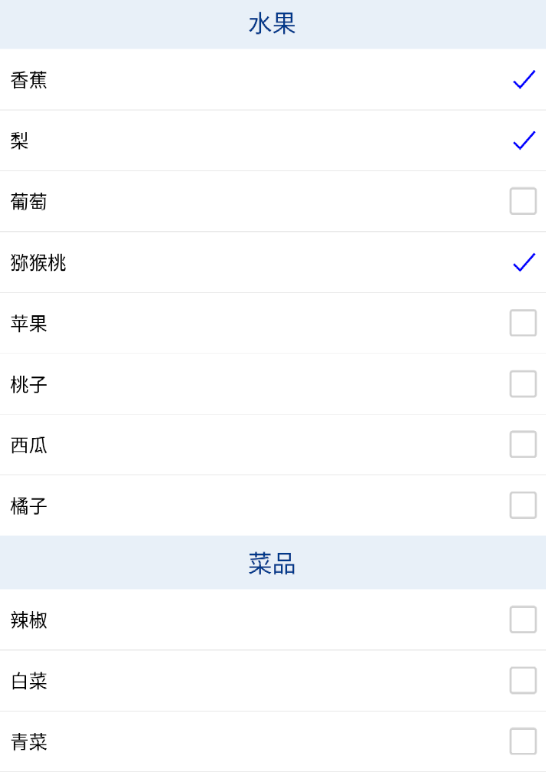
代码如下:
import React, { useRef, Component } from 'react';

import {

    Platform,

    Text,

    View,

    TextInput,

    TouchableOpacity,

    ScrollView,

    Image,

    Button,

    SectionList,

    StyleSheet,

    ToastAndroid,

    Dimensions,

    Alert,

} from 'react-native';

import Icon from 'react-native-vector-icons/Ionicons';
    {

        titleId: "1",

        titleName: "水果",

        data: [

            { id: '01', name: '香蕉', selected: false },

            { id: '02', name: '梨', selected: false },

            { id: '03', name: '葡萄', selected: false },

            { id: '04', name: '猕猴桃', selected: false },

            { id: '05', name: '苹果', selected: false },

            { id: '06', name: '桃子', selected: false },

            { id: '07', name: '西瓜', selected: false },

            { id: '08', name: '橘子', selected: false },

        ]

    },

    {

        titleId: "2",

        titleName: "菜品",

        data: [

            { id: '09', name: '辣椒', selected: false },

            { id: '10', name: '白菜', selected: false },

            { id: '11', name: '青菜', selected: false },

            { id: '12', name: '茄子', selected: false },

            { id: '13', name: '南瓜', selected: false },

            { id: '14', name: '土豆', selected: false },

            { id: '15', name: '西红柿', selected: false },

            { id: '16', name: '粉条', selected: false },

            { id: '17', name: '豇豆', selected: false },

            { id: '18', name: '牛肉', selected: false },

            { id: '19', name: '猪肉', selected: false },

            { id: '20', name: '鸡翅', selected: false },

            { id: '21', name: '鸡爪', selected: false },

            { id: '22', name: '鸭肉', selected: false },

        ]

    },

];

export default class TestScreen extends Component {

    constructor(props) {

        super(props);

        this.state = {

            sourceData: DATA,

            selectedItem: []//选中的项

        }

    };

    render() {return (

            <View style={styles.container}><SectionList

                        sections={this.state.sourceData}

                        keyExtractor={(item, index) => index.toString()}

                        extraData={this.state}

                        stickySectionHeadersEnabled={true}//吸顶效果

                        renderItem={this._renderItem}   //cell

                        renderSectionHeader={({ section: { titleName } }) => (

                            <View style={{ height: 40, justifyContent: 'center', backgroundColor: 'rgba(232,240,248,1)' }}>

                                <Text style={[, { color: "#0a3989", textAlign: 'center', fontSize: CommonVar.userStyle.titleFontSize + 2 }]}>{titleName}</Text>

                            </View>

                        )}

                        ItemSeparatorComponent={() => {

                            return <View style={{ borderWidth: 0.2, borderColor: "#d2d2d2" }} />

                        }}

                    />

            </View>

        )

    }

    _renderItem = (info) => {

        // console.log(info);

        if (info.item.selected == true) {

            return <TouchableOpacity onPress={this._itemPress.bind(this, info.item, info.index)}>

                <View style={{ height: 45, flexDirection: 'row', justifyContent: 'space-between', backgroundColor: '#FFFFFF' }}>

                    <Text style={{ marginLeft: 10, alignSelf: 'center', color: "#000000" }}>{info.item.name}</Text>

                    <Icon name="ios-checkmark-outline" color='blue' size={25} style={{ alignSelf: 'center', marginRight: 5 }} />

                </View>

            </TouchableOpacity>

        } else {

            return <TouchableOpacity onPress={this._itemPress.bind(this, info.item, info.index)}>

                <View style={{ height: 45, flexDirection: 'row', justifyContent: 'space-between', backgroundColor: '#FFFFFF' }}>

                    <Text style={{ marginLeft: 10, alignSelf: 'center', color: "#000000" }}>{info.item.name}</Text>

                    <Icon name="ios-square-outline" color='#d2d2d2' size={25} style={{ alignSelf: 'center', marginRight: 5 }} />

                </View>

            </TouchableOpacity>

        }

    }

    _itemPress(selectItem, index) {

        var $this = this;

        this.state.sourceData.forEach(function (item1, lev1Index) {

            item1.data.forEach(function (item2, lev2Index) {

                if (item2.id == selectItem.id) {

                    //循环数据是否存在,存在就移除

                    var isExist = false;

                    $this.state.selectedItem.forEach(function (obj, objIndex) {

                        if (obj.id == selectItem.id && obj.titleId == item1.titleId) {

                            //找到存在的对象删除掉

                            $this.state.selectedItem.splice(objIndex, 1);

                            isExist = true;

                        }

                    })

                    if (isExist == false) {

                        //不存在就加到集合中去

                        $this.state.selectedItem.push({ id: selectItem.id, titleId: item1.titleId });

                    }

                    $this.state.sourceData[lev1Index].data[index].selected = !selectItem.selected;

                }

            })

        })

        console.log(this.state.selectedItem)

        this.setState({ sourceData: this.state.sourceData })

    }

}

const styles = StyleSheet.create({

    container: {

        flex: 1,

        backgroundColor: "#FFFFFF"

    },

})
react native SectionList组件实现多选的更多相关文章
- 封装 React Native 原生组件(iOS / Android)
封装 React Native 原生组件(iOS / Android) 在 React Native中,有很多种丰富的组件了,例如 ScrollView.FlatList.SectionList.Bu ...
- React Native 之 组件化开发
前言 学习本系列内容需要具备一定 HTML 开发基础,没有基础的朋友可以先转至 HTML快速入门(一) 学习 本人接触 React Native 时间并不是特别长,所以对其中的内容和性质了解可能会有所 ...
- React Native的组件ListView
React Native的组件ListView类似于iOS中的UITableView和UICollectionView,也就是说React Native的组件ListView既可以实现UITableV ...
- React Native交互组件之Touchable
React Native交互组件之Touchable:只要在组件外面包一个Touchable组件就可以实现点击交互. TouchableHighlight:高亮触摸 当点击时,组件的透明度会改变,可以 ...
- React Native常用组件在Android和IOS上的不同
React Native常用组件在Android和IOS上的不同 一.Text组件在两个平台上的不同表现 1.1 height与fontSize 1.1.1只指定font,不指定height 在这种情 ...
- react native 常用组件汇总
react-native-uploader //文件上传https://github.com/aroth/react-native-uploader jpush-react-native //官方版本 ...
- React Native常用组件Image使用
前言 学习本系列内容需要具备一定 HTML 开发基础,没有基础的朋友可以先转至 HTML快速入门(一) 学习 本人接触 React Native 时间并不是特别长,所以对其中的内容和性质了解可能会有所 ...
- React Native 中组件的生命周期
概述 就像 Android 开发中的 View 一样,React Native(RN) 中的组件也有生命周期(Lifecycle).所谓生命周期,就是一个对象从开始生成到最后消亡所经历的状态,理解生命 ...
- React Native 获取组件(Component)在屏幕上的位置
年后主客户端的需求以及老的业务迁移RN,现在疯狂的在学RN.在迁移需求的时候遇到需要获取组件在屏幕上的绝对位置.页面如下: 就需要展开的时候获取sectionHeader(默认排序)在屏幕上的具体位置 ...
- React Native常用组件之ListView
1. ListView常用属性 ScrollView 相关属性样式全部继承 dataSource ListViewDataSource 设置ListView的数据源 initialListSize n ...
随机推荐
- printf()和scanf()的*修飾符
如果你不想預先設置字段的寬度,想通過程序來進行設定,則可以可以使用"*"來進行修飾字段的寬度,前提是在程序中要包含"*"和參數對應的值(比如%*d,那麽參數應該 ...
- 最新版 Proteus 8.15 Professional 图文安装教程 [ 附安装包 ]
前言 Proteus 是世界上唯一将电路仿真软件.PCB设计软件和虚拟模型仿真软件三合一的设计平台. Proteus 8.15 现已发布,本篇将带领大家安装此版本. 介绍 Proteus Proteu ...
- 网络爬虫及openyxl模块
网络爬虫及openyxl模块 一.第三方模块简介 1.第三方模块的用处 python之所以在这么多的编程语言中脱颖而出的优点是有众多的第三方库函数,可以更高效率的实现开发 2.第三方模块的使用 1.第 ...
- Java入门与进阶P-4.3+P-4.4
循环控制 素数 只能被1和自己整除的数,不包括1 2 3 5 7 11 13 17 19 ... 1.循环控制语句 可以在满足循环条件的请款下,反复的执行某一段代码,这段被重复执行的代码被称为循环体语 ...
- centos7连接WIFI
centos7图形化界面可以直接连接WIFI,命令行会稍麻烦一些 环境: 1.笔记本安装centos7,没有很大的流量,基本都是交互 2.桌子后面的线路太乱,想要省去一根网线 过程: 1.安装软件 y ...
- Performance API不完全使用指北
本教程解释了如何使用Performance API来记录真实用户访问你的应用程序的统计数据. 使用浏览器的DevTools来评估web应用性能是很有用的,但要复现现实世界的使用情况并不容易.因为人们在 ...
- NetCoreWebApi3.0-------MiniProfiler使用教程
参考博客:ASP.NET Core WebAPI中的分析工具MiniProfiler - LamondLu - 博客园 (cnblogs.com) 注意事项: 1.不要盲目copy别人的代码 var ...
- Servlet HTTP Request Response笔记
# 今日内容: 1. Servlet 2. HTTP协议 3. Request## Servlet: 1. 概念 2. 步骤 3. 执行原理 4. 生命周期 ...
- P17_总结
能够知道如何创建小程序项目 微信开发者工具的使用.appID 的获取 能够清楚小程序项目的基本组成结构 app.js.app.json.app.wxss.pages 文件夹 能够知道小程序页面由几部分 ...
- Spring Boot整合Redis-CRUD
Springboot整合redis spring Data Redis 操作Redis 1.pom.xml <?xml version="1.0" encoding=&quo ...