
tp 天气Vue参考
<!DOCTYPE html>

<html>

<head>

    <title>Bootstrap 实例</title>

    <meta charset="utf-8">

    <meta name="viewport" content="width=device-width, initial-scale=1">

    <link rel="stylesheet" href="https://cdn.staticfile.org/twitter-bootstrap/4.3.1/css/bootstrap.min.css">

    <script src="https://cdn.staticfile.org/jquery/3.2.1/jquery.min.js"></script>

    <script src="https://cdn.staticfile.org/popper.js/1.15.0/umd/popper.min.js"></script>

    <script src="https://cdn.staticfile.org/twitter-bootstrap/4.3.1/js/bootstrap.min.js"></script>

    <script src="https://cdn.staticfile.org/vue/2.2.2/vue.min.js"></script>

    <script src="https://unpkg.com/axios/dist/axios.min.js"></script>

</head>

<style>

    .container{

        width: 80%;

        margin: 0 auto;

        border:1px solid #cccccc;

        border-radius: 10px;

        padding: 40px;

    }

    table{

        margin-top: 40px;

    }

</style>

<body>

<div class="container">

    <form class="form-inline">

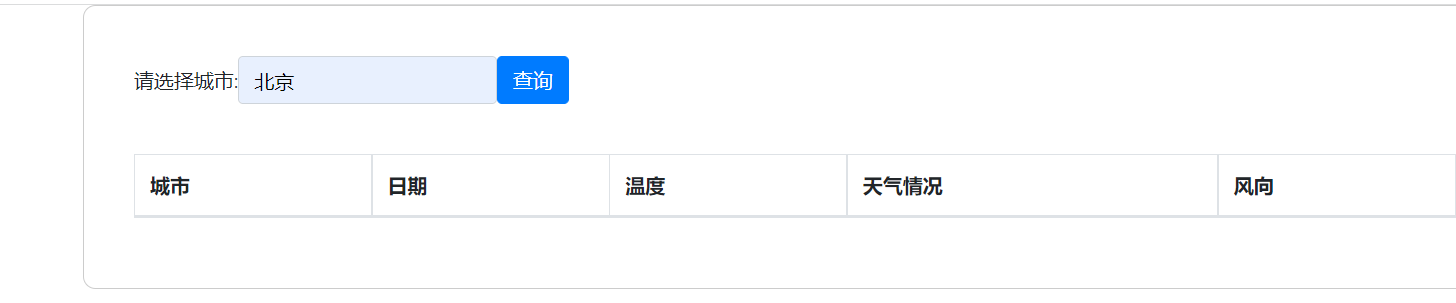
        <label for="city">请选择城市:</label>

        <input type="text" class="form-control" id="city" placeholder="请选择城市" v-model="city">

        <button type="button" class="btn btn-primary" v-on:click="search">查询</button>

    </form>

    <table class="table table-bordered">

        <thead>

        <tr>

            <th>城市</th>

            <th>日期</th>

            <th>温度</th>

            <th>天气情况</th>

            <th>风向</th>

        </tr>

        </thead>

        <tbody>

            <tr v-for="item in info">

                <td>{{ city }}</td>

                <td>{{ item.date }}</td>

                <td>{{ item.temperature }}</td>

                <td>{{ item.weather }}</td>

                <td>{{ item.direct }}</td>

            </tr>

        </tbody>

    </table>

</div>

</body>

<script>

    new Vue({

        el: '.container',

        data () {

            return {

                info: null,

                city: null

            }

        },

        // mounted () {

        //

        // },

        methods:{

            search:function(){

                _this = this;

               axios

                   .get('http://www.1809A.com/api/Index/index/city/'+_this.city)

                   .then(function (response) {

                       _this.info = response.data.result.future;

                       _this.city = response.data.result.city;

                   })

                   .catch(function (error) { // 请求失败处理

                       console.log(error);

                   });

            }

        }

    })

</script>

</html>

api模块index控制器kuaidi方法

    public function index()

    {

        // 查询天气预报

        $city = input("city");

        // 确定接口地址:

        $url = "http://apis.juhe.cn/simpleWeather/query";

        // 确定参数

        $param = ['city'=>$city,'key'=>'7808686de93c14aae043ee1b8eb9916c'];

        // 调用函数执行

        $result = curl_request($url,true,$param);

        // 判断结果

        if(!$result){

            echo "查询失败";

            die;

        }

        // 成功

        return $result;

    }
tp 天气Vue参考的更多相关文章
- vue参考
https://github.com/taylorchen709/vue-admin http://element-cn.eleme.io/#/zh-CN/component/layout https ...
- 新手创建Vue项目
======================安装vue=============================(参考网址:http://www.bubuko.com/infodetail-21320 ...
- vue源码逐行注释分析+40多m的vue源码程序流程图思维导图 (diff部分待后续更新)
vue源码业余时间差不多看了一年,以前在网上找帖子,发现很多帖子很零散,都是一部分一部分说,断章的很多,所以自己下定决定一行行看,经过自己坚持与努力,现在基本看完了,差ddf那部分,因为考虑到自己要换 ...
- vue eslint 代码自动格式化
vue-cli 代码风格为 JavaScript Standard Style 代码检查规范严格,一不小心就无法运行,使用eslint的autoFixOnSave可以在保存代码的时候自动格式化代码 V ...
- vue之mapMutaions的使用 && vuex中 action 用法示例 && api.js的使用
vue之mapMutations的使用 我们通过Mutation来改变store中的state,方法往往是在子组件中使用 this.$store.commit(); 来实现,但是这样的缺点是不容易查看 ...
- vue理解$nextTick
首先要明确: Vue 实现响应式并不是数据发生变化之后 DOM 立即变化,而是按一定的策略进行 DOM 的更新. $nextTick 是在下次 DOM 更新循环结束之后执行延迟回调,在修改数据之后使用 ...
- vue系列之vue cli 3引入ts
插件 Vue2.5+ Typescript 引入全面指南 vue-class-component强化 Vue 组件,使用 TypeScript/装饰器 增强 Vue 组件 vue-property-d ...
- angular里使用vue/vue组件怎么在angular里用
欢迎加入前端交流群交流知识&&获取视频资料:749539640 如何在angularjs(1)中使用vue参考: https://medium.com/@graphicbeacon/h ...
- Vue框架Element UI教程-axios请求数据
Element UI手册:https://cloud.tencent.com/developer/doc/1270 中文文档:http://element-cn.eleme.io/#/zh-CN gi ...
随机推荐
- Disruptor-高性能队列
简介 Disruptor是英国外汇交易公司LMAX开发的一个高性能队列,研发的初衷是解决内存队列的延迟问题.与Kafka.RabbitMQ用于服务间的消息队列不同,disruptor一般用于线程间消息 ...
- nginx入门教程 (转)
1.Nginx 状态码配置和错误文件 server { # 配置访问 /test.js 时报 403 错 location /test.js { return 403; } # 配置访问 /404 时 ...
- Typora快捷键 shortcuts-windows
Typora快捷键 shortcuts-windows 快捷键 作用 ctrl+ ctrl- 字体大小调节 ctrl + shift + ` 行内代码 alt+shift+5 删除线 ctrl+shi ...
- Webpack 多html入口、devServer、热更新配置
一.clean-webpack-plugin: 在每次生成dist目录前,先删除本地的dist文件(每次自动删除太麻烦) 1.安装clean-webpack-plugin npm/cnpm i c ...
- NSString为何要用copy修饰,而不是strong?
NSString本身是无所谓的,但是如果一个 NSString 指针指向了一个 NSMutableString的内存空间的话,如果使用 strong 修饰的话,如果你在别处修改这个值的话,那么原来的值 ...
- 【转】JVM--内存区域划分
[原文地址]https://blog.csdn.net/sd4015700/article/details/50109939 Eden Space.Survivor Space.Tenured Gen ...
- Zookeeper、Kafka集群与Filebeat+Kafka+ELK架构
Zookeeper.Kafka集群与Filebeat+Kafka+ELK架构 目录 Zookeeper.Kafka集群与Filebeat+Kafka+ELK架构 一.Zookeeper 1. Zook ...
- Solution -「SDOI 2017」「洛谷 P3784」遗忘的集合
\(\mathcal{Description}\) Link. 给定 \(\{f_1,f_2,\cdots,f_n\}\),素数 \(p\).求字典序最小的 \(\{a_1,a_2,\cdot ...
- SpringBoot外部配置属性注入
一.命令行参数配置 Spring Boot可以是基于jar包运行的,打成jar包的程序可以直接通过下面命令运行: java -jar xx.jar 那么就可以通过命令行改变相关配置参数.例如默认tom ...
- 面试官灵魂三问:什么是SOA?什么是微服务?SOA和微服务有什么区别?
SOA SOA(Service-Oriented Architecture,面向服务的架构)是一种高层级的架构设计理念,可通过在网络上使用基于通用通信语言的服务接口,让软件组件可重复使用. 那么什么是 ...