
SpringBoot写第一个接口
服务可以理解为一个接口,一个controller,一个做业务请求的
新建一个HelloWorldController
import org.springframework.boot.SpringApplication;


import org.springframework.boot.autoconfigure.EnableAutoConfiguration;


import org.springframework.web.bind.annotation.RequestMapping;


import org.springframework.web.bind.annotation.RestController;


import java.util.HashMap;


import java.util.Map;
@EnableAutoConfiguration//做spring的注容器,创建tomcat,开spring的加载,然后类就都可以使用了


//@RestController 表示该接口全部返回json格式  相当于下面写了一个@ResponseBody


@RestController


public class HelloWorldController {


//    @ResponseBody


    @RequestMapping("/index")


    public String index(){


        return "success";


    }


    @RequestMapping("/getMap")


    public Map<String , Object> getMap(){


        Map<String , Object> result = new HashMap<String , Object>();


        result.put("errorCode","200");


        result.put("errorMsg","成功");


        return result;


    }


    public static void main(String[] args){   //这个函数只运行这一个java文件,因为加入这个@EnableAutoConfiguration注解后默认只扫当前,其他的不访问
        //主函數運行springboot項目 (主入口)    springboot核心是嵌入Tomcat,但是需要运行,而运行需要一个入口,这个就相当于一个入口


        SpringApplication.run(HelloWorldController.class, args);


    }


}
然后点击左边的三角号运行
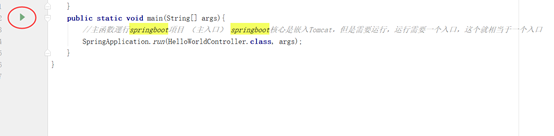
当出现这种情况就可以了

然后在浏览器输入http://localhost:8080/index

输入http://localhost:8080/getMap因为是map集合所以是一个json格式

Pom.xml文件,在这里我用的war
<?xml version="1.0" encoding="UTF-8"?>
<project xmlns="http://maven.apache.org/POM/4.0.0"
xmlns:xsi="http://www.w3.org/2001/XMLSchema-instance"
xsi:schemaLocation="http://maven.apache.org/POM/4.0.0
http://maven.apache.org/xsd/maven-4.0.0.xsd">
<modelVersion>4.0.0</modelVersion>
<groupId>com.itmayiedu</groupId>
<artifactId>springboot1</artifactId>
<version>1.0-SNAPSHOT</version>
<packaging>war</packaging>
<name>springboot1 Maven Webapp</name>
<!-- FIXME change it to the project's website -->
<url>http://www.example.com</url>
<properties>
<project.build.sourceEncoding>UTF-8</project.build.sourceEncoding>
<maven.compiler.source>1.7</maven.compiler.source>
<maven.compiler.target>1.7</maven.compiler.target>
</properties>
<!—引入springboot父类依赖-->
<parent>
<groupId>org.springframework.boot</groupId>
<artifactId>spring-boot-starter-parent</artifactId>
<version>1.3.3.RELEASE</version>
</parent>
<!—springboot-web组件 springmvc+spring+mybatis-->
<dependencies>
<dependency>
<groupId>junit</groupId>
<artifactId>junit</artifactId>
<version>4.11</version>
<scope>test</scope>
</dependency>
<dependency>
<groupId>org.springframework.boot</groupId>
<artifactId>spring-boot-starter-web</artifactId>
</dependency>
</dependencies>
<!—这个build中的东西一件出来就有了,具体不大清楚,希望哪位大佬看到帮忙解释下,万分感谢!!!-->
<build>
<finalName>springboot1</finalName>
<pluginManagement><!-- lock down plugins versions to avoid
using Maven defaults (may be moved to parent pom) -->
<plugins>
<plugin>
<artifactId>maven-clean-plugin</artifactId>
<version>3.0.0</version>
</plugin>
<!-- see
http://maven.apache.org/ref/current/maven-core/default-bindings.html#Plugin_bindings_for_war_packaging
-->
<plugin>
<artifactId>maven-resources-plugin</artifactId>
<version>3.0.2</version>
</plugin>
<plugin>
<artifactId>maven-compiler-plugin</artifactId>
<version>3.7.0</version>
</plugin>
<plugin>
<artifactId>maven-surefire-plugin</artifactId>
<version>2.20.1</version>
</plugin>
<plugin>
<artifactId>maven-war-plugin</artifactId>
<version>3.2.0</version>
</plugin>
<plugin>
<artifactId>maven-install-plugin</artifactId>
<version>2.5.2</version>
</plugin>
<plugin>
<artifactId>maven-deploy-plugin</artifactId>
<version>2.8.2</version>
</plugin>
</plugins>
</pluginManagement>
</build>
</project>
SpringBoot写第一个接口的更多相关文章
- SpringBoot写后端接口,看这一篇就够了!
摘要:本文演示如何构建起一个优秀的后端接口体系,体系构建好了自然就有了规范,同时再构建新的后端接口也会十分轻松. 一个后端接口大致分为四个部分组成:接口地址(url).接口请求方式(get.post等 ...
- SpringBoot写一个登陆注册功能,和期间走的坑
文章目录 前言 1. 首先介绍项目的相关技术和工具: 2. 首先创建项目 3. 项目的结构 3.1实体类: 3.2 Mapper.xml 3.3 mapper.inteface 3.4 Service ...
- 接口_简单get接口_第一个接口
import flask,json # print(__name__) ##__name__代表当前这个python文件 server = flask.Flask(__name__) #把咱们当前的这 ...
- Spring写第一个应用程序
ref:http://www.importnew.com/13246.html 让我们用Spring来写第一个应用程序吧. 完成这一章要求: 熟悉Java语言 设置好Spring的环境 熟悉简单的Ec ...
- Django使用AJAX调用自己写的API接口
Django使用AJAX调用自己写的API接口 *** 具体代码和数据已上传到github https://github.com/PythonerKK/eleme-api-by-django-rest ...
- 编写高质量代码改善C#程序的157个建议——建议157:从写第一个界面开始,就进行自动化测试
建议157:从写第一个界面开始,就进行自动化测试 如果说单元测试是白盒测试,那么自动化测试就是黑盒测试.黑盒测试要求捕捉界面上的控件句柄,并对其进行编码,以达到模拟人工操作的目的.具体的自动化测试请学 ...
- 使用springboot写一个简单的测试用例
使用springboot写一个简单的测试用例 目录结构 pom <?xml version="1.0" encoding="UTF-8"?> < ...
- Springboot整合elasticsearch以及接口开发
Springboot整合elasticsearch以及接口开发 搭建elasticsearch集群 搭建过程略(我这里用的是elasticsearch5.5.2版本) 写入测试数据 新建索引book( ...
- 用vetr.x写一个HTTP接口适配器, 对接各种形式接口
用vetr.x写一个HTTP接口适配器, 对接各种形式接口 项目地址:https://github.com/hjx601496320/transmit 业务说明 在日常开发工作中,我们经常会遇到要和各 ...
- Python接口测试(第一个接口返回的数据作为第二个参数的入参)
python代码如下 import requests url1="http://localhost:8080/pinter/com/getSku?id=1" respon=requ ...
随机推荐
- Windows10下SecureCRT、SecureFX安装与破解(超级详细)
整理了Windows10下最新版本SecureCRT9.1.SecureFX9.1安装 1.资源地址: 链接:https://pan.baidu.com/s/1XoQqpRlpBm6Tvc0fHni6 ...
- Ubuntu 复制粘贴快捷键
打开命令行terminal ctrl+alt+t 复制粘贴 ctrl+shift+c ctrl+shift+v /usr/share/applications/ 这个文件夹可以创建桌面快捷方式 换源 ...
- websphere+IHS+plugin集群搭建
配置:wa1+was2 was1:Dmgr app01 oracle ihs was2:Dmgr app02 原理:通过Dmgr管理下面两个agent,再通过agent去间接控制运行在节点上的ser ...
- 成品直播源码推荐,java 实现邮件服务
成品直播源码推荐,java 实现邮件服务 1. 引入maven 依赖 <!--邮件服务--><dependency> <groupId>org.springf ...
- 对比学习InfoNCE loss之“搬砖学习”
以下链接讲解清晰,供参考 对比学习损失(InfoNCE loss)与交叉熵损失的联系,以及温度系数的作用 - 知乎 (zhihu.com)
- oralce sql 缓存查询及删除
--缓存查询语句 V$SQLAREA 视图记录sql 执行情况(加载次数/用时/Id....) 常用字段 ADDRESS:SQL语句在SGA中的地址. 这两列被用于鉴别SQL语句,有时,两条不同的语句 ...
- Delphi as 和 is 的使用
as就是把某个类型对象转换为某个指定类型,这样方便使用指定类型中的一些成员. is就是判断某个对象是不是某个类型,可以筛选出我们需要的对象. 下面是一个as is 的实例代码,该代码同时也实现了两种方 ...
- 第二周day6
第二周day6,星期六 所花时间:0 代码量:0 搏客量:1 了解到的知识点:多锻炼.
- c语言 开灯问题 vs2019编译通过
1 #include<stdio.h> 2 #include<stdlib.h> 3 //开灯问题 4 //总共有n盏灯,编号为1~n,k个人 5 //第一个人摁下所有灯的开关 ...
- HTML学习笔记1----HTML是什么
随笔记录方便自己和同路人查阅. #------------------------------------------------我是可耻的分割线--------------------------- ...