
技术分享|MySQL caching_sha2_password认证异常问题分析
欢迎来到 GreatSQL社区分享的MySQL技术文章,如有疑问或想学习的内容,可以在下方评论区留言,看到后会进行解答
0. 导读
相同的账号、密码,手动客户端连接可以成功,通过MySQL Connectors却失败了,为什么?
1. 现象描述
通过MySQL C API编写的一个程序,在进行用户登录操作的时候,程序报错,登录失败。
但是如果通过mysql客户端,手动登录成功后,再启动客户端程序,不再报错,程序运行成功。
2. 抓包分析问题
学会抓包,就超越了90%的程序员。

sudo tcpdump -i any tcp and port xxx -s 1500 -w filename -v
C程序登录失败时的包
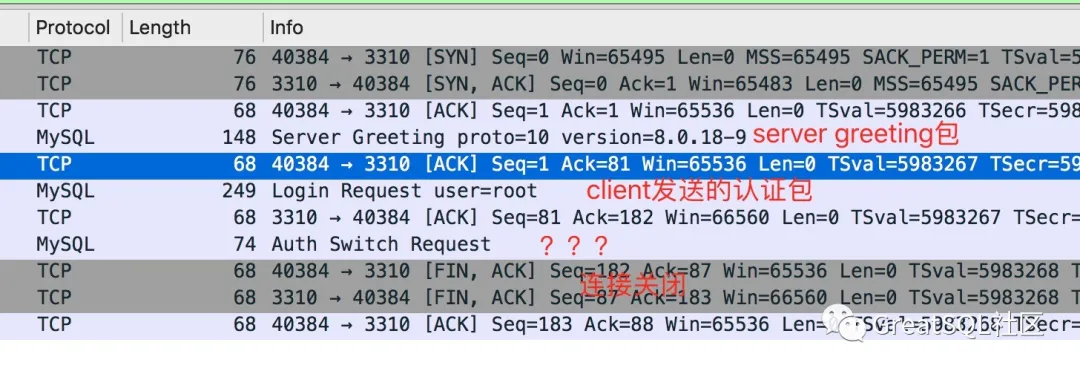
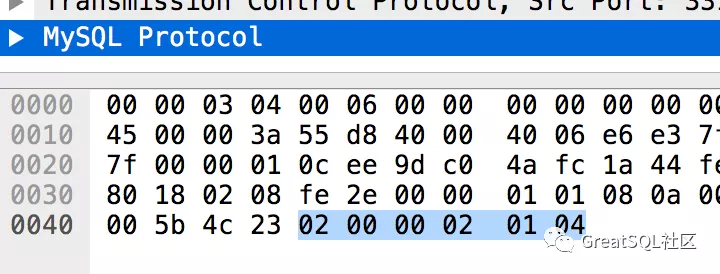
前两个包很正常,第三个包第一次见,wireshark解析的叫做 AuthSwitchRequest.
看下这个包的内容。
mysql客户端登录成功后,再执行C程序登录成功时的包
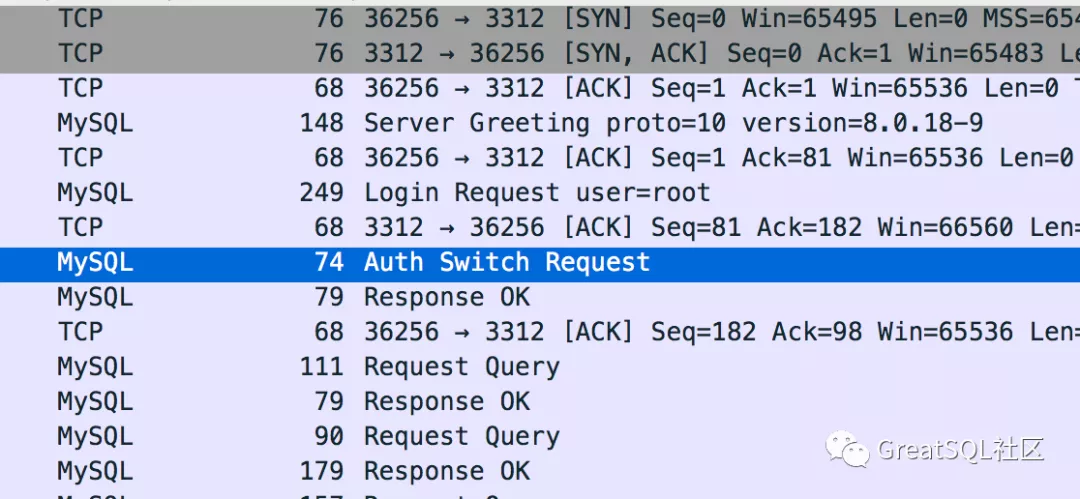
看下这个AuthSwithRequest包的内容。
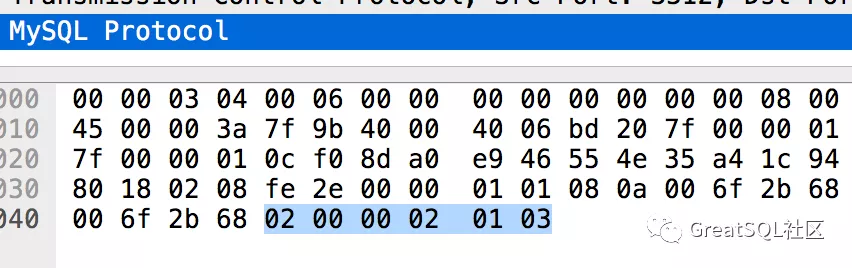
认证成功和失败的包数据是不同的,分别是03和04。
3. AuthSwitchRequest包
首先看下AuthSwitchRequest包的官方解释。
Protocol::AuthSwitchRequest:

Authentication Method Switch Request Packet. If both server and client support CLIENT_PLUGIN_AUTH capability, server can send this packet to ask client to use another authentication method.

Payload

1              [fe]

string[NUL]    plugin name

string[EOF]    auth plugin data
可以看出,这个包payload的第一个字节是0xfe,与抓包中的01是不同的,而且AuthSwitchRequest后面跟的应该是plugin name,是个字符串,而抓包中,内容是04。
所以wireshard解包错误了。
在协议里面我们找下payload第一个字节是01的包,找到了AuthMoreData的包。
Protocol::AuthMoreData:

Payload

1              [01]

string[EOF]    plugin data
这个包的说明payload后面是string类型,和我们的抓包也是有些出入,先不管这个了。
跟到这里只能去代码里面找下这个包是什么。
4. 服务器认证
目前用户认证默认都走caching_sha2_password的plugin,之前版本都是mysql_native_password。
mysql > select user,host,plugin from mysql.user;

+------------------+-----------+-----------------------+

| user             | host      | plugin                |

+------------------+-----------+-----------------------+

| mysql.infoschema | localhost | caching_sha2_password |

| mysql.session    | localhost | caching_sha2_password |

| mysql.sys        | localhost | caching_sha2_password |

| root             | localhost | caching_sha2_password |

+------------------+-----------+-----------------------+

mysql > show variables like '%auth%';

+-------------------------------+-----------------------+

| Variable_name                 | Value                 |

+-------------------------------+-----------------------+

| default_authentication_plugin | caching_sha2_password |

+-------------------------------+-----------------------+

1 row in set (0.01 sec)
服务器端认证代码在sql/auth/sha2password.cc文件中的caching_sha2_password_authenticate函数。
在此函数中,找到了发包的代码,正好可以对应到我们抓包的AuthMoreData。
 996   if (pkt_len != sha2_password::CACHING_SHA2_DIGEST_LENGTH) return CR_ERROR;

 997

 998   std::pair<bool, bool> fast_auth_result =

 999       g_caching_sha2_password->fast_authenticate(

1000           authorization_id, reinterpret_cast<unsigned char *>(scramble),

1001           SCRAMBLE_LENGTH, pkt,

1002           info->additional_auth_string_length ? true : false);

1003

1004   if (fast_auth_result.first) {

1005     /*

1006       We either failed to authenticate or did not find entry in the cache.

1007       In either case, move to full authentication and ask the password

1008     */

1009     if (vio->write_packet(vio, (uchar *)&perform_full_authentication, 1))

1010       return CR_AUTH_HANDSHAKE;

1011   } else {

1012     /* Send fast_auth_success packet followed by CR_OK */

1013     if (vio->write_packet(vio, (uchar *)&fast_auth_success, 1))

1014       return CR_AUTH_HANDSHAKE;

1015     if (fast_auth_result.second) {

1016       const char *username =

1017           *info->authenticated_as ? info->authenticated_as : "";

1018       LogPluginErr(INFORMATION_LEVEL,

1019                    ER_CACHING_SHA2_PASSWORD_SECOND_PASSWORD_USED_INFORMATION,

1020                    username, hostname ? hostname : "");

1021     }

1022

1023     return CR_OK;

1024   }

1025
首先进行了fast_authenticate,根据这个结果fast_auth_result.first,分别发送了不同的包perform_full_authentication和fast_auth_success。
791 static char request_public_key = '\2';

 792 static char fast_auth_success = '\3';

 793 static char perform_full_authentication = '\4';
可以看到我们C程序登录失败时,给我们发送的是perform_full_authentication,而认证成功发送的是fast_auth_success包。
什么情况下会出现perform_full_authentication包呢?代码中给出了说明,我们就不去看fast_authenticate的代码逻辑了,从说明就能了解到大概情况。
1006 We either failed to authenticate or did not find entry in the cache. 1007 In either case, move to full authentication and ask the password
也就是说,如果cache中没有记录,或者认证失败,会进入perform_full_authentication流程。我们从这个认证插件的名字caching_sha2_password就可以知道,这是个带cache的认证插件。
而这正好解释了为什么用mysql客户端手动登陆后,我们C程序就登录成功了,因为cache中已经有了记录。
那么:为什么手动客户端认证就能成功呢?而我们自己写的C程序就会失败呢?
且看客户端认证分析。
5. 客户端认证
客户端认证的代码逻辑在sql-common/client_authentication.cc中的caching_sha2_password_auth_client函数中。
514     if (pkt_len != 1 || *pkt != perform_full_authentication) {

515       DBUG_PRINT("info", ("Unexpected reply from server."));

516       return CR_ERROR;

517     }

518

519     /* If connection isn't secure attempt to get the RSA public key file */

520     if (!connection_is_secure) {

521       public_key = rsa_init(mysql);

......

523       if (public_key == NULL && mysql->options.extension &&

524           mysql->options.extension->get_server_public_key) {

525         // If no public key; request one from the server.

......

540       }

541

542       if (public_key) {

543         /*

......

584       } else {

585         set_mysql_extended_error(mysql, CR_AUTH_PLUGIN_ERR, unknown_sqlstate,

586                                  ER_CLIENT(CR_AUTH_PLUGIN_ERR),

587                                  "caching_sha2_password",

588                                  "Authentication requires secure connection.");

589         return CR_ERROR;

590       }

591     } else {

592       /* The vio is encrypted already; just send the plain text passwd */

593       if (vio->write_packet(vio, (uchar *)mysql->passwd, passwd_len))

594         return CR_ERROR;

595     }
可以看到客户端收到perform_full_authentication包后,根据connection_is_secure进行了分支。
我们的客户端中的连接肯定是没有开启SSL的,所以会走进if (!connection_is_secure)流程。
mysql客户端登录默认是开启SSL认证的,故走了else流程。
我们使用mysql客户端登录时的命令如下,是开启了ssl的:
shell> bin/mysql -h127.0.0.1 -uroot -P3301 -ppassword
如果客户端想禁用ssl,需要加上–ssl-mode=disable选项。
所以,这就解释了为什么客户端能登录成功了。
现在我们看下if (!connection_is_secure)流程,发现没有进入下面的if流程,这样就不会生成public_key,导致public_key为空。
if (public_key == NULL && mysql->options.extension &&

524           mysql->options.extension->get_server_public_key)
具体来说,是因为我们的连接选项没有设置mysql->options.extension->get_server_public_key。
6. 解决方法
在不开启ssl选项的时候,我们需要设置get_server_public_key选项。
+  bool get_server_public_key = true;

+  mysql_options(m_client, MYSQL_OPT_GET_SERVER_PUBLIC_KEY,

+                &get_server_public_key);
参考文档
connection-phase-packets, https://dev.mysql.com/doc/internals/en/connection-phase-packets.html
authentication method mismatch, https://dev.mysql.com/doc/internals/en/authentication-method-mismatch.html
Enjoy GreatSQL
本文由博客一文多发平台 OpenWrite 发布!
技术分享|MySQL caching_sha2_password认证异常问题分析的更多相关文章
- 技术分享 | MySQL中MGR中SECONDARY节点磁盘满,导致mysqld进程被OOM Killed
欢迎来到 GreatSQL社区分享的MySQL技术文章,如有疑问或想学习的内容,可以在下方评论区留言,看到后会进行解答 在MGR测试中,人为制造磁盘满问题后,节点被oom killed 问题描述 在对 ...
- 技术分享 | MySQL Group Replication集群对IP地址的限制导致的一些问题与解决办法
GreatSQL社区原创内容未经授权不得随意使用,转载请联系小编并注明来源. 1. 遇到问题 测试人员小玲准备在docker环境中部署MGR集群进行一些测试,她有三个容器,容器IP分别是: 172.3 ...
- 技术分享 | MySQL数据误删除的总结
欢迎来到 GreatSQL社区分享的MySQL技术文章,如有疑问或想学习的内容,可以在下方评论区留言,看到后会进行解答 内容提要 用delete语句 使用drop.truncate删除表以及drop删 ...
- 技术分享 | mysql 表数据校验
1. checksum table. checksum table 会对表一行一行进行计算,直到计算出最终的 checksum 结果.比如对表 n4 进行校验(记录数 157W,大小为 4G) [yt ...
- 技术分享 | 简单测试MySQL 8.0.26 vs GreatSQL 8.0.25的MGR稳定性表现
欢迎来到 GreatSQL社区分享的MySQL技术文章,如有疑问或想学习的内容,可以在下方评论区留言,看到后会进行解答 GreatSQL社区原创内容未经授权不得随意使用,转载请联系小编并注明来源. M ...
- MySQL 8.0新增特性详解【华为云技术分享】
版权声明:本文为博主原创文章,遵循CC 4.0 BY-SA版权协议,转载请附上原文出处链接和本声明. 本文链接:https://blog.csdn.net/devcloud/article/detai ...
- 尖峰7月线上技术分享--Hadoop、MySQL
7月2号晚20:30-22:30 东大博士Dasight分享主题<大数据与Hadoop漫谈> 7月5号晚20:30-22:30 原支付宝MySQL首席DBA分享主题<MySQL ...
- 技术分享|闪回在MySQL中的实现和改进
GreatSQL社区原创内容未经授权不得随意使用,转载请联系小编并注明来源. 3306π 福州站,以下内容是由万里数据库,研发工程师唐洁分享的MySQL闪回方案完整PPT. Enjoy GreatSQ ...
- 技术分享 | Prometheus+Grafana监控MySQL浅析
GreatSQL社区原创内容未经授权不得随意使用,转载请联系小编并注明来源. 简介 Prometheus 一套开源的监控&报警&时间序列数据库的组合,通常 Kubernetes 中都会 ...
随机推荐
- 简历应该怎么写,HR看一篇简历仅需要5秒吗,简历模板大全
哈喽!大家好,我是小奇,一位热爱分享的程序员 小奇打算以轻松幽默的对话方式来分享一些技术,如果你觉得通过小奇的文章学到了东西,那就给小奇一个赞吧 文章持续更新 一.前言 最近有很多小伙伴问奇哥,说奇哥 ...
- Netty是什么,Netty为什么速度这么快,线程模型分析
哈喽!大家好,我是小奇,一位热爱分享的程序员 小奇打算以轻松幽默的对话方式来分享一些技术,如果你觉得通过小奇的文章学到了东西,那就给小奇一个赞吧 文章持续更新 一.前言 书接上回,现在下着大雨看来是去 ...
- CF1625D - Binary Spiders[trie树优化dp]
官方题解 题意:给数列a[],选择尽量多的数满足任意两个异或起来<=k 1625D - Binary Spiders 思路:首先,将数列排序得到,然后升序取得的值的任意两个最小值为相邻两个异或的 ...
- hdu多校题解
hdu2020多校-1 J Math is Simple 给定 \(n\) ,求 \[\sum\limits_{1\le a<b\le n \\ gcd(a,b)=1 \\ a+b\ge n} ...
- Spring boot中最大连接数、最大线程数与最大等待数在生产中的异常场景
在上周三下午时,客户.业务和测试人员同时反溃生产环境登录进入不了系统,我亲自测试时,第一次登录进去了,待退出后再登录时,复现了客户的问题,场景像是请求连接被拒绝了,分析后判断是spring boot的 ...
- pip国内源配置
Python 的一大优点就是丰富的类库,所以我们经常会用 pip 来安装各种库,所以对于Python开发用户来讲,PIP安装软件包是家常便饭.但国外的源下载速度实在太慢,浪费时间.而且经常出现下载后安 ...
- .NET C#基础(5):结构体 - 高性能代码的基石
0. 文章目的 本文面向有一定.NET C#基础知识的学习者,介绍C#中结构体定义.使用以及特点. 1. 阅读基础 了解C#基本语法 了解.NET中的栈与托管堆 2. 值类型 2.1 .N ...
- 【spring源码系列】之【FactoryBean类型的接口】
1.概述 目前我们知道,spring创建bean有多种方式,比如xml方式创建,比如@Component,@Service,@Controler,@Repository注解创建,比如@Autowire ...
- centos 修改PHP默认版本
命令行输入export PATH=/usr/local/php/bin:$PATH 然后回车.
- VMware Workstation 虚拟机详细安装教程
一.介绍篇 VMware Workstation 16 Pro是VMware(威睿公司)于2021年最新发布的一代虚拟机软件,软件的中文名是"VMware 工作站 16 专业版". ...