
vert.x学习(三),Web开发之Thymeleaf模板的使用
在vert.x中使用Thymeleaf模板,需要引入vertx-web-templ-thymeleaf依赖。pom.xml文件如下
<?xml version="1.0" encoding="UTF-8"?>

<project xmlns="http://maven.apache.org/POM/4.0.0"

         xmlns:xsi="http://www.w3.org/2001/XMLSchema-instance"

         xsi:schemaLocation="http://maven.apache.org/POM/4.0.0 http://maven.apache.org/xsd/maven-4.0.0.xsd">

    <modelVersion>4.0.0</modelVersion>

    <groupId>com.javafm</groupId>

    <artifactId>vertx.helloworld</artifactId>

    <version>1.0-SNAPSHOT</version>

    <dependencies>

        <dependency>

            <groupId>io.vertx</groupId>

            <artifactId>vertx-web-templ-thymeleaf</artifactId>

            <version>3.3.3</version>

        </dependency>

    </dependencies>

    <build>

        <plugins>

            <plugin>

                <groupId>org.apache.maven.plugins</groupId>

                <artifactId>maven-compiler-plugin</artifactId>

                <version>3.6.0</version>

                <configuration>

                    <source>1.8</source>

                    <target>1.8</target>

                </configuration>

            </plugin>

        </plugins>

    </build>

</project>
同前面一篇文章一样,不需要引入core和web了,vertx-web-templ-thymeleaf会自动导入相关依赖。
编写模板文件resources/templates/hello.html
<!DOCTYPE html>

<html lang="en">

<head>

    <meta charset="UTF-8">

    <title></title>

</head>

<body>

    <h1 th:text="${msg}"></h1>

</body>

</html>
编写vertx http服务,并解析模板,HelloThymeleaf.java
package com.javafm.vertx.helloworld;

import io.vertx.core.Vertx;

import io.vertx.core.http.HttpServer;

import io.vertx.ext.web.Router;

import io.vertx.ext.web.templ.ThymeleafTemplateEngine;

/**

 * Created by lemontea <36634584@qq.com> on 16-12-19.

 */

public class HelloThymeleaf {

    public static void main(String[] args) {

        Vertx vertx = Vertx.vertx();

        HttpServer httpServer = vertx.createHttpServer();

        Router router = Router.router(vertx);

        // 创建一个模板引擎

        ThymeleafTemplateEngine templateEngine = ThymeleafTemplateEngine.create();

        // 设置访问路径

        router.route("/hello").handler(routingContext -> {

            // 传递值到模板中,在模板中可以通过${msg}直接取出

           routingContext.put("msg", "Hello Thymeleaf!");

            // 渲染模板

            templateEngine.render(routingContext, "templates/hello.html", res -> {

                // 如果模板解析成功,就将结果写到response

                if (res.succeeded()) {

                    routingContext.response().putHeader("Content-Type", "text/html").end(res.result());

                } else {  // 如果解析失败,就显示fail

                    routingContext.fail(res.cause());

                }

            });

        });

        httpServer.requestHandler(router::accept).listen(8080);

    }

}
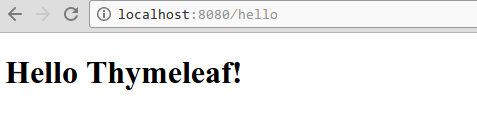
启动http服务,到浏览器查看结果
原创文章,转载请注明出处。
vert.x学习(三),Web开发之Thymeleaf模板的使用的更多相关文章
- Web开发之Tomcat&Servlet
<!doctype html>01 - JavaEE - Tomcat&Servlet figure:first-child { margin-top: -20px; } #wri ...
- 移动web开发之rem适配布局
移动web开发之rem适配布局 方案: 页面布局文字能否随着屏幕大小变化而变化 流式布局和flex布局主要针对于宽度布局,那高度如何布局? 怎样让屏幕发生变化的时候元素高度和宽度等比例缩放? 1. r ...
- Vim下的Web开发之html,CSS,javascript插件
Vim下的Web开发之html,CSS,javascript插件 HTML 下载HTML.zip 解压HTML.zip,然后将里面的所有文件copy到C:\Program Files\Vim\vi ...
- SpringBoot Web开发(4) Thymeleaf模板与freemaker
SpringBoot Web开发(4) Thymeleaf模板与freemaker 一.模板引擎 常用得模板引擎有JSP.Velocity.Freemarker.Thymeleaf SpringBoo ...
- web开发之Servlet 三
昨天我们学习了Servlet的运行过程和生命周期,那么今天我们学习下Servlet中非常重要的两个类:ServletConfig ServletContext 我们可以看到,与顶层Servlet主动 ...
- python web开发之flask框架学习(2) 加载模版
上次学习了flask的helloword项目的创建,这次来学习flask项目的模版加载: 第一步:创建一个flask项目 第二步:在项目目录的templates文件夹下创建一个html文件 第三步: ...
- python web开发之flask框架学习(1) 创建flask项目
python 开发越来越火,作为菜鸟,也应该学习一下,感觉还可以,记录下来,方便学习参考. 不管做什么开发首先肯定是安装环境,这里我用的是pycharm,python3.如果不清楚怎么安装环境可以去网 ...
- HTML5+JS手机web开发之jQuery Mobile初涉
一.起始之语 我一直都是在PC上折腾网页的,这会儿怎么风向周边捣鼓起手机网页开发呢?原因是公司原先使用Java开发的产品,耗了不少人力财力,但是最后的效果却不怎么好.因为,Android系统一套东西, ...
- .NET Web开发之.NET MVC框架
摘要:MVC是一种架构设计模式,该模式主要应用于图形化用户界面(GUI)应用程序.那么什么是MVC?MVC由三部分组成:Model(模型).View(视图)及Controller(控制器). MVC概 ...
随机推荐
- Redis Sentinel 高可用实现说明
背景: 前面介绍了Redis 复制.Sentinel的搭建和原理说明,通过这篇文章大致能了解Sentinel的原理和实现方法以及相关的搭建.这篇文章就针对Redis Sentinel的搭建做 ...
- VC++ CString类完美总结(整理)
CString 是编程中一种非常有用的数据类型,它是MFC中的一个类,很大程度上简化了MFC中的许多字符串的操作. CString位于头文件afx.h中. ①.CString 类对象的初始化: CSt ...
- 全选、取消、2级 checkbox的选中切换
需求:点击父级checkbox的时候,子级出现全选或全取消:点击子级时,如:子级都是在未选中时,点击某一个子级,则父级选中:如:子级中只有一个选中状态(其他子级都是未选中),点击该子级,则父级也改为未 ...
- mybatis 书写
查询语句是使用 MyBatis 时最常用的元素之一 select元素配置细节如下 属性 描述 取值 默认 id 在这个模式下唯一的标识符,可被其它语句引用 parameterType 传给此语 ...
- ProgressBar显示进度值,垂直或者水平滚动条
过去一段时间,在研究Windows的系统控件ProgressBar,一直奇怪为啥它不能显示进度值,本以为是个很简单的问题,结果搜索很久,也没有找到好的解决方案,最后终于找到一个Perfect方案,特记 ...
- 安装mcrypt
Mcrypt扩展是 mcrypt 库的接口,mcrypt 库提供了对多种块算法的支持. 安装mcrypt之前请确认已经安装yum install gcc php-devel 执行命令:yum upda ...
- mysql多表联合查询
转自:http://www.cnblogs.com/Toolo/p/3634563.html 多表连接,小分三种(笛卡尔积.内连接.外连接),多分五种 (笛卡尔积.内连接.左连接.右连接.全连接(my ...
- SSH 常用命令解析
SSH 是什么 SSH(全 称 Secure Shell)是一种加密的网络协议.使用该协议的数据将被加密,如果在传输中间数据泄漏,也可以确保没有人能读取出有用信息.要使用 SSH,目标机器应该安装 S ...
- 简单的后台json,前台解析 操作
后台: List<PageData> KeyWords=plantDefDetailCSAService.findKeyWords(pd); JSONArray array = new J ...
- 如何在插件中添加Actor类
只要按照BlueprintFunctionLibrary的那个模板做就好了,把用编辑器生成的代码复制到插件对应的目录 之后需要注意做以下修改 1.H文件中的 GENERATED_UCLASS_BODY ...