
Nginx - Additional Modules, Website Access and Logging
The following set of modules allows you to configure how visitors access your website and the way your server logs requests.
Index
The Index module provides a simple directive named index, which lets you define the page that Nginx will serve by default if no filename is specified in the client request (in other words, it defines the website index page). You may specify multiple filenames; the first file to be found will be served. If none of the specified files are found, Nginx will either attempt to generate an automatic index of the files, if the autoindex directive is enabled, or return a 403 Forbidden error page.
Optionally, you may insert an absolute filename (such as /page.html) but only as the last argument of the directive.
Syntax: index file1 [file2…] [absolute_file];
Default value: index.html
Eaxmple:
index index.php index.html index.htm;
index index.php index2.php /catchall.php;
This directive is valid in the following contexts: http, server, location.
Autoindex
If Nginx cannot provide an index page for the requested directory, the default behavior is to return a 403 Forbidden HTTP error page. With the following set of directives, you enable an automatic listing of the files that are present in the requested directory:
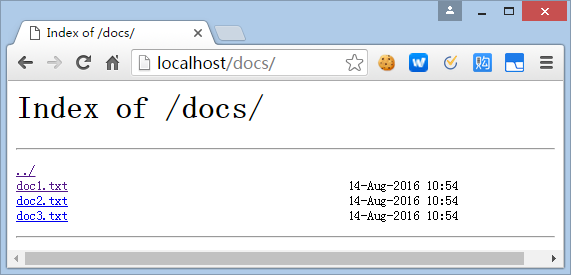
Three columns of information appear for each file—the filename, the file date and time, and the file size in bytes.
autoindex
Context: http, server, location
Enables or disables automatic directory listing for directories missing an index page.
Syntax: on or off
autoindex_exact_size
Context: http, server, location
If set to on, this directive ensures that the listing displays file sizes in bytes. Otherwise, another unit is employed, such as KB, MB, or GB.
Syntax: on or off
Default value: on
autoindex_localtime
Context: http, server, location
By default, this directive is set to off, so the date and time of files in the listing appears as GMT time. Set it to on to make use of the local server time.
Syntax: on or off
Default value: off
Random Index
This module enables a simple directive, random_index, which can be used within a location block in order for Nginx to return an index page selected randomly among the files of the specified directory.
This module is not included in the default Nginx build.
Syntax: on or off
Log
This module controls the behavior of Nginx regarding access logs. It is a key module for system administrators as it allows analyzing the runtime behavior of web applications. It is composed of three essential directives:
access_log
Context: http, server, location
This parameter defines the access log file path, the format of entries in the access log by selecting a template name, or disables access logging.
Syntax: access_log path [format [buffer=size]] | off;
Some remarks concerning the directive syntax:
- Use access_log off to disable access logging at the current level
- The format argument corresponds to a template declared with the log_format directive, described below
- If the format argument is not specified, the default format is employed (combined)
- You may use variables in the file path
log_format
Context: http, server, location
Defines a template to be utilized by the access_log directive, describing the contents that should be included in an entry of
the access log.
Syntax: log_format template_name format_string;
The default template is called combined and matches the following example:
log_format combined '$remote_addr - $remote_user [$time_local] '"$request" $status $body_bytes_sent '"$http_referer" "$http_user_agent"';
# Other example
log_format simple '$remote_addr $request';
open_log_file_cache
Context: http, server, location
Configures the cache for log file descriptors. Please refer to the open_file_cache directive of the HTTP Core Module for additional information.
Syntax: open_log_file_cache max=N [inactive=time] [min_uses=N] [valid=time] | off;
The arguments are similar to the open_file_cache and other related directives; the difference being that this applies to access log files only.
The Log module also enables several new variables, though they are only accessible when writing log entries:
- $connection: The connection number
- $pipe: The variable is set to "p" if the request was pipelined
- $time_local: Local time (at the time of writing the log entry)
- $msec: Local time (at the time of writing the log entry) to the microsecond
- $request_time: Total length of the request processing, in milliseconds
- $status: Response status code
- $bytes_sent: Total number of bytes sent to the client
- $body_bytes_sent: Number of bytes sent to the client for the response body
- $apache_bytes_sent: Similar to $body_bytes, which corresponds to the %B parameter of Apache's mod_log_config
- $request_length: Length of the request body
Nginx - Additional Modules, Website Access and Logging的更多相关文章
- Nginx - Additional Modules, About Your Visitors
The following set of modules provides extra functionality that will help you find out more informati ...
- Nginx - Additional Modules, Limits and Restrictions
The following modules allow you to regulate access to the documents of your websites — require users ...
- Nginx - Additional Modules, Content and Encoding
The following set of modules provides functionalities having an effect on the contents served to the ...
- Nginx - Additional Modules, SSL and Security
Nginx provides secure HTTP functionalities through the SSL module but also offers an extra module ca ...
- 通过Nginx,Tomcat访问日志(access log)记录请求耗时
一.Nginx通过$upstream_response_time $request_time统计请求和后台服务响应时间 nginx.conf使用配置方式: log_format main '$remo ...
- Thinkphp框架网站 nginx环境 访问页面access denied
今日不熟一个tiinkphp框架网站的时候,由于服务器环境是centos6.5+nginx1.8,已经运行php商城项目很正常, 本以为一切比较简单,直接新建了项目文件夹,xftp上传了程序,并配置n ...
- linux+nginx+phpfpm 访问出现Access denied错误解决方案
linux上安装nginx,php-fpm后访问页面一直出现Access denied错误. 网上搜原因大概如下图: 我试了第一个方案,然后就好了.
- Table of Contents - Nginx
Downloading and Installing Nginx Nginx for Windows Basic Nginx Configuration Configuration File Syn ...
- nginx---reference
nginx (pronounced "engine x") is a free open source web server written by Igor Sysoev, a R ...
随机推荐
- Windows-to-go-带着win10满街跑
一.前言 有句话是这么说的,程序员对工作是时刻准备着的.无论你是长假还是短假,只要有网,你就躲不开客户.这样子,当你外出的时候你可以选择时刻背着电脑,因为你的电脑有着你顺手的开发工具以及开发环境.我们 ...
- exit和_exit的区别
参考 http://www.cnblogs.com/hnrainll/archive/2011/08/17/2142001.html p.p1 { margin: 0.0px 0.0px 0.0px ...
- IOC使用Unity 实现依赖注入
转自:http://www.cnblogs.com/techborther/archive/2012/01/06/2313498.html http://www.cnblogs.com/xishuai ...
- Centos6.3 jekyll环境安装
yum install ruby yum install rubygems yum install ruby-devel gem install rdiscount yum install pytho ...
- java中匿名类的讲解
匿名内部类也就是没有名字的内部类 正因为没有名字,所以匿名内部类只能使用一次,它通常用来简化代码编写 但使用匿名内部类还有个前提条件:必须继承一个父类或实现一个接口 实例1:不使用匿名内部类来实现抽象 ...
- C#中判断空字符串的3种方法性能分析
3种方法分别是:string a="";1.if(a=="")2.if(a==String.Empty)3.if(a.Length==0) 3种方法都是等效的, ...
- Android - FrameLayout覆盖顺序
FrameLayout覆盖顺序 本文地址: http://blog.csdn.net/caroline_wendy FrameLayout: Child views are drawn in a st ...
- visualsvn server 报错 can't read file "current":End of file out
需要删除文件:Repositories\ProjectName\db\revprops\X 需要修改文件:repository/db/txn_current.repository/db/current ...
- 1、netlink 连接器 通信机制
使用netlink之前,先参考一下资料:http://www.ibm.com/developerworks/cn/linux/l-connector/ netlink通信机制介绍:资料来源 linux ...
- HBase-分布式安装
HBase的安装很简单,也是分为单机伪分布式和分布式 先保证hadoop环境JDK环境,我的是2.2.0和1.6_45 1.确定hadoop正常 2.上传HBase并解压,我用的是和hadoop2.2 ...