
SPRING IN ACTION 第4版笔记-第八章Advanced Spring MVC-005-Pizza例子的订单流程()
一、
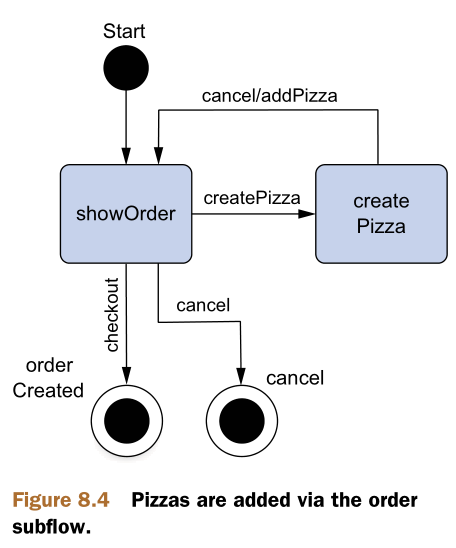
1.订单流程定义文件order-flow.xml
 <?xml version="1.0" encoding="UTF-8"?>

 <flow xmlns="http://www.springframework.org/schema/webflow" xmlns:xsi="http://www.w3.org/2001/XMLSchema-instance" Listing 8.8 Order subflow view shows states to display the order and create a pizza create Pizza S Start cancel order Created createPizza cancel/addPizza checkout cancel showOrder Figure 8.4 Pizzas are added via the order subflow. www.it-ebooks.info 239 Putting it all together: the pizza flow xsi:schemaLocation="http://www.springframework.org/schema/webflow

 http://www.springframework.org/schema/webflow/spring-webflow-2.3.xsd">

     <input name="order" required="true" />

     <view-state id="showOrder">

         <transition on="createPizza" to="createPizza" />

         <transition on="checkout" to="orderCreated" />

         <transition on="cancel" to="cancel" />

     </view-state>

     <view- state id="createPizza" model="flowScope.pizza">

         <on-entry>

             <set name="flowScope.pizza" value="new com.springinaction.pizza.domain.Pizza()" />

             <evaluate result="viewScope.toppingsList" expression="T(com.springinaction.pizza.domain.Topping).asList()" />

         </on-entry>

         <transition on="addPizza" to="showOrder">

             <evaluate expression="order.addPizza(flowScope.pizza)" />

         </transition>

         <transition on="cancel" to="showOrder" />

         </view-state>

         <end-state id="cancel" / <end-state id="orderCreated" />

 </flow>
或者
 <?xml version="1.0" encoding="UTF-8"?>

 <flow xmlns="http://www.springframework.org/schema/webflow"

   xmlns:xsi="http://www.w3.org/2001/XMLSchema-instance"

   xsi:schemaLocation="http://www.springframework.org/schema/webflow

   http://www.springframework.org/schema/webflow/spring-webflow-2.0.xsd">

     <input name="order" required="true" />

     <!-- Order -->

     <view-state id="showOrder">

         <transition on="createPizza" to="createPizza" />

         <transition on="checkout" to="orderCreated" />

         <transition on="cancel" to="cancel" />

     </view-state>

     <view-state id="createPizza" model="flowScope.pizza">

         <on-entry>

           <set name="flowScope.pizza"

               value="new com.springinaction.pizza.domain.Pizza()" />

           <evaluate result="viewScope.toppingsList"

               expression="T(com.springinaction.pizza.domain.Topping).asList()" />

         </on-entry>

         <transition on="addPizza" to="showOrder">

           <evaluate expression="order.addPizza(flowScope.pizza)" />

         </transition>

         <transition on="cancel" to="showOrder" />

     </view-state>

     <!-- End state -->

     <end-state id="cancel" />

     <end-state id="orderCreated" />

 </flow>
The <on-entry> element adds a new Pizza object to flow scope to be populated when the form is submitted. Note that the model of this view state references the same flow-scoped Pizza object. That Pizza object is bound to the Create Pizza form, shown next.
2.createPizza.jsp
 <%@ taglib prefix="form" uri="http://www.springframework.org/tags/form" %>

 <div>

     <h2>Create Pizza</h2>

     <form:form commandName="pizza">

       <input type="hidden" name="_flowExecutionKey"

           value="${flowExecutionKey}"/>

       <b>Size: </b><br/>

       <form:radiobutton path="size" label="Small (12-inch)" value="SMALL"/><br/>

     <form:radiobutton path="size" label="Medium (14-inch)" value="MEDIUM"/><br/>

     <form:radiobutton path="size" label="Large (16-inch)" value="LARGE"/><br/>

     <form:radiobutton path="size" label="Ginormous (20-inch)" value="GINORMOUS"/><br/>

       <br/>

       <b>Toppings: </b><br/>

       <form:checkboxes path="toppings" items="${toppingsList}"

                        delimiter="<br/>"/><br/><br/>

       <input type="submit" class="button"

           name="_eventId_addPizza" value="Continue"/>

       <input type="submit" class="button"

           name="_eventId_cancel" value="Cancel"/>

     </form:form>

 </div>
When the form is submitted via the Continue button, the size and topping selections are bound to the Pizza object, and the addPizza transition is taken. The <evaluate> element associated with that transition indicates that the flow-scoped Pizza object should be passed in a call to the order’s addPizza() method before transitioning to the showOrder state.
SPRING IN ACTION 第4版笔记-第八章Advanced Spring MVC-005-Pizza例子的订单流程()的更多相关文章
- SPRING IN ACTION 第4版笔记-第八章Advanced Spring MVC-004-Pizza例子的用户流程(flowExecutionKey、_eventId_phoneEntered、flowExecutionUrl )
一. 1. 2. 3.customer-flow.xml 自己定义customer,最后output <?xml version="1.0" encoding="U ...
- SPRING IN ACTION 第4版笔记-第八章Advanced Spring MVC-003-Pizza例子的基本流程
一. 1. 2.pizza-flow.xml <?xml version="1.0" encoding="UTF-8"?> <flow xml ...
- SPRING IN ACTION 第4版笔记-第八章Advanced Spring MVC-002-SpringFlow的组件(state\<transition>\<var>\<set>\<evaluate>)
一. In Spring Web Flow, a flow is defined by three primary elements: states, transitions,and flow dat ...
- SPRING IN ACTION 第4版笔记-第八章Advanced Spring MVC-007-给flowl加权限控制<secured>
States, transitions, and entire flows can be secured in Spring Web Flow by using the <secured> ...
- SPRING IN ACTION 第4版笔记-第八章Advanced Spring MVC-001- 配置SpringFlow(flow-executor、flow-registry、FlowHandlerMapping、FlowHandlerAdapter)
一. 1.Wiring a flow executor <flow:flow-executor id="flowExecutor" /> Although the fl ...
- SPRING IN ACTION 第4版笔记-第八章Advanced Spring MVC-006-Pizza例子的支付流程
一. 1. 2.payment-flow.xml <?xml version="1.0" encoding="UTF-8"?> <flow x ...
- SPRING IN ACTION 第4版笔记-第十一章Persisting data with object-relational mapping-006Spring-Data的运行规则(@EnableJpaRepositories、<jpa:repositories>)
一.JpaRepository 1.要使Spring自动生成实现类的步骤 (1)配置文件xml <?xml version="1.0" encoding="UTF- ...
- SPRING IN ACTION 第4版笔记-第十章Hitting the database with spring and jdbc-003-四种方式获取DataSource
一.概述 1.Spring offers several options for configuring data-source beans in your Spring application, i ...
- SPRING IN ACTION 第4版笔记-第十章Hitting the database with spring and jdbc-001-Spring对原始JDBC的封装
1.spring扩展的jdbc异常 2.Template的运行机制 Spring separates the fixed and variable parts of the data-access p ...
随机推荐
- 关于ajax解析
出处:http://www.cnblogs.com/huashanlin/archive/2006/10/09/524707.html 要很好地领会Ajax技术的关键是了解超文本传输协议(HTTP), ...
- Php 操作事务
PHP来操作数据库 关于事务操作 连接数据 mysql_connect('localhost','root','123'); 设置字符集 mysql_query('set names utf8'); ...
- 【leetcode】352. Data Stream as Disjoint Intervals
问题描述: Given a data stream input of non-negative integers a1, a2, ..., an, ..., summarize the numbers ...
- 'WinMain' : function cannot be overloaded
Create a MFC Application (UNICODE), paste following code in one of your cpp file. int APIENTRY WinMa ...
- libevent 初试
一直就想用一下libevent库,直到今天才去码代码.用法在他的头文件里面写的很清楚,原理的话也不是很难,感谢作者做的工作! 今天做了几个探索: 实现自定义事件类型的设置与触发 尝试 setInter ...
- xamarin android——数据绑定到控件(四)
本文为通过自定义列表适配器定义ListView,以上文为基础,基于ListActivity. 定义列表项布局,包含一个图片显示,标题和描述 <LinearLayout xmlns:android ...
- xamarin android——数据绑定到控件(二)
本示例为通过媒体内容提供器获取本机中的图片显示在Gallery中. 活动中简单的初始化代码 private void InitGallery() { Gallery gallery = FindVie ...
- Mysql 数据库安装配置
MySQL的多种安装方法 在当今的互联网企业,Mysql数据服务几乎都是运行在LINUX系统操作系统上,当然你也可以在WINDOWS.UNIX等商业操作系统上运行. 但是一般企业都会采用LNMP.LA ...
- 锋利的jquery-validation
jquery插件 jquery插件项目托管于gitHub,项目地址https://github.com/jquery/plugins.jquery.com jquery插件的使用 表单验证插件 现在网 ...
- 【转】SQL 2008 Insert返回自动编号id三种方法比较
SQL Server 2008中,insert数据的时候返回自动编号的id,有三种方法实现SCOPE_IDENTITY.IDENT_CURRENT 和 @@IDENTITY, 它们都返回插入到 IDE ...