
captche验证码
JCaptcha 是一个用来生成验证码的开源Java类库
CaptchaServiceSingleton类(单态类)
package com.dongbin.testy;

import com.octo.captcha.service.captchastore.FastHashMapCaptchaStore;

import com.octo.captcha.service.image.DefaultManageableImageCaptchaService;

import com.octo.captcha.service.image.ImageCaptchaService;

public class CaptchaServiceSingleton {

    private static ImageCaptchaService instance =

            new DefaultManageableImageCaptchaService( new FastHashMapCaptchaStore(), new ImageCaptchaEngineExtend(),

                    180, 100000, 75000);

    public static ImageCaptchaService getInstance(){

        return instance;

    }

}
ImageCaptchaEngineExtend类 (扩展验证码格式)
package com.dongbin.testy;

import java.awt.Color;

import java.awt.Font;

import com.octo.captcha.component.image.backgroundgenerator.BackgroundGenerator;

import com.octo.captcha.component.image.backgroundgenerator.UniColorBackgroundGenerator;

import com.octo.captcha.component.image.color.RandomRangeColorGenerator;

import com.octo.captcha.component.image.fontgenerator.FontGenerator;

import com.octo.captcha.component.image.fontgenerator.RandomFontGenerator;

import com.octo.captcha.component.image.textpaster.DecoratedRandomTextPaster;

import com.octo.captcha.component.image.textpaster.TextPaster;

import com.octo.captcha.component.image.textpaster.textdecorator.BaffleTextDecorator;

import com.octo.captcha.component.image.textpaster.textdecorator.LineTextDecorator;

import com.octo.captcha.component.image.textpaster.textdecorator.TextDecorator;

import com.octo.captcha.component.image.wordtoimage.ComposedWordToImage;

import com.octo.captcha.component.image.wordtoimage.WordToImage;

import com.octo.captcha.component.word.wordgenerator.RandomWordGenerator;

import com.octo.captcha.component.word.wordgenerator.WordGenerator;

import com.octo.captcha.engine.image.ListImageCaptchaEngine;

import com.octo.captcha.image.gimpy.GimpyFactory;

public class ImageCaptchaEngineExtend extends ListImageCaptchaEngine{

    @Override

    protected void buildInitialFactories() {

        int num = 5;//默认为5个

        //设置内容

        WordGenerator wgen =  new RandomWordGenerator("abcdefghijklmnopqrstuvwxyz123456789");

        //设置颜色

        RandomRangeColorGenerator cgen = new RandomRangeColorGenerator(

        new int[] { 100, 255 }, new int[] { 100, 255 },

        new int[] { 100, 255 });

        RandomRangeColorGenerator cgen1 = new RandomRangeColorGenerator(

                new int[] { 0, 100 }, new int[] { 0, 100 },

                new int[] { 0, 100 });

        //设置背景色

        BackgroundGenerator backgroundGenerator = new UniColorBackgroundGenerator(new Integer(80), new Integer(37),Color.WHITE);

        //设置字体

        Font[] fontsList = new Font[] { new Font("Arial", 0, 12),

                new Font("Tahoma", 0, 12), new Font("Verdana", 0, 12), };

        FontGenerator fontGenerator = new RandomFontGenerator(new Integer(26),

                new Integer(26), fontsList);

//        BaffleTextDecorator baffleTextDecorator = new BaffleTextDecorator(1,cgen1);//气泡干扰

        LineTextDecorator lineTextDecorator = new LineTextDecorator(0,cgen1);//曲线干扰

        TextDecorator[] textDecorators = new TextDecorator[1];

//        textDecorators[0] = baffleTextDecorator;

        textDecorators[0] = lineTextDecorator;

        TextPaster textPaster = new DecoratedRandomTextPaster(new Integer(num),new Integer(num), cgen, true,textDecorators);

//        TextPaster textPaster = new DecoratedRandomTextPaster(new Integer(num),new Integer(num), cgen, true,

//                new TextDecorator[] { new BaffleTextDecorator(new Integer(1), Color.WHITE) });

        WordToImage wordToImage = new ComposedWordToImage(fontGenerator,backgroundGenerator, textPaster);

        this.addFactory(new GimpyFactory(wgen, wordToImage));

    }

}
ImageCaptchaServlet类
package com.dongbin.testy;

import java.awt.image.BufferedImage;

import java.io.ByteArrayOutputStream;

import java.io.IOException;

import javax.imageio.ImageIO;

import javax.servlet.ServletConfig;

import javax.servlet.ServletException;

import javax.servlet.ServletOutputStream;

import javax.servlet.http.HttpServlet;

import javax.servlet.http.HttpServletRequest;

import javax.servlet.http.HttpServletResponse;

import com.octo.captcha.service.CaptchaServiceException;

public class ImageCaptchaServlet extends HttpServlet {

    private static final long serialVersionUID = 1L;

    public void init(ServletConfig servletConfig) throws ServletException {

            super.init(servletConfig);

     }

    protected void doGet(HttpServletRequest request, HttpServletResponse response) throws ServletException, IOException {

        response.setHeader("Cache-Control", "no-store");

        response.setHeader("Pragma", "no-cache");

        response.setDateHeader("Expires", 0);

        response.setContentType("image/jpeg");

        ServletOutputStream out = response.getOutputStream();

        try {

            String captchaId = request.getSession(true).getId();

            BufferedImage challenge = (BufferedImage)  CaptchaServiceSingleton.getInstance().getChallengeForID(captchaId, request.getLocale());

            ImageIO.write(challenge, "jpg", out);

            out.flush();

        } catch (CaptchaServiceException e) {

        } finally {

            out.close();

        }

    }

}
页面index.jsp
 <form action="testjcaptcha">

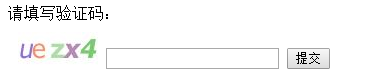
        <label for="j_captcha_response">请填写验证码:</label><br/>

        <img src="jcaptcha"alt="点击刷新" onClick="this.src='jcaptcha?t=' + Math.random();" align="absmiddle" style="vertical-align: bottom;margin: 10px 0 0 10px;cursor: pointer;">

        <input type="text" name="j_captcha_response" value="">

        <input type="submit" value="提交">

    </form>
效果图
验证VerifyCodeServlet类
package com.dongbin.testy;

import java.io.IOException;

import java.io.PrintWriter;

import javax.servlet.ServletException;

import javax.servlet.http.HttpServlet;

import javax.servlet.http.HttpServletRequest;

import javax.servlet.http.HttpServletResponse;

import com.octo.captcha.service.CaptchaServiceException;

public class VerifyCodeServlet extends HttpServlet {

    private static final long serialVersionUID = 1L;

    @Override

    protected void doPost(HttpServletRequest req, HttpServletResponse resp)

            throws ServletException, IOException {

        this.doGet(req, resp);

    }

    @Override

    protected void doGet(HttpServletRequest request, HttpServletResponse response)

            throws ServletException, IOException {

        boolean b = false;

        String codeValue =request.getParameter("j_captcha_response");

        try {

            b = CaptchaServiceSingleton.getInstance().validateResponseForID(request.getSession().getId(), codeValue.toLowerCase());

        } catch (CaptchaServiceException e) {

            e.printStackTrace();

        }

        response.setContentType("text/html;charset=utf-8");

        PrintWriter out = response.getWriter();

        out.println("<!DOCTYPE HTML PUBLIC \"-//W3C//DTD HTML 4.01 Transitional//EN\">");

        out.println("<HTML>");

        out.println("  <HEAD><TITLE>验证结果:</TITLE></HEAD>");

        out.println("  <BODY>");

        if(b == Boolean.TRUE){

            out.print("验证通过!");

        }else {

            out.print("验证失败!");

        }

        out.println("  </BODY>");

        out.println("</HTML>");

        out.flush();

        out.close();

    }

}
captche验证码的更多相关文章
- .net点选验证码实现思路分享
哈哈好久没冒泡了,最进看见点选验证码有点意思,所以想自己写一个. 先上效果图 如果你被这个效果吸引了就请继续看下去. 贴代码前先说点思路: 1.要有一个汉字库,并按字形分类.(我在数据库里是安部首分类 ...
- 【探索】无形验证码 —— PoW 算力验证
先来思考一个问题:如何写一个能消耗对方时间的程序? 消耗时间还不简单,休眠一下就可以了: Sleep(1000) 这确实消耗了时间,但并没有消耗 CPU.如果对方开了变速齿轮,这瞬间就能完成. 不过要 ...
- TODO:Laravel增加验证码
TODO:Laravel增加验证码1. 先聊聊验证码是什么,有什么作用?验证码(CAPTCHA)是"Completely Automated Public Turing test to te ...
- PHP-解析验证码类--学习笔记
1.开始 在 网上看到使用PHP写的ValidateCode生成验证码码类,感觉不错,特拿来分析学习一下. 2.类图 3.验证码类部分代码 3.1 定义变量 //随机因子 private $char ...
- 随手记_C#验证码
前言 最近在网上偶然看见一个验证码,觉得很有意思,于是搜了下,是使用第三方实现的,先看效果: 总体来说效果还是可以的,官方提供的SDK也比较详细,可配置性很高.在这里在简单啰嗦几句使用方式: 使用步骤 ...
- WPF做12306验证码点击效果
一.效果 和12306是一样的,运行一张图上点击多个位置,横线以上和左边框还有有边框位置不允许点击,点击按钮输出坐标集合,也就是12306登陆的时候,需要向后台传递的参数. 二.实现思路 1.获取验证 ...
- 零OCR基础6行代码实现C#验证码识别
这两天因为工作需要,要到某个网站采集信息,一是要模拟登陆,二是要破解验证码,本想用第三方付费打码,但是想想网上免费的代码也挺多的,于是乎准备从网上撸点代码下来,谁知道,撸了好多个都不行,本人以前也没接 ...
- ASP.NET中画图形验证码
context.Response.ContentType = "image/jpeg"; //生成随机的中文验证码 string yzm = "人口手大小多少上中下男女天 ...
- asp.net mvc 验证码
效果图 验证码类 namespace QJW.VerifyCode { //用法: //public FileContentResult CreateValidate() //{ // Validat ...
随机推荐
- informix 存储过程结构
1.简介 存储过程(Stored Procedure)是一组为了完成特定功能的SQL语句集,经编译后存储在数据库中.用户通过指定存储过程的名字并给出参数(如果该存储过程带有参数)来执行 ...
- Python基础(十一)-面向对象
三种编程范式: 1.函数式编程:函数指数学意义上的函数 由于命令式编程语言也可以通过类似函数指针的方式来实现高阶函数,函数式的最主要的好处主要是不可变性带来的.没有可变的状态,函数就是引用透明(Ref ...
- python基础-安装篇
1.安装之前我们要先去python的官网下载python的安装包 下载地址:https://www.python.org/downloads/ Python 官网有两个版本一个是3.5.2(最新版)一 ...
- js的日期、定时器
第一.js的日期 js的日期是用内置对象Date来操作,首先先创建一个日期 var date=new Date();,然后就可以调用它的API来获取年月日.时分秒等等,这不是本文重点,本文重点讲如何把 ...
- js基础 2
- Oracle截取某字段前后字符串
创建测试表及数据 1 2 3 4 5 6 7 8 9 create table test (name varchar2(10)); insert into test values ('2-15') ...
- Nginx+Apache实现反向代理
一 反向代理 1.1 反向代理是什么 反向代理(Reverse Proxy)方式是指以代理服务器来接受internet上的连接请求,然后将请求转发给内部网络上的服务器, 并将从服务器上得到的结果返回给 ...
- Major and minor numbers
The major nuber is the driver associated with the device, while the minor number is used by the kern ...
- openresty 前端开发轻量级MVC框架封装二(渲染篇)
这一章主要介绍怎么使用模板,进行后端渲染,主要用到了lua-resty-template这个库,直接下载下来,放到lualib里面就行了,推荐第三方库,已经框架都放到lualib目录里面,lua目录放 ...
- 《JS权威指南学习总结--8.7 函数属性、方法和构造函数》
内容要点: 在JS程序中,函数是值.对函数执行typeof运算会返回字符串 "function",但是函数是JS中特殊的对象.因为函数也是对象,它们也可以拥有属性和方法,就像普 ...